Deploy smart contracts and build frontends on zkSync Era v3 with this step-by-step guide. Reduce gas costs and increase transaction speed while keeping Ethereum's security.
What is zkSync Era v3?
zkSync Era v3 is a Layer 2 scaling solution for Ethereum that uses zero-knowledge proofs to process transactions. Version 3 brings significant improvements:
- 10x higher throughput than zkSync Era v2
- Lower transaction costs compared to Ethereum mainnet
- Native account abstraction for better user experience
- Enhanced composability with other Layer 2 solutions
- Improved developer tools for faster building
Smart contracts on zkSync Era v3 work similarly to Ethereum but with added benefits of Layer 2 scaling. This guide will help you deploy contracts and connect them to your frontend application.
Prerequisites
Before starting, make sure you have:
- Node.js (v16+) and npm installed
- Basic knowledge of Solidity and JavaScript/TypeScript
- Experience with Hardhat or similar Ethereum development tools
- MetaMask or another Ethereum wallet
Step 1: Set Up Your Development Environment
First, create a new project and install the required dependencies:
mkdir zksync-project
cd zksync-project
npm init -y
npm install --save-dev hardhat @matterlabs/hardhat-zksync-solc @matterlabs/hardhat-zksync-deploy @openzeppelin/contracts dotenv
Create a .env file to store your private key:
PRIVATE_KEY=your_private_key_here
Next, set up your Hardhat configuration file (hardhat.config.js):
require("@matterlabs/hardhat-zksync-solc");
require("@matterlabs/hardhat-zksync-deploy");

require("dotenv").config();

module.exports = {
  solidity: {
    version: "0.8.17",
  },
  networks: {
    zkSyncEraTestnet: {
      url: "https://testnet.era.zksync.dev",
      ethNetwork: "goerli",
      zksync: true,
    },
    zkSyncEraMainnet: {
      url: "https://mainnet.era.zksync.io",
      ethNetwork: "mainnet",
      zksync: true,
    },
  },
  defaultNetwork: "zkSyncEraTestnet",
};
Step 2: Write Your Smart Contract
Create a contracts folder and add a simple smart contract:
mkdir contracts
Create a file contracts/SimpleStorage.sol:
// SPDX-License-Identifier: MIT
pragma solidity ^0.8.17;

contract SimpleStorage {
    uint256 private value;

    event ValueChanged(uint256 newValue);

    function setValue(uint256 newValue) public {
        value = newValue;
        emit ValueChanged(newValue);
    }

    function getValue() public view returns (uint256) {
        return value;
    }
}
Step 3: Compile Your Smart Contract
Compile your smart contract using Hardhat:
npx hardhat compile
This creates a artifacts-zk directory with your compiled contract.
Step 4: Deploy Your Smart Contract
Create a deploy directory:
mkdir deploy
Create a deployment script deploy/deploy.js:
const { Wallet, utils } = require("zksync-web3");
const { Deployer } = require("@matterlabs/hardhat-zksync-deploy");
const { HardhatRuntimeEnvironment } = require("hardhat/types");
require("dotenv").config();

async function main(hre) {
  console.log("Deploying SimpleStorage contract...");

  // Initialize the wallet
  const wallet = new Wallet(process.env.PRIVATE_KEY);

  // Create deployer
  const deployer = new Deployer(hre, wallet);

  // Deploy contract
  const artifact = await deployer.loadArtifact("SimpleStorage");
  const simpleStorage = await deployer.deploy(artifact);

  // Show contract address
  console.log(`SimpleStorage contract deployed to ${simpleStorage.address}`);

  // Verify contract (optional)
  await hre.run("verify:verify", {
    address: simpleStorage.address,
    contract: "contracts/SimpleStorage.sol:SimpleStorage",
  });
}

module.exports = main;
Run the deployment script:
npx hardhat deploy-zksync
Save the contract address for frontend integration.
Step 5: Create Frontend Application
Now, let's create a React application to interact with our smart contract:
npx create-react-app zksync-frontend
cd zksync-frontend
npm install ethers@5.7.2 zksync-web3
Step 6: Configure Frontend to Connect to zkSync Era v3
Create a utils folder inside the src directory:
mkdir -p src/utils
Create a file src/utils/zkSyncSetup.js:
import { ethers } from "ethers";
import { Provider, Contract } from "zksync-web3";

// Contract ABI and address
const SIMPLE_STORAGE_ABI = [
  "function setValue(uint256 newValue) public",
  "function getValue() public view returns (uint256)",
  "event ValueChanged(uint256 newValue)",
];
const CONTRACT_ADDRESS = "YOUR_DEPLOYED_CONTRACT_ADDRESS";

// Initialize provider and contract
export const setupZkSync = async () => {
  try {
    // Check if MetaMask is installed
    if (!window.ethereum) {
      throw new Error("MetaMask not installed");
    }

    // Request account access
    await window.ethereum.request({ method: "eth_requestAccounts" });

    // Create Ethereum provider
    const ethProvider = new ethers.providers.Web3Provider(window.ethereum);
    const signer = ethProvider.getSigner();

    // Create zkSync provider
    const zkSyncProvider = new Provider("https://testnet.era.zksync.dev");

    // Switch network to zkSync Era Testnet
    try {
      await window.ethereum.request({
        method: "wallet_switchEthereumChain",
        params: [{ chainId: "0x118" }], // Chain ID for zkSync Era Testnet
      });
    } catch (switchError) {
      // Network not added to MetaMask
      if (switchError.code === 4902) {
        await window.ethereum.request({
          method: "wallet_addEthereumChain",
          params: [
            {
              chainId: "0x118",
              chainName: "zkSync Era Testnet",
              nativeCurrency: {
                name: "ETH",
                symbol: "ETH",
                decimals: 18,
              },
              rpcUrls: ["https://testnet.era.zksync.dev"],
              blockExplorerUrls: ["https://goerli.explorer.zksync.io"],
            },
          ],
        });
      }
    }

    // Create contract instance
    const contract = new Contract(
      CONTRACT_ADDRESS,
      SIMPLE_STORAGE_ABI,
      signer
    );

    return { contract, signer, zkSyncProvider };
  } catch (error) {
    console.error("Setup error:", error);
    throw error;
  }
};
Step 7: Create UI Components for Interaction
Update src/App.js:
import React, { useState, useEffect } from "react";
import { setupZkSync } from "./utils/zkSyncSetup";
import "./App.css";

function App() {
  const [contract, setContract] = useState(null);
  const [currentValue, setCurrentValue] = useState(null);
  const [newValue, setNewValue] = useState("");
  const [loading, setLoading] = useState(false);
  const [error, setError] = useState("");
  const [txHash, setTxHash] = useState("");

  // Connect to zkSync and get contract instance
  useEffect(() => {
    const initialize = async () => {
      try {
        const { contract } = await setupZkSync();
        setContract(contract);

        // Get current value
        const value = await contract.getValue();
        setCurrentValue(value.toString());

        // Listen for value changes
        contract.on("ValueChanged", (newValue) => {
          setCurrentValue(newValue.toString());
        });
      } catch (err) {
        setError(`Initialization error: ${err.message}`);
      }
    };

    initialize();

    // Cleanup
    return () => {
      if (contract) {
        contract.removeAllListeners();
      }
    };
  }, []);

  // Set a new value
  const handleSetValue = async (e) => {
    e.preventDefault();
    setLoading(true);
    setError("");
    setTxHash("");

    try {
      const tx = await contract.setValue(newValue);
      setTxHash(tx.hash);
      await tx.wait();
      setNewValue("");
    } catch (err) {
      setError(`Transaction error: ${err.message}`);
    } finally {
      setLoading(false);
    }
  };

  return (
    <div className="App">
      <header className="App-header">
        <h1>zkSync Era v3 Demo</h1>
        <p>Interact with a simple storage contract on zkSync Era v3</p>

        {error && <div className="error">{error}</div>}

        <div className="card">
          <h2>Current Value</h2>
          {currentValue !== null ? (
            <p className="value">{currentValue}</p>
          ) : (
            <p>Loading...</p>
          )}
        </div>

        <div className="card">
          <h2>Set New Value</h2>
          <form onSubmit={handleSetValue}>
            <input
              type="number"
              value={newValue}
              onChange={(e) => setNewValue(e.target.value)}
              placeholder="Enter a number"
              required
            />
            <button type="submit" disabled={loading || !contract}>
              {loading ? "Processing..." : "Set Value"}
            </button>
          </form>
        </div>

        {txHash && (
          <div className="card">
            <h2>Transaction Submitted</h2>
            <p>
              <a
                href={`https://goerli.explorer.zksync.io/tx/${txHash}`}
                target="_blank"
                rel="noopener noreferrer"
              >
                View on Explorer
              </a>
            </p>
          </div>
        )}
      </header>
    </div>
  );
}

export default App;
Add styles in src/App.css:
.App {
  text-align: center;
  max-width: 800px;
  margin: 0 auto;
  padding: 20px;
}

.App-header {
  display: flex;
  flex-direction: column;
  gap: 20px;
}

.card {
  background-color: #f5f5f5;
  border-radius: 8px;
  padding: 20px;
  margin-bottom: 20px;
}

.value {
  font-size: 24px;
  font-weight: bold;
}

form {
  display: flex;
  flex-direction: column;
  gap: 10px;
}

input {
  padding: 10px;
  font-size: 16px;
}

button {
  padding: 10px;
  background-color: #0e76fd;
  color: white;
  border: none;
  border-radius: 4px;
  cursor: pointer;
  font-size: 16px;
}

button:disabled {
  background-color: #cccccc;
}

.error {
  background-color: #ffeeee;
  color: #ff0000;
  padding: 10px;
  border-radius: 4px;
}
Step 8: Run Your Application
Start your frontend application:
npm start
Your app should now connect to zkSync Era v3 and interact with your deployed smart contract.
Results Visualization
Here's what you'll see after completing this tutorial:
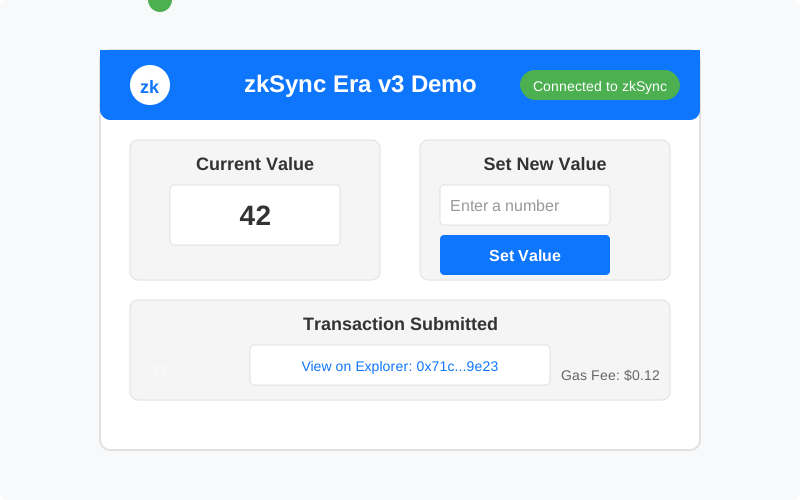
Expected Output:
- A web application that connects to zkSync Era v3
- Display of the current value from your smart contract
- Ability to update the value and see the changes in real-time
- Links to view transactions on the zkSync explorer
Performance Benefits
| Metric | Ethereum Mainnet | zkSync Era v3 |
|---|---|---|
| Transaction Cost | $5-20 | $0.10-0.50 |
| Transaction Finality | ~15 minutes | ~1-2 minutes |
| TPS (Transactions Per Second) | ~15 | ~2000 |
| Security | Base layer | Inherits from Ethereum |
Troubleshooting Common Issues
Contract Deployment Fails
- Ensure you have enough ETH in your wallet for gas fees
- Verify your private key is correct in the
.envfile - Check network connection to zkSync Era testnet
Frontend Connection Issues
- Confirm MetaMask is connected to zkSync Era network
- Verify contract address is correct in
zkSyncSetup.js - Check browser console for detailed error messages
Transaction Errors
- Ensure gas settings are appropriate for zkSync Era
- Verify your input values match expected contract parameters
- Check wallet has sufficient funds for the transaction
Next Steps
After mastering these basics, you can:
- Add more contract functionality - Expand your smart contract with additional features
- Implement account abstraction - Utilize zkSync's native account abstraction for better UX
- Integrate with other dApps - Connect your application with other protocols on zkSync
- Deploy to mainnet - Move your application to zkSync Era v3 mainnet when ready
Conclusion
Building on zkSync Era v3 offers significant advantages for developers who need scalable and cost-effective blockchain applications. The deployment process is straightforward, and frontend integration follows familiar Web3 patterns with a few zkSync-specific considerations.
By following this guide, you've learned how to deploy smart contracts on zkSync Era v3 and create frontend applications that interact with them. These skills provide a foundation for developing high-performance decentralized applications that benefit from Layer 2 scaling while maintaining Ethereum's security guarantees.
Start building your next project on zkSync Era v3 today to take advantage of lower costs, higher throughput, and an improved developer experience.