Problem: Your Chatbot Is Locked to One LLM
You've built a chatbot using the OpenAI SDK. Now your team wants Claude fallback support, Gemini for cost-sensitive routes, and a local Ollama model for dev. That means rewriting API calls, auth logic, and response parsing — for every new provider.
LiteLLM fixes this with a single unified interface.
You'll learn:
- How to call 100+ LLM providers with one function
- How to build a chatbot that hot-swaps models at runtime
- How to add fallbacks so your app survives API outages
Time: 30 min | Level: Intermediate
Why This Happens
Every LLM provider ships a different SDK with different method signatures, auth patterns, and response shapes. Switching from openai.chat.completions.create() to Anthropic's client.messages.create() isn't just a rename — it's a different object structure, different streaming API, different error types.
LiteLLM wraps all of them behind the OpenAI spec. Your code calls litellm.completion() and never needs to know which provider is underneath.
Common symptoms this solves:
- "We need Claude support but our codebase only speaks OpenAI"
- Provider outages taking down your whole app
- Dev costs blowing up because you can't easily route to cheaper models
Solution
Step 1: Install and Configure LiteLLM
pip install litellm python-dotenv
Create a .env file for your API keys:
OPENAI_API_KEY=sk-...
ANTHROPIC_API_KEY=sk-ant-...
GOOGLE_API_KEY=...
LiteLLM reads standard env var names automatically — no extra config needed.
Step 2: Your First Multi-Model Call
import litellm
from dotenv import load_dotenv

load_dotenv()

def chat(message: str, model: str = "gpt-4o") -> str:
    response = litellm.completion(
        model=model,
        messages=[{"role": "user", "content": message}]
    )
    # Same response shape regardless of provider
    return response.choices[0].message.content

# Swap providers by changing the model string — nothing else changes
print(chat("Explain async/await in Python", model="gpt-4o"))
print(chat("Explain async/await in Python", model="claude-3-5-sonnet-20241022"))
print(chat("Explain async/await in Python", model="gemini/gemini-1.5-pro"))
Expected: All three return a response. Same code, different providers.
If it fails:
AuthenticationError: Check your.envkey names match LiteLLM's expected format (e.g.ANTHROPIC_API_KEY, notCLAUDE_KEY)ModelNotFoundError: Use LiteLLM's exact model strings — check docs.litellm.ai/docs/providers
 All three providers return the same response structure — no parsing changes needed
Step 3: Build the Chatbot Class
This is the real payload. A stateful chatbot that holds conversation history and lets you swap the model mid-conversation.
import litellm
from dotenv import load_dotenv

load_dotenv()

class MultiModelChatbot:
    def __init__(self, model: str = "gpt-4o"):
        self.model = model
        self.history: list[dict] = []

    def switch_model(self, model: str) -> None:
        # History carries over — context is preserved across model switches
        self.model = model
        print(f"Switched to: {model}")

    def chat(self, user_message: str) -> str:
        self.history.append({"role": "user", "content": user_message})

        response = litellm.completion(
            model=self.model,
            messages=self.history,
        )

        assistant_reply = response.choices[0].message.content
        self.history.append({"role": "assistant", "content": assistant_reply})
        return assistant_reply

    def clear(self) -> None:
        self.history = []
Step 4: Add Fallbacks for Reliability
LiteLLM has built-in fallback routing. If your primary model fails, it automatically retries with the next one.
response = litellm.completion(
    model="gpt-4o",
    messages=[{"role": "user", "content": "Hello"}],
    fallbacks=["claude-3-5-sonnet-20241022", "gemini/gemini-1.5-pro"],
    # Retry the same model twice before falling back
    num_retries=2,
)
Why this matters: OpenAI has had multiple outages in 2025. With fallbacks, your app degrades gracefully instead of returning 500s.
Step 5: Wire Up a CLI Interface
def run():
    bot = MultiModelChatbot(model="gpt-4o")
    print("Multi-model chatbot ready. Commands: /switch <model>, /clear, /quit")

    while True:
        user_input = input("\nYou: ").strip()

        if not user_input:
            continue
        elif user_input == "/quit":
            break
        elif user_input == "/clear":
            bot.clear()
            print("History cleared.")
        elif user_input.startswith("/switch "):
            model = user_input.split(" ", 1)[1]
            bot.switch_model(model)
        else:
            reply = bot.chat(user_input)
            print(f"\nBot ({bot.model}): {reply}")

if __name__ == "__main__":
    run()
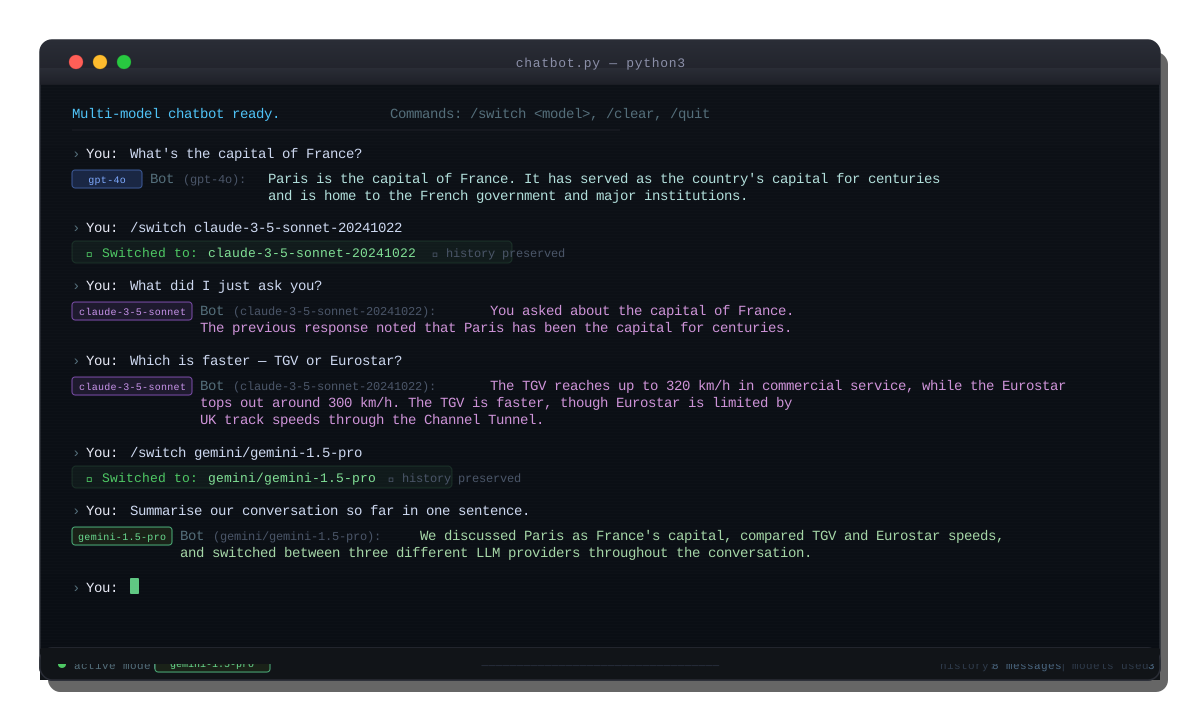 Switching from GPT-4o to Claude mid-conversation — history persists across the switch
Verification
python chatbot.py
You should see: The prompt Multi-model chatbot ready. followed by working responses. Test the switch:
You: What's the capital of France?
Bot (gpt-4o): Paris is the capital of France.

You: /switch claude-3-5-sonnet-20241022
Switched to: claude-3-5-sonnet-20241022

You: What did I just ask you?
Bot (claude-3-5-sonnet-20241022): You asked about the capital of France.
Claude correctly sees the prior GPT-4o exchange. History works across providers.
What You Learned
- LiteLLM gives you a single
completion()call that works across 100+ providers without code changes - Conversation history is just a list of dicts — model-agnostic by design
- Built-in fallbacks handle provider outages automatically
- Limitation: Streaming responses need a small tweak (
stream=True+ iterateresponseas a generator); the pattern above is non-streaming only - When NOT to use this: If you need provider-specific features like OpenAI Assistants, function calling schemas differ slightly across providers — test each one
Tested on LiteLLM 1.55+, Python 3.12, macOS & Ubuntu 24.04