Your yield farming position just dropped 40% overnight. Again. If only someone had warned you...
Missing profitable yield farming opportunities costs money. Staying glued to your screen costs sanity. Discord bot alerts solve both problems by monitoring your positions 24/7 and notifying you instantly when action is needed.
This guide shows you how to build a custom Discord bot that tracks yield farming metrics, sends real-time alerts, and helps you optimize your DeFi strategy. You'll learn to monitor multiple protocols, set custom thresholds, and receive notifications directly in your Discord server.
Why You Need Yield Farming Alerts
Yield farming markets move fast. Pool rewards change hourly. Liquidity shifts without warning. Manual monitoring becomes impossible when farming across multiple protocols.
Common problems without alerts:
- Missing impermanent loss warnings
- Late exits from failing pools
- Overlooking new high-yield opportunities
- Manual monitoring burnout
Benefits of Discord bot alerts:
- Real-time yield change notifications
- Automated impermanent loss tracking
- Custom threshold monitoring
- Multi-protocol coverage
- Team collaboration features
Discord Bot Setup Requirements
Before building your yield farming alert system, gather these requirements:
Technical Prerequisites:
- Node.js 16+ installed
- Discord Developer Account
- API access to DeFi protocols
- Basic JavaScript knowledge
API Services Needed:
- Discord Bot Token
- DeFiPulse API key (or similar)
- Web3 RPC endpoint
- CoinGecko API access
Hardware Requirements:
- VPS or cloud server
- 1GB RAM minimum
- Stable internet connection
Step-by-Step Discord Bot Creation
1. Create Discord Application
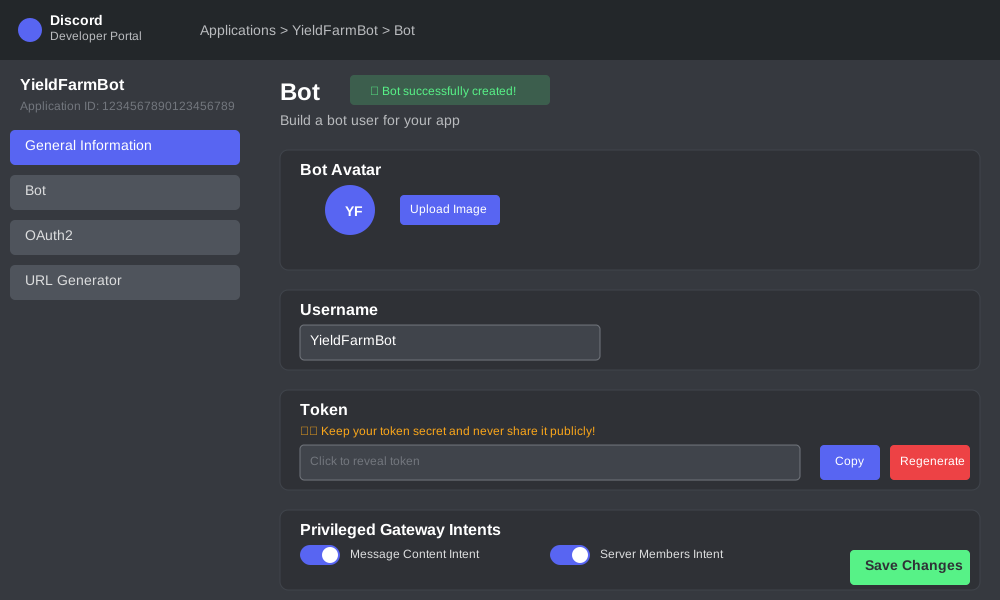
Navigate to Discord Developer Portal and create a new application:
// Bot configuration example
const botConfig = {
  name: "YieldFarmBot",
  description: "Automated yield farming alerts",
  permissions: ["Send Messages", "Embed Links", "Read Messages"]
};
Setup steps:
- Go to Discord Developer Portal
- Click "New Application"
- Name your bot "YieldFarmBot"
- Navigate to "Bot" section
- Copy the bot token
- Enable required permissions
2. Install Required Dependencies
Create your project directory and install necessary packages:
npm init -y
npm install discord.js axios web3 node-cron dotenv
// package.json dependencies
{
  "dependencies": {
    "discord.js": "^14.0.0",
    "axios": "^1.0.0",
    "web3": "^4.0.0",
    "node-cron": "^3.0.0",
    "dotenv": "^16.0.0"
  }
}
3. Basic Bot Structure
Create the main bot file with essential functions:
// bot.js - Main bot file
const { Client, GatewayIntentBits, EmbedBuilder } = require('discord.js');
const axios = require('axios');
const cron = require('node-cron');
require('dotenv').config();

// Initialize Discord client
const client = new Client({
  intents: [GatewayIntentBits.Guilds, GatewayIntentBits.GuildMessages]
});

// Bot configuration
const config = {
  token: process.env.DISCORD_TOKEN,
  channelId: process.env.ALERT_CHANNEL_ID,
  checkInterval: '*/5 * * * *', // Every 5 minutes
  yieldThreshold: 5.0 // Alert when yield drops below 5%
};

client.once('ready', () => {
  console.log(`Bot is ready! Logged in as ${client.user.tag}`);
  startYieldMonitoring();
});

client.login(config.token);
Alert Configuration System
1. Yield Threshold Settings
Configure alert triggers for different farming scenarios:
// alertConfig.js - Alert configuration
const alertThresholds = {
  yieldDrop: {
    warning: 2.0,    // Warn at 2% drop
    critical: 5.0    // Critical at 5% drop
  },
  impermanentLoss: {
    warning: 3.0,    // Warn at 3% IL
    critical: 10.0   // Critical at 10% IL
  },
  liquidityChange: {
    warning: 15.0,   // Warn at 15% liquidity drop
    critical: 30.0   // Critical at 30% drop
  }
};

// Pool monitoring configuration
const monitoredPools = [
  {
    protocol: "Uniswap V3",
    pair: "ETH/USDC",
    address: "0x8ad599c3A0ff1De082011EFDDc58f1908eb6e6D8",
    threshold: alertThresholds.yieldDrop
  },
  {
    protocol: "Curve",
    pair: "3CRV",
    address: "0xbEbc44782C7dB0a1A60Cb6fe97d0b483032FF1C7",
    threshold: alertThresholds.yieldDrop
  }
];
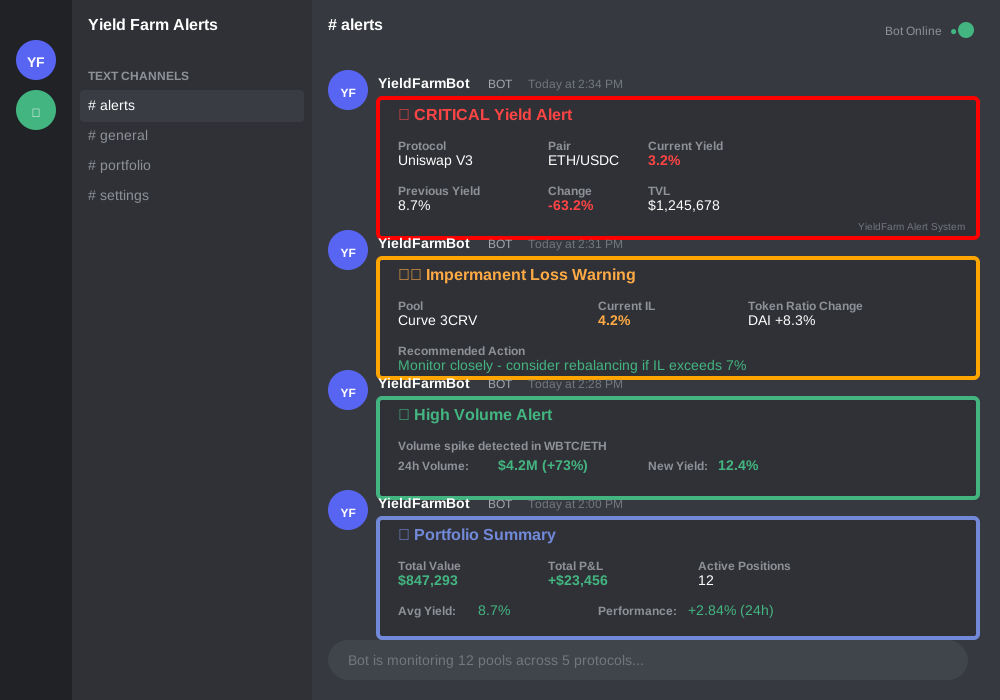
2. Alert Message Templates
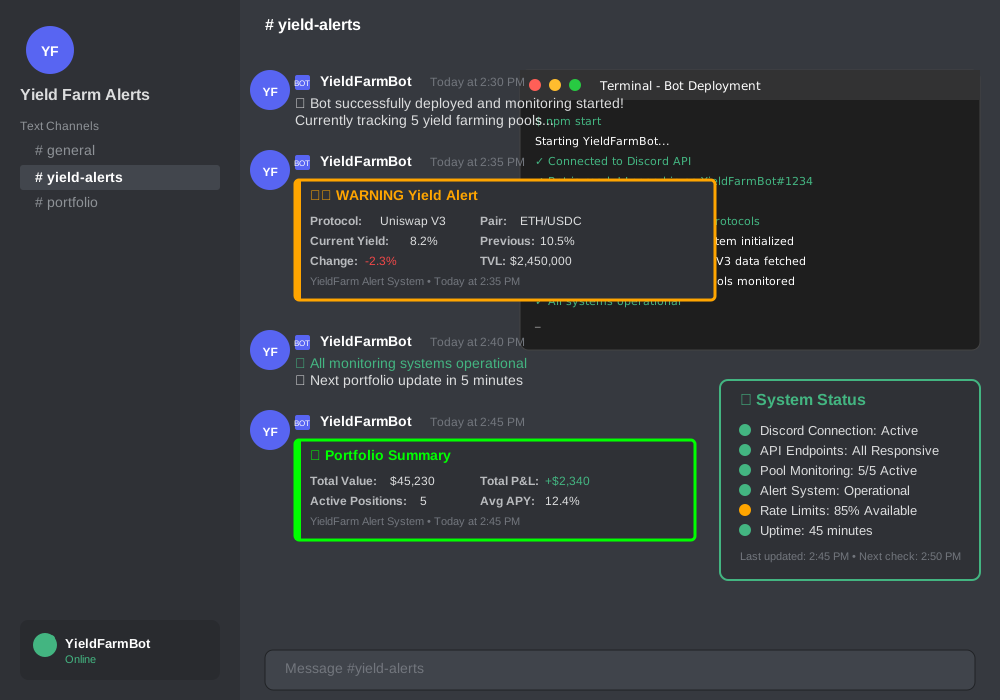
Create formatted Discord embeds for different alert types:
// alerts.js - Alert message formatting
function createYieldAlert(poolData, alertType) {
  const embed = new EmbedBuilder()
    .setTitle(`🚨 ${alertType.toUpperCase()} Yield Alert`)
    .setColor(alertType === 'critical' ? '#FF0000' : '#FFA500')
    .addFields(
      { name: 'Protocol', value: poolData.protocol, inline: true },
      { name: 'Pair', value: poolData.pair, inline: true },
      { name: 'Current Yield', value: `${poolData.currentYield}%`, inline: true },
      { name: 'Previous Yield', value: `${poolData.previousYield}%`, inline: true },
      { name: 'Change', value: `${poolData.yieldChange}%`, inline: true },
      { name: 'TVL', value: `$${poolData.tvl.toLocaleString()}`, inline: true }
    )
    .setTimestamp()
    .setFooter({ text: 'YieldFarm Alert System' });

  return embed;
}

function createImpermanentLossAlert(poolData) {
  const embed = new EmbedBuilder()
    .setTitle('⚠️ Impermanent Loss Warning')
    .setColor('#FF6600')
    .addFields(
      { name: 'Pool', value: `${poolData.protocol} ${poolData.pair}`, inline: false },
      { name: 'Current IL', value: `${poolData.impermanentLoss}%`, inline: true },
      { name: 'Token Ratio Change', value: poolData.ratioChange, inline: true },
      { name: 'Recommended Action', value: poolData.recommendation, inline: false }
    )
    .setTimestamp();

  return embed;
}
Data Fetching and Processing
1. Protocol API Integration
Connect to different DeFi protocols for real-time data:
// dataFetcher.js - Protocol data fetching
class ProtocolDataFetcher {
  constructor() {
    this.apiKeys = {
      defipulse: process.env.DEFIPULSE_API_KEY,
      coingecko: process.env.COINGECKO_API_KEY
    };
  }

  async fetchUniswapV3Data(poolAddress) {
    try {
      const response = await axios.get(
        `https://api.thegraph.com/subgraphs/name/uniswap/uniswap-v3`,
        {
          params: {
            query: `{
              pool(id: "${poolAddress.toLowerCase()}") {
                token0 { symbol }
                token1 { symbol }
                feeTier
                liquidity
                volumeUSD
                totalValueLockedUSD
              }
            }`
          }
        }
      );

      return this.processUniswapData(response.data);
    } catch (error) {
      console.error(`Error fetching Uniswap data: ${error.message}`);
      return null;
    }
  }

  async fetchCurveData(poolAddress) {
    try {
      const response = await axios.get(
        `https://api.curve.fi/api/getPools`
      );

      const pool = response.data.data.poolData.find(
        p => p.address.toLowerCase() === poolAddress.toLowerCase()
      );

      return this.processCurveData(pool);
    } catch (error) {
      console.error(`Error fetching Curve data: ${error.message}`);
      return null;
    }
  }

  processUniswapData(data) {
    const pool = data.data.pool;

    return {
      protocol: "Uniswap V3",
      pair: `${pool.token0.symbol}/${pool.token1.symbol}`,
      liquidity: parseFloat(pool.liquidity),
      volume24h: parseFloat(pool.volumeUSD),
      tvl: parseFloat(pool.totalValueLockedUSD),
      yield: this.calculateUniswapYield(pool)
    };
  }

  calculateUniswapYield(poolData) {
    // Simplified yield calculation
    const dailyVolume = parseFloat(poolData.volumeUSD);
    const tvl = parseFloat(poolData.totalValueLockedUSD);
    const feeTier = parseFloat(poolData.feeTier) / 10000; // Convert from basis points

    const dailyFees = dailyVolume * feeTier;
    const dailyYield = (dailyFees / tvl) * 100;
    const annualYield = dailyYield * 365;

    return annualYield.toFixed(2);
  }
}
2. Yield Monitoring Logic
Implement the core monitoring system:
// monitor.js - Core monitoring logic
class YieldMonitor {
  constructor(client, config) {
    this.client = client;
    this.config = config;
    this.dataFetcher = new ProtocolDataFetcher();
    this.previousData = new Map();
  }

  async startMonitoring() {
    console.log('Starting yield monitoring...');

    // Schedule monitoring every 5 minutes
    cron.schedule(this.config.checkInterval, async () => {
      await this.checkAllPools();
    });
  }

  async checkAllPools() {
    for (const pool of monitoredPools) {
      try {
        const currentData = await this.fetchPoolData(pool);
        const previousData = this.previousData.get(pool.address);

        if (previousData) {
          await this.analyzeChanges(pool, previousData, currentData);
        }

        this.previousData.set(pool.address, currentData);
      } catch (error) {
        console.error(`Error monitoring pool ${pool.address}: ${error.message}`);
      }
    }
  }

  async fetchPoolData(pool) {
    switch (pool.protocol) {
      case "Uniswap V3":
        return await this.dataFetcher.fetchUniswapV3Data(pool.address);
      case "Curve":
        return await this.dataFetcher.fetchCurveData(pool.address);
      default:
        throw new Error(`Unsupported protocol: ${pool.protocol}`);
    }
  }

  async analyzeChanges(pool, previous, current) {
    const yieldChange = current.yield - previous.yield;
    const yieldChangePercent = (yieldChange / previous.yield) * 100;

    // Check yield drop threshold
    if (Math.abs(yieldChangePercent) >= pool.threshold.warning) {
      const alertType = Math.abs(yieldChangePercent) >= pool.threshold.critical ? 'critical' : 'warning';

      await this.sendAlert({
        type: 'yield_change',
        severity: alertType,
        pool: pool,
        current: current,
        previous: previous,
        change: yieldChangePercent
      });
    }

    // Check liquidity changes
    const liquidityChange = ((current.tvl - previous.tvl) / previous.tvl) * 100;
    if (Math.abs(liquidityChange) >= alertThresholds.liquidityChange.warning) {
      await this.sendAlert({
        type: 'liquidity_change',
        severity: Math.abs(liquidityChange) >= alertThresholds.liquidityChange.critical ? 'critical' : 'warning',
        pool: pool,
        current: current,
        previous: previous,
        change: liquidityChange
      });
    }
  }

  async sendAlert(alertData) {
    const channel = this.client.channels.cache.get(this.config.channelId);
    if (!channel) {
      console.error('Alert channel not found');
      return;
    }

    let embed;
    switch (alertData.type) {
      case 'yield_change':
        embed = createYieldAlert({
          protocol: alertData.pool.protocol,
          pair: alertData.pool.pair,
          currentYield: alertData.current.yield,
          previousYield: alertData.previous.yield,
          yieldChange: alertData.change.toFixed(2),
          tvl: alertData.current.tvl
        }, alertData.severity);
        break;
      case 'liquidity_change':
        embed = createLiquidityAlert(alertData);
        break;
    }

    await channel.send({ embeds: [embed] });
    console.log(`Alert sent for ${alertData.pool.protocol} ${alertData.pool.pair}`);
  }
}
Testing and Deployment
1. Local Testing Setup
Test your bot before deployment:
// test.js - Testing configuration
const testConfig = {
  ...config,
  checkInterval: '*/1 * * * *', // Check every minute for testing
  yieldThreshold: 0.1 // Lower threshold for testing
};

// Test data simulation
const simulateYieldDrop = async () => {
  const testPool = {
    protocol: "Test Protocol",
    pair: "TEST/USDC",
    address: "0xtest"
  };

  const mockData = {
    previous: { yield: 10.5, tvl: 1000000 },
    current: { yield: 8.2, tvl: 950000 }
  };

  // Simulate alert trigger
  console.log('Testing alert system...');
  // Add your test logic here
};
2. Environment Configuration
Set up your environment variables:
# .env file
DISCORD_TOKEN=your_discord_bot_token
ALERT_CHANNEL_ID=your_discord_channel_id
DEFIPULSE_API_KEY=your_defipulse_api_key
COINGECKO_API_KEY=your_coingecko_api_key
WEB3_RPC_URL=your_web3_rpc_endpoint

# Production settings
NODE_ENV=production
LOG_LEVEL=info
3. Deployment Options
VPS Deployment:
# Install PM2 for process management
npm install -g pm2

# Start bot with PM2
pm2 start bot.js --name "yield-farm-bot"
pm2 startup
pm2 save
Docker Deployment:
# Dockerfile
FROM node:16-alpine

WORKDIR /app
COPY package*.json ./
RUN npm ci --only=production

COPY . .
EXPOSE 3000

CMD ["node", "bot.js"]
Advanced Alert Features
1. Multi-Protocol Support
Extend monitoring to additional protocols:
// protocolRegistry.js - Protocol support registry
const protocolHandlers = {
  'uniswap-v3': new UniswapV3Handler(),
  'curve': new CurveHandler(),
  'compound': new CompoundHandler(),
  'aave': new AaveHandler(),
  'balancer': new BalancerHandler()
};

class ProtocolRegistry {
  static async fetchData(protocol, poolAddress) {
    const handler = protocolHandlers[protocol.toLowerCase()];
    if (!handler) {
      throw new Error(`Protocol ${protocol} not supported`);
    }

    return await handler.fetchPoolData(poolAddress);
  }
}
2. Custom Alert Rules
Implement user-defined alert conditions:
// customRules.js - User-defined alert rules
class CustomAlertRule {
  constructor(name, condition, action) {
    this.name = name;
    this.condition = condition;
    this.action = action;
  }

  evaluate(poolData, previousData) {
    return this.condition(poolData, previousData);
  }

  execute(client, channelId, data) {
    return this.action(client, channelId, data);
  }
}

// Example custom rules
const customRules = [
  new CustomAlertRule(
    'High Volume Spike',
    (current, previous) => {
      const volumeIncrease = (current.volume24h / previous.volume24h) - 1;
      return volumeIncrease > 0.5; // 50% volume increase
    },
    async (client, channelId, data) => {
      const embed = new EmbedBuilder()
        .setTitle('📈 High Volume Alert')
        .setDescription(`Volume spike detected in ${data.pair}`)
        .setColor('#00FF00');

      const channel = client.channels.cache.get(channelId);
      await channel.send({ embeds: [embed] });
    }
  )
];
3. Portfolio Analytics
Add portfolio tracking capabilities:
// portfolio.js - Portfolio tracking
class PortfolioTracker {
  constructor() {
    this.positions = new Map();
  }

  addPosition(poolAddress, amount, entryPrice) {
    this.positions.set(poolAddress, {
      amount,
      entryPrice,
      entryDate: new Date(),
      currentValue: amount * entryPrice
    });
  }

  async updatePortfolioValue() {
    let totalValue = 0;
    let totalPnL = 0;

    for (const [address, position] of this.positions) {
      const currentData = await this.fetchCurrentPrice(address);
      const currentValue = position.amount * currentData.price;
      const pnl = currentValue - (position.amount * position.entryPrice);

      position.currentValue = currentValue;
      position.pnl = pnl;

      totalValue += currentValue;
      totalPnL += pnl;
    }

    return { totalValue, totalPnL, positions: this.positions };
  }

  async generatePortfolioReport() {
    const portfolio = await this.updatePortfolioValue();

    const embed = new EmbedBuilder()
      .setTitle('📊 Portfolio Summary')
      .addFields(
        { name: 'Total Value', value: `$${portfolio.totalValue.toLocaleString()}`, inline: true },
        { name: 'Total P&L', value: `$${portfolio.totalPnL.toLocaleString()}`, inline: true },
        { name: 'Positions', value: portfolio.positions.size.toString(), inline: true }
      )
      .setTimestamp();

    return embed;
  }
}
Troubleshooting Common Issues
1. API Rate Limits
Handle API rate limiting gracefully:
// rateLimiter.js - Rate limiting handler
class RateLimiter {
  constructor() {
    this.requests = new Map();
    this.limits = {
      'defipulse': { max: 100, window: 3600000 }, // 100 per hour
      'coingecko': { max: 50, window: 60000 }     // 50 per minute
    };
  }

  async checkLimit(service) {
    const now = Date.now();
    const limit = this.limits[service];

    if (!this.requests.has(service)) {
      this.requests.set(service, []);
    }

    const requests = this.requests.get(service);

    // Remove old requests outside the window
    const validRequests = requests.filter(time => now - time < limit.window);
    this.requests.set(service, validRequests);

    if (validRequests.length >= limit.max) {
      const oldestRequest = Math.min(...validRequests);
      const waitTime = limit.window - (now - oldestRequest);
      throw new Error(`Rate limit exceeded. Wait ${waitTime}ms`);
    }

    validRequests.push(now);
    return true;
  }
}
2. Connection Issues
Implement robust error handling:
// errorHandler.js - Error handling and recovery
class ErrorHandler {
  static async handleDiscordError(error, client) {
    console.error('Discord error:', error);

    if (error.code === 'TOKEN_INVALID') {
      console.error('Invalid Discord token. Check your .env file.');
      process.exit(1);
    }

    if (error.code === 'MISSING_PERMISSIONS') {
      console.error('Bot lacks required permissions.');
      return;
    }

    // Attempt reconnection
    setTimeout(() => {
      client.login(process.env.DISCORD_TOKEN);
    }, 5000);
  }

  static async handleAPIError(error, retryCount = 0) {
    if (retryCount >= 3) {
      console.error('Max retries reached:', error.message);
      return null;
    }

    const delay = Math.pow(2, retryCount) * 1000; // Exponential backoff
    console.log(`Retrying in ${delay}ms... (attempt ${retryCount + 1})`);

    await new Promise(resolve => setTimeout(resolve, delay));
    return retryCount + 1;
  }
}
3. Data Validation
Ensure data quality with validation:
// validator.js - Data validation
class DataValidator {
  static validatePoolData(data) {
    const required = ['protocol', 'pair', 'yield', 'tvl'];

    for (const field of required) {
      if (!(field in data) || data[field] === null || data[field] === undefined) {
        throw new Error(`Missing required field: ${field}`);
      }
    }

    if (typeof data.yield !== 'number' || data.yield < 0) {
      throw new Error('Invalid yield value');
    }

    if (typeof data.tvl !== 'number' || data.tvl < 0) {
      throw new Error('Invalid TVL value');
    }

    return true;
  }

  static sanitizeUserInput(input) {
    return input.toString().replace(/[^\w\s.-]/gi, '');
  }
}
Monitoring Best Practices
1. Alert Frequency Management
Prevent alert spam with smart throttling:
// alertThrottler.js - Alert frequency management
class AlertThrottler {
  constructor() {
    this.lastAlerts = new Map();
    this.cooldownPeriod = 300000; // 5 minutes
  }

  shouldSendAlert(poolAddress, alertType) {
    const key = `${poolAddress}-${alertType}`;
    const lastAlert = this.lastAlerts.get(key);

    if (!lastAlert) {
      this.lastAlerts.set(key, Date.now());
      return true;
    }

    const timeSinceLastAlert = Date.now() - lastAlert;
    if (timeSinceLastAlert >= this.cooldownPeriod) {
      this.lastAlerts.set(key, Date.now());
      return true;
    }

    return false;
  }
}
2. Performance Optimization
Optimize bot performance for multiple pools:
// optimizer.js - Performance optimization
class PerformanceOptimizer {
  static async batchFetchData(pools) {
    const batchSize = 5;
    const results = [];

    for (let i = 0; i < pools.length; i += batchSize) {
      const batch = pools.slice(i, i + batchSize);
      const batchPromises = batch.map(pool =>
        this.fetchWithTimeout(pool, 10000) // 10 second timeout
      );

      const batchResults = await Promise.allSettled(batchPromises);
      results.push(...batchResults);
    }

    return results;
  }

  static async fetchWithTimeout(pool, timeout) {
    return Promise.race([
      dataFetcher.fetchPoolData(pool),
      new Promise((_, reject) =>
        setTimeout(() => reject(new Error('Timeout')), timeout)
      )
    ]);
  }
}
Conclusion
Your Discord bot now monitors yield farming positions automatically, sending real-time alerts when yields drop, liquidity changes, or impermanent loss threatens your profits. This system saves time, reduces risk, and helps you optimize DeFi strategies across multiple protocols.
Key benefits achieved:
- 24/7 automated monitoring
- Instant Discord notifications
- Multi-protocol support
- Custom alert thresholds
- Portfolio tracking capabilities
Next steps:
- Add more protocols to your monitoring list
- Create custom alert rules for specific strategies
- Implement portfolio analytics and reporting
- Consider adding price prediction features
The yield farming alert system you've built provides the foundation for sophisticated DeFi portfolio management. Monitor your positions, protect your profits, and never miss profitable opportunities again.
Ready to deploy your bot? Follow the deployment guide above and start receiving yield farming alerts in Discord today.