Your tokens are ready to farm. Your wallet says "no." Sound familiar?
You've found the perfect yield farming pool. The APY looks amazing. You click "approve" and... nothing happens. Or worse, you get a cryptic error message that makes you question your life choices.
Yield farming approval errors plague millions of DeFi users daily. These token permission issues prevent you from depositing funds into liquidity pools. The good news? Most approval errors have simple fixes.
This guide shows you how to diagnose and resolve the most common token permission problems in yield farming. You'll learn to fix smart contract approvals, handle gas estimation failures, and troubleshoot wallet connection issues.
What Are Yield Farming Approval Errors?
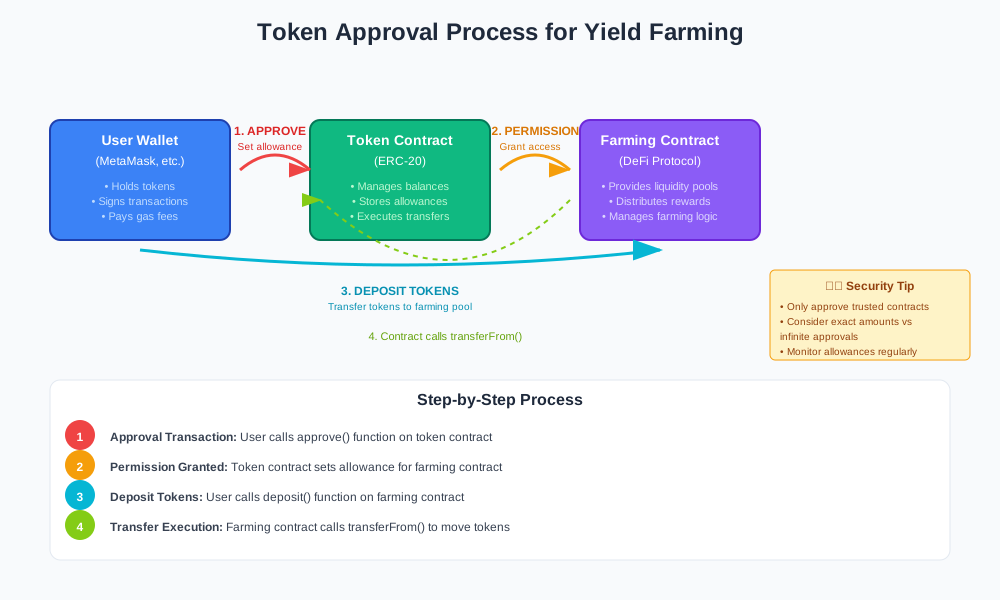
Yield farming approval errors occur when your wallet cannot grant permission to a smart contract. The contract needs authorization to move your tokens from your wallet to the farming pool.
Think of it like giving someone permission to withdraw money from your bank account. Without proper authorization, the transaction fails.
Common Approval Error Types
Smart Contract Approval Failures
- Transaction reverts during approval
- Gas estimation errors
- Insufficient allowance permissions
Wallet Connection Issues
- MetaMask connection timeouts
- Network mismatch problems
- Pending transaction conflicts
Token-Specific Problems
- Non-standard ERC-20 implementations
- Fee-on-transfer token complications
- Proxy contract interactions
Why Do Token Permission Errors Happen?
Understanding the root causes helps you prevent future issues and solve current problems faster.
Gas Price Fluctuations
High network congestion increases gas prices rapidly. Your wallet may estimate gas incorrectly, causing the approval transaction to fail.
Example scenario:
// Your wallet estimates 21,000 gas
const estimatedGas = 21000;

// But network congestion requires 45,000 gas
const actualGasNeeded = 45000;

// Result: Transaction fails with "out of gas" error
Insufficient Token Balance
You need enough tokens to cover both the farming deposit and the approval transaction gas fees.
Outdated Allowance Values
Previous partial approvals can interfere with new approval attempts. Old allowance values must be reset to zero before setting new permissions.
Network Congestion
High transaction volume on Ethereum or other networks creates bottlenecks. Your approval might timeout before processing.
How to Fix Yield Farming Token Approval Issues
Follow these detailed steps to resolve the most common approval errors.
Step 1: Check Your Token Balance and Gas Funds
Verify you have sufficient tokens and ETH for gas fees.
// Check token balance
const tokenBalance = await tokenContract.balanceOf(userAddress);
console.log("Token balance:", ethers.utils.formatEther(tokenBalance));

// Check ETH balance for gas
const ethBalance = await provider.getBalance(userAddress);
console.log("ETH balance:", ethers.utils.formatEther(ethBalance));
Expected outcome: You should have enough tokens for your desired farm amount plus 0.01-0.05 ETH for gas fees.
Step 2: Reset Existing Token Allowances
Clear old allowance values that might conflict with new approvals.
// Reset allowance to zero first
const resetTx = await tokenContract.approve(farmingContractAddress, 0);
await resetTx.wait();

// Then set new allowance
const approveTx = await tokenContract.approve(
  farmingContractAddress,
  ethers.utils.parseEther("1000") // Approve 1000 tokens
);
await approveTx.wait();
Expected outcome: The old allowance resets to zero, then updates to your desired amount.
Step 3: Increase Gas Limit Manually
Override automatic gas estimation with a higher limit.
// Manual gas limit increase
const approvalTx = await tokenContract.approve(
  farmingContractAddress,
  approvalAmount,
  {
    gasLimit: 100000, // Increase from estimated 65000
    gasPrice: ethers.utils.parseUnits("20", "gwei")
  }
);
Expected outcome: The transaction processes successfully with sufficient gas allocation.
Step 4: Use Infinite Approval for Future Convenience
Set maximum allowance to avoid repeated approval transactions.
// Infinite approval using max uint256 value
const maxApproval = ethers.constants.MaxUint256;

const infiniteApproveTx = await tokenContract.approve(
  farmingContractAddress,
  maxApproval
);
Warning: Infinite approvals carry security risks. Only use with trusted protocols.
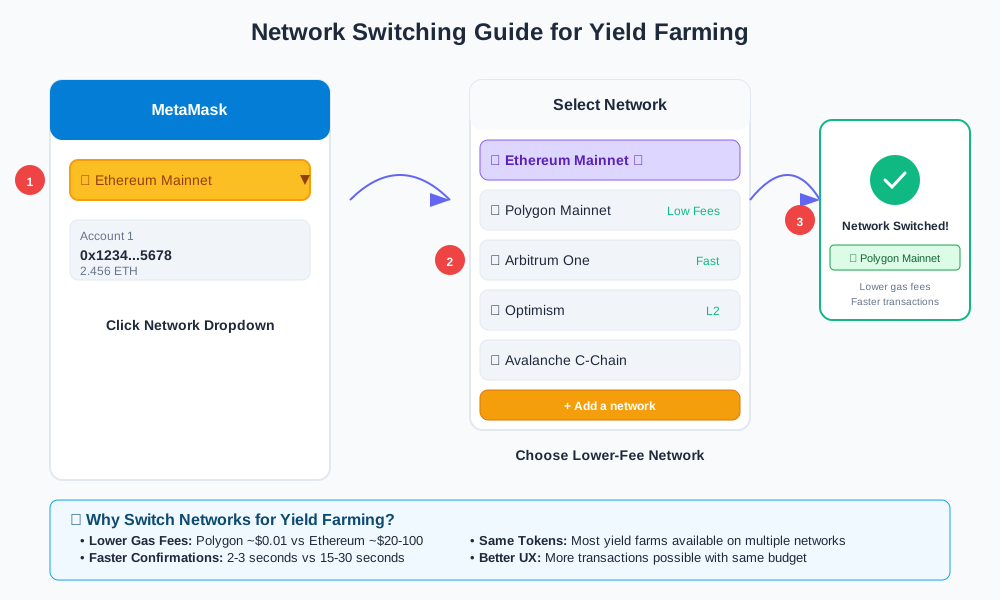
Step 5: Switch Networks if Congested
Try farming on less congested networks like Polygon or Arbitrum.
Advanced Troubleshooting for Persistent Errors
Some approval errors require advanced techniques to resolve.
Handle Non-Standard ERC-20 Tokens
Some tokens don't follow standard ERC-20 implementations. They require special handling.
// Check if token uses non-standard approval
try {
  // Standard approval
  await tokenContract.approve(spender, amount);
} catch (error) {
  // Try alternative approval method
  await tokenContract.increaseAllowance(spender, amount);
}
Deal with Fee-on-Transfer Tokens
Tokens like SAFEMOON charge fees on transfers. Account for reduced received amounts.
// Calculate actual received amount after fees
const transferFee = await tokenContract.transferFee(); // Usually 1-10%
const actualAmount = approvalAmount * (1 - transferFee / 100);

// Approve slightly more to account for fees
const adjustedApproval = approvalAmount * 1.1; // 10% buffer
Resolve Proxy Contract Issues
Some farming contracts use proxy patterns. You might need to approve the implementation contract instead.
// Get implementation address from proxy
const proxyContract = new ethers.Contract(proxyAddress, proxyABI, signer);
const implementationAddress = await proxyContract.implementation();

// Approve the implementation contract
await tokenContract.approve(implementationAddress, amount);
Smart Contract Approval Best Practices
Follow these practices to minimize future approval issues.
Batch Multiple Approvals
Approve multiple tokens in one transaction to save gas.
// Multicall contract for batch approvals
const multicallTx = await multicallContract.aggregate([
  tokenA.interface.encodeFunctionData("approve", [farmAddress, amountA]),
  tokenB.interface.encodeFunctionData("approve", [farmAddress, amountB])
]);
Monitor Allowance Levels
Check current allowances before farming to avoid surprises.
// Check current allowance
const currentAllowance = await tokenContract.allowance(
  userAddress,
  farmingContractAddress
);

if (currentAllowance.lt(depositAmount)) {
  // Need new approval
  await tokenContract.approve(farmingContractAddress, depositAmount);
}
Use Permit Functions When Available
Some tokens support gasless approvals through permit signatures.
// EIP-2612 permit signature
const permit = await signPermit(
  tokenContract,
  userAddress,
  farmingContractAddress,
  depositAmount,
  deadline
);

// Use permit in farming transaction
await farmingContract.depositWithPermit(
  depositAmount,
  permit.deadline,
  permit.v,
  permit.r,
  permit.s
);
Preventing Future Approval Problems
Implement these strategies to avoid approval errors before they happen.
Keep Wallets Updated
Update MetaMask and other wallets regularly. New versions include improved gas estimation and error handling.
Monitor Gas Prices
Use tools like GasTracker to time your transactions during low-congestion periods.
Use Hardware Wallets Carefully
Hardware wallets sometimes timeout during complex approval flows. Keep your device connected and confirm transactions promptly.
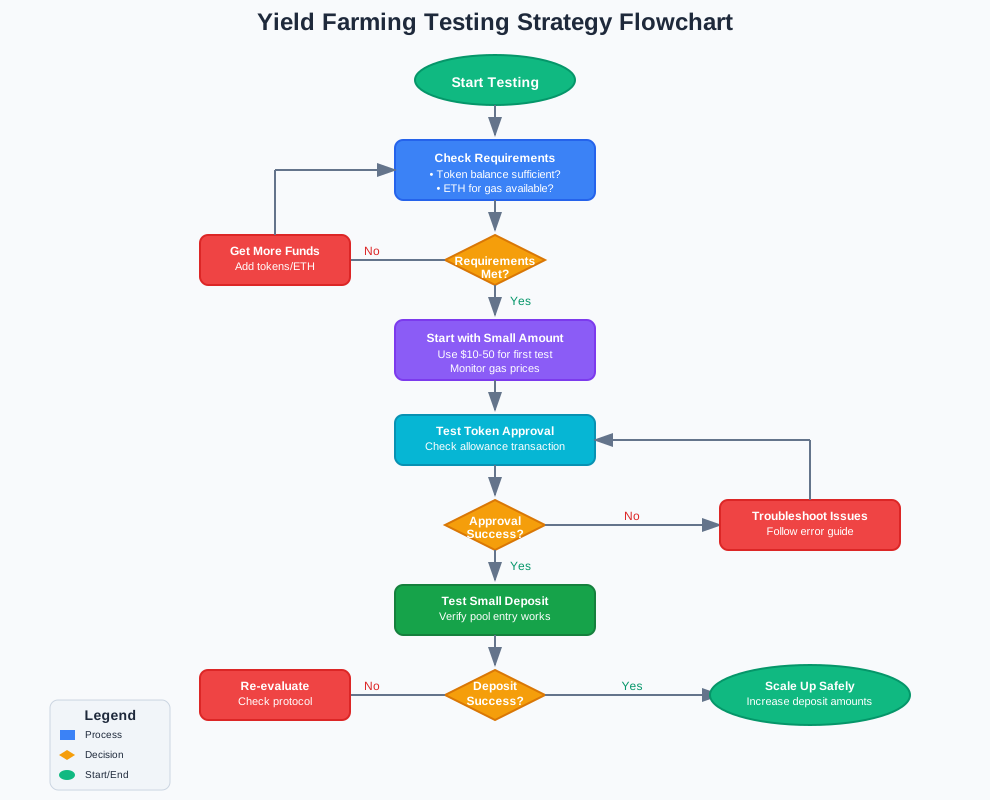
Test with Small Amounts First
Always test new farming protocols with small amounts before committing significant funds.
When to Contact Protocol Support
Some issues require protocol team intervention. Contact support when you encounter:
- Repeated transaction failures despite following all troubleshooting steps
- Smart contract bugs that prevent any approvals
- Protocol-specific error messages not covered in documentation
- Successful approvals that don't register in the farming interface
Include these details in your support request:
- Transaction hash of failed approval
- Token contract address
- Farming pool contract address
- Wallet type and version
- Network used (Ethereum, Polygon, etc.)
Conclusion
Yield farming approval errors frustrate even experienced DeFi users. But most token permission issues have straightforward solutions. Reset old allowances, increase gas limits, and verify your token balances. These simple steps resolve 90% of approval problems.
Advanced issues like non-standard tokens or proxy contracts need specialized approaches. Use the troubleshooting techniques in this guide to handle complex scenarios.
Remember to test new protocols with small amounts first. This practice saves money and reduces stress when approval errors occur.
Start implementing these token permission fixes today. Your yield farming journey becomes much smoother when you understand approval mechanics and common error solutions.