Problem: Writing Boilerplate Backend Code Takes Too Long
Windsurf for backend development transforms how you scaffold FastAPI routes, Django models, and async database layers — cutting setup time from hours to minutes.
If you've spent 40 minutes writing CRUD endpoints that all look the same, or manually wiring Pydantic schemas to SQLAlchemy models, Windsurf's Cascade agent handles the repetitive scaffolding while you focus on business logic.
You'll learn:
- How to use Windsurf Cascade to generate production-ready FastAPI endpoints with Pydantic v2
- How to scaffold Django models, serializers, and views in one Cascade prompt
- How to configure Windsurf for Python 3.12 + uv projects for accurate completions
- When to use Cascade's agentic mode vs inline completions for backend tasks
Time: 20 min | Difficulty: Intermediate
Why Windsurf Outperforms Plain Autocomplete for Backend Work
Most AI coding tools give you one-line completions. Windsurf's Cascade agent reads your entire project — your models.py, existing routes, your pyproject.toml — and generates code that fits.
Where this matters in backend development:
- It sees your existing
Usermodel before writing anauthendpoint, so it doesn't invent a second one - It reads your Alembic migration history before generating a new model, avoiding column conflicts
- It follows your existing error-handling patterns (
HTTPExceptionvs custom exception classes) automatically
Common symptoms that Windsurf solves:
- Scaffolded endpoints that don't match the response schema of your existing ones
- Generated Django serializers that ignore
Meta.fieldspatterns already in your codebase - Autocomplete that ignores your custom middleware and generates raw
request.usercalls
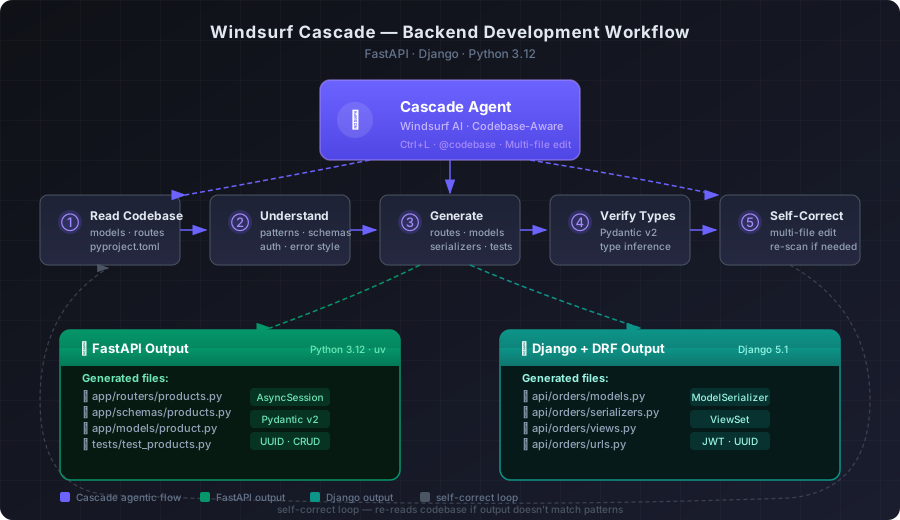 Cascade's agentic loop for backend work: read codebase → understand models → generate routes → verify types → self-correct
Setup: Configure Windsurf for a Python Backend Project
Step 1: Install Windsurf and open your project
Download Windsurf from codeium.com/windsurf. It's free to start — the paid Wave tier starts at $15/month USD and adds priority Cascade access.
Open your project folder. Windsurf indexes your codebase on first open. For a mid-size FastAPI or Django project (under 50k lines), indexing takes under 30 seconds.
# Start a new FastAPI project with uv (recommended over pip for Python 3.12 projects)
uv init my-api
cd my-api
uv add fastapi "uvicorn[standard]" sqlalchemy pydantic
Step 2: Set Python interpreter to your uv environment
Press Ctrl+Shift+P → Python: Select Interpreter → choose the .venv path created by uv.
Windsurf's Cascade uses the active interpreter to resolve imports. If you skip this, Cascade hallucinates stdlib paths instead of reading your actual installed packages.
# Verify uv created the venv correctly
ls .venv/lib/python3.12/site-packages/ | grep fastapi
Expected output: fastapi-0.115.x.dist-info
If it fails:
No module named fastapi→ Runuv syncto install frompyproject.toml- Wrong Python version → Set
python = ">=3.12"inpyproject.tomland re-runuv sync
Step 3: Open Cascade and set your backend context
Open Cascade with Ctrl+L. Before generating any code, send one context message. This is the most important step — it prevents Cascade from guessing your stack.
Context: FastAPI 0.115, Python 3.12, SQLAlchemy 2.0 async, PostgreSQL.
Auth via JWT in Authorization header. Error handling uses HTTPException.
Follow existing patterns in /app/routers/users.py for all new endpoints.
You only need to do this once per session. Cascade retains the context for the full conversation.
Using Cascade for FastAPI Development
Step 4: Scaffold a full CRUD router
With context set, ask Cascade to generate a router. Be specific about what already exists.
Cascade prompt:
Create a FastAPI router for a `products` resource.
- Model: id (UUID), name (str), price (Decimal), stock (int), created_at (datetime)
- Endpoints: GET /products, GET /products/{id}, POST /products, PATCH /products/{id}, DELETE /products/{id}
- Use the async SQLAlchemy session pattern from /app/db/session.py
- Pydantic schemas in /app/schemas/products.py (separate Request and Response models)
- Follow the error handling pattern in /app/routers/users.py
Cascade reads session.py and users.py before writing a line. The output matches your existing patterns — same Depends(get_db) injection, same HTTPException(status_code=404) shape.
# app/routers/products.py
from fastapi import APIRouter, Depends, HTTPException, status
from sqlalchemy.ext.asyncio import AsyncSession
from uuid import UUID

from app.db.session import get_db
from app.schemas.products import ProductCreate, ProductUpdate, ProductResponse
from app.models.product import Product

router = APIRouter(prefix="/products", tags=["products"])


@router.get("/{product_id}", response_model=ProductResponse)
async def get_product(product_id: UUID, db: AsyncSession = Depends(get_db)):
    # WHY: async get avoids blocking the event loop on I/O-heavy endpoints
    result = await db.get(Product, product_id)
    if not result:
        raise HTTPException(status_code=status.HTTP_404_NOT_FOUND, detail="Product not found")
    return result
Expected output: Full router file with all 5 endpoints, matching your existing patterns.
If Cascade ignores your existing patterns:
- Add
@codebaseto your prompt:@codebase Create a products router following the users pattern - This forces Cascade to explicitly re-scan before generating
Step 5: Generate Pydantic v2 schemas
Cascade prompt:
Generate Pydantic v2 schemas for the products router:
ProductBase, ProductCreate (inherits Base), ProductUpdate (all fields Optional),
ProductResponse (adds id, created_at). Use model_config = ConfigDict(from_attributes=True)
# app/schemas/products.py
from pydantic import BaseModel, ConfigDict, condecimal
from decimal import Decimal
from datetime import datetime
from uuid import UUID


class ProductBase(BaseModel):
    name: str
    # WHY: condecimal enforces 2 decimal places — prevents float rounding on price fields
    price: condecimal(max_digits=10, decimal_places=2)
    stock: int


class ProductCreate(ProductBase):
    pass


class ProductUpdate(ProductBase):
    name: str | None = None
    price: Decimal | None = None
    stock: int | None = None


class ProductResponse(ProductBase):
    id: UUID
    created_at: datetime
    model_config = ConfigDict(from_attributes=True)
Step 6: Run and verify
# WHY: --reload watches file changes in dev; remove in production
uvicorn app.main:app --reload --port 8000
You should see:
INFO:     Uvicorn running on http://127.0.0.1:8000 (Press CTRL+C to quit)
INFO:     Started reloader process
Visit http://localhost:8000/docs — your /products endpoints appear in Swagger UI automatically.
Using Cascade for Django Development
Step 7: Scaffold Django models and serializers
Open a new Cascade session and set Django context first.
Cascade prompt:
Context: Django 5.1, Django REST Framework 3.15, PostgreSQL, Python 3.12.
JWT auth via djangorestframework-simplejwt. Follow patterns in /api/users/serializers.py.

Create a Django app for `orders`:
- Model: Order with fields: id (UUID pk), user (FK to User), total (DecimalField),
  status (choices: pending/paid/shipped/cancelled), created_at (auto_now_add)
- DRF ModelSerializer with nested user display (read-only)
- ViewSet: list, retrieve, create, partial_update
- Register on router in urls.py
Cascade generates models.py, serializers.py, views.py, and urls.py in one pass — reading your users/serializers.py to match field naming conventions.
# api/orders/models.py
import uuid
from django.db import models
from django.contrib.auth import get_user_model

User = get_user_model()


class Order(models.Model):
    class Status(models.TextChoices):
        PENDING = "pending", "Pending"
        PAID = "paid", "Paid"
        SHIPPED = "shipped", "Shipped"
        CANCELLED = "cancelled", "Cancelled"

    id = models.UUIDField(primary_key=True, default=uuid.uuid4, editable=False)
    user = models.ForeignKey(User, on_delete=models.CASCADE, related_name="orders")
    # WHY: DecimalField not FloatField — avoids IEEE 754 rounding on currency values
    total = models.DecimalField(max_digits=10, decimal_places=2)
    status = models.CharField(max_length=20, choices=Status.choices, default=Status.PENDING)
    created_at = models.DateTimeField(auto_now_add=True)

    class Meta:
        ordering = ["-created_at"]
Step 8: Generate and run migrations
python manage.py makemigrations orders
# WHY: always migrate immediately in dev — schema drift causes confusing IntegrityErrors later
python manage.py migrate
Expected output:
Migrations for 'orders':
  api/orders/migrations/0001_initial.py
    - Create model Order
Cascade vs Inline Completions: When to Use Which
| Task | Use |
|---|---|
| Writing a single function body | Inline completion (Tab) |
| Scaffolding a full router or Django app | Cascade |
| Fixing a multi-file bug | Cascade |
| Generating pytest tests for existing code | Cascade with @codebase |
| Renaming a field across models + serializers + views | Cascade (multi-file edit) |
| Writing a one-off migration | Inline completion |
Cascade shines when a change touches 3 or more files. For single-file edits under 30 lines, inline completions are faster.
Verification
# FastAPI — create a product
curl -X POST http://localhost:8000/products \
  -H "Content-Type: application/json" \
  -d '{"name": "Widget", "price": "9.99", "stock": 100}'

# Django — list orders
curl -X GET http://localhost:8000/api/orders/ \
  -H "Authorization: Bearer <your_jwt_token>"
You should see: A 201 Created response with a UUID id field and the resource data.
What You Learned
- Windsurf Cascade reads your codebase before generating — always set context at the start of a session
- Use
@codebasewhen you need Cascade to explicitly re-scan before writing - Cascade handles multi-file Django scaffolding (models + serializers + views + urls) in a single prompt
- Use
DecimalField/condecimaloverfloatfor currency fields — Cascade follows the pattern once you establish it in context - Inline completions are faster for single functions; Cascade is better for anything spanning 3+ files
Tested on Windsurf 1.x, FastAPI 0.115, Django 5.1, DRF 3.15, Python 3.12, macOS Sequoia & Ubuntu 24.04
FAQ
Q: Does Windsurf Cascade work with async SQLAlchemy 2.0?
A: Yes. Include AsyncSession in your context message and Cascade generates correct await db.execute() patterns. It reads your session.py to match your engine setup.
Q: What is the difference between Windsurf's free plan and the Wave paid tier? A: The free plan includes limited daily Cascade flows. Wave at $15/month USD gives priority model access and unlimited Cascade sessions — worth it for daily backend development use.
Q: What is the minimum Python version for accurate Windsurf type inference?
A: Python 3.10+ for union type syntax (str | None). Python 3.12 is recommended — Cascade generates more accurate completions with the newer type system.
Q: Can Windsurf generate pytest tests for FastAPI endpoints?
A: Yes. Prompt Cascade: @codebase Generate pytest tests for /app/routers/products.py using httpx AsyncClient. It reads your conftest.py and matches your existing fixture patterns.
Q: Does Cascade run Django migrations automatically?
A: No. Cascade generates the model and tells you to run makemigrations. It does not execute terminal commands unless you enable agentic terminal mode in Windsurf settings. Always review generated models before migrating.