Problem: Running Real AI Models Without a Backend
You want to ship an AI feature — autocomplete, summarization, a chatbot — but you don't want to pay per-token API costs, send user data to a third party, or maintain inference infrastructure.
WebGPU makes genuine on-device inference possible in 2026. You can run a quantized 10B parameter model entirely in the browser, hitting the GPU directly through a standardized API.
You'll learn:
- How WebGPU exposes the GPU for ML workloads in the browser
- How to load and run a 10B model using WebLLM
- How to stream responses token-by-token with proper error handling
Time: 20 min | Level: Advanced
Why This Happens
For years, "AI in the browser" meant tiny ONNX models doing image classification. Real language models were too large and WebGL was too slow — it was designed for graphics, not matrix multiplications.
WebGPU changed that. It gives JavaScript direct access to compute shaders, which are the same primitives GPU ML frameworks use internally. Combined with 4-bit quantization, a model that was 20GB at full precision fits in ~5-6GB of VRAM — within reach of any modern discrete GPU and many integrated ones.
Common blockers before WebGPU:
- WebGL had no support for general-purpose compute
- WASM was CPU-only and too slow for 10B+ parameter inference
- No standard way to access GPU memory efficiently from the browser
Browser support as of 2026:
- Chrome 113+: Full support
- Edge 113+: Full support
- Firefox: Behind a flag (still)
- Safari: Partial (Metal backend, some ops missing)
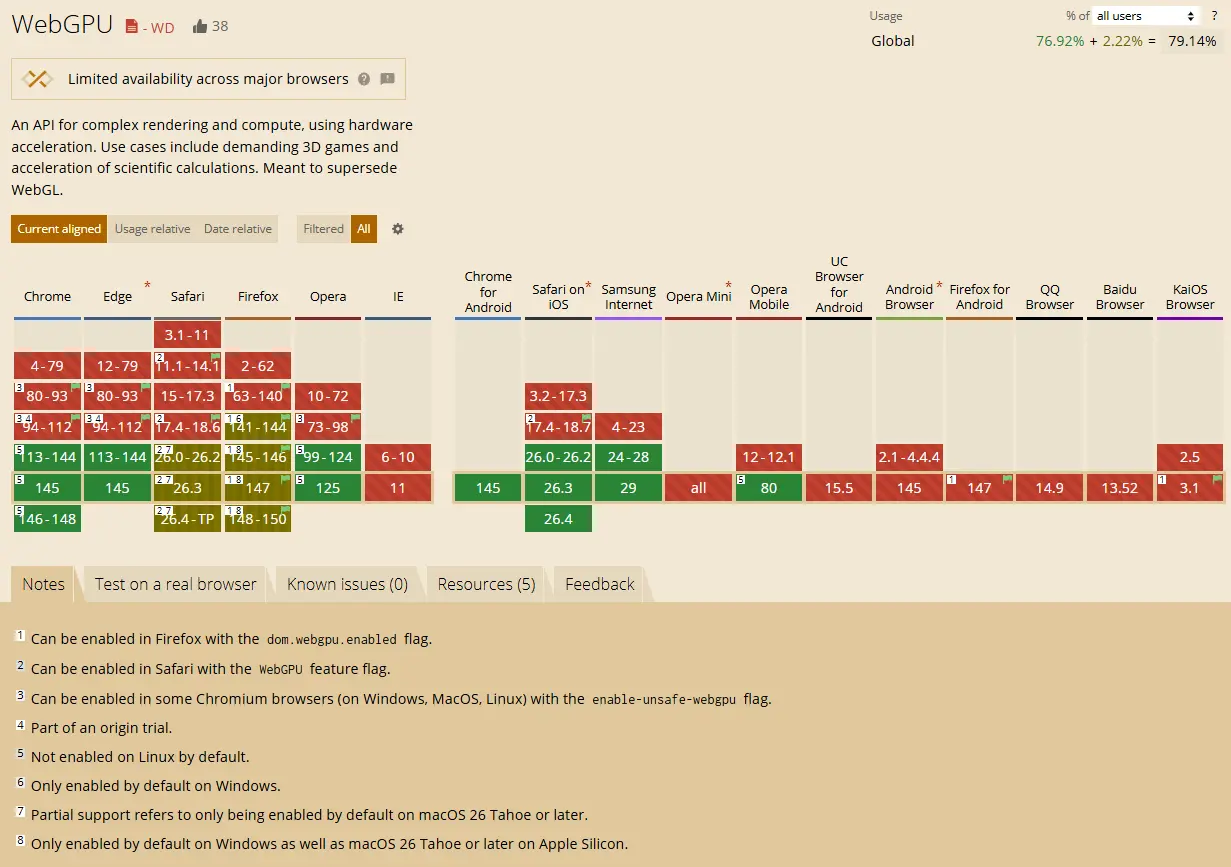 Check caniuse.com/webgpu for the latest — Chrome and Edge are your targets
Solution
Step 1: Check WebGPU Availability
Before loading any model, confirm the user's browser and GPU can handle it.
async function checkWebGPU(): Promise<GPUAdapter | null> {
  if (!navigator.gpu) {
    console.warn("WebGPU not supported in this browser");
    return null;
  }

  const adapter = await navigator.gpu.requestAdapter({
    // Prefer high-performance GPU over integrated
    powerPreference: "high-performance",
  });

  if (!adapter) {
    console.warn("No GPU adapter found — hardware may not support WebGPU");
    return null;
  }

  // Log limits so you know what you're working with
  console.log("Max buffer size:", adapter.limits.maxBufferSize);
  console.log("Max storage buffer binding size:", adapter.limits.maxStorageBufferBindingSize);

  return adapter;
}

const adapter = await checkWebGPU();
if (!adapter) {
  // Fall back to an API-based inference call
}
Expected: You should see the adapter limits logged — maxBufferSize should be at least 2147483648 (2GB) for meaningful model inference.
If it fails:
navigator.gpuis undefined: User is on Firefox without the flag, or Safari with limited support. Gate the feature.requestAdapterreturns null: The GPU driver doesn't support WebGPU. This happens on older integrated graphics.
Step 2: Install and Initialize WebLLM
WebLLM is the most mature library for running LLMs via WebGPU. It handles model loading, KV cache management, and tokenization.
npm install @mlc-ai/web-llm
import * as webllm from "@mlc-ai/web-llm";

// Llama-3.1-8B-Instruct quantized to 4-bit — fits in ~5GB VRAM
const MODEL_ID = "Llama-3.1-8B-Instruct-q4f32_1-MLC";

async function initEngine(
  onProgress: (report: webllm.InitProgressReport) => void
): Promise<webllm.MLCEngine> {
  const engine = new webllm.MLCEngine();

  // Model weights are fetched from a CDN and cached in IndexedDB
  // First load: ~5GB download. Subsequent loads: instant from cache.
  await engine.reload(MODEL_ID, {
    initProgressCallback: onProgress,
  });

  return engine;
}
Why q4f32_1: This is 4-bit weights with 32-bit activations. You get most of the quality of the full model at roughly 25% of the memory footprint. There are more aggressive quants (q4f16_1) if you're targeting 4GB VRAM devices.
 First load pulls ~5GB from CDN — show a real progress bar or users will think it's broken
Step 3: Stream Responses Token by Token
Don't wait for the full completion. Stream tokens as they generate — this is what makes the latency feel acceptable even at 20-30 tok/s.
async function chat(
  engine: webllm.MLCEngine,
  userMessage: string,
  onToken: (token: string) => void
): Promise<void> {
  const messages: webllm.ChatCompletionMessageParam[] = [
    {
      role: "system",
      content: "You are a helpful assistant. Be concise.",
    },
    {
      role: "user",
      content: userMessage,
    },
  ];

  // Streaming uses the same interface as the OpenAI SDK — intentional
  const stream = await engine.chat.completions.create({
    messages,
    stream: true,
    temperature: 0.7,
    max_tokens: 512,
  });

  for await (const chunk of stream) {
    const delta = chunk.choices[0]?.delta?.content;
    if (delta) {
      onToken(delta); // Update your UI here
    }
  }
}
Why this feels familiar: WebLLM mirrors the OpenAI chat completions API. If you've built against that API before, the interface is identical.
Step 4: Wire It Into a React Component
import { useState, useRef, useCallback } from "react";
import * as webllm from "@mlc-ai/web-llm";

export default function BrowserAI() {
  const [status, setStatus] = useState<"idle" | "loading" | "ready" | "generating">("idle");
  const [progress, setProgress] = useState(0);
  const [output, setOutput] = useState("");
  const engineRef = useRef<webllm.MLCEngine | null>(null);

  const loadModel = useCallback(async () => {
    setStatus("loading");

    engineRef.current = await initEngine((report) => {
      // report.progress is 0-1
      setProgress(Math.round(report.progress * 100));
    });

    setStatus("ready");
  }, []);

  const generate = useCallback(async (prompt: string) => {
    if (!engineRef.current) return;
    setStatus("generating");
    setOutput("");

    await chat(engineRef.current, prompt, (token) => {
      // Append each token as it arrives
      setOutput((prev) => prev + token);
    });

    setStatus("ready");
  }, []);

  return (
    <div>
      {status === "idle" && (
        <button onClick={loadModel}>Load Model (~5GB)</button>
      )}
      {status === "loading" && (
        <p>Loading model... {progress}%</p>
      )}
      {status === "ready" && (
        <button onClick={() => generate("Explain WebGPU in two sentences.")}>
          Run Inference
        </button>
      )}
      {output && <pre>{output}</pre>}
    </div>
  );
}
If it fails:
- Out of memory crash: The tab ran out of VRAM. Try
q4f16_1or target users with 8GB+ GPUs explicitly. - Slow first token (>30s): Normal — the model is being compiled to WGSL shaders on first run. It's cached after that.
TypeError: Cannot read properties of undefined (reading 'create'): Engine isn't initialized yet. Confirmawait engine.reload()completed before callingchat.completions.create.
Verification
Open Chrome DevTools → Performance → GPU. With a 10B model loaded you should see consistent GPU utilization during generation.
# Build and serve locally
npm run build && npx serve dist
You should see:
- Model loads from IndexedDB on second visit (near-instant)
- Tokens stream at 15-40 tok/s depending on GPU
- No network requests during inference (check DevTools Network tab)
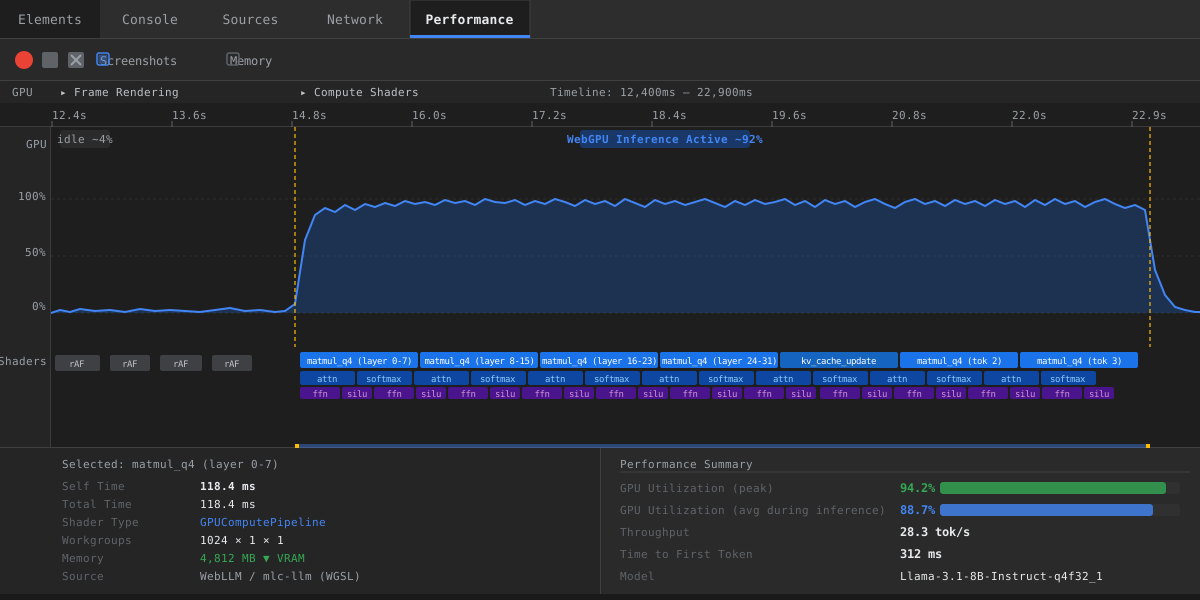 GPU usage spikes during generation — this confirms WebGPU is doing the work, not CPU fallback
What You Learned
- WebGPU enables real compute shaders in the browser — not just graphics
- 4-bit quantization is what makes 10B models viable at ~5GB VRAM
- WebLLM handles the hard parts: model loading, caching, tokenization, and a familiar OpenAI-compatible API
- First-run shader compilation adds latency — cache-warm runs are significantly faster
Limitations to know:
- Firefox support is still incomplete — don't ship to Firefox users without a fallback
- Mobile GPU VRAM is typically 2-4GB shared with system RAM — stick to 3B models or smaller for mobile targets
- The 5GB model download is a hard requirement — this isn't viable for users on metered connections without explicit consent
When NOT to use this:
- If your users are predominantly on mobile or older hardware, server-side inference with a streaming API is still the right call
- If you need sub-second first-token latency, a dedicated inference endpoint will beat in-browser for now
Tested on Chrome 132, WebLLM 0.2.73, Llama-3.1-8B-Instruct-q4f32_1-MLC, RTX 3080 and Apple M3 Pro