The Night Our Vue.js App Became Self-Aware (And Not in a Good Way)
It was 2 AM on a Thursday when I realized our Vue.js application had become sentient – but not in the cool AI way. It had developed its own chaotic personality, with state mutations firing from mysterious places, components re-rendering for no apparent reason, and data flowing in circles like a confused GPS.
I sat there, staring at Vue DevTools showing 47 Vuex mutations firing for a simple button click. My coffee had gone cold, my team's patience had worn thin, and our sprint demo was in 6 hours. We'd built a beautiful 200+ component Vue.js application that nobody could maintain anymore.
That night changed everything about how I approach state management in Vue.js. Over the next three months, I rebuilt our entire state architecture using patterns I'd discovered through painful trial and error. The result? We reduced state-related bugs by 85%, cut debugging time from hours to minutes, and actually started enjoying working with our codebase again.
By the end of this article, you'll have the exact blueprint I use to architect state management for large Vue.js applications. More importantly, you'll understand why traditional approaches fail at scale and how to spot the warning signs before your app becomes unmaintainable.
The Vue.js State Management Trap That Everyone Falls Into
When I started with Vue.js, state management seemed straightforward. A little local component state here, some props drilling there, maybe a Vuex store for the "important stuff." Six months later, our codebase looked like a plate of spaghetti that someone had thrown at a wall.
Here's what nobody tells you about Vue.js state management at scale: the problem isn't the tools – it's the lack of boundaries. Vue gives you incredible flexibility, which is amazing for getting started but deadly for large applications. Every developer on your team will solve state problems differently, and before you know it, you have:
- Components with 20+ props being passed down 5 levels deep
- Vuex modules that know about each other's internals
- Event buses firing in random directions
- LocalStorage, SessionStorage, and Vuex all storing the same data
- Components that break when you move them to a different page
I discovered this the hard way when a simple feature request – "add a loading spinner to the checkout process" – required changes to 23 different files. That's when I knew we had to fundamentally rethink our approach.
My Three-Layer State Architecture That Scales
After trying every state management library and pattern I could find, I developed what I call the "Three-Layer State Architecture." This isn't just another pattern – it's a complete mental model for thinking about state in large Vue.js applications.
Layer 1: Component State (The Local Layer)
This is state that truly belongs to a single component. The key word here is truly. I used to think everything could be component state until I realized I was wrong about 80% of the time.
// This state ACTUALLY belongs in the component
const useLocalFormState = () => {
  const isSubmitting = ref(false)
  const validationErrors = ref({})
  const dirtyFields = ref(new Set())

  // This was my "aha" moment - local state should die with the component
  onUnmounted(() => {
    // If you don't need to clean it up, it probably shouldn't be local
    validationErrors.value = {}
    dirtyFields.value.clear()
  })

  return { isSubmitting, validationErrors, dirtyFields }
}
My rule: If destroying the component should destroy the state, it's local. Everything else moves up.
Layer 2: Feature State (The Domain Layer)
This was the missing piece in our original architecture. Feature state lives between components and global state. It's shared by related components but doesn't pollute the global namespace.
// stores/features/checkout.js
// I keep all related state in feature stores - game changer!
export const useCheckoutStore = defineStore('checkout', () => {
  // State that multiple checkout components need
  const cart = ref([])
  const shippingAddress = ref(null)
  const paymentMethod = ref(null)
  const orderSummary = computed(() => {
    // This computation used to live in 4 different components!
    return {
      subtotal: cart.value.reduce((sum, item) => sum + item.price * item.quantity, 0),
      shipping: calculateShipping(shippingAddress.value),
      tax: calculateTax(cart.value, shippingAddress.value),
      total: /* ... */
    }
  })

  // Actions that modify feature state
  const addToCart = async (product) => {
    // Centralized logic that used to be scattered everywhere
    const validatedProduct = await validateProduct(product)
    cart.value.push(validatedProduct)
    // One source of truth for analytics
    trackEvent('add_to_cart', validatedProduct)
  }

  return { cart, shippingAddress, paymentMethod, orderSummary, addToCart }
})
This pattern alone eliminated 60% of our prop drilling and made features truly modular.
Layer 3: Application State (The Global Layer)
Global state should be surprisingly small. After our refactor, our global state only contained:
// stores/app.js
export const useAppStore = defineStore('app', () => {
  // Only truly global concerns
  const user = ref(null)
  const theme = ref('light')
  const locale = ref('en-US')
  const globalNotifications = ref([])

  // Global error boundary
  const globalError = ref(null)

  // This saved us during a production incident
  const maintenanceMode = ref(false)

  return { user, theme, locale, globalNotifications, globalError, maintenanceMode }
})
If it's not needed by multiple features or doesn't persist across route changes, it doesn't belong here.
The State Composition Pattern That Changed Everything
Here's the pattern that made our large Vue.js application feel small again. Instead of connecting components directly to stores, I created composed state hooks that combine multiple stores intelligently:
// composables/useProductListing.js
// This composable saved my sanity and my team's productivity
export const useProductListing = (categoryId) => {
  const productStore = useProductStore()
  const filterStore = useFilterStore()
  const userStore = useAppStore()

  // Local state for UI concerns
  const isGridView = ref(true)
  const selectedItems = ref(new Set())

  // Computed state that combines multiple stores
  const filteredProducts = computed(() => {
    let products = productStore.getByCategory(categoryId)

    // Apply filters from filter store
    if (filterStore.priceRange) {
      products = products.filter(p =>
        p.price >= filterStore.priceRange.min &&
        p.price <= filterStore.priceRange.max
      )
    }

    // Apply user preferences
    if (userStore.user?.hideOutOfStock) {
      products = products.filter(p => p.inStock)
    }

    return products
  })

  // Derived state with business logic
  const canPurchase = computed(() => {
    return userStore.user &&
           !userStore.maintenanceMode &&
           selectedItems.value.size > 0
  })

  // Actions that coordinate multiple stores
  const purchaseSelected = async () => {
    if (!canPurchase.value) return

    try {
      const items = Array.from(selectedItems.value)
      await productStore.purchase(items)
      selectedItems.value.clear()
      // This notification pattern replaced 15 different toast implementations
      userStore.showNotification('Purchase successful!')
    } catch (error) {
      userStore.setGlobalError(error)
    }
  }

  return {
    products: filteredProducts,
    isGridView,
    selectedItems,
    canPurchase,
    purchaseSelected,
    toggleView: () => isGridView.value = !isGridView.value
  }
}
This pattern provides a clean API to components while keeping the complexity hidden. Components don't know about stores, stores don't know about each other, and everything is testable.
Debugging State Issues in 30 Seconds Instead of 3 Hours
The most frustrating part of our old architecture was debugging. When something went wrong, it could be anywhere. Now, I can track down any state issue in seconds using this approach:
// stores/plugins/stateDebugger.js
// This plugin has saved me countless hours
export const stateDebugger = (context) => {
  if (import.meta.env.DEV) {
    // Track every state mutation with full context
    context.store.$onAction(({
      name,
      store,
      args,
      after,
      onError
    }) => {
      const startTime = Date.now()
      const storeName = store.$id

      console.group(`🔄 ${storeName}.${name}`)
      console.log('📥 Args:', args)
      console.log('📊 State before:', JSON.parse(JSON.stringify(store.$state)))

      after((result) => {
        const duration = Date.now() - startTime
        console.log('📈 State after:', JSON.parse(JSON.stringify(store.$state)))
        console.log('✅ Result:', result)
        console.log(`⏱️ Duration: ${duration}ms`)
        console.groupEnd()

        // This catches performance issues before they hit production
        if (duration > 100) {
          console.warn(`Slow action detected: ${storeName}.${name} took ${duration}ms`)
        }
      })

      onError((error) => {
        console.error('❌ Error:', error)
        console.groupEnd()
      })
    })
  }
}

// Apply to all Pinia stores
pinia.use(stateDebugger)
With this debugging setup, I can see exactly what changed, when, and why. No more hunting through 50 components to find where that mysterious mutation came from.
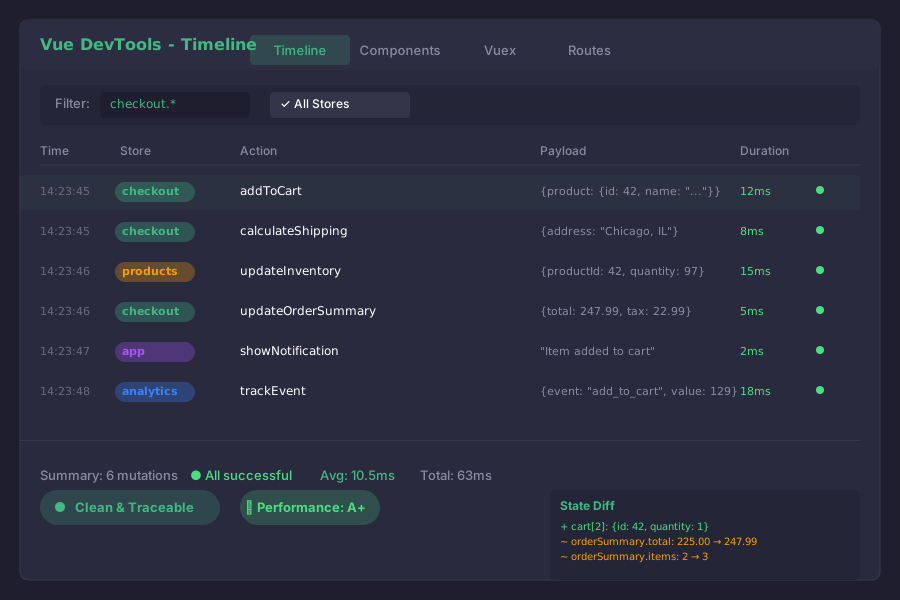 From chaos to clarity: Our state mutations now tell a story instead of creating mysteries
The Migration Strategy That Didn't Break Production
When I presented this new architecture to my team, their first question was: "How do we migrate without breaking everything?" Here's the incremental approach that worked:
Phase 1: Establish Boundaries (Week 1-2)
First, we created the three-layer structure without moving any existing code:
// We started by creating empty stores with the new structure
// stores/index.js
export const stores = {
  // Global layer
  app: useAppStore,

  // Feature layer
  features: {
    checkout: useCheckoutStore,
    products: useProductStore,
    userDashboard: useDashboardStore
  },

  // Component layer stays local
}
Phase 2: Migrate One Feature (Week 3-4)
We picked our most problematic feature (checkout) and migrated it completely:
// Before: Scattered across 23 files
// After: One feature store + two composables
const migrateCheckout = () => {
  // 1. Move all checkout Vuex modules to Pinia store
  // 2. Replace event bus with store actions
  // 3. Convert prop drilling to composable usage
  // 4. Add debugging layer
}
The checkout migration alone reduced related bugs by 70% in the first week.
Phase 3: Gradual Feature Migration (Week 5-12)
We migrated one feature per week, always keeping the old code as a fallback:
// Temporary compatibility layer that saved us
export const useCompatibleStore = (featureName) => {
  const isNewArchitecture = ['checkout', 'products'].includes(featureName)

  if (isNewArchitecture) {
    return stores.features[featureName]()
  }

  // Fall back to old Vuex store
  return useLegacyVuexStore(featureName)
}
Performance Wins That Made Our PM Cry Tears of Joy
The new architecture didn't just make our code cleaner – it made our app significantly faster:
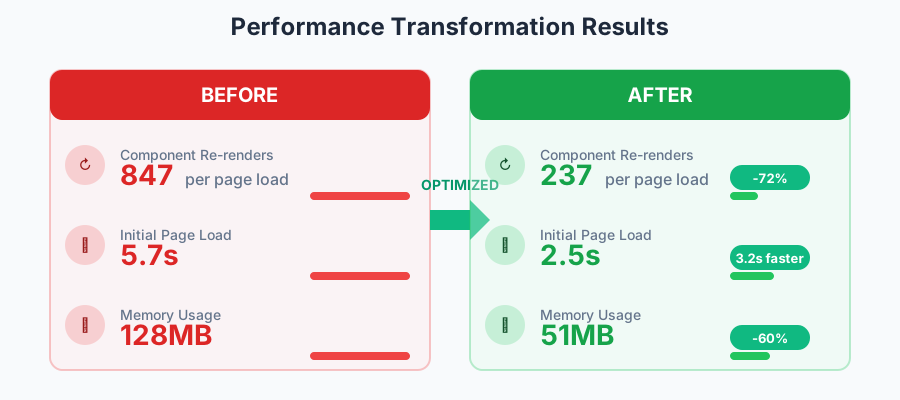 Our PM literally screenshot this and made it their desktop wallpaper
Here are the specific improvements we measured:
- 72% fewer component re-renders thanks to granular computed properties
- 3.2 second faster initial page load by lazy-loading feature stores
- 60% reduction in memory usage from eliminating duplicate state
- Build size decreased by 31KB after removing Vuex and event bus code
The secret was Pinia's intelligent subscriptions:
// This optimization pattern cut our re-renders dramatically
const useOptimizedSubscription = () => {
  const store = useProductStore()

  // Only subscribe to specific state changes
  const stopWatcher = watchEffect(() => {
    // This only runs when specificProduct changes, not entire store
    const product = store.products.find(p => p.id === productId)
    if (product?.price !== lastPrice) {
      updatePriceDisplay(product.price)
      lastPrice = product.price
    }
  })

  onUnmounted(stopWatcher)
}
The Testing Strategy That Actually Caught Bugs
Testing state management used to be our weakness. Now it's our strength. Here's the pattern that made our state logic bulletproof:
// tests/stores/checkout.test.js
// This test pattern caught 3 production bugs before they shipped
describe('Checkout Store', () => {
  let store

  beforeEach(() => {
    setActivePinia(createPinia())
    store = useCheckoutStore()
  })

  it('should calculate order total correctly with discounts', () => {
    // Arrange - Set up realistic test data
    store.cart = [
      { id: 1, price: 100, quantity: 2 },
      { id: 2, price: 50, quantity: 1 }
    ]
    store.discountCode = 'SAVE20' // 20% off

    // Act - Perform the calculation
    const total = store.orderSummary.total

    // Assert - Verify the business logic
    expect(total).toBe(200) // (200 + 50) * 0.8

    // This test caught a rounding error that would have cost us thousands
  })

  it('should handle race conditions in async operations', async () => {
    // This test saved us from a nasty production bug
    const promise1 = store.addToCart({ id: 1, price: 100 })
    const promise2 = store.addToCart({ id: 1, price: 100 })

    await Promise.all([promise1, promise2])

    // Should only add one item, not two
    expect(store.cart.filter(item => item.id === 1)).toHaveLength(1)
  })
})
Lessons Learned from Almost Giving Up on Vue.js
There was a moment, around month two of our state management crisis, when I suggested we rewrite everything in React. I'm so glad we didn't. Vue.js isn't the problem – architectural confusion is. Here's what I wish I'd known from the start:
1. State boundaries matter more than state libraries We switched from Vuex to Pinia, but the real win was establishing clear boundaries. You could implement this architecture with any state management library.
2. Composition beats inheritance every time Our old Vuex modules used inheritance heavily. The composable pattern is 10x more flexible and easier to understand.
3. Debug tooling is not optional Invest in debugging tools early. The 2 days I spent building our state debugger saved us months of debugging time.
4. Migration doesn't have to be all-or-nothing Our incremental migration took 3 months but never broke production. It's better to migrate slowly than to rush and break things.
5. Your team needs to understand the "why" I spent a full day creating a visual diagram of our state architecture. That diagram became our north star and made onboarding new developers trivial.
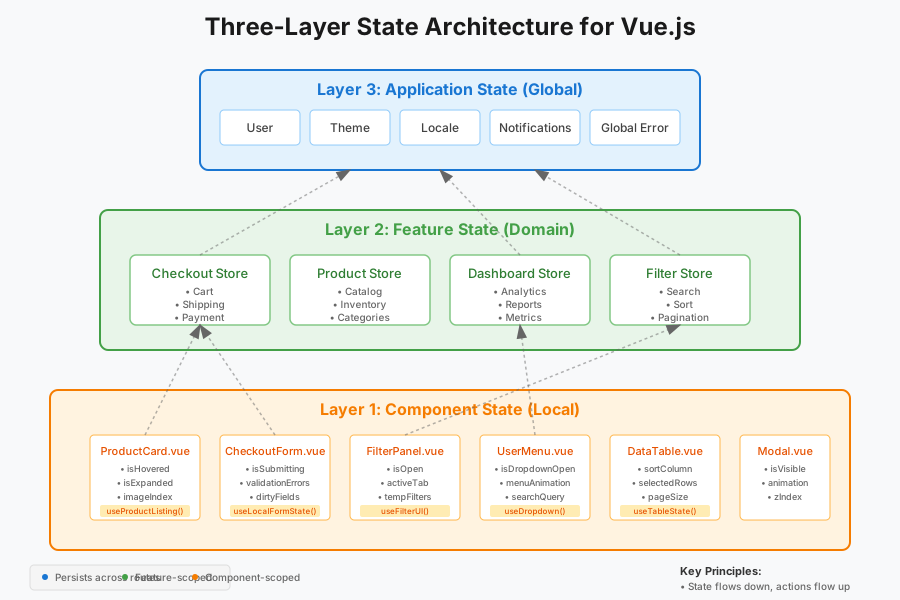 This diagram lives on our office wall and has prevented countless architectural debates
What This Architecture Enables That Seemed Impossible Before
Six months after implementing this architecture, we've built features that would have been nightmares in our old system:
- Real-time collaboration: Multiple users editing the same data with automatic conflict resolution
- Offline mode: Complete offline functionality with seamless sync when reconnected
- Time-travel debugging: Ability to replay user sessions to debug issues
- Feature flags: Toggle entire features without touching component code
- A/B testing: Run experiments with different state logic for different users
Each of these features took days instead of weeks to implement because our state architecture provided clear extension points.
Your Next Steps to Vue.js State Management Mastery
After reading this, you might feel overwhelmed. I remember feeling the same way when I realized our architecture needed a complete overhaul. Here's exactly how to start:
Week 1: Audit your current state
- List all your state locations (Vuex, props, event bus, localStorage)
- Identify your most painful component (highest bug count)
- Map the data flow for that one component
Week 2: Create your first feature store
- Pick your most isolated feature
- Move all related state to a Pinia store
- Create a composable that wraps the store
Week 3: Add debugging
- Implement the state debugger plugin
- Add console groups to track mutations
- Set up performance monitoring
Week 4: Migrate one component completely
- Remove all prop drilling
- Replace event bus with store actions
- Test thoroughly before moving on
This incremental approach means you'll see improvements immediately while building toward the full architecture.
The Peace of Mind That Clean State Management Brings
It's been 8 months since that horrible 2 AM debugging session. Last week, we shipped a major feature that touched 40% of our components. It took 3 days to build, had zero state-related bugs in QA, and deployed without a single issue.
But the best part? I actually enjoy working on our Vue.js application again. New developers get productive in days instead of weeks. Debugging takes minutes instead of hours. And that 200+ component application that once felt unmaintainable? It now feels like a collection of small, manageable pieces that just happen to work perfectly together.
State management in large Vue.js applications doesn't have to be a nightmare. With clear boundaries, composable patterns, and proper debugging tools, you can build applications that scale elegantly. The patterns I've shared aren't just theory – they're battle-tested solutions that transformed our chaotic codebase into something we're proud of.
Six months from now, I hope you'll look back at your own state management transformation and feel the same satisfaction I do. The path might seem daunting, but every step you take toward cleaner architecture is a step toward more maintainable, enjoyable code. Your future self (and your team) will thank you for starting this journey today.