Problem: Your VS Code Isn't Set Up for Robotics
Robotics development spans C++, Python, ROS 2, embedded firmware, URDF files, and real-time hardware debugging. A generic VS Code setup forces you to context-switch constantly and misses critical tooling.
You'll learn:
- Which extensions handle ROS 2 workspace complexity
- The best tools for C++ and Python in hardware-constrained environments
- Extensions that catch bugs before they reach a physical robot
Time: 10 min | Level: Intermediate
Why This Matters
A robotics codebase isn't like a web app. You're dealing with mixed-language packages, custom message types, real-time constraints, and hardware-in-the-loop testing. The wrong extensions slow you down; the right ones surface errors before a motor spins the wrong way.
Common friction points without the right setup:
- No IntelliSense for ROS 2 message types or
rclcppheaders - Manual
colcon buildwith no error highlighting in-editor - Zero awareness of launch file syntax or URDF structure
- Serial and CAN bus output buried in a Terminal with no filtering
The Top 10 Extensions
Extension 1: ROS (ms-iot.vscode-ros)
The official Microsoft ROS extension is the foundation. It gives you ROS 2 workspace detection, launch file support, and integrated rosrun/ros2 run commands directly from the command palette.
# Install via CLI
code --install-extension ms-iot.vscode-ros
What it does: Detects your ros2 environment, sources setup.bash automatically, and adds task runners for colcon build, colcon test, and individual package builds.
Expected: A ROS status bar item appears at the bottom of VS Code showing your active ROS 2 distro (e.g., ROS2: Jazzy).
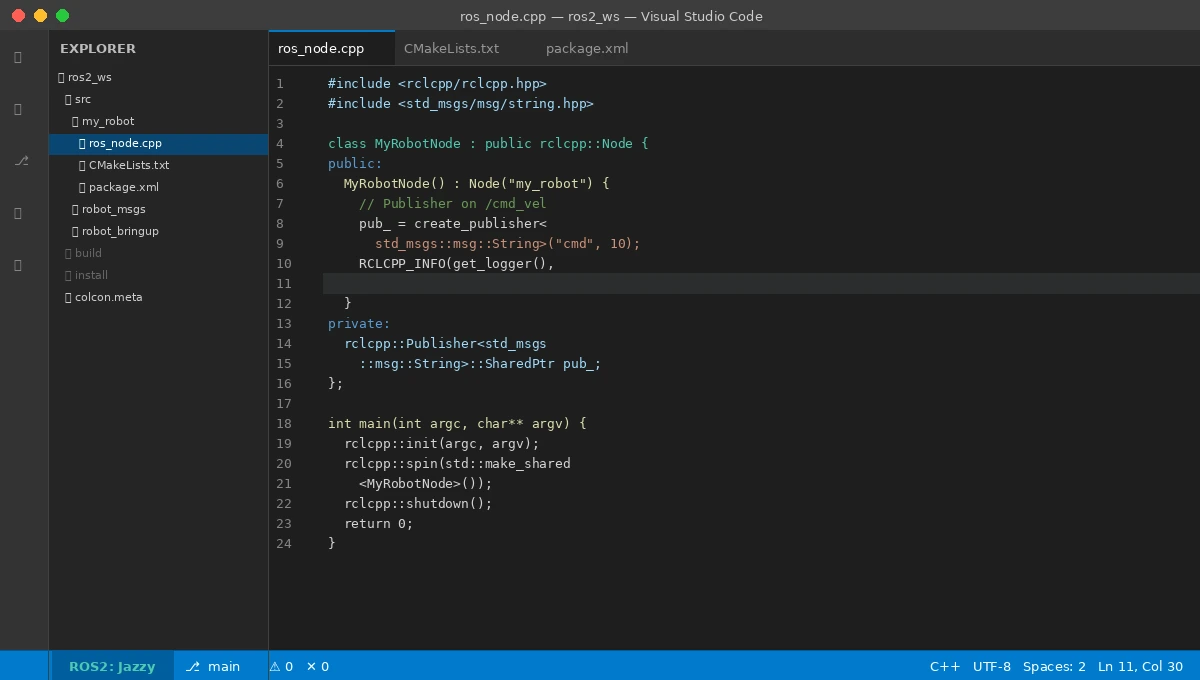 The ROS 2 distro indicator confirms your workspace is sourced correctly
If it fails:
- "ROS not found": Make sure
source /opt/ros/jazzy/setup.bashis in your.bashrc, then restart VS Code - Wrong distro shown: Set
ros.distroin your workspacesettings.json
Extension 2: C/C++ (ms-vscode.cpptools)
Non-negotiable for any ROS 2 C++ package. This gives you IntelliSense, Go to Definition, and error squiggles across your rclcpp, sensor_msgs, and custom message headers.
// .vscode/c_cpp_properties.json
{
  "configurations": [
    {
      "name": "Linux",
      "includePath": [
        "${workspaceFolder}/**",
        "/opt/ros/jazzy/include/**",
        "/usr/include/**"
      ],
      "compilerPath": "/usr/bin/g++",
      "cppStandard": "c++17",
      "intelliSenseMode": "linux-gcc-x64"
    }
  ]
}
Why this config: ROS 2 headers live outside your workspace. Without explicitly pointing IntelliSense at /opt/ros/jazzy/include, you'll see red squiggles on every #include <rclcpp/rclcpp.hpp>.
Extension 3: Python (ms-python.python) + Pylance
ROS 2 Python nodes use rclpy, which Pylance can fully type-check if configured correctly. Add the ROS 2 Python path to your interpreter settings.
// .vscode/settings.json
{
  "python.defaultInterpreterPath": "/usr/bin/python3",
  "python.analysis.extraPaths": [
    "/opt/ros/jazzy/lib/python3.12/site-packages"
  ]
}
Expected: import rclpy resolves without errors, and you get autocomplete on Node, Publisher, Subscription, and message types.
Extension 4: CMake Tools (ms-vscode.cmake-tools)
ROS 2 packages are CMake projects. This extension surfaces CMake configuration errors inline, handles multi-package workspaces, and adds a build toolbar to your status bar.
Set it to use colcon rather than raw CMake:
// .vscode/settings.json
{
  "cmake.buildDirectory": "${workspaceFolder}/build/${workspaceFolderBasename}",
  "cmake.configureOnOpen": false  // Let colcon handle configure
}
Why configureOnOpen: false: In a colcon workspace, letting CMake Tools auto-configure fights with colcon build. Disable it and run builds through the ROS extension tasks instead.
Extension 5: URDF Preview (smilerobotics.urdf)
URDF files are painful to debug blind. This extension renders a 3D preview of your robot model directly in VS Code — no need to launch RViz just to check a joint offset.
code --install-extension smilerobotics.urdf
How to use: Open any .urdf or .xacro file, then run URDF: Preview from the command palette.
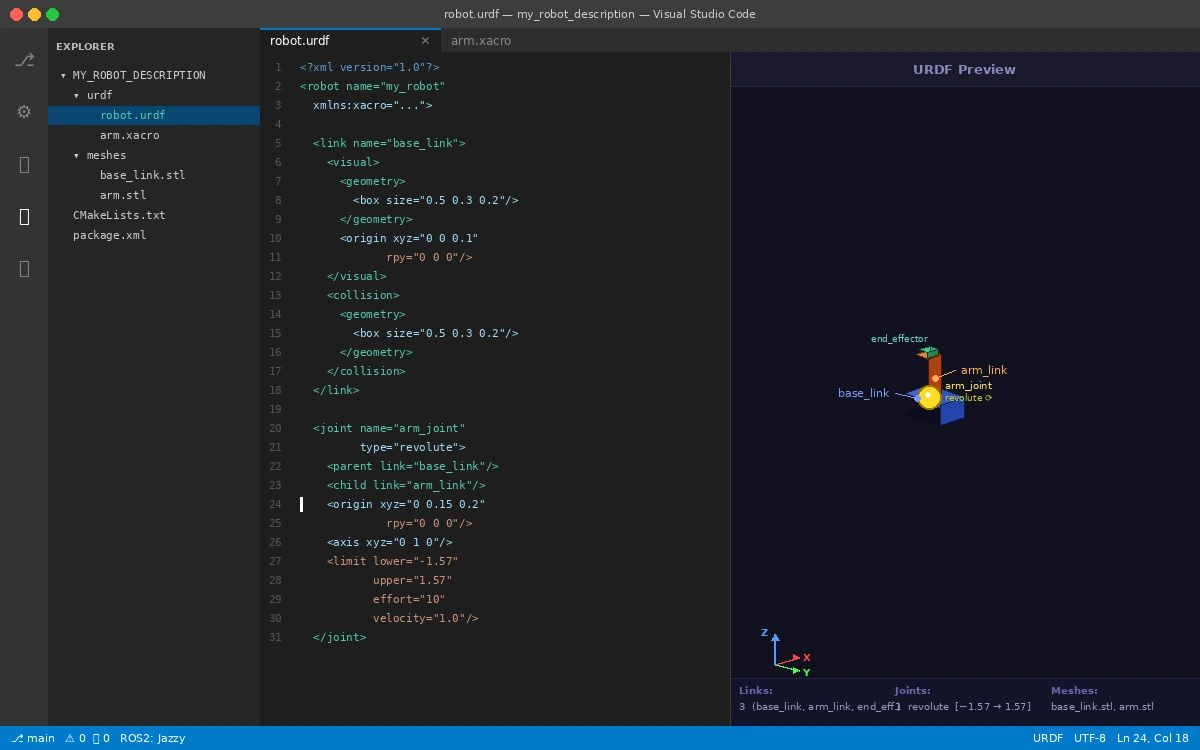 Real-time 3D preview updates as you edit joint origins and link geometry
If it fails:
- Blank preview: Check that your mesh paths (
package://) are resolvable; the extension needs your ROS workspace sourced
Extension 6: Serial Monitor (ms-vscode.vscode-serial-monitor)
For embedded work — microcontrollers, motor drivers, IMUs — this extension replaces screen and minicom with a proper in-editor serial terminal. Supports baud rate switching, line ending config, and hex view.
code --install-extension ms-vscode.vscode-serial-monitor
Key config:
{
  "serialMonitor.portPath": "/dev/ttyUSB0",
  "serialMonitor.baudRate": 115200
}
Expected: A "Serial Monitor" panel appears in your bottom panel alongside Terminal and Output.
Extension 7: GitLens (eamodio.gitlens)
Robotics teams run long hardware-integration sprints where a single bad commit can brick a test session. GitLens adds inline blame, branch comparison, and commit search without leaving your editor.
The most useful feature for robotics: File History. Right-click any file → Open File History to see exactly when a parameter change or controller tweak was introduced.
Extension 8: Error Lens (usernamehw.errorlens)
Surfaces compiler errors and linter warnings inline — directly on the offending line — instead of making you check the Problems panel. For C++ robotics code where a type mismatch can cause a runtime crash, catching it visually in-context saves real debugging time.
code --install-extension usernamehw.errorlens
No config needed. It works immediately with C/C++ and Pylance diagnostics.
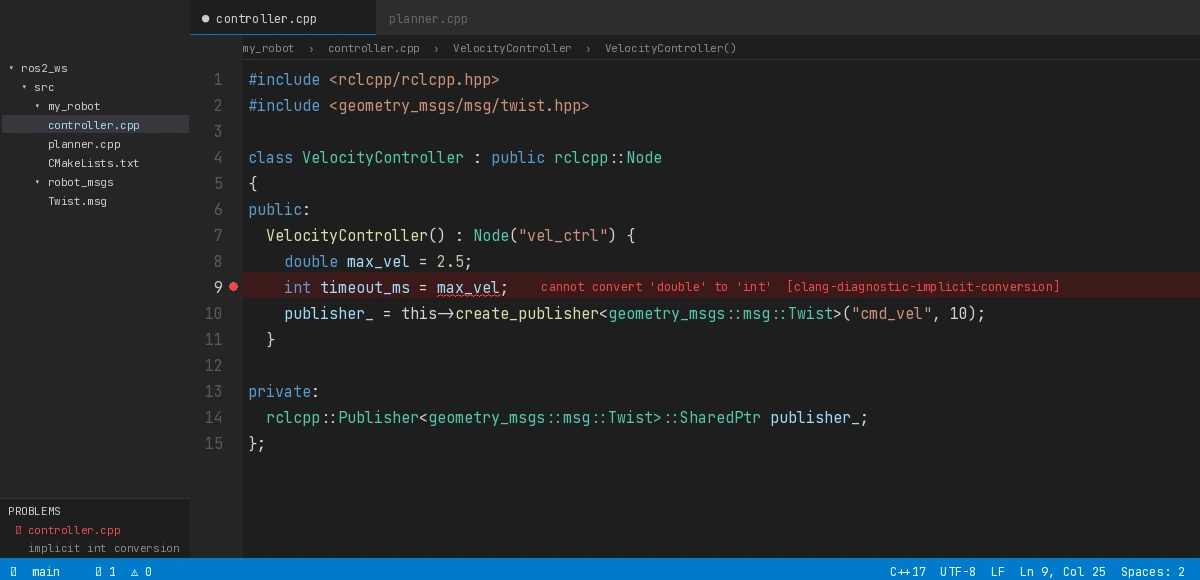 Type mismatch shown inline — no need to open the Problems panel
Extension 9: Clang-Format (xaver.clang-format)
ROS 2 follows the ament_clang_format style. This extension auto-formats on save, keeping your PRs clean and ament_clang_format --reformat checks green in CI.
// .vscode/settings.json
{
  "editor.formatOnSave": true,
  "[cpp]": {
    "editor.defaultFormatter": "xaver.clang-format"
  },
  "clang-format.style": "file"  // Uses .clang-format in your repo root
}
Set up your .clang-format:
# .clang-format at repo root
BasedOnStyle: Google
IndentWidth: 2
ColumnLimit: 100
Extension 10: Docker (ms-azuretools.vscode-docker)
Modern robotics teams run everything in containers — simulation, cross-compilation for ARM targets, CI environments. This extension gives you a Docker Explorer sidebar, integrated docker-compose support, and one-click container attach for remote debugging.
The killer feature for robotics: Attach VS Code directly to a running ROS 2 container and get full IntelliSense inside the container's filesystem — no volume mounts required for your source files.
# Attach to a running container
# Command Palette → "Dev Containers: Attach to Running Container"
Verification
After installing all 10, restart VS Code and open a ROS 2 workspace:
cd ~/ros2_ws
code .
You should see:
ROS2: Jazzy(or your distro) in the status bar- No red squiggles on
#include <rclcpp/rclcpp.hpp> - CMake Tools kit detected
- Python interpreter pointing to system Python 3.x
Run a build to confirm the task integration works:
# VS Code Command Palette → "Tasks: Run Task" → "colcon: build"
Expected output in the terminal panel: Summary: X packages finished
What You Learned
- The ROS extension + C/C++ + CMake Tools trio is the non-negotiable baseline for any ROS 2 project
- URDF Preview and Serial Monitor eliminate the need to leave VS Code during hardware bringup
- Error Lens and Clang-Format together enforce quality before you push — critical when a bug means a physical test failure
- Docker attach lets you develop inside containers without sacrificing editor features
Limitation: The ROS extension's IntelliSense can lag in very large workspaces (50+ packages). If that happens, limit includePath in c_cpp_properties.json to the packages you're actively editing.
When NOT to use this setup: If you're doing pure embedded firmware (no ROS), swap the ROS extension for PlatformIO and Cortex-Debug instead.
Tested on Ubuntu 24.04, ROS 2 Jazzy, VS Code 1.97, Python 3.12