Problem: You Need to Pick Hardware for Local AI — and Both Options Are Expensive
You're serious about running LLMs locally. You've narrowed it to two paths: build around an RTX 6090 (or wait for one), or buy a Mac Studio M4 Ultra. Both cost north of $3,000. Both have real tradeoffs that benchmarks don't capture.
You'll learn:
- Why memory architecture matters more than raw TFLOPS for LLM inference
- Where the RTX 6090 wins, where Apple Silicon wins, and where it's genuinely close
- Which one to actually buy based on your workflow
Time: 12 min | Level: Intermediate
Why This Is Harder Than It Looks
The instinct is to compare teraflops. Don't. For local AI inference, the bottleneck is almost always memory bandwidth, not compute. A model that doesn't fit in VRAM is either offloaded to slow system RAM or truncated — both kill throughput.
This is why Apple Silicon has punched above its weight since M1: unified memory lets the GPU use all system RAM at full bandwidth. An M4 Ultra with 192 GB of unified memory can load a 70B model at full precision. A discrete GPU with 32 GB VRAM cannot.
Where things get complicated: The RTX 6090 isn't out yet. Based on leaks and NVIDIA's Rubin architecture roadmap, it's expected in early 2027 with roughly 32–48 GB GDDR7 and over 600W TDP. The M4 Ultra doesn't exist yet either — it will almost certainly fuse two M4 Max dies, following Apple's standard Ultra pattern, giving it around 192–256 GB of unified memory.
Both machines are futures bets. Here's how to think through it.
Common confusion points:
- "More TFLOPS = better AI" — false for inference
- "Apple Silicon can't match a real GPU" — only true for training
- "VRAM doesn't matter for quantized models" — partially true, but context windows still fill memory fast
The Specs That Actually Matter
RTX 6090 (Rubin Architecture — Projected)
| Spec | Projected Value |
|---|---|
| VRAM | 32–48 GB GDDR7 |
| Memory bandwidth | ~1.8–2.3 TB/s |
| TDP | 550–650W |
| CUDA cores | ~20,000–24,000 |
| Compute (AI) | ~200+ TOPS (est.) |
| Price | $2,000–$3,000+ |
What this means for AI: With 48 GB VRAM you can load a 34B model at Q4 quantization and have headroom for context. You can run SDXL, video generation, and fine-tuning at full speed. CUDA's tooling support is unmatched — PyTorch, JAX, and virtually every AI framework treats CUDA as the default.
Mac Studio M4 Ultra (Projected)
| Spec | Projected Value |
|---|---|
| Unified memory | 192–256 GB |
| Memory bandwidth | ~800 GB/s |
| TDP | ~200W (whole system) |
| Neural Engine | ~60 TOPS |
| MLX support | Native |
| Price | $3,000–$5,000+ |
What this means for AI: You can load a 70B model at Q4, a 34B model at Q6, and still have RAM left for your IDE and browser. The M3 Ultra (the current closest equivalent) runs quantized DeepSeek R1 671B, just slowly. The M4 Ultra will close that speed gap. Power draw is the other story — the whole machine uses ~200W versus the RTX 6090 alone drawing 600W.
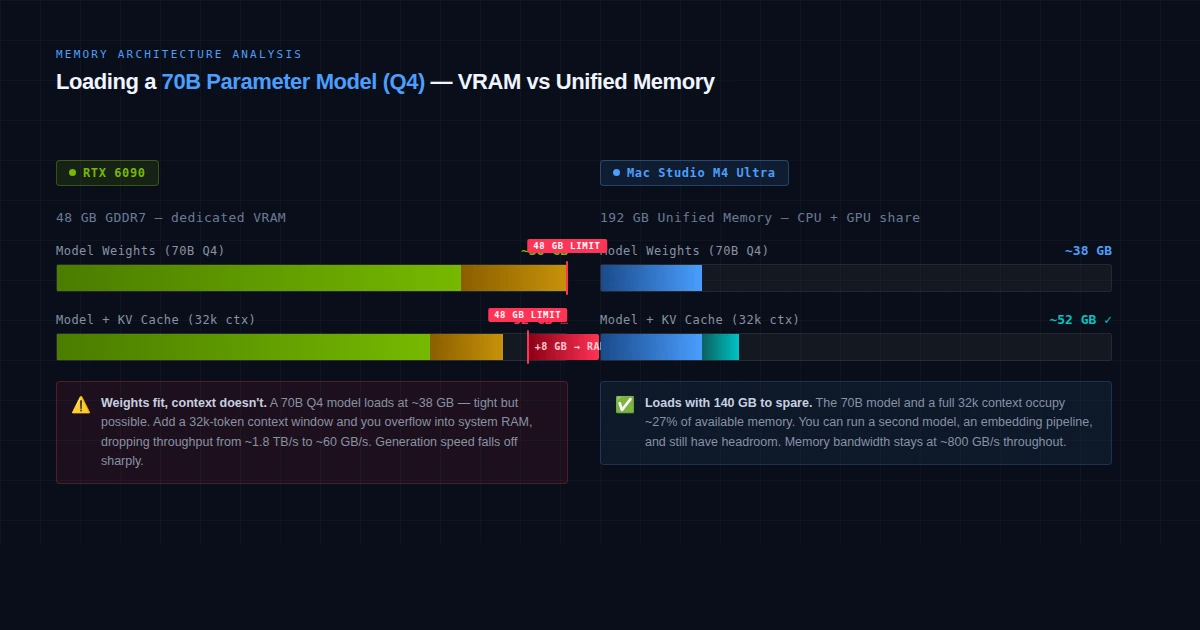 A 70B Q4 model needs ~40GB — fits Mac Studio M4 Ultra, doesn't fit the RTX 6090 on its own
Solution: Pick Based on Your Actual Workflow
Step 1: Define Your Primary Use Case
Local AI use cases (choose your primary):

A) LLM inference — chatting with local models, coding assist, RAG
B) Image/video generation — Stable Diffusion, ComfyUI, video AI
C) Fine-tuning or training — LoRA, QLoRA, custom datasets
D) Multi-model pipelines — running LLM + image gen + embeddings simultaneously
The right answer changes completely based on this.
If A (LLM inference): Mac Studio M4 Ultra wins. Unified memory lets you run larger models at better quality. An M4 Ultra running a 70B Q4 model will outperform a system where a 70B model is split between 48 GB VRAM and system RAM.
If B (image/video generation): RTX 6090 wins decisively. ComfyUI, A1111, and video AI tools are optimized for CUDA. Apple's Metal backend has improved, but the CUDA ecosystem lead is years deep.
If C (fine-tuning/training): RTX 6090 wins. Training still requires CUDA for most frameworks. Apple's MLX supports fine-tuning, but the tooling for LoRA on PyTorch+CUDA is far more mature.
If D (multi-model pipelines): Mac Studio M4 Ultra wins. Memory capacity beats raw speed here. Running a 34B LLM, an embedding model, and a Whisper instance simultaneously fits comfortably in 192 GB.
Step 2: Run the Memory Math
# Quick model memory estimation (rule of thumb)
# Q4 quantization: ~0.5 GB per billion parameters
# Q8 quantization: ~1 GB per billion parameters
# F16 full precision: ~2 GB per billion parameters

model_sizes = {
    "Llama 3.1 8B at Q4":   8 * 0.5,   # 4 GB
    "Mistral 24B at Q4":    24 * 0.5,   # 12 GB
    "Llama 3.3 70B at Q4":  70 * 0.5,  # 35 GB
    "Qwen 72B at Q4":       72 * 0.5,  # 36 GB
    "DeepSeek R1 671B at Q4": 671 * 0.5, # 335 GB
}

# RTX 6090 headroom (48GB VRAM):  handles up to ~70B at Q4
# M4 Ultra (192GB):               handles up to ~200B at Q4
# M4 Ultra (256GB):               can attempt DeepSeek R1 671B at Q4
Expected: Any 70B model at Q4 fits the M4 Ultra with room to spare. The RTX 6090 fits it just barely at 48 GB — but add KV cache for long contexts and you'll hit the wall.
If context windows matter to you: Mac Studio M4 Ultra. A long coding session, a big document analysis, or multi-turn RAG chews through VRAM fast. Unified memory handles this gracefully.
Step 3: Factor In the Real Costs
Total cost of ownership (3 years):

RTX 6090 build:
  Card:                   $2,500–$3,000
  System (PC):            $1,000–$1,500
  Electricity (600W avg): ~$600–900/year
  3-year total:           ~$6,300–$7,200

Mac Studio M4 Ultra:
  Machine:                $3,000–$5,000
  Electricity (~200W avg): ~$200–300/year
  3-year total:           ~$3,600–$5,900
The power difference is real. If your system runs models for hours per day, the RTX 6090's 600W draw adds up. The Mac Studio's full system often runs under 200W even under load.
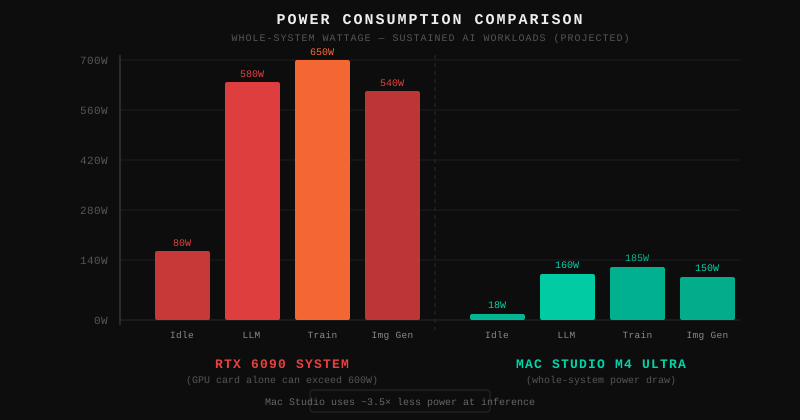 RTX 6090 card alone vs. Mac Studio M4 Ultra whole-system power draw under sustained inference load
Verification: How to Benchmark Before You Buy
# On Apple Silicon — test current M4 Max performance first
# Install Ollama
curl -fsSL https://ollama.com/install.sh | sh

# Pull and run a 70B model
ollama pull llama3.3:70b
ollama run llama3.3:70b

# Benchmark throughput
ollama run llama3.3:70b --verbose "Write a 500-word essay on systems design"
You should see: On M4 Max (128GB), expect 8–15 tokens/sec for a 70B Q4 model. The M4 Ultra should roughly double that to 15–25 tok/s.
# On NVIDIA — test with llama.cpp (CUDA build)
CMAKE_ARGS="-DGGML_CUDA=on" pip install llama-cpp-python
python -m llama_cpp.server --model your-model.gguf --n_gpu_layers -1
You should see: RTX 5090 benchmarks (the current closest NVIDIA card) run 70B Q4 at ~20–30 tok/s when it fits. The RTX 6090 should improve on that by 40–60%.
What You Learned
- Memory capacity matters more than TFLOPS for LLM inference — choose the platform where your target model fits entirely in GPU memory
- RTX 6090 is the clear winner for image/video generation, fine-tuning, and anything requiring CUDA's mature ecosystem
- Mac Studio M4 Ultra wins for large-model inference, long contexts, multi-agent pipelines, and anyone who values low power draw and silent operation
- Neither machine exists yet — if you need hardware today, consider an M3 Ultra Mac Studio or a system built around the RTX 5090
Limitation: Both specs are based on leaks and projections as of early 2026. RTX 6090 is expected Q1 2027; M4 Ultra availability is unconfirmed. Real benchmarks will tell a different story than paper specs.
When NOT to choose the Mac Studio: If your workflow centers on ComfyUI, LoRA training, or any tool that assumes CUDA, the friction with Apple's Metal/MLX backend will frustrate you more than the performance numbers suggest.
Specs based on leaks and projections as of February 2026. RTX 6090 is unannounced; Mac Studio M4 Ultra configuration is unconfirmed. Verify before buying.