LM Studio GGUF vs GPTQ is the first decision you hit when downloading a model — and picking the wrong format means either a crash, wasted VRAM, or slower inference than your hardware can actually deliver.
This comparison cuts through the noise. By the end you'll know exactly which format to load for your GPU, RAM, and use case.
Time: 10 min | Difficulty: Intermediate
GGUF vs GPTQ: TL;DR
| GGUF | GPTQ | |
|---|---|---|
| Best for | CPU + GPU hybrid, low VRAM | Dedicated GPU, high throughput |
| CPU inference | ✅ Full support | ❌ Not supported |
| Partial GPU offload | ✅ Layer-by-layer | ❌ All-or-nothing |
| VRAM requirement | Lower (offloads to RAM) | Higher (full model in VRAM) |
| Inference speed (GPU) | Slightly slower | Faster on NVIDIA |
| Inference speed (CPU-only) | ✅ Viable | ❌ Not viable |
| Model availability | Very high (llama.cpp ecosystem) | Good (AutoGPTQ ecosystem) |
| Apple Silicon (M1/M2/M3/M4) | ✅ Native Metal support | ❌ Limited |
| Windows support | ✅ | ✅ NVIDIA only |
| Pricing to run | Free — hardware you already own | Free — NVIDIA GPU required |
Choose GGUF if: you have less than 24GB VRAM, are running on CPU, Mac, or want to split the model across RAM + GPU.
Choose GPTQ if: you have a dedicated NVIDIA GPU with enough VRAM to hold the full model and want maximum tokens-per-second.
What We're Comparing
Both GGUF and GPTQ are post-training quantization formats — they compress a full-precision (FP16 or BF16) model into a smaller representation so it fits on consumer hardware.
They solve the same problem differently:
- GGUF (formerly GGML) is the format used by llama.cpp. It stores weights in a custom binary format that the
llama.cppruntime reads layer by layer. This makes partial GPU offloading possible — you can push 20 layers to the GPU and keep the rest in system RAM. - GPTQ is a one-shot weight quantization algorithm. It uses second-order Hessian information during calibration to minimize quantization error. The resulting model requires a CUDA-capable GPU to run; there is no CPU fallback path.
LM Studio supports both natively as of v0.3.x. The format you pick determines which backend LM Studio uses under the hood.
How GGUF Works
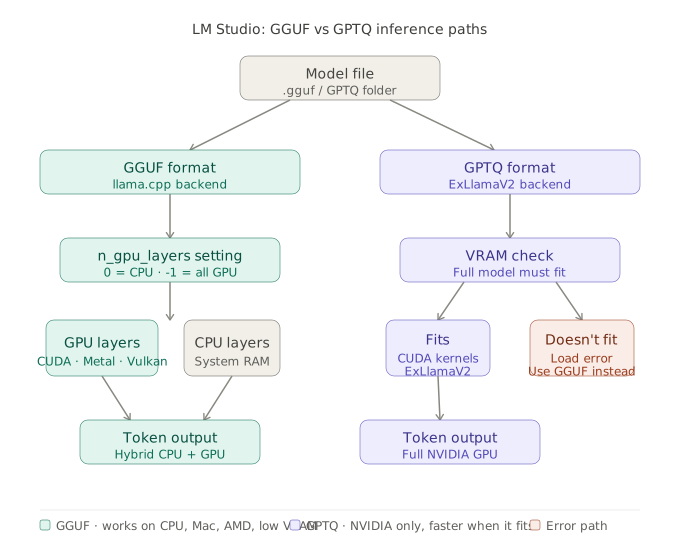 GGUF uses llama.cpp for layer-wise GPU offloading; GPTQ uses ExLlamaV2 for full-GPU inference
GGUF files embed everything needed to run the model: tokenizer, metadata, architecture config, and quantized weights — all in a single .gguf file.
When LM Studio loads a GGUF model, it calls the llama.cpp backend and you control how many layers go to the GPU with the n_gpu_layers setting (exposed as "GPU Layers" in the LM Studio UI). Set it to -1 to offload all layers that fit. Set it to 0 for pure CPU inference.
Quantization levels in GGUF (most common):
| Quant | Bits | ~Size (7B) | Quality vs FP16 |
|---|---|---|---|
| Q4_K_M | 4-bit | ~4.1 GB | Best 4-bit tradeoff |
| Q5_K_M | 5-bit | ~5.0 GB | Near-lossless for most tasks |
| Q6_K | 6-bit | ~6.0 GB | Negligible quality loss |
| Q8_0 | 8-bit | ~7.7 GB | Essentially identical to FP16 |
| Q2_K | 2-bit | ~2.7 GB | Noticeable degradation |
Q4_K_M is the recommended default for most users. It uses k-quants (channel-wise mixed precision) which are significantly more accurate than the older Q4_0 at roughly the same file size.
GGUF on Mac
Apple Silicon gets Metal GPU acceleration automatically. A 13B Q4_K_M model runs at ~25–35 tokens/sec on an M3 Max with 36GB unified memory — the unified memory architecture means there is no VRAM ceiling separate from RAM.
GGUF on Windows / Linux
On NVIDIA, n_gpu_layers = -1 with enough VRAM gives you Vulkan or CUDA acceleration. A 7B Q4_K_M on an RTX 4070 (12GB) runs at ~80–100 tokens/sec. CPU-only on a modern Ryzen 9 lands around 8–15 tokens/sec — slow but functional.
How GPTQ Works
GPTQ quantizes weights to 4-bit or 3-bit integers using a calibration dataset. The algorithm minimizes the difference between the original FP16 output and the quantized output layer by layer, which is why GPTQ models generally have slightly better quality than naive round-to-nearest quantization at the same bit width.
LM Studio uses ExLlamaV2 as the GPTQ backend. ExLlamaV2 is a highly optimized CUDA kernel that processes the packed 4-bit weights extremely fast — often 20–30% faster than llama.cpp on the same GPU for the same model size.
GPTQ requirements:
- NVIDIA GPU with CUDA support (Ampere or newer for best performance — RTX 30xx, 40xx, 50xx)
- Enough VRAM to load the entire model. There is no partial offload.
- For a 7B GPTQ-4bit model: ~5.5 GB VRAM minimum
- For a 13B GPTQ-4bit model: ~9.5 GB VRAM minimum
- For a 70B GPTQ-4bit model: ~38 GB VRAM — requires A100 or multi-GPU setup
GPTQ is not supported on AMD GPUs in LM Studio. The ExLlamaV2 backend is CUDA-only. AMD users should use GGUF with ROCm or Vulkan.
Head-to-Head: Speed, Quality, and Compatibility
Inference Speed
On an RTX 4090 (24GB), running Llama 3.1 8B:
| Format | Tokens/sec (prompt processing) | Tokens/sec (generation) |
|---|---|---|
| GGUF Q4_K_M | ~2,800 t/s | ~110 t/s |
| GPTQ 4-bit (ExLlamaV2) | ~4,200 t/s | ~140 t/s |
GPTQ wins on pure GPU throughput. The gap is most visible in prompt processing (prefill), where ExLlamaV2's fused CUDA kernels are particularly fast.
On a machine with 8GB VRAM and 32GB RAM running a 13B model, GGUF wins because GPTQ cannot run the model at all — it simply won't fit.
Output Quality
At 4-bit, both formats are close to FP16 for most use cases. The differences become visible on:
- Math and reasoning tasks — Q4_K_M and GPTQ-4bit both show minor accuracy drops vs FP16. Q5_K_M or Q6_K close this gap significantly.
- Code generation — Comparable at 4-bit. Step up to Q5_K_M if you notice frequent syntax errors.
- Long context (>8k tokens) — Both degrade similarly; this is a quantization-level issue, not a format issue.
If quality is the priority and you have VRAM to spare, use GGUF Q8_0 — it's nearly lossless and LM Studio loads it cleanly.
Compatibility Matrix
| Scenario | Recommended |
|---|---|
| Mac M1 / M2 / M3 / M4 | GGUF (Metal) |
| NVIDIA GPU, full model fits in VRAM | GPTQ (ExLlamaV2) |
| NVIDIA GPU, model is too large for VRAM | GGUF (partial offload) |
| AMD GPU (Windows / Linux) | GGUF (Vulkan) |
| CPU-only (no GPU) | GGUF |
| Intel Arc GPU | GGUF (Vulkan) |
| NVIDIA + large RAM, need max quality | GGUF Q8_0 |
| Production batch inference, A100/H100 | GPTQ or AWQ (not LM Studio) |
Which Should You Use?
Start with GGUF unless you have a specific reason not to.
The practical rule: if the model fits in your VRAM at GPTQ-4bit, try GPTQ for the speed boost. If it doesn't fit, GGUF is your only viable option anyway.
Here's the decision tree:
- Mac? → GGUF, always.
- AMD or Intel GPU? → GGUF, always.
- NVIDIA, VRAM ≥ model size at 4-bit? → Try GPTQ first. Benchmark both if throughput matters.
- NVIDIA, VRAM < model size? → GGUF with partial offload (
n_gpu_layerstuned to fit). - CPU-only? → GGUF Q4_K_M. Accept ~10 tokens/sec and move on.
For most US developers running LM Studio on a personal machine — an RTX 4070 (12GB), RTX 3080 (10GB), or a MacBook Pro — GGUF Q4_K_M is the right default. It works everywhere, has the widest model availability on Hugging Face, and the quality difference vs GPTQ is negligible for chat and coding workflows.
If you're running an RTX 4090 or a workstation with an A6000 (48GB VRAM) and want to benchmark throughput for a local API, GPTQ is worth the switch.
What You Learned
- GGUF uses llama.cpp and supports CPU inference, partial GPU offload, and all platforms including Mac.
- GPTQ uses ExLlamaV2, is NVIDIA-only, and requires the full model to fit in VRAM — but delivers higher tokens/sec when that condition is met.
- Q4_K_M is the best general-purpose GGUF quant; step up to Q5_K_M or Q6_K if you notice quality issues.
- GPTQ is not a better format — it's a faster format under specific hardware conditions.
- When in doubt, load GGUF. You can always switch.
Tested on LM Studio v0.3.6, ExLlamaV2 v0.2.x, llama.cpp b3800+, Windows 11 and macOS Sequoia 15
FAQ
Q: Can I run GPTQ models without an NVIDIA GPU? A: No. GPTQ in LM Studio uses the ExLlamaV2 backend, which requires CUDA. AMD, Intel, and Apple Silicon users should use GGUF instead.
Q: What is the difference between Q4_0 and Q4_K_M in GGUF? A: Q4_K_M uses k-quantization with mixed precision across channels, which significantly reduces perplexity degradation compared to the older Q4_0 uniform quantization. Always prefer Q4_K_M over Q4_0 when available.
Q: Does GPTQ work on Windows? A: Yes, on NVIDIA GPUs only. LM Studio handles the ExLlamaV2 backend installation automatically on Windows. AMD on Windows should use GGUF with Vulkan acceleration.
Q: How much VRAM do I need for a 70B model in GPTQ 4-bit? A: Approximately 38–40 GB VRAM. This requires an NVIDIA A100 80GB, two RTX 4090s in NVLink, or similar. For 70B on consumer hardware, GGUF with partial CPU offload is the only realistic option.
Q: Is there a quality difference between GGUF and GPTQ at 4-bit? A: Minimal for most tasks. Benchmarks show GPTQ-4bit and GGUF Q4_K_M within 1–2% perplexity of each other. Step up to Q5_K_M or Q6_K if you need closer-to-FP16 quality in math or reasoning tasks.