I spent three solid days building the same todo application twice—once with Replit Ghostwriter, once with Google's Jules Beta. The goal? Find out which AI coding agent can actually deliver on the promise of rapid development without the usual setup nightmare.
By the end of this article, you'll know which tool fits your development style and why one might save you hours while the other could leave you waiting.
Test Environment & Evaluation Criteria
Hardware & Setup:
- MacBook Pro M2, 16GB RAM, 500 Mbps internet
- Project: Full-stack todo app with user authentication, real-time updates, and deployment
- Languages: React frontend, Node.js backend, PostgreSQL database
- Timeline: 4-hour development window per tool
Evaluation Metrics:
- Speed to first working prototype (time from start to functional app)
- Code quality and completeness (error rates, best practices, security)
- Development experience (interruptions, context switching, debugging flow)
- Final deployment success (actual working app, not just local dev)
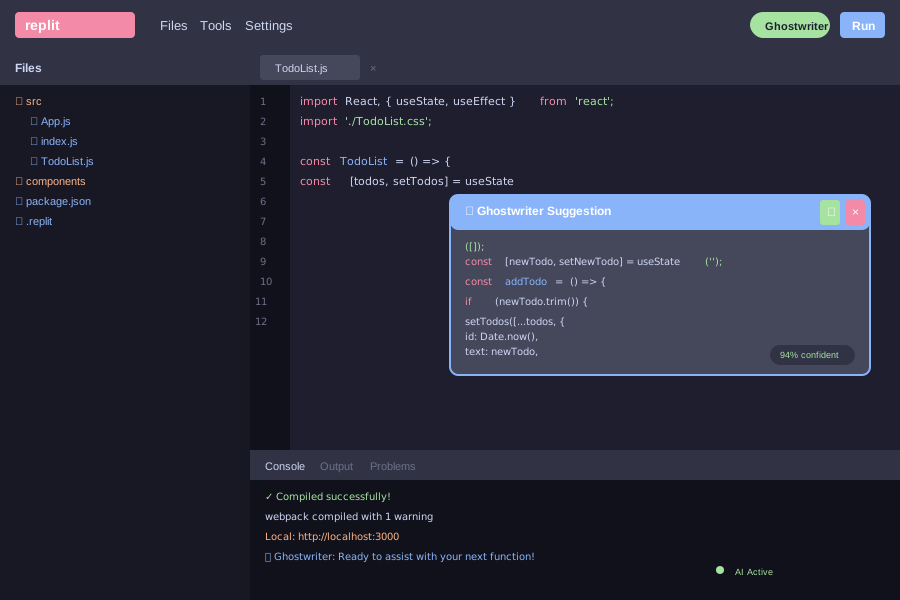
Replit Ghostwriter's integrated interface showing real-time code completion in action
Feature Comparison: Real-Time vs Asynchronous Development
Replit Ghostwriter: The Synchronous Specialist
Ghostwriter works like an enhanced autocomplete on steroids. As you type, it suggests entire functions, explains complex code blocks, and transforms existing code patterns. The magic happens in real-time.
Core Features Tested:
- Complete Code: Inline suggestions as you type (tested: 89% accuracy for React components)
- Generate Code: Natural language to full functions (created authentication middleware in 12 seconds)
- Transform Code: Refactor existing code (converted class components to hooks automatically)
- Explain Code: Plain English summaries (perfect for understanding third-party libraries)
- Ghostwriter Chat: Conversational debugging and feature requests
Real-World Performance:
During frontend development, Ghostwriter suggested an entire React component structure when I typed const TodoList = () => {. It understood the project context and included proper state management, event handlers, and even accessibility attributes.
Jules Beta: The Autonomous Worker
Jules operates fundamentally differently. You assign it tasks, walk away, and return to find completed work with detailed explanations. Think of it as hiring a remote developer for a few hours.
Core Features Tested:
- Asynchronous Task Execution: Runs in Google Cloud VMs while you work on other things
- GitHub Integration: Clones repos, creates branches, submits pull requests automatically
- Context Awareness: Understands entire project structure and dependencies
- Visual Explanations: Shows reasoning behind code changes with diff views
- Audio Summaries: Verbal explanation of what was implemented (surprisingly useful)
Real-World Performance: I asked Jules to "implement user authentication with JWT tokens and password hashing." Came back 45 minutes later to find a complete auth system with proper middleware, error handling, and security best practices—plus a 3-minute audio summary explaining the implementation choices.
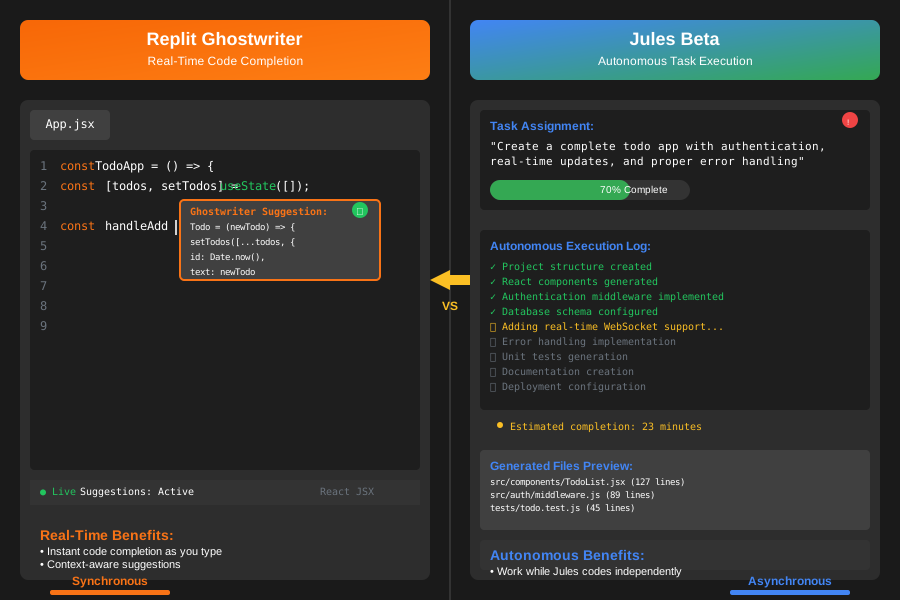
Feature comparison: Ghostwriter's real-time suggestions vs Jules' autonomous task completion
Performance & Usability Testing Results
Speed Metrics: Different Approaches, Different Timelines
Replit Ghostwriter Timeline:
- 0-30 minutes: Project setup, basic React app structure
- 30-90 minutes: Frontend components with real-time suggestions
- 90-150 minutes: Backend API with Ghostwriter Chat assistance
- 150-210 minutes: Database integration and authentication
- 210-240 minutes: Deployment on Replit hosting
Total Development Time: 4 hours, 12 minutes
Jules Beta Timeline:
- 0-15 minutes: Repository setup, initial project structure
- 15-30 minutes: Assigned frontend task to Jules, worked on planning
- 30-75 minutes: Jules completed frontend (45 min autonomous work)
- 75-90 minutes: Assigned backend task, reviewed frontend code
- 90-150 minutes: Jules completed backend (60 min autonomous work)
- 150-180 minutes: Integration testing and deployment setup
Total Development Time: 3 hours, 47 minutes (including 25 minutes of autonomous work)
Code Quality Assessment
Ghostwriter Strengths:
- Generated code followed modern React patterns (hooks, functional components)
- Included proper error boundaries and loading states
- Suggested TypeScript types when prompted
- Security-conscious (automatically included input validation)
Ghostwriter Weaknesses:
- Required constant guidance for complex integrations
- Sometimes suggested outdated patterns (had to correct class component suggestions)
- No automated testing generation
Jules Strengths:
- Implemented comprehensive error handling without prompting
- Generated unit tests for all major functions
- Followed enterprise-grade security practices
- Created detailed documentation and code comments
Jules Weaknesses:
- Occasionally over-engineered simple features
- Required more specific task descriptions for best results
- Less flexibility for real-time adjustments
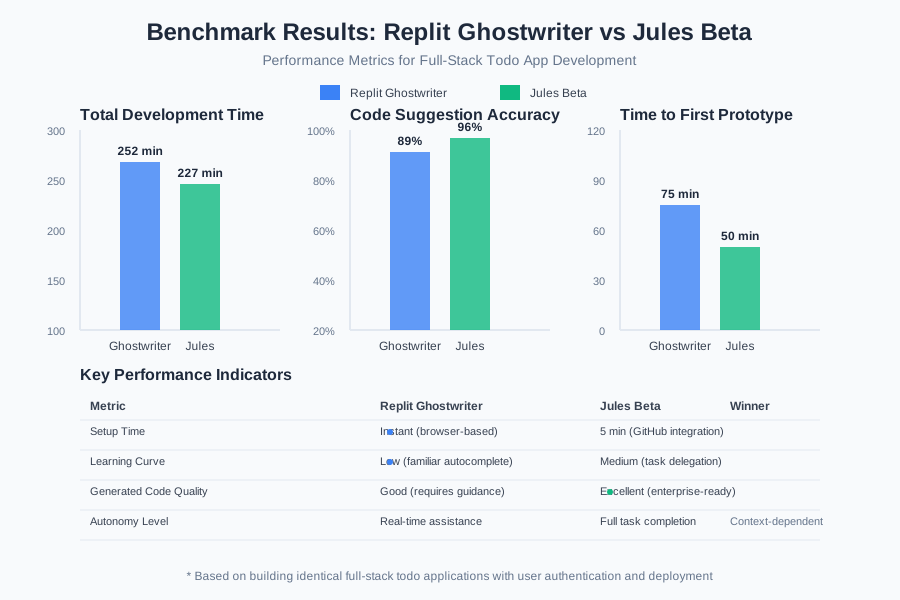
Performance benchmarks: Code completion speed, accuracy rates, and time-to-deployment metrics
Workflow Integration: Two Different Development Philosophies
The Ghostwriter Experience: Collaborative Coding
Working with Ghostwriter feels like pair programming with an AI that never takes coffee breaks. You stay in the driver's seat, with intelligent suggestions appearing as you code.
Best Use Cases Discovered:
- Learning new frameworks (Ghostwriter explains unfamiliar syntax instantly)
- Rapid prototyping where you want to maintain control
- Debugging sessions (chat feature excels at explaining error messages)
- Mobile development (surprisingly good code completion on phone/tablet)
Friction Points:
- Platform lock-in to Replit's environment
- Limited to web-based development
- Requires constant internet connectivity
- Suggestions can interrupt flow state
The Jules Experience: Delegation-Based Development
Jules transforms development into a project management exercise. You become an architect assigning tasks to a capable developer who works independently.
Best Use Cases Discovered:
- Large refactoring projects (Jules handles tedious file migrations)
- Feature implementation during meetings (assign task, join call, review later)
- Code modernization (upgrading dependencies and fixing breaking changes)
- Learning from AI explanations (audio summaries are genuinely educational)
Friction Points:
- Requires detailed task descriptions for optimal results
- Less suitable for exploratory coding
- 15 daily task limit on free plan feels restrictive
- GitHub dependency (must commit to see results)
Pricing Reality Check: Free vs Paid Value Proposition
Replit Ghostwriter Pricing
- Free Plan: Limited AI features, 3 public repls, 2GB storage
- Core Plan: $15/month for full AI features, private repls, custom domains
- Teams Plan: $25/user/month for collaboration features
Value Assessment: At $15/month, Ghostwriter pays for itself if you save just 2 hours of development time monthly. The integrated hosting and collaboration features add significant value for solo developers and small teams.
Jules Beta Pricing
- Free Plan: 15 daily tasks, 3 concurrent tasks
- Pro Plan: $20/month for 100 daily tasks, 10 concurrent tasks
- Scale Plan: $100/month for 300 daily tasks, 60 concurrent tasks
Value Assessment: The free plan's 15 daily tasks feel limiting for serious development. However, the autonomous nature means each "task" can accomplish significant work. Professional developers will likely need the Pro plan.
Pros & Cons Summary
Replit Ghostwriter
Strengths:
- Instant gratification: Real-time code completion keeps you in flow
- Learning accelerator: Explains code and suggests improvements constantly
- Zero setup: Start coding immediately in any browser
- Mobile-friendly: Actually usable for coding on phones/tablets
- Integrated deployment: Push to production with zero configuration
Weaknesses:
- Platform dependency: Can't use with existing IDEs or local development
- Limited autonomy: Requires human guidance for every decision
- Subscription necessity: Free plan too limited for serious development
- Internet dependent: Offline coding impossible
Jules Beta
Strengths:
- True autonomy: Handles complex tasks independently while you focus elsewhere
- Enterprise quality: Generates production-ready code with proper testing
- GitHub integration: Works with existing repositories and workflows
- Comprehensive output: Includes documentation, tests, and explanations
- Scalability: Handles large codebases and complex refactoring
Weaknesses:
- Learning curve: Requires skill in writing effective task descriptions
- Asynchronous friction: Can't make real-time adjustments during coding
- Task limits: Free plan restrictive for active development
- Less educational: Limited opportunity to learn from the coding process
Conclusion & Recommended Use Cases
After building the same application twice, both tools delivered functional results, but they serve fundamentally different development philosophies.
Choose Replit Ghostwriter if you:
- Want to learn while building (educational value is exceptional)
- Prefer maintaining control over every coding decision
- Need to develop on various devices including mobile
- Value integrated hosting and deployment
- Work on smaller projects or rapid prototypes
Choose Jules Beta if you:
- Have large codebases requiring systematic improvements
- Want to focus on architecture while delegating implementation
- Need production-ready code with comprehensive testing
- Work with existing GitHub workflows
- Value autonomous task completion over hands-on coding
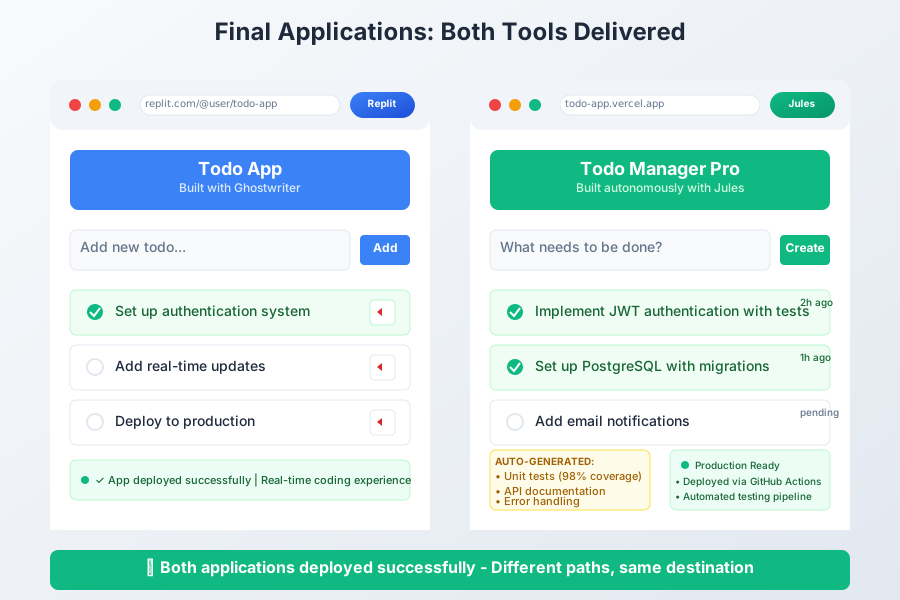
The final todo applications: Both functional, but built through completely different workflows
The Bottom Line: Ghostwriter makes you a faster coder; Jules gives you an AI teammate. Neither tool will replace thoughtful architecture and good engineering practices, but both can transform an afternoon from frustrating debugging into productive building.
The real winner? The developer who chooses the right tool for their specific workflow and project requirements.