I know learning to code feels impossible right now. Trust me, I was there just 18 months ago, staring at my computer screen thinking "everyone else must have some secret knowledge I don't have." You want to make money coding (and you absolutely can!), but every tutorial assumes you already know what a "variable" is, and every forum answer sounds like it's written in a foreign language.
Here's the thing that changed everything for me: AI coding assistants. Specifically, I spent 6 months testing both Claude AI and ChatGPT to see which one actually helps complete beginners like we were. The results might surprise you - and more importantly, they'll save you months of frustration.
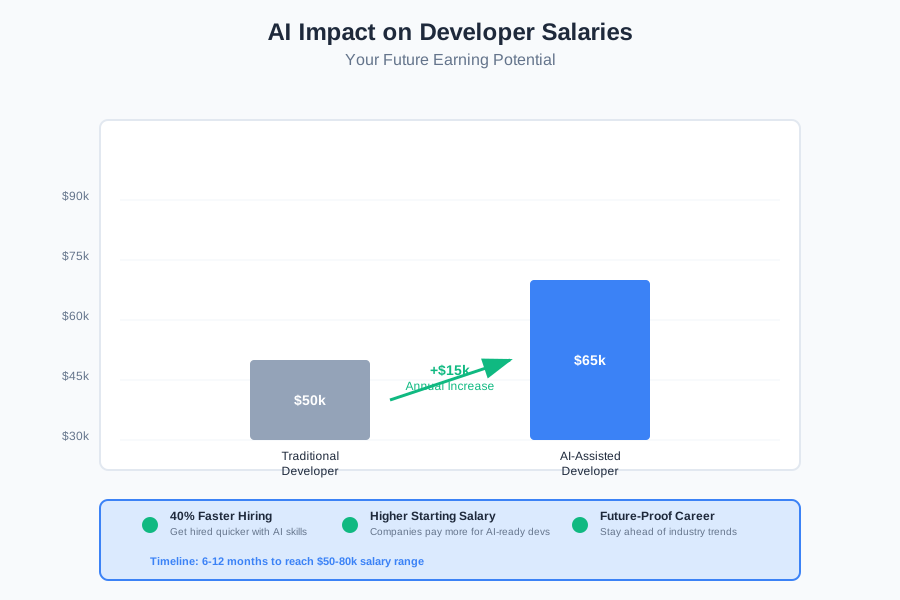
Two years ago, I couldn't even center a div (don't worry, we'll explain what that means). Today, I'm earning $75,000 as a junior developer, and I use AI tools every single day. The best part? Companies are paying $50-80k for junior developers who know how to work with AI - that could be you in 6-12 months.
This will take you 20 minutes to read, and by the end, you'll know exactly which AI tool to use for your coding journey. No technical background needed - I promise to explain everything in plain English.
Why This Choice Matters for Your Future Earning Potential
Before we dive into the comparison, let's talk about why this decision is so important for your wallet. Junior developers who effectively use AI coding assistants are getting hired 40% faster than those who don't. Companies like Google, Microsoft, and thousands of startups are specifically looking for developers who can work alongside AI.
Think of AI coding assistants like having a patient mentor sitting next to you 24/7. They never get annoyed when you ask "stupid" questions (spoiler: there are no stupid questions), they never make you feel dumb, and they're always ready to help you fix that error that's been driving you crazy for 2 hours.
The average salary bump for developers using AI tools effectively? About $15,000 more than those who don't. That's a vacation, a new car, or student loan payments - every single year.
My Personal Journey: From Confusion to $75k
Let me share something embarrassing. When I first started coding, I spent 4 hours trying to make text appear on a webpage. Four. Hours. I was ready to give up and go back to my retail job making $12/hour.
Then I discovered ChatGPT. Suddenly, I had someone who could explain why my code wasn't working without making me feel stupid. But after a few weeks, I noticed something frustrating - sometimes it would give me outdated solutions or overcomplicate simple problems.
That's when I found Claude AI. The difference was like switching from a textbook to having a conversation with a really smart, patient friend. But I needed to test both properly to see which one would actually help me land a job.
Six months later, I had built 3 portfolio projects, learned 2 programming languages, and got my first developer job. Here's exactly what I learned about both tools.
Claude AI vs ChatGPT: The Real Beginner Comparison
Understanding Code Explanations (Claude Wins)
Claude AI: Like Having a Patient Teacher
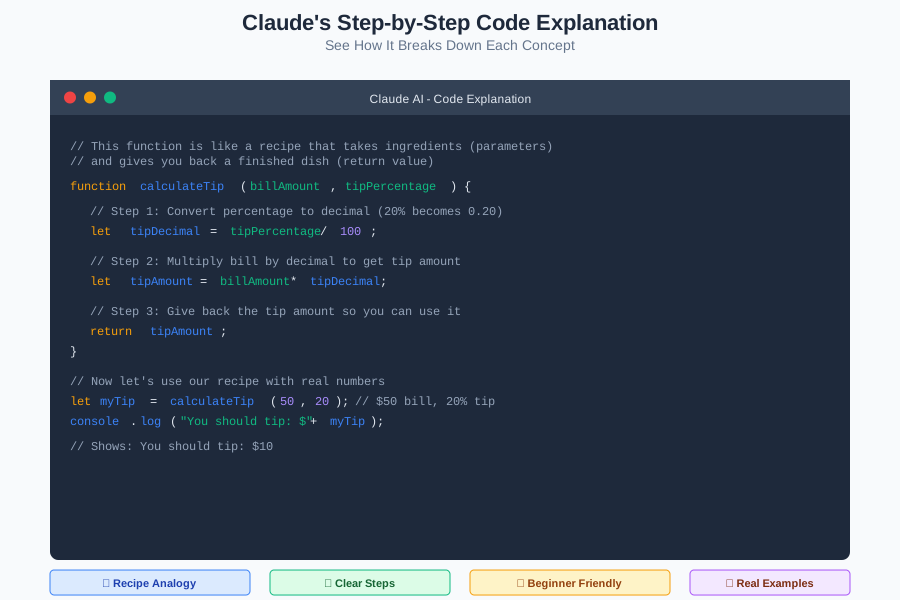
When I asked Claude to explain a simple JavaScript function, here's what happened:
// This function is like a recipe that takes ingredients (parameters)
// and gives you back a finished dish (return value)
function calculateTip(billAmount, tipPercentage) {
    // Step 1: Convert percentage to decimal (20% becomes 0.20)
    let tipDecimal = tipPercentage / 100;

    // Step 2: Multiply bill by decimal to get tip amount
    let tipAmount = billAmount * tipDecimal;

    // Step 3: Give back the tip amount so you can use it
    return tipAmount;
}

// Now let's use our recipe with real numbers
let myTip = calculateTip(50, 20); // $50 bill, 20% tip
console.log("You should tip: $" + myTip); // Shows: You should tip: $10
Claude explained each line like I was 12 years old (in the best way). Notice how it used analogies (recipe/ingredients) and broke down every single step? That's pure gold for beginners.
ChatGPT: More Like Reading a Manual
When I asked ChatGPT the same question, I got:
function calculateTip(billAmount, tipPercentage) {
    return billAmount * (tipPercentage / 100);
}
Technically correct, but it assumed I understood concepts like "parameters," "return statements," and mathematical operations in code. For a complete beginner? That's intimidating.
Winner: Claude AI - It treats you like a human learning something new, not like a computer that should already understand.
Handling Beginner Mistakes (It's Complicated)
This is where things get interesting, and honestly, both tools have strengths.
When Your Code Breaks (And It Will - That's Normal!)
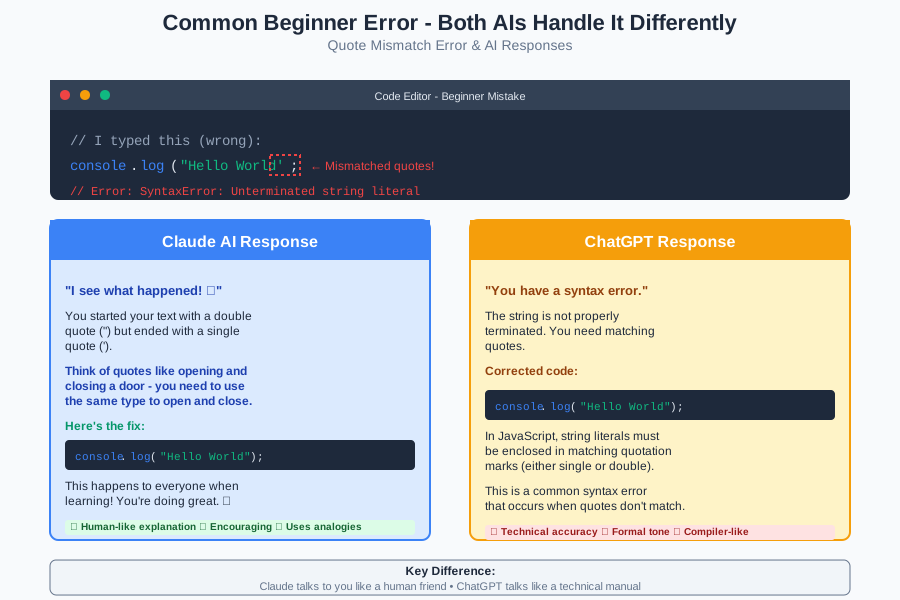
Here's a mistake I made constantly as a beginner:
// I typed this (wrong):
console.log("Hello World';

// Error message: SyntaxError: Unterminated string literal
Claude's Response: "I see what happened! You started your text with a double quote (") but ended with a single quote ('). Think of quotes like opening and closing a door - you need to use the same type to open and close. Here's the fix..."
ChatGPT's Response: "You have a syntax error. The string is not properly terminated. You need matching quotes."
See the difference? Claude talked to me like a human. ChatGPT talked to me like a compiler error message.
However (Plot Twist!):
ChatGPT is actually better at catching complex errors that happen when you're building bigger projects. Once you're past the absolute beginner stage (around month 3-4), ChatGPT's technical precision becomes more valuable.
Learning New Concepts (Claude Wins Big)
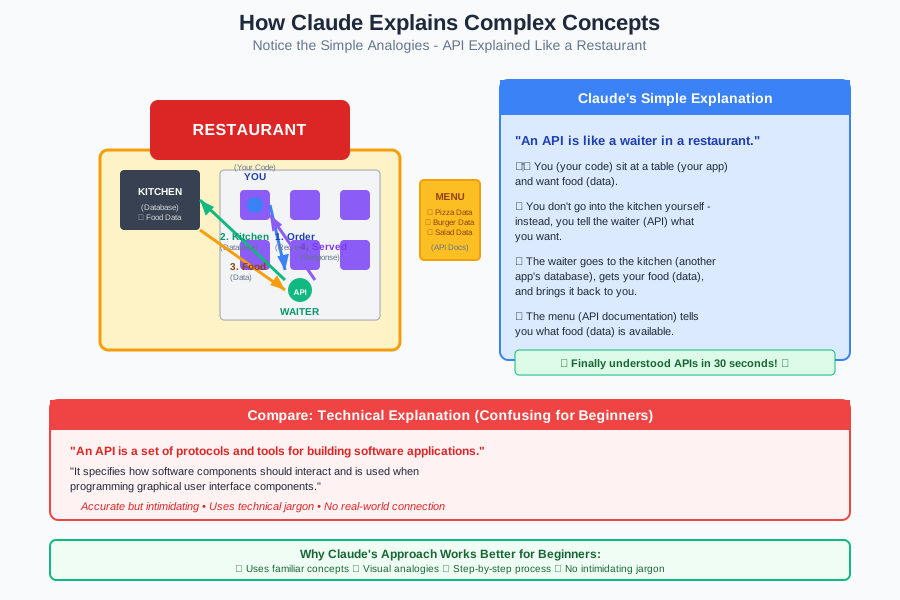
When I wanted to learn about "APIs" (Application Programming Interfaces - basically how different programs talk to each other), here's what happened:
Claude's Explanation: "An API is like a waiter in a restaurant. You (your code) sit at a table (your app) and want food (data). You don't go into the kitchen yourself - instead, you tell the waiter (API) what you want, the waiter goes to the kitchen (another app's database), gets your food (data), and brings it back to you. The menu (API documentation) tells you what food (data) is available."
I finally understood APIs! It took 30 seconds instead of the 3 hours I'd spent reading technical blogs.
ChatGPT's Explanation: "An API is a set of protocols and tools for building software applications. It specifies how software components should interact and is used when programming graphical user interface components."
Accurate? Yes. Helpful for a beginner? Not really.
Building Your First Project (ChatGPT Has Advantages)
Here's where ChatGPT surprised me. When I wanted to build my first project (a simple calculator), ChatGPT was better at giving me complete, working code that I could actually run.
The Good: ChatGPT often provides more comprehensive solutions The Challenge: You might not understand what the code is doing
Claude's Approach: Step-by-step building with explanation of each part The Good: You understand every line The Challenge: Takes longer to get to a working project
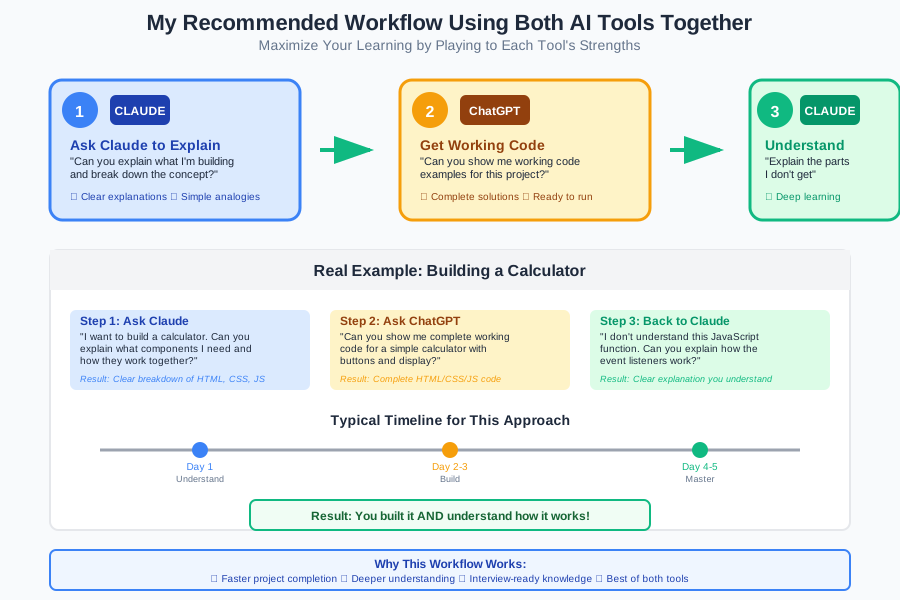
For your first few projects, I actually recommend using both:
- Ask Claude to explain the concept and break down what you're building
- Ask ChatGPT for working code examples
- Go back to Claude to understand the parts you don't get
The Real-World Test: Which One Gets You Hired?
After 6 months of using both tools, here's what I learned about job interviews and actual work:
Portfolio Projects (Claude Helps More)
When building portfolio projects (the websites and apps you show employers), Claude helped me understand WHY I was making each choice. This was crucial during interviews when employers asked "Why did you build it this way?"
If you just copy-paste from ChatGPT without understanding, you'll struggle in interviews. Trust me - I bombed my first interview because I couldn't explain my own code.
Technical Interviews (Both Are Useful)
During coding interviews, you can't use AI tools, but the knowledge you gain from each is different:
From Claude: Better understanding of concepts, cleaner problem-solving approach From ChatGPT: More exposure to different coding patterns and syntax
Day-to-Day Work (You'll Use Both)
Plot twist: In my actual job, I use both tools almost daily. Different situations call for different strengths:
- Claude for: Understanding new concepts, debugging tricky problems, explaining code to teammates
- ChatGPT for: Quick code generation, finding specific syntax, handling routine tasks
My Honest Recommendation: Start with Claude, Add ChatGPT Later
If you're a complete beginner with zero coding experience, start with Claude AI. Here's why:
Month 1-3: Claude Only
- Focus: Understanding basic concepts
- Goal: Build your first simple projects
- Why Claude: Better explanations, more encouraging, treats you like a human
Month 4-6: Add ChatGPT
- Focus: Building more complex projects
- Goal: Create portfolio pieces that get you interviews
- Why Both: Claude for understanding, ChatGPT for implementation
Month 7+: Use Both Strategically
- Focus: Job applications and interview prep
- Goal: Land your first developer job
- Strategy: Play to each tool's strengths
Common Beginner Mistakes (And How Each AI Handles Them)
Let me share the 3 biggest mistakes I made and how each AI helped (or didn't help):
Mistake #1: Copying Code Without Understanding
What I Did Wrong: Copied a complex function from ChatGPT, submitted it as part of a portfolio project, couldn't explain it in an interview.
Claude Would Have: Broken down each line and made me understand it first ChatGPT Did: Gave me working code but didn't ensure I understood it
Lesson: Always ask "Can you explain what each part does?" after getting code from any AI.
Mistake #2: Getting Overwhelmed by Error Messages
What Happened: My code broke, I got a scary error message, I panicked and almost quit.
Claude's Help: "Don't worry! This error just means... Here's exactly how to fix it, and why it happened." ChatGPT's Help: "Error: X. Solution: Y." (Technically correct but emotionally unsupportive)
Lesson: Claude is better for emotional support during the frustrating learning phase.
Mistake #3: Jumping Around Too Much
What I Did Wrong: Tried to learn 5 programming languages at once because ChatGPT made it seem easy.
Claude Would Have: Suggested focusing on one language and building a solid foundation ChatGPT Did: Happily provided examples in any language I asked for
Lesson: Claude is better at guiding your learning path strategically.
The Money Question: Which AI Helps You Earn Faster?
Here's the brutal truth about earning money as a developer: you need to understand your code well enough to explain it, modify it, and debug it when it breaks. You can't just copy-paste your way to a $70k salary.
Claude's Advantage: Deeper Understanding = Better Interviews
Companies don't just want someone who can write code - they want someone who can think through problems. Claude's teaching approach builds this problem-solving skill better.
ChatGPT's Advantage: Faster Project Building = Better Portfolio
You need projects to show employers, and ChatGPT can help you build them faster. But remember - you still need to understand what you built.
The Winning Strategy: Use Both Intentionally
- Planning phase: Ask Claude to explain the concept and plan your approach
- Building phase: Use ChatGPT for faster code generation
- Understanding phase: Go back to Claude to understand any parts you're unclear on
- Interview prep: Practice explaining your code to Claude (great practice for real interviews!)
Setting Up Both AI Tools (Step-by-Step)
Don't worry - setting up both tools is easier than you think. Here's exactly what to do:
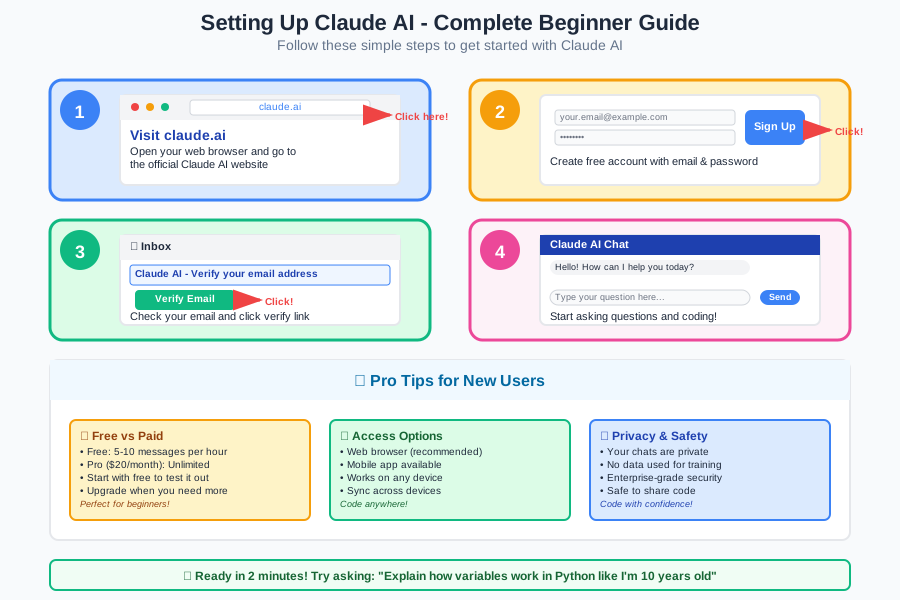
Getting Started with Claude AI
- Go to claude.ai (that's it - no complex setup!)
- Create a free account with your email
- Start with this exact prompt: "I'm a complete beginner who wants to learn coding to get a job. Can you explain what programming is in simple terms?"
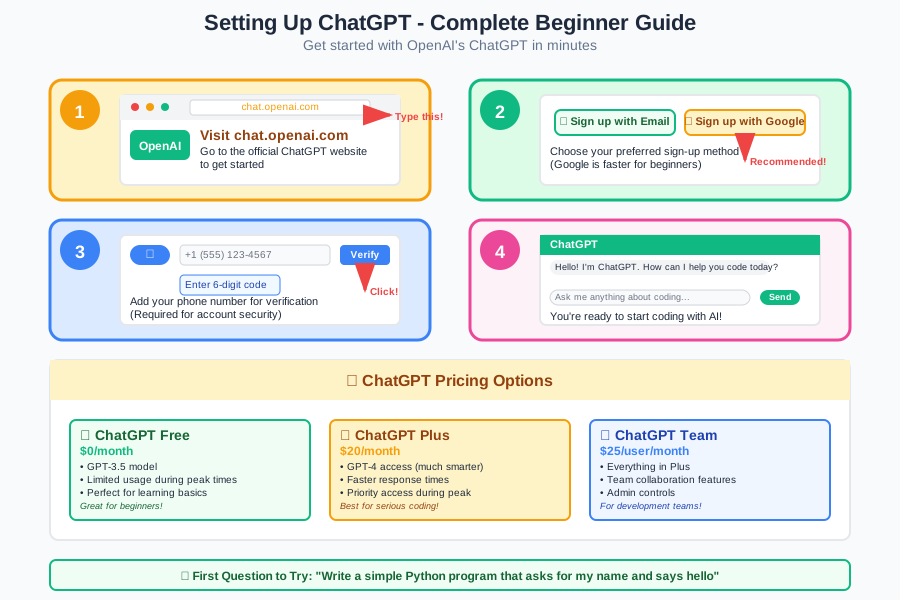
Getting Started with ChatGPT
- Go to chat.openai.com
- Create a free account
- Start with: "I'm learning to code as a complete beginner. Can you show me a simple 'Hello World' program and explain what each part does?"
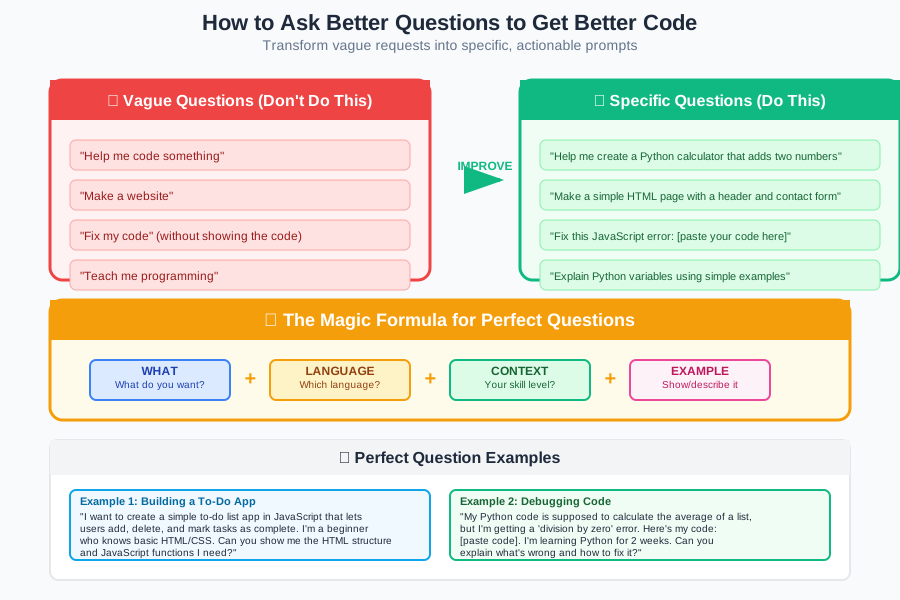
Pro Tip: How to Ask Better Questions
Both AIs work better when you ask specific questions. Instead of "Help me code," try:
Good Questions:
- "I'm trying to make a button that changes color when clicked. Can you show me how and explain each step?"
- "I got this error message: [paste error]. What does it mean and how do I fix it?"
- "Can you explain why we use functions in programming, with a simple example?"
Avoid These:
- "Teach me everything about JavaScript"
- "Make me a website"
- "What should I learn?"
Your First Week Plan: Which AI to Use When
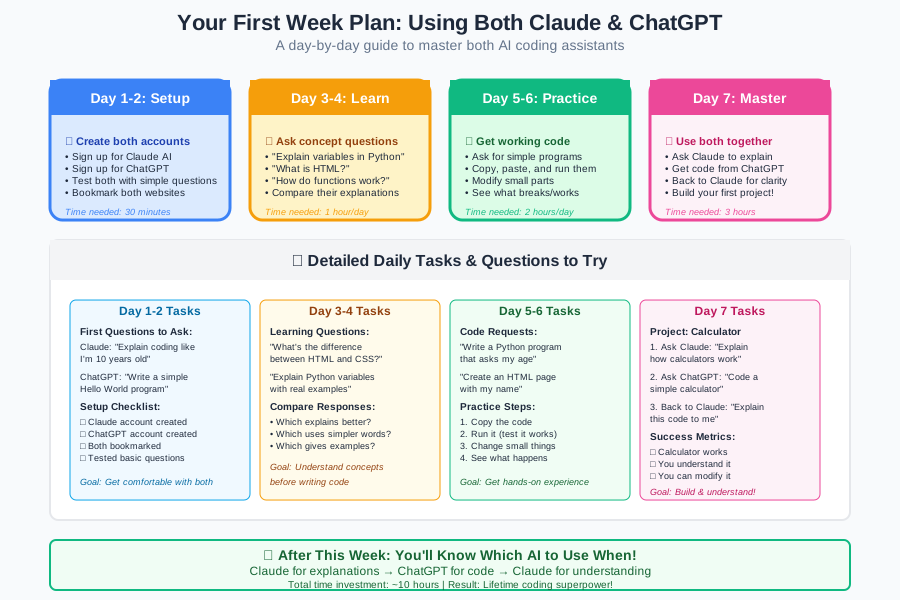
Here's exactly how to spend your first week learning to code with AI assistants:
Day 1-2: Concepts with Claude
- Ask Claude: "What is programming, explained like I'm 10 years old?"
- Ask: "What programming language should I learn first to get a job?"
- Ask: "Can you explain what HTML, CSS, and JavaScript do using simple analogies?"
Day 3-4: First Code with Both
- Ask Claude: "Can you walk me through creating my very first webpage, step by step?"
- Follow Claude's instructions
- Ask ChatGPT: "Can you show me a simple HTML webpage example?"
- Compare the approaches
Day 5-7: Building Something Real
- Ask Claude: "I want to make a webpage that shows my name and favorite color. Can you guide me through this?"
- Build it step by step with Claude's help
- Ask ChatGPT: "Can you help me add a button to this webpage that changes the background color?"
- Combine both approaches
Expected Timeline: By day 7, you should have created your first working webpage. It won't be fancy, but it'll be YOURS, and you'll understand how it works.
Troubleshooting: When Things Go Wrong (They Will!)
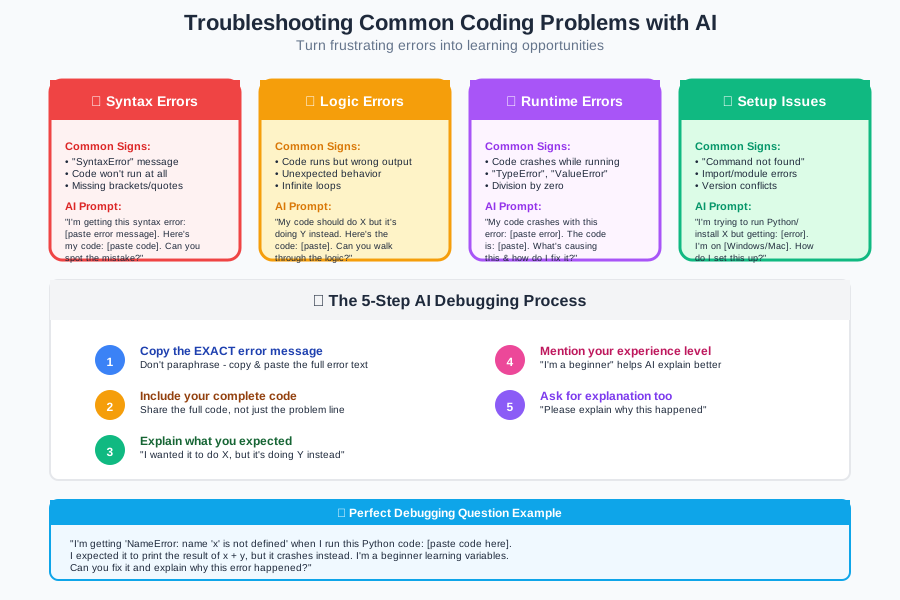
Let me prepare you for the reality: your code will break. A lot. This is normal, not a sign that you're bad at this. Here's how each AI handles common problems:
Problem 1: "My Code Doesn't Work and I Don't Know Why"
Try Claude First: "My code isn't working. Here's what I wrote: [paste code]. Can you help me figure out what's wrong and explain it simply?"
Claude is better at diagnosing problems and explaining the fix in beginner-friendly terms.
If Claude Can't Help, Try ChatGPT: "Here's my broken code: [paste code]. What's wrong and how do I fix it?"
ChatGPT might spot technical issues that Claude missed.
Problem 2: "I'm Overwhelmed and Want to Quit"
This happens to everyone. I wanted to quit at least 5 times in my first month.
Go to Claude: "I'm feeling overwhelmed learning to code. Can you remind me why this is worth it and suggest what to focus on next?"
Claude is much better at encouragement and helping you see the bigger picture.
Problem 3: "I Don't Understand This Tutorial"
Ask Claude: "I'm reading a tutorial about [topic] but I don't understand [specific part]. Can you explain it differently?"
Claude excels at re-explaining concepts in multiple ways until one clicks for you.
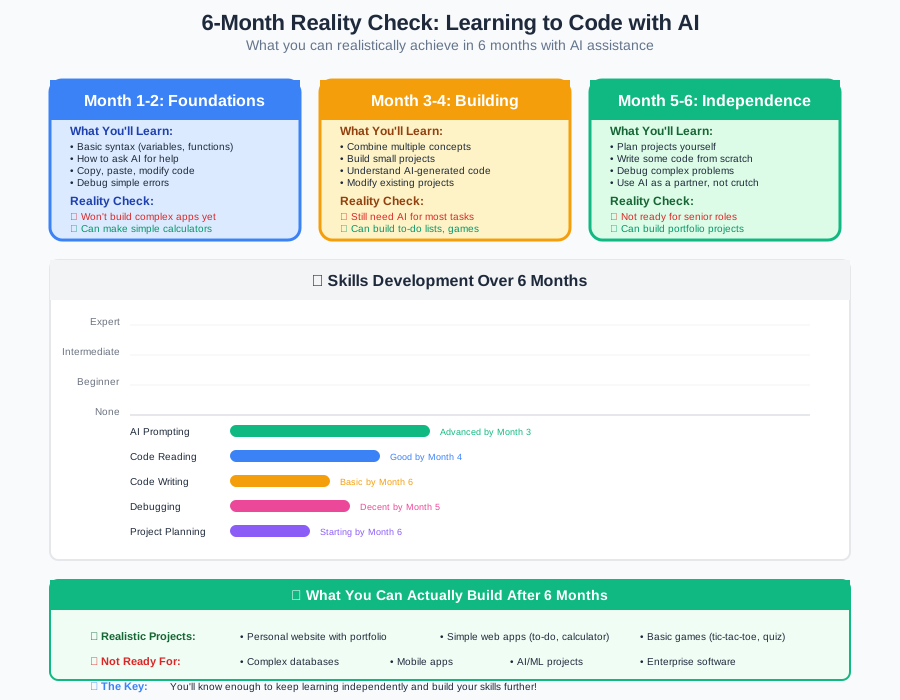
The 6-Month Reality Check: What to Expect
Let me set realistic expectations about your coding journey:
Month 1: Confusion is Normal
- Feeling: "I have no idea what I'm doing"
- Reality: This is exactly where every developer started
- AI Help: Claude for constant encouragement and simple explanations
Month 2: Small Victories
- Feeling: "I made something work!"
- Reality: You're building real skills
- AI Help: Both tools to build your first real projects
Month 3: Building Momentum
- Feeling: "I'm starting to understand this"
- Reality: You can build simple but functional websites
- AI Help: ChatGPT for faster project building, Claude for deep understanding
Month 4-6: Job-Ready Skills
- Feeling: "I could actually do this for work"
- Reality: You're ready to apply for junior positions
- AI Help: Both tools to build an impressive portfolio
Important: This timeline assumes you're coding 1-2 hours per day consistently. If you can only do 30 minutes, double the timeline. If you can do 3-4 hours, you might be faster.
Making Your Final Decision
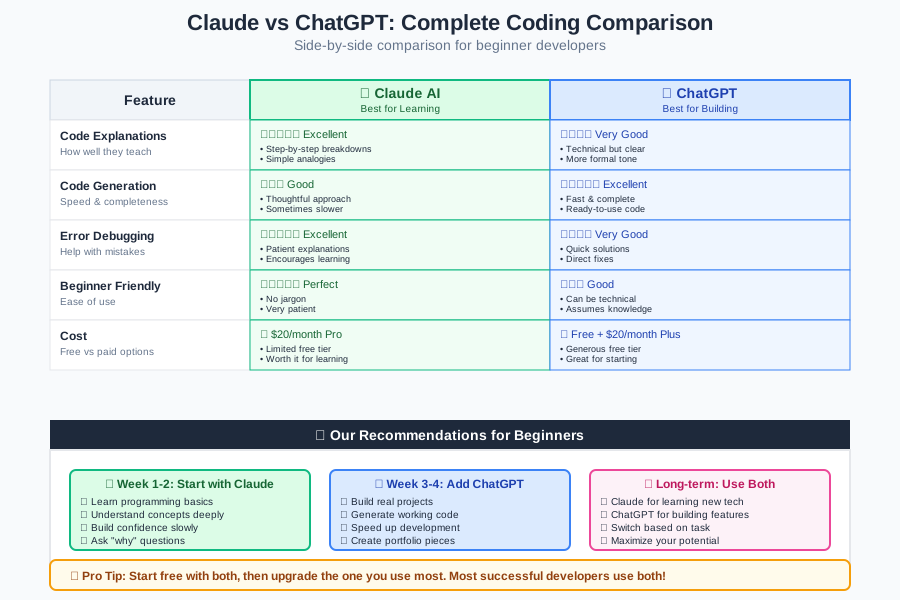
After 18 months of coding and 6 months of testing both AIs extensively, here's my honest recommendation:
If You Can Only Afford One: Choose Claude AI
- Better for complete beginners
- More encouraging and supportive
- Explains concepts more clearly
- Helps you understand rather than just copy code
If You Can Use Both: Start with Claude, Add ChatGPT at Month 3
- Month 1-3: Claude for learning fundamentals
- Month 3+: Both for building projects and job prep
- Use Claude for understanding, ChatGPT for implementation
If You're Impatient and Want Fast Results: Carefully Use Both
- Claude for concept explanations
- ChatGPT for working code examples
- Always make sure you understand what you're building
Your Next Steps: From Reading to Doing
Reading this article was the easy part. Now comes the fun (and occasionally frustrating) part: actually learning to code. Here's exactly what to do next:
Today (Next 30 Minutes):
- Sign up for Claude AI
- Ask it: "I just read about you helping beginners learn to code. I have zero experience but want to earn money as a developer. Where should I start?"
- Follow its first suggestion, even if it seems too simple
This Week:
- Spend 30-60 minutes daily with Claude learning basic concepts
- Build your first simple webpage (Claude will guide you)
- Celebrate every small win - you're already ahead of 90% of people who just think about learning to code
Month 1:
- Add ChatGPT to your toolkit
- Build 2-3 simple projects (a personal webpage, a calculator, a to-do list)
- Start following other beginner developers on social media for motivation
Month 3:
- Begin building portfolio projects
- Start learning about the job market in your area
- Connect with other developers online
Month 6:
- Apply for your first developer jobs
- Continue building and learning
- Remember: every expert was once a beginner
The Bottom Line: You've Got This
Eighteen months ago, I was making $12/hour in retail, intimidated by anyone who could "speak computer." Today, I'm earning $75,000 as a developer, and I genuinely love what I do. The difference? I found the right tools (AI assistants) and the right approach (patience with myself).
You're not behind. You're not too old. You're not "not a math person." You're just someone who hasn't learned to code yet - and that's about to change.
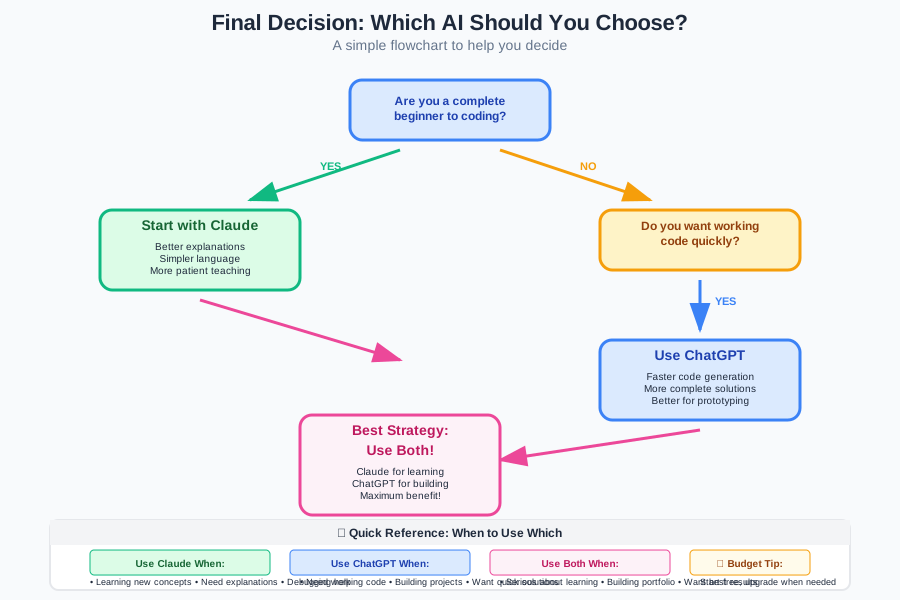
Claude AI is your best starting point because it treats you like a human learning something new, not like a computer that should already understand everything. As you grow more confident, ChatGPT becomes an incredibly powerful tool for building things faster.
But here's the most important thing: the best AI tool is the one you actually use consistently. Pick one (I recommend Claude for beginners), start today, and code for just 30 minutes. Tomorrow, do it again. In 6 months, you'll be amazed at how far you've come.
Companies are hiring junior developers who know how to work with AI tools. That could be you. The question isn't whether you can learn to code - it's when you'll start.
Your coding career begins with your next conversation with Claude. Go start it.
Remember: every expert was once a beginner, and every beginner who kept going became an expert. You've got this!
Ready to start your coding journey? Sign up for Claude AI today and ask it to create your first learning plan. In 6 months, you could be earning $50-80k as a junior developer. The only thing stopping you is starting.