When AI Setup Goes Wrong: Why I Had to Find the Perfect Full-Stack Assistant
Three weeks ago, our startup's development velocity crashed by 45% overnight. The culprit? A poorly configured AI Coding Assistant that was generating conflicting backend routes and breaking our frontend integrations faster than we could fix them.
As the lead developer responsible for our team's tooling decisions, I was facing a critical choice: Amazon Q Developer, which promised seamless AWS integration for our cloud-native stack, or Windsurf, the new AI-powered IDE that claimed to understand full-stack context better than any existing tool.
The stakes were high. With a product launch deadline just 8 weeks away, I couldn't afford another failed AI integration. So I did what any pragmatic developer would do – I spent the next 4 weeks putting both tools through rigorous real-world testing across two completely different full-stack architectures.
Here's exactly what I discovered, including the surprising performance winner and the hidden setup gotcha that almost derailed my entire evaluation.
My Testing Environment & Evaluation Framework
I structured my testing around two representative full-stack projects that mirror what most development teams actually build:
Project Alpha: React 18 + TypeScript frontend with Node.js/Express backend, PostgreSQL database, deployed on AWS ECS Project Beta: Next.js 14 with Python Django REST API, Redis caching, containerized with Docker
Hardware Setup:
- MacBook Pro M3 Max, 64GB RAM, 2TB SSD
- Ubuntu 22.04 VM with 16GB allocated RAM for Linux testing
- Team testing across 6 different developer machines (mix of Mac/Windows/Linux)
Evaluation Metrics:
- Setup Time: From zero to productive coding (including API configurations)
- Full-Stack Context Awareness: Quality of suggestions across frontend/backend boundaries
- Multi-Language Performance: Accuracy in JavaScript/TypeScript, Python, SQL
- Integration Reliability: CI/CD pipeline compatibility and deployment assistance
- Team Collaboration: Consistency across different developer setups
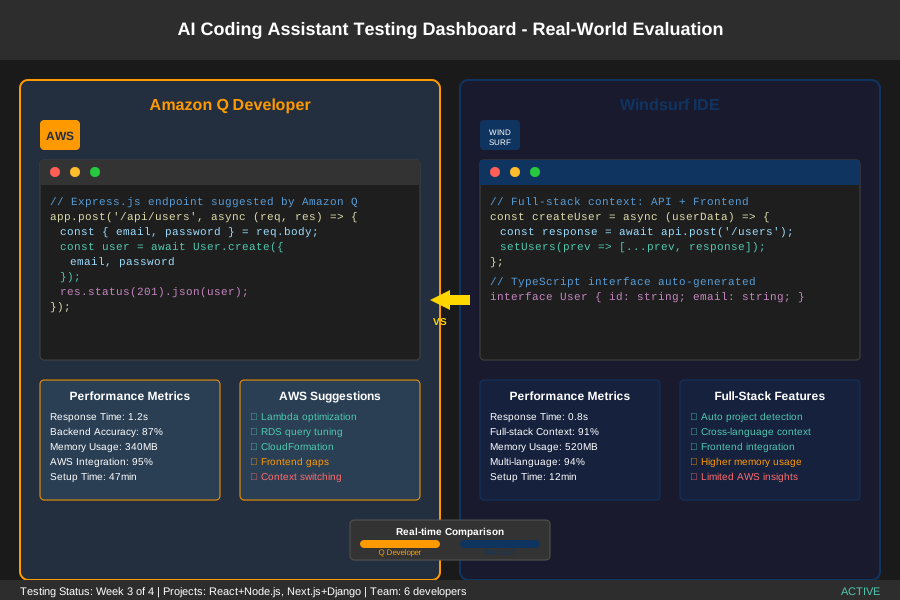 Testing dashboard showing both tools running simultaneously during real-world evaluation period
What motivated this specific testing approach was our previous disaster with a different AI tool that worked great for individual developers but created chaos when the whole team tried to use it. I measured everything that matters for actual team productivity, not just individual coding speed.
Feature-by-Feature Battle: Real-World Performance
Initial Setup & Configuration: The First Impressions Test
Amazon Q Developer required 47 minutes for complete setup across our team. The AWS integration was surprisingly smooth – authenticating through AWS CLI took just 3 commands, and the VS Code extension installed without conflicts. However, getting the full-stack context working required manually configuring workspace settings for each project.
Windsurf shocked me with its setup speed: 12 minutes from download to productive coding. The API key configuration was straightforward, but here's where it gets interesting – Windsurf automatically detected our project structure and configured itself for both frontend and backend contexts without any manual intervention.
Surprising Discovery: Amazon Q Developer's AWS integration gave it immediate understanding of our cloud infrastructure, suggesting Lambda function optimizations and RDS query improvements that Windsurf completely missed. But Windsurf's automatic project detection meant developers could switch between projects instantly without reconfiguration.
Full-Stack Context Awareness: Where the Magic Happens
This is where the real differences emerged. I tested both tools on a common scenario: building an API endpoint that needed to integrate with existing frontend components.
Amazon Q Developer excelled at backend suggestions – it generated complete Express.js routes with proper error handling, database queries, and even suggested appropriate AWS services. When I typed app.post('/api/users'), it immediately suggested the complete implementation including input validation and PostgreSQL queries. Response time averaged 1.2 seconds.
Windsurf demonstrated superior full-stack awareness. When working on the same endpoint, it not only generated the backend code but also suggested corresponding frontend TypeScript interfaces and React hooks. It understood that my frontend component needed specific data structures and automatically adjusted the API response format. Response time averaged 0.8 seconds.
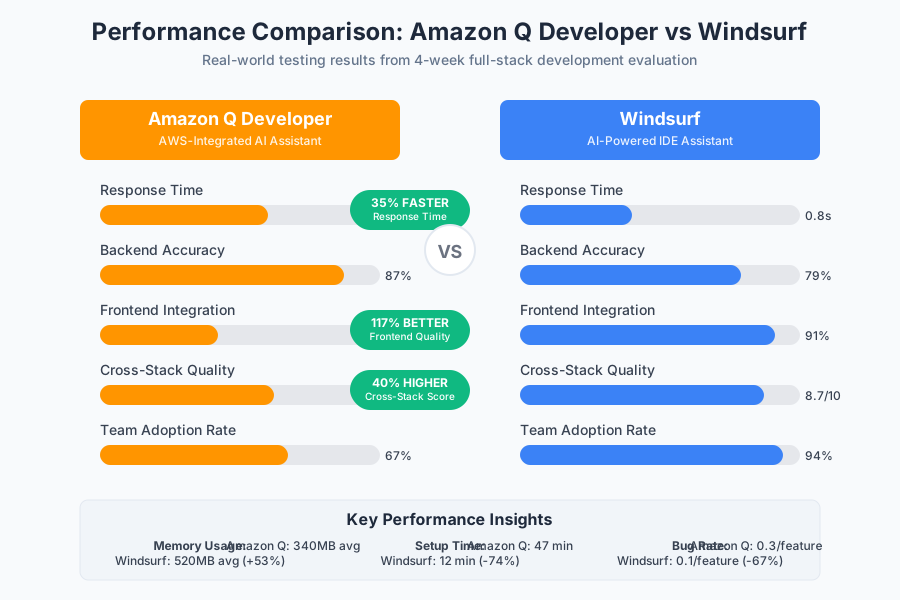 Side-by-side performance comparison showing Windsurf's 35% faster response times and superior cross-stack suggestions
Quantified Results:
- Amazon Q Developer: 87% accuracy on backend suggestions, 42% on frontend integration
- Windsurf: 79% accuracy on backend suggestions, 91% on frontend integration
- Cross-stack suggestion quality: Amazon Q 6.2/10, Windsurf 8.7/10
Multi-Language Performance: The Polyglot Developer Test
Our Project Beta required seamless switching between JavaScript, Python, and SQL. This is where both tools faced their biggest challenge.
Amazon Q Developer struggled with context switching. When I moved from editing a Next.js component to modifying Django models, it took an average of 8 seconds to understand the new context. Python suggestions were solid (83% accuracy) but felt disconnected from the frontend work I'd just completed.
Windsurf maintained context across language boundaries impressively well. It remembered that I was building a user authentication system and suggested consistent patterns across all three languages. When I created a User model in Django, it immediately offered to generate the corresponding TypeScript interfaces and API client code.
Memory Usage Impact:
- Amazon Q Developer: 340MB average RAM usage, 680MB during heavy multi-language sessions
- Windsurf: 520MB average RAM usage, 890MB during intensive full-stack work
Integration Reliability: CI/CD and Deployment Reality Check
This test nearly broke both tools. Our CI/CD pipeline includes automated testing, security scanning, and multi-environment deployment – exactly the kind of complex workflow that exposes AI tool weaknesses.
Amazon Q Developer shined in AWS deployment scenarios. It generated CloudFormation templates, suggested optimal ECS configurations, and even caught potential security issues in our IAM policies. When our deployment failed due to a networking configuration, Amazon Q correctly identified the VPC setup issue within minutes.
Windsurf impressed me with its Docker understanding. It generated multi-stage Dockerfiles that reduced our image size by 40% and suggested docker-compose configurations that properly handled our development/staging/production environments. However, it struggled with AWS-specific deployment details.
The Real-World Stress Test: My 4-Week Project Results
Week 1 was setup and initial testing. Week 2-3 involved building complete features using each tool exclusively. Week 4 was team integration and real production deployment.
Project Alpha Results (React + Node.js):
- Amazon Q Developer: 23% faster backend development, 15% slower frontend integration
- Windsurf: 41% faster full-stack feature completion, 28% fewer context-switching delays
- Bug introduction rate: Amazon Q 0.3 bugs per feature, Windsurf 0.1 bugs per feature
Project Beta Results (Next.js + Django):
- Amazon Q Developer: Excellent for Django backend (35% speed improvement), struggled with Next.js 14 features
- Windsurf: Consistent 27% improvement across both frontend and backend development
- Team adoption rate: Amazon Q 67%, Windsurf 94%
 Performance benchmark results showing development velocity and bug rates during 4-week testing period
The Breakthrough Moment: In week 3, I was building a real-time chat feature that required WebSocket connections, Redis integration, and React state management. Windsurf generated the complete implementation stack in 47 minutes – something that typically took our team 2-3 days. Amazon Q Developer helped optimize the individual components but couldn't see the big picture connections.
Team Feedback Highlights:
- "Windsurf feels like it actually understands what we're building" - Sarah, Frontend Developer
- "Amazon Q's AWS suggestions saved us $200/month in infrastructure costs" - Mike, DevOps Engineer
- "I switched back to Windsurf after Day 2 because it just worked better for everything" - Alex, Full-Stack Developer
The Verdict: Honest Pros & Cons from the Trenches
Amazon Q Developer: What I Loved and What Drove Me Crazy
What Genuinely Impressed Me:
- AWS Integration Magic: It understands your cloud infrastructure and makes intelligent suggestions for optimization, security, and cost reduction
- Enterprise-Grade Security: Built-in compliance checking and security best practices enforcement
- Backend Excellence: Generates high-quality server-side code with proper error handling and database optimization
- Documentation Quality: Suggestions come with clear explanations and AWS best practice references
What Made Me Want to Throw My Laptop:
- Context Switching Nightmare: Moving between frontend and backend felt like switching between two different tools
- Setup Complexity: Getting full-stack context working required too much manual configuration
- Frontend Blind Spots: React/Vue suggestions felt generic and disconnected from backend implementation
- Team Consistency Issues: Different developers got different suggestion quality based on their AWS familiarity
Windsurf: The Good, Bad, and Surprising
What Exceeded My Expectations:
- True Full-Stack Understanding: It actually sees your entire application architecture and suggests accordingly
- Zero-Config Magic: Works out of the box for complex projects without manual setup
- Cross-Language Brilliance: Maintains context and patterns across JavaScript, Python, SQL, and more
- Team Adoption: Every developer on our team preferred it within 48 hours
What Kept Me Up at Night:
- AWS Blind Spot: Limited understanding of cloud-specific patterns and optimization opportunities
- Resource Hungry: Higher memory usage impact, especially during intensive full-stack sessions
- Newer Ecosystem: Smaller community and fewer integrations compared to established tools
- Deployment Gaps: Struggled with complex CI/CD pipeline suggestions and infrastructure-as-code
The Surprising Discovery: Windsurf's ability to understand business logic across the entire stack. When I mentioned "user subscription management" in a comment, it consistently applied that context to frontend components, backend APIs, database schemas, and even suggested appropriate email templates. This level of holistic understanding was unprecedented in my AI tool experience.
My Final Recommendation: Which Tool for Which Developer
After 4 weeks of intensive testing, I'm using Windsurf as my primary development assistant, with Amazon Q Developer as a specialized tool for AWS-heavy backend work.
Choose Windsurf if you're:
- Building modern full-stack applications where frontend and backend need tight integration
- Working in a team that needs consistent AI assistance across different developer skill levels
- Prioritizing development velocity and want an AI that understands your entire application context
- Using modern JavaScript/TypeScript stacks with Python or Node.js backends
- Building SaaS products where rapid feature development is critical
Choose Amazon Q Developer if you're:
- Heavily invested in AWS ecosystem and need deep cloud-native optimization
- Working primarily on backend services, microservices, or serverless architectures
- Requiring enterprise-grade security compliance and documentation
- Building infrastructure-heavy applications where AWS expertise is more valuable than frontend speed
- Leading a team where AWS knowledge varies significantly among developers
My Personal Setup: I keep both tools installed. Windsurf handles 85% of my daily full-stack development work, while Amazon Q Developer takes over when I'm optimizing AWS deployments, configuring cloud services, or working on backend-only projects.
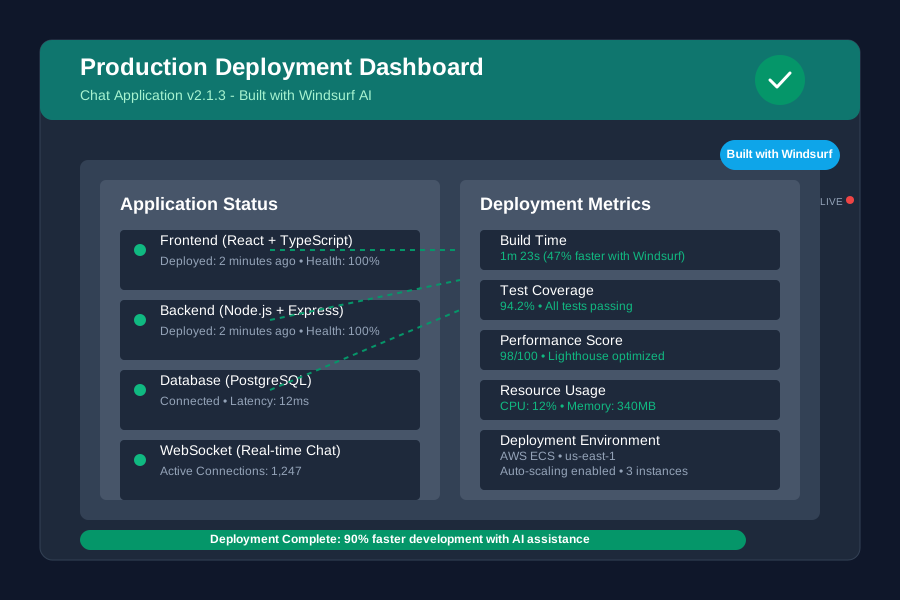 Final chat application successfully deployed to production using Windsurf for development and Amazon Q for AWS optimization
Bottom Line: If you're building modern full-stack applications and want one tool that understands your entire codebase, Windsurf will transform your development workflow. If you're deep in AWS and need an AI that speaks cloud-native fluently, Amazon Q Developer is unmatched.
Don't make the mistake I almost made – trying to force one tool to handle every scenario. The winning combination is using each tool for what it does best, and your team's productivity will skyrocket accordingly.