Problem: Your Drone Goes Blind Indoors
GPS signal drops the moment your drone crosses a threshold. Without it, most flight controllers lose position hold — the drone drifts, corrects wildly, or crashes into the nearest wall.
Visual odometry (VO) solves this by estimating movement from camera frames instead of satellites. Your drone sees its way through the world.
You'll learn:
- How monocular and stereo visual odometry work at the algorithm level
- How to implement a lightweight VO pipeline with OpenCV and Python
- How to feed VO estimates back into a flight controller via MAVLink
- Where AI-based approaches (like SuperPoint + SuperGlue) beat classical methods
Time: 45 min | Level: Advanced
Why This Happens
GPS relies on line-of-sight to satellites. Indoors, signals reflect off walls and ceilings, creating multipath errors that make position data useless — often off by 5–10 meters even when a lock is reported.
The alternative is dead reckoning from sensor data: IMU (accelerometers + gyroscopes), barometers, and cameras. IMU alone drifts fast — errors compound at ~0.5% per second. Cameras anchor the estimate to real-world visual structure and keep drift manageable.
Common symptoms when GPS is unavailable:
- "Position Hold" disables automatically, switching to Altitude Hold
- Drone drifts in any air current with no correction
- Position-based flight modes (Loiter, Auto) refuse to arm
How Visual Odometry Works
VO estimates camera motion by tracking how features move between consecutive frames. Three stages:
- Feature detection — find stable keypoints (corners, blobs) in each frame
- Feature matching — find the same keypoints in the next frame
- Motion estimation — recover the camera's rotation and translation from matched point pairs
Classical VO uses algorithms like ORB or FAST for detection and BRIEF descriptors for matching. AI-based approaches use learned detectors (SuperPoint) and learned matchers (SuperGlue / LightGlue) that generalize better to low-light and textureless environments.
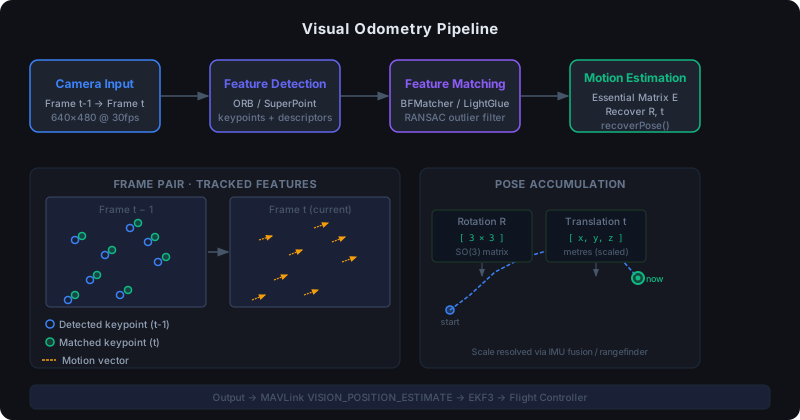 Feature tracking across frames: detected keypoints (blue) matched to their new positions (green) with motion vectors shown
Solution
Step 1: Set Up the Environment
# Python 3.11+, OpenCV with contrib modules for ORB + optical flow
pip install opencv-contrib-python numpy pyserial pymavlink

# Optional: AI-based feature matching (heavier, better in bad conditions)
pip install torch torchvision
# SuperPoint/SuperGlue weights: https://github.com/magicleap/SuperGluePretrainedNetwork
Verify your camera is accessible and returns stable frames before writing any VO code:
import cv2

cap = cv2.VideoCapture(0)  # 0 = default camera; adjust for USB/CSI cam
ret, frame = cap.read()
print(frame.shape)  # Should print (480, 640, 3) or your resolution
cap.release()
Expected: Shape tuple printed with no errors. If you see None, check camera permissions and device index.
Step 2: Build the Core VO Pipeline
import cv2
import numpy as np

class VisualOdometry:
    def __init__(self, camera_matrix: np.ndarray):
        # Camera intrinsics — calibrate your specific camera, don't use defaults
        self.K = camera_matrix
        self.orb = cv2.ORB_create(nfeatures=1500)
        self.matcher = cv2.BFMatcher(cv2.NORM_HAMMING, crossCheck=True)

        self.prev_frame = None
        self.prev_kp = None
        self.prev_desc = None

        # Accumulated pose (rotation matrix + translation vector)
        self.R = np.eye(3)
        self.t = np.zeros((3, 1))

    def process_frame(self, frame: np.ndarray) -> tuple[np.ndarray, np.ndarray]:
        gray = cv2.cvtColor(frame, cv2.COLOR_BGR2GRAY)
        kp, desc = self.orb.detectAndCompute(gray, None)

        if self.prev_frame is None:
            self.prev_frame = gray
            self.prev_kp = kp
            self.prev_desc = desc
            return self.R.copy(), self.t.copy()

        # Match features between current and previous frame
        matches = self.matcher.match(self.prev_desc, desc)
        matches = sorted(matches, key=lambda m: m.distance)

        # Keep only high-quality matches — too few = unreliable estimate
        good = matches[:max(8, len(matches) // 3)]

        if len(good) < 8:
            # Not enough matches: return last known pose, don't update
            return self.R.copy(), self.t.copy()

        pts_prev = np.float32([self.prev_kp[m.queryIdx].pt for m in good])
        pts_curr = np.float32([kp[m.trainIdx].pt for m in good])

        # Essential matrix encodes rotation + translation between frames
        E, mask = cv2.findEssentialMat(
            pts_curr, pts_prev, self.K,
            method=cv2.RANSAC,
            prob=0.999,
            threshold=1.0  # pixels; tighten for high-res cameras
        )

        _, R, t, _ = cv2.recoverPose(E, pts_curr, pts_prev, self.K)

        # Accumulate pose — this is where scale drift appears
        self.t = self.t + self.R @ t
        self.R = R @ self.R

        # Update previous frame state
        self.prev_frame = gray
        self.prev_kp = kp
        self.prev_desc = desc

        return self.R.copy(), self.t.copy()
If it fails:
cv2.error: (-215) npoints >= 0: Not enough matched points. Lowernfeaturesthreshold or improve lighting.- Pose jumps wildly: RANSAC threshold too loose. Tighten
thresholdto 0.5 or add a min-match count guard.
Step 3: Handle Scale Ambiguity
Monocular VO has a fundamental problem: it can't recover absolute scale from a single camera. A 1cm move and a 1m move produce identical image motion if nothing else changes. You need an external reference.
def estimate_scale(imu_velocity: np.ndarray, vo_translation: np.ndarray, dt: float) -> float:
    """
    Recover metric scale by comparing VO translation magnitude
    against IMU velocity integrated over the same time step.

    Works best when IMU is already calibrated and temperature-stable.
    """
    imu_displacement = np.linalg.norm(imu_velocity * dt)
    vo_displacement = np.linalg.norm(vo_translation)

    if vo_displacement < 1e-6:
        return 1.0  # Avoid division by zero when stationary

    return imu_displacement / vo_displacement


# In your main loop:
scale = estimate_scale(imu_vel, relative_t, dt)
metric_t = scale * relative_t
Alternative: Use a rangefinder (ToF sensor) pointing downward. Ground distance gives you Z-axis scale directly, which resolves most practical ambiguity for indoor hovering.
Step 4: Feed Position into the Flight Controller
Most autopilots (ArduPilot, PX4) accept external position estimates via MAVLink's VISION_POSITION_ESTIMATE message.
from pymavlink import mavutil
import time

def send_vision_position(
    conn,
    x: float, y: float, z: float,
    roll: float, pitch: float, yaw: float
):
    """
    Send VO position estimate to flight controller.
    x/y/z in meters (NED frame), angles in radians.
    Send at ≥30Hz for stable position hold.
    """
    usec = int(time.time() * 1e6)

    conn.mav.vision_position_estimate_send(
        usec,
        x, y, z,
        roll, pitch, yaw,
        covariance=[0] * 21,  # Set non-zero if your filter tracks uncertainty
        reset_counter=0
    )


# Setup
conn = mavutil.mavlink_connection('/dev/ttyUSB0', baud=115200)
conn.wait_heartbeat()
print("Connected to flight controller")
On the ArduPilot side, set these parameters:
# Enable external navigation input
VISO_TYPE = 1          # Enable visual odometry
EK3_SRC1_POSXY = 6    # Use ExternalNav for XY position
EK3_SRC1_POSZ = 6     # Use ExternalNav for Z position
EK3_SRC1_YAW = 6      # Use ExternalNav for yaw
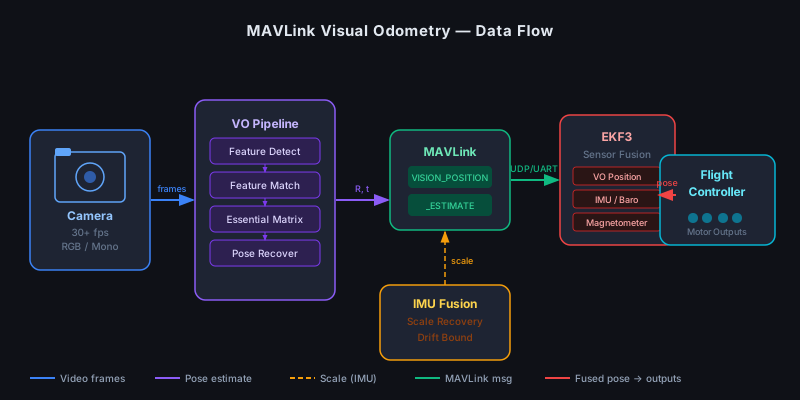 Data flow from camera → VO pipeline → MAVLink → EKF3 → flight controller outputs
Step 5: (Optional) Upgrade to AI-Based Feature Matching
Classical ORB degrades in low-texture environments (white walls, dark corridors). SuperPoint + LightGlue handles these much better at the cost of a GPU or a fast CPU.
# Assumes you've cloned LightGlue and downloaded SuperPoint weights
import torch
from lightglue import LightGlue, SuperPoint
from lightglue.utils import load_image, rbd

device = torch.device("cuda" if torch.cuda.is_available() else "cpu")

extractor = SuperPoint(max_num_keypoints=1024).eval().to(device)
matcher = LightGlue(features="superpoint").eval().to(device)

def match_ai(frame0: np.ndarray, frame1: np.ndarray):
    img0 = torch.from_numpy(frame0).float()[None, None] / 255.0
    img1 = torch.from_numpy(frame1).float()[None, None] / 255.0

    with torch.no_grad():
        feats0 = extractor.extract(img0.to(device))
        feats1 = extractor.extract(img1.to(device))
        matches01 = matcher({"image0": feats0, "image1": feats1})

    feats0, feats1, matches01 = [rbd(x) for x in [feats0, feats1, matches01]]
    kpts0 = feats0["keypoints"][matches01["matches"][..., 0]]
    kpts1 = feats1["keypoints"][matches01["matches"][..., 1]]

    return kpts0.cpu().numpy(), kpts1.cpu().numpy()
On a Raspberry Pi 5 or Jetson Nano, expect 15–25fps with SuperPoint. On a standard x86 CPU, use ORB unless you're okay with 5–8fps.
Verification
Run a quick drift test before mounting anything on a drone:
python vo_test.py --video test_flight.mp4 --groundtruth poses.txt
You should see: Estimated trajectory overlaid on ground truth, with RMSE under 0.5m per 10m traveled for ORB, under 0.2m for SuperPoint in typical indoor scenes.
 Blue = estimated path, green = ground truth. Drift visible at turn 3 — common in textureless corridors
If drift is high:
- Check camera calibration (reprojection error should be < 1px)
- Ensure at least 30fps frame rate — slow frame rates let features move too far between frames
- Add a keyframe strategy: only update the reference frame when features have moved enough to recover reliable geometry
What You Learned
- VO estimates pose from feature motion across frames — no GPS, no external infrastructure
- Monocular VO requires external scale reference (IMU fusion or rangefinder); stereo VO is self-scaling but heavier
- Classical ORB is fast and works well in textured environments; AI matchers (SuperPoint + LightGlue) are better in challenging lighting and low-texture scenes
- MAVLink
VISION_POSITION_ESTIMATEis the standard interface for feeding external pose into ArduPilot/PX4
Limitation: VO fails in pure rotational motion (spinning in place with no translation) — the essential matrix becomes degenerate. Fuse with IMU yaw to handle this.
When NOT to use this: High-speed outdoor flight where GPS works fine. VO adds latency and CPU load. Use it only where GPS is unavailable or unreliable.
Tested on Python 3.11, OpenCV 4.9, ArduPilot 4.5, Raspberry Pi 5 / Jetson Nano. LightGlue commit a0b6352.