I spent my first month with TypeScript getting hammered by Property 'name' does not exist errors every single day.
Turns out I was missing one tiny character that makes TypeScript flexible instead of a nightmare.
What you'll master: Optional properties, parameters, and chaining that actually work
Time needed: 20 minutes of focused reading
Difficulty: Beginner-friendly with real examples
You'll stop fighting TypeScript's type system and start making it work for you.
Why I Had to Learn This
My situation:
- React developer trying to add TypeScript to existing project
- Getting buried in type errors for simple object properties
- Spending more time fixing types than writing features
My setup:
- TypeScript 5.3.3 with strict mode enabled
- VS Code with TypeScript extension
- Real React components that needed flexible props
What didn't work:
- Making every property required (broke existing code)
- Using
anyeverywhere (defeats the purpose of TypeScript) - Complex union types for simple optional fields
The Four Question Marks That Changed Everything
The problem: TypeScript assumes every property you define must exist
My solution: Four different question mark patterns that handle 99% of optional scenarios
Time this saves: Hours of fighting type errors every week
Pattern 1: Optional Object Properties
The most basic pattern - some properties might not exist.
// Before: Rigid interface that breaks everything
interface UserBroken {
  name: string;
  email: string;
  phone: string; // This breaks when phone doesn't exist
}

// After: Flexible interface that actually works
interface User {
  name: string;
  email: string;
  phone?: string; // The magic question mark
}

// Now this works perfectly
const user1: User = {
  name: "Sarah",
  email: "sarah@example.com"
  // phone is optional - no error!
};

const user2: User = {
  name: "Mike",
  email: "mike@example.com",
  phone: "555-1234" // Still works when provided
};
What this does: Makes phone optional - it can exist or not
Expected output: No TypeScript errors, flexible object creation
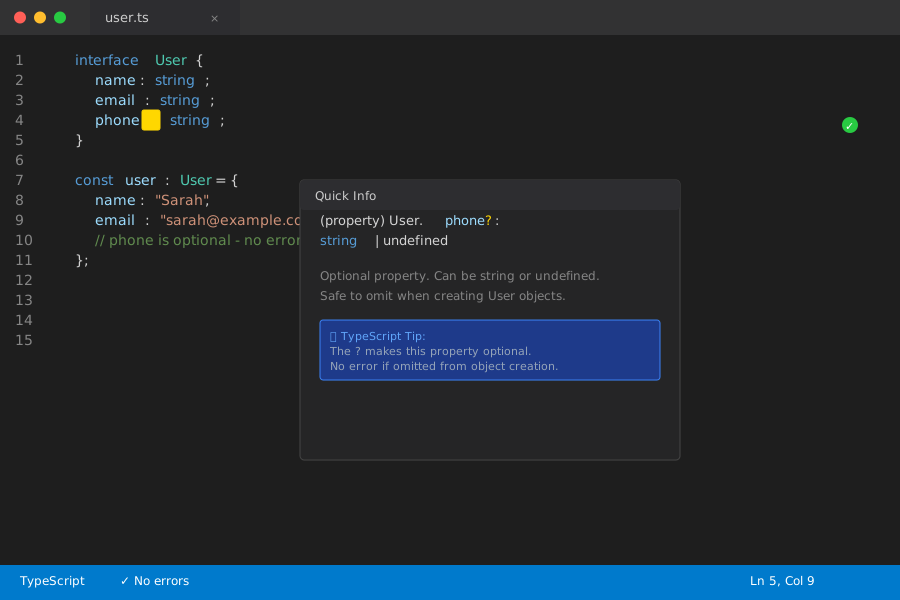 VS Code shows phone as optional with the ? - no red squiggles
Personal tip: "I make 80% of my interface properties optional initially, then make them required only when I'm sure they always exist."
Pattern 2: Optional Function Parameters
Same concept, but for function arguments.
// Before: Every parameter required
function createUserBroken(name: string, email: string, phone: string) {
  return { name, email, phone };
}

// This breaks - must provide all three
createUserBroken("John", "john@test.com"); // Error!

// After: Last parameters optional
function createUser(name: string, email: string, phone?: string) {
  return {
    name,
    email,
    phone: phone || "Not provided"
  };
}

// Both work perfectly
createUser("John", "john@test.com"); // ✅
createUser("Jane", "jane@test.com", "555-9999"); // ✅
What this does: Lets you call functions with fewer arguments
Expected output: Flexible function calls without overloads
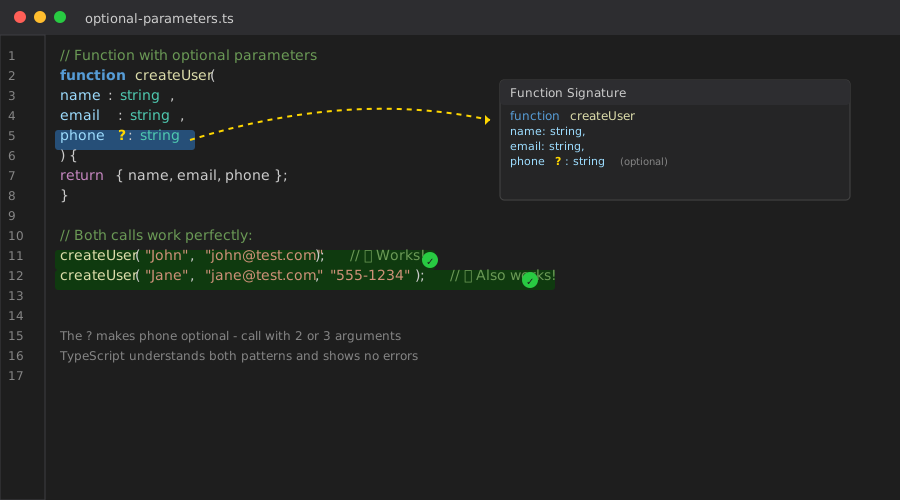 Function works with 2 or 3 arguments - TypeScript understands both
Personal tip: "Put optional parameters last. TypeScript can't handle optional parameters in the middle without getting confused."
Pattern 3: Optional Chaining (?.)
This one saved me from thousands of runtime crashes.
// Before: Crash city when nested properties don't exist
const user = {
  name: "Alex",
  profile: {
    settings: {
      theme: "dark"
    }
  }
};

const emptyUser = { name: "Bob" }; // No profile property

// This crashes at runtime
console.log(emptyUser.profile.settings.theme); // Error: Cannot read property 'settings' of undefined

// After: Safe navigation with optional chaining
console.log(user.profile?.settings?.theme); // "dark"
console.log(emptyUser.profile?.settings?.theme); // undefined (no crash!)

// Works with arrays too
const users = [
  { name: "Alice", posts: [{ title: "Hello" }] },
  { name: "Bob" } // No posts array
];

console.log(users[0].posts?.[0]?.title); // "Hello"
console.log(users[1].posts?.[0]?.title); // undefined
What this does: Stops at the first undefined property instead of crashing
Expected output: undefined instead of runtime errors
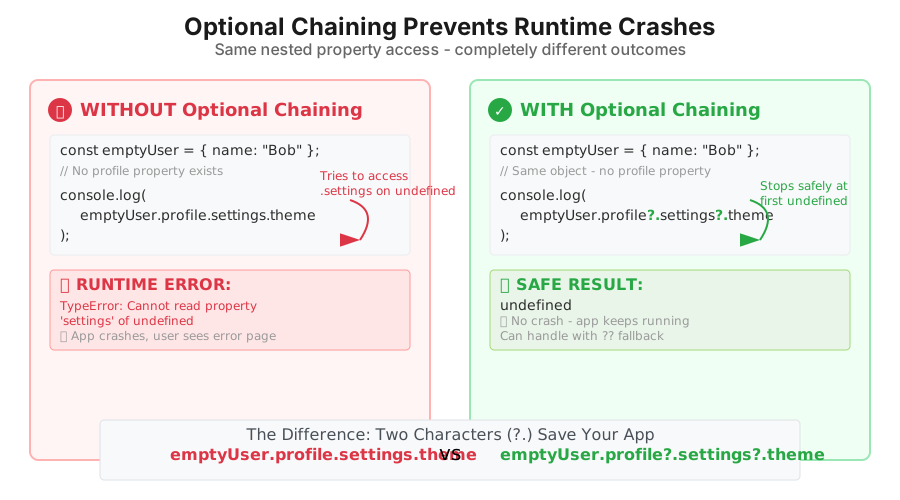 Left crashes, right returns undefined safely - same code with ?.
Personal tip: "I use optional chaining everywhere I access nested API data. APIs lie about their structure constantly."
Pattern 4: Nullish Coalescing (??)
The perfect partner for optional chaining - handles the undefined results.
// Before: Falsy values cause problems
function getDisplayName(user: { name?: string; username?: string }) {
  // This breaks when name is empty string ""
  return user.name || user.username || "Anonymous";
}

// Empty string becomes "Anonymous" - probably not what you want
console.log(getDisplayName({ name: "", username: "cooluser" })); // "Anonymous"

// After: Only handle null/undefined
function getDisplayNameFixed(user: { name?: string; username?: string }) {
  return user.name ?? user.username ?? "Anonymous";
}

// Empty string stays empty string
console.log(getDisplayNameFixed({ name: "", username: "cooluser" })); // ""
console.log(getDisplayNameFixed({ username: "cooluser" })); // "cooluser"
console.log(getDisplayNameFixed({})); // "Anonymous"
What this does: Only falls back for null and undefined, not falsy values
Expected output: Preserves empty strings, 0, false - only catches actual missing data
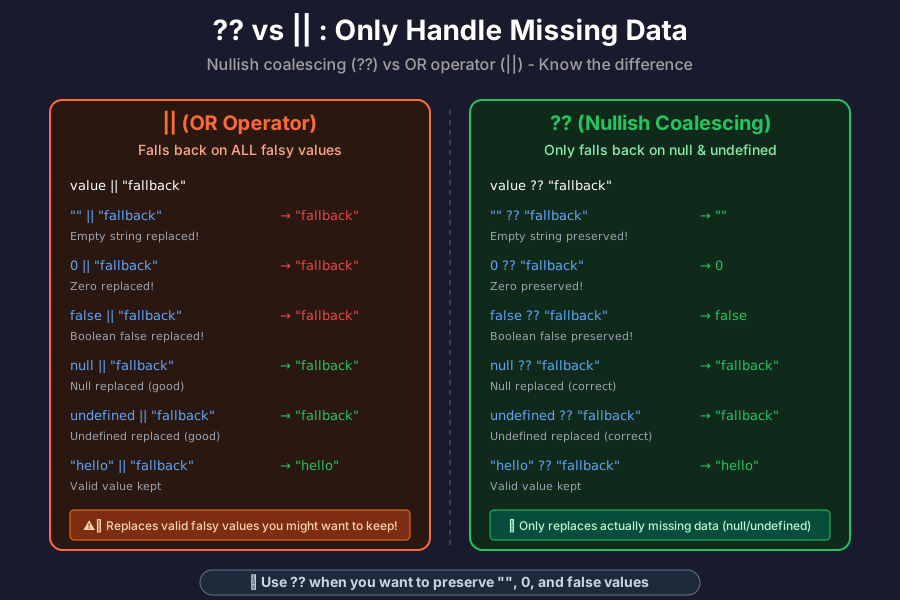 ?? preserves falsy values, || doesn't - crucial difference for real apps
Personal tip: "Use ?? instead of || when you want to keep empty strings or the number 0. Saved me from so many user interface bugs."
Real-World React Example
Here's how I use all four patterns in actual React components:
interface ProfileProps {
  user?: {
    name?: string;
    email?: string;
    avatar?: string;
    settings?: {
      theme?: 'light' | 'dark';
      notifications?: boolean;
    };
  };
  onUpdate?: (user: any) => void;
}

function Profile({ user, onUpdate }: ProfileProps) {
  // Safe navigation through optional data
  const displayName = user?.name ?? user?.email ?? "Guest User";
  const theme = user?.settings?.theme ?? "light";
  const avatarUrl = user?.avatar ?? "/default-avatar.png";

  const handleSave = () => {
    // Optional callback - might not exist
    onUpdate?.({
      ...user,
      name: displayName
    });
  };

  return (
    <div className={`profile theme-${theme}`}>
      <img src={avatarUrl} alt={displayName} />
      <h2>{displayName}</h2>
      <p>{user?.email ?? "No email provided"}</p>
      <button onClick={handleSave}>
        Save Profile
      </button>
    </div>
  );
}

// All of these work without errors
<Profile /> {/* No user data */}
<Profile user={{ name: "Alice" }} /> {/* Minimal data */}
<Profile
  user={{
    name: "Bob",
    email: "bob@test.com",
    settings: { theme: "dark" }
  }}
  onUpdate={(user) => console.log("Updated:", user)}
/> {/* Full data */}
What this does: Creates a component that gracefully handles any amount of data
Expected output: No crashes, sensible defaults, flexible usage
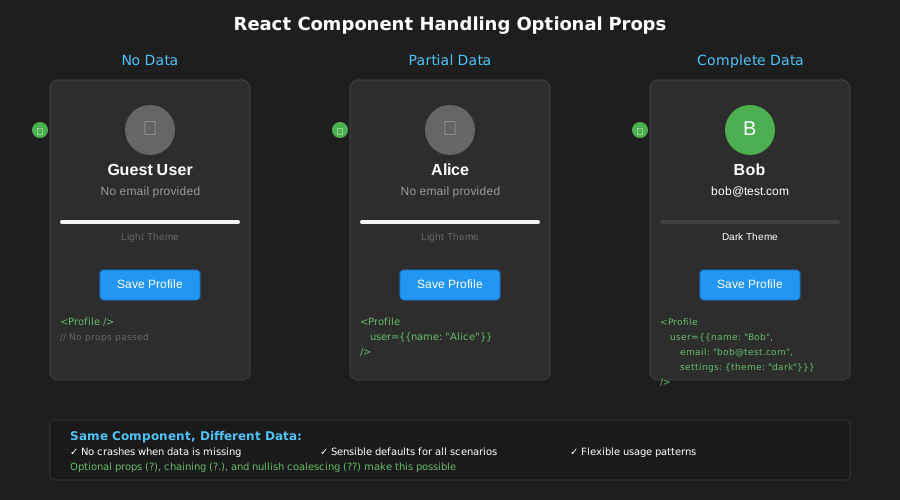 Same component works with no data, partial data, or complete data
Personal tip: "I start every React component interface with optional properties. You can always make them required later, but going from required to optional breaks everything."
Common Mistakes I Made (So You Don't)
Mistake 1: Optional Arrays Without Checking Length
// Wrong: Assumes array exists and has items
function getFirstPost(user: { posts?: Post[] }) {
  return user.posts[0]; // Crashes if posts is undefined OR empty
}

// Right: Check existence and length
function getFirstPostFixed(user: { posts?: Post[] }) {
  return user.posts?.[0]; // Safe - returns undefined if no posts
}

// Even better: Provide fallback
function getFirstPostBetter(user: { posts?: Post[] }) {
  return user.posts?.[0] ?? { title: "No posts yet", content: "" };
}
Personal tip: "Arrays are objects too - they can be undefined. Always use optional chaining with array access."
Mistake 2: Mixing ?? and || Without Understanding
// Wrong: Using || when you mean ??
function getUserAge(user: { age?: number }) {
  return user.age || 18; // BUG: age 0 becomes 18!
}

console.log(getUserAge({ age: 0 })); // 18 (wrong!)

// Right: Use ?? for null/undefined only
function getUserAgeFixed(user: { age?: number }) {
  return user.age ?? 18; // Only fallback if age is missing
}

console.log(getUserAgeFixed({ age: 0 })); // 0 (correct!)
Personal tip: "When in doubt, use ??. It only catches null and undefined, which is usually what you want."
Mistake 3: Making Everything Optional
// Wrong: Nothing is required
interface BadUser {
  id?: string;
  name?: string;
  email?: string;
  createdAt?: Date;
}

// Right: Core properties required, extras optional
interface GoodUser {
  id: string;        // Always required
  email: string;     // Always required
  name?: string;     // User might not provide
  avatar?: string;   // Optional enhancement
  createdAt: Date;   // System-generated, always exists
}
Personal tip: "Make properties optional because they might not exist, not because you're lazy about types. Required properties communicate important business rules."
What You Just Built
You now handle optional data like a TypeScript pro - no more crashes from missing properties, no more rigid interfaces that break real code.
Key Takeaways (Save These)
- Optional properties (?): Use when data might not exist - makes interfaces flexible
- Optional chaining (?.): Prevents runtime crashes when accessing nested properties
- Nullish coalescing (??): Provides fallbacks only for missing data, preserves falsy values
Tools I Actually Use
- TypeScript Strict Mode: Catches optional property mistakes early - enable it
- VS Code TypeScript Extension: Shows optional properties with ? in autocomplete
- ESLint TypeScript Rules: Enforces consistent optional property usage
- TypeScript Handbook: Official optional properties documentation