Problem: Running LLM Training Without a GPU Farm
You want to fine-tune a language model on custom data, but cloud GPU costs add up fast and sending your data to a third-party feels wrong. Your Mac with Apple Silicon is sitting there doing nothing useful.
Apple's MLX framework makes it possible to train and fine-tune small language models (SLMs) directly on your M-series Mac using unified memory — no CUDA, no cloud, no $300 GPU bill.
You'll learn:
- How to install MLX and
mlx-lmfor language model training - How to format your dataset for fine-tuning
- How to run LoRA fine-tuning on a 1B–7B parameter model
- How to run inference with your fine-tuned adapter
Time: 30 min | Level: Intermediate
Why This Happens to Work
Apple Silicon chips share memory between CPU and GPU. That means a 16GB M3 MacBook Pro can hold a 7B model in memory and train on it — something impossible on a discrete GPU with 8GB VRAM.
MLX is Apple's own array framework, designed for this unified architecture. Unlike PyTorch with MPS (which has constant backend quirks), MLX was built from scratch for Apple Silicon, so operations stay on-device cleanly.
What you need:
- Mac with Apple M1 or later (M2/M3/M4 recommended)
- macOS 13.5+ (Ventura or later)
- 16GB RAM minimum (32GB+ for 7B models)
- Python 3.11+
What you don't need:
- NVIDIA GPU
- CUDA
- Docker
- Cloud account
 MLX uses unified memory so the GPU and CPU share model weights — no copying between VRAM and RAM
Solution
Step 1: Install MLX and mlx-lm
# Create a clean environment
python3 -m venv mlx-env
source mlx-env/bin/activate

# Install MLX and the language model toolkit
pip install mlx-lm

# Verify GPU access
python3 -c "import mlx.core as mx; print(mx.default_device())"
Expected: You should see Device(gpu, 0). If you see cpu, your macOS version may be too old.
If it fails:
- "No module named mlx": Make sure you activated the venv first
- Device shows cpu: Upgrade to macOS 13.5 or later
Step 2: Pick and Download Your Base Model
MLX works with models converted to its format. The mlx-community org on Hugging Face maintains ready-to-use versions of popular models.
Good starting points by RAM:
| RAM | Recommended Model |
|---|---|
| 16GB | mlx-community/Llama-3.2-1B-Instruct-4bit |
| 32GB | mlx-community/Qwen2.5-7B-Instruct-4bit |
| 64GB+ | mlx-community/Llama-3.3-70B-Instruct-4bit |
# Download the model (cached in ~/.cache/huggingface/)
python3 -c "
from mlx_lm import load
model, tokenizer = load('mlx-community/Llama-3.2-1B-Instruct-4bit')
print('Model loaded successfully')
"
Expected: Model files download (~700MB for 1B-4bit) and you see the success message.
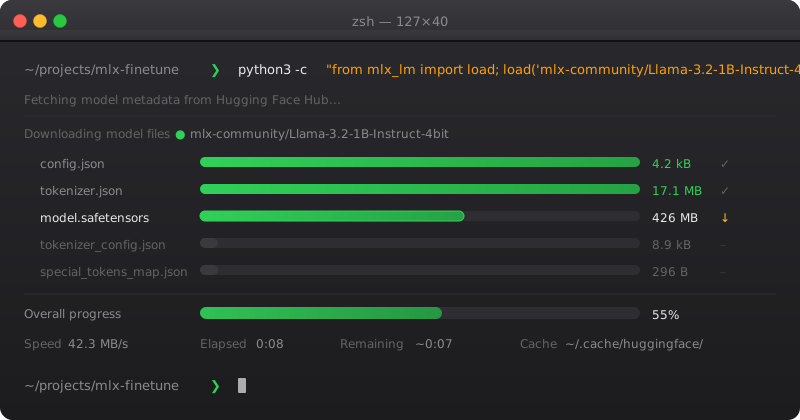 The model downloads once and caches locally — no re-downloading on subsequent runs
Step 3: Prepare Your Dataset
MLX fine-tuning expects JSONL format. Each line is one training example.
For instruction fine-tuning (most common):
{"prompt": "What is the capital of France?", "completion": "Paris is the capital of France."}
{"prompt": "Summarize this in one sentence: [your text]", "completion": "Your expected summary here."}
For chat-style training:
{"messages": [{"role": "user", "content": "Fix this Python bug: ..."}, {"role": "assistant", "content": "The issue is..."}]}
Create your files:
mkdir -p data
# train.jsonl — your main training data (80%)
# valid.jsonl — validation set (20%)
Minimum viable dataset: 50–100 examples for style transfer, 500+ for domain adaptation.
# Helper script to split your data
import json, random

with open("my_data.jsonl") as f:
    examples = [json.loads(line) for line in f]

random.shuffle(examples)
split = int(len(examples) * 0.8)

with open("data/train.jsonl", "w") as f:
    for ex in examples[:split]:
        f.write(json.dumps(ex) + "\n")

with open("data/valid.jsonl", "w") as f:
    for ex in examples[split:]:
        f.write(json.dumps(ex) + "\n")
Step 4: Run LoRA Fine-Tuning
LoRA (Low-Rank Adaptation) trains a small set of adapter weights instead of the full model. This is what makes fine-tuning feasible on consumer hardware.
python3 -m mlx_lm.lora \
  --model mlx-community/Llama-3.2-1B-Instruct-4bit \
  --train \
  --data ./data \
  --iters 1000 \
  --batch-size 4 \
  --lora-layers 8 \
  --learning-rate 1e-4 \
  --adapter-path ./adapters \
  --save-every 100
What these flags do:
--iters 1000— training steps (start here, increase if loss is still dropping)--batch-size 4— examples per step (lower if you get OOM errors)--lora-layers 8— how many layers get adapters (more = more expressive, more memory)--adapter-path— where your fine-tuned weights save
Expected output:
Iter 100: Train loss 2.341, Val loss 2.198, Iter/sec 3.2
Iter 200: Train loss 1.876, Val loss 1.923, Iter/sec 3.1
...
Loss should decrease over time. If it plateaus after 200 iterations, your learning rate may be too high — try 1e-5.
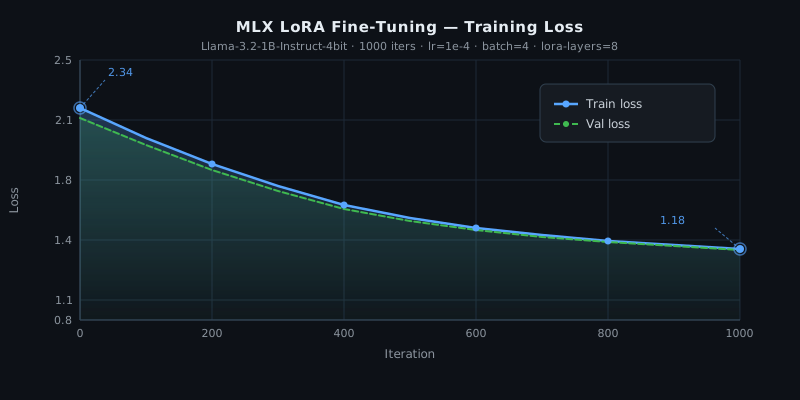 Training loss dropping from ~2.3 to ~1.2 over 1000 iterations — this is what healthy training looks like
If it fails:
- OOM / process killed: Reduce
--batch-sizeto 2 or 1, reduce--lora-layersto 4 - Loss not decreasing: Lower
--learning-rateto1e-5, check your data format - "No such file: train.jsonl": MLX expects the files named exactly
train.jsonlandvalid.jsonlinside your--datafolder
Step 5: Run Inference with Your Adapter
python3 -m mlx_lm.generate \
  --model mlx-community/Llama-3.2-1B-Instruct-4bit \
  --adapter-path ./adapters \
  --prompt "Your test prompt here" \
  --max-tokens 200
Or use it in Python:
from mlx_lm import load, generate

# Load base model + your adapter
model, tokenizer = load(
    "mlx-community/Llama-3.2-1B-Instruct-4bit",
    adapter_path="./adapters"
)

# Run inference
prompt = "Explain gradient descent in plain English"
response = generate(model, tokenizer, prompt=prompt, max_tokens=300, verbose=True)
print(response)
Expected: Your model responds in the style/domain you trained it on, faster than calling an API.
Step 6 (Optional): Fuse Adapter into the Model
For deployment, fuse the adapter weights into the base model to get a single standalone model:
python3 -m mlx_lm.fuse \
  --model mlx-community/Llama-3.2-1B-Instruct-4bit \
  --adapter-path ./adapters \
  --save-path ./my-finetuned-model
This produces a self-contained model directory you can share or load without the base model.
Verification
Test that your fine-tuned model behaves differently from the base:
# Base model response
python3 -m mlx_lm.generate \
  --model mlx-community/Llama-3.2-1B-Instruct-4bit \
  --prompt "Your test prompt" \
  --max-tokens 100

# Fine-tuned response (same prompt)
python3 -m mlx_lm.generate \
  --model mlx-community/Llama-3.2-1B-Instruct-4bit \
  --adapter-path ./adapters \
  --prompt "Your test prompt" \
  --max-tokens 100
You should see: Noticeably different outputs — the fine-tuned version should reflect your training data's style, domain, or format.
 Base model (left) gives a generic answer; fine-tuned model (right) responds in the target domain
What You Learned
- MLX uses Apple Silicon's unified memory to run training that would normally need a dedicated GPU
- LoRA fine-tuning only trains adapter weights (~1% of parameters) — the full model stays frozen
- Dataset quality matters more than size: 100 clean examples beat 1000 noisy ones
- The
adapters/folder is small (~10MB) — you only need the base model + adapter to deploy
Limitations:
- Training speed is roughly 3–5 iterations/sec on M2, compared to 30+ on an A100 — fine for experimentation, slow for large datasets
- MLX format models must be converted from PyTorch/Hugging Face format — not every model has an
mlx-communityversion yet - When NOT to use this: if you need to train on 10k+ examples regularly, a cloud GPU (or Apple M4 Ultra) will save you hours
Next tuning levers if results aren't great:
- More data (most impactful)
- More iterations (watch for overfitting on valid loss)
- Increase
--lora-layersto 16 - Try a larger base model if RAM allows
Tested on Apple M3 Pro (18GB), macOS 15.3, mlx-lm 0.21.0, Python 3.11