Together AI's fast inference API gives you OpenAI-compatible access to over 200 open-source LLMs — Llama 3.3 70B, Mistral, Qwen 2.5, DeepSeek R1 — with no infrastructure to manage and a free tier to start.
This guide walks through integrating the Together AI API into a Python or TypeScript project, handling streaming, batching, and keeping costs under control. Pricing starts at $0.18/1M tokens for Llama 3.3 8B (USD).
You'll learn:
- How to authenticate and call Together AI's chat completions endpoint
- Streaming responses and handling tool calls
- Picking the right model tier for speed vs. cost in production
- Comparing Together AI to self-hosting on your own GPU
Time: 20 min | Difficulty: Intermediate
Why Together AI Exists
Running open-source LLMs yourself is appealing until you hit the first cold-start timeout or GPU OOM error. Together AI's infrastructure team has spent years optimizing inference throughput for models that would otherwise require an A100 cluster to serve at production latency.
The API surface is intentionally OpenAI-compatible. You can swap openai for together in most codebases in under five minutes.
Common pain points it solves:
- Llama 3.3 70B requires ~140GB VRAM to run at full precision — most teams don't have that
- Self-hosted vLLM or TGI setups take days to tune for optimal throughput
- Provider lock-in with closed-source models (GPT-4o, Claude Sonnet)
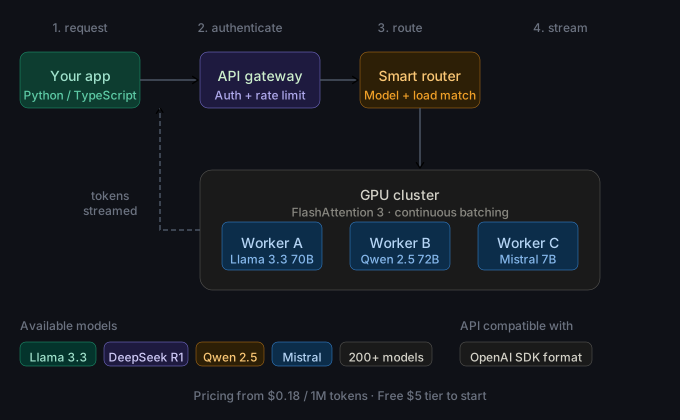 Together AI routes each request to the fastest available GPU worker, streams tokens back, and handles autoscaling automatically.
Step 1: Get Your API Key
Sign up at together.ai. The free tier gives you $5 in credits — enough to run several hundred Llama 3.3 8B completions.
- Go to Settings → API Keys
- Click Create New Key
- Copy the key — it starts with
together_
Store it as an environment variable. Never hardcode it.
export TOGETHER_API_KEY="together_xxxxxxxxxxxxxxxxxxxx"
Step 2: Install the SDK
Together AI ships a first-party Python SDK that wraps the REST API with typed responses and automatic retries.
pip install together
For TypeScript:
npm install together-ai
Verify the install:
python -c "import together; print(together.__version__)"
Expected output: 1.x.x (current stable as of March 2026)
Step 3: Make Your First Chat Completion
The API follows the OpenAI messages schema exactly. If you've used openai.chat.completions.create, this will look familiar.
import os
from together import Together

client = Together(api_key=os.environ["TOGETHER_API_KEY"])

response = client.chat.completions.create(
    model="meta-llama/Llama-3.3-70B-Instruct-Turbo",  # Turbo = optimized throughput routing
    messages=[
        {"role": "system", "content": "You are a helpful assistant."},
        {"role": "user", "content": "Explain token streaming in one paragraph."},
    ],
    max_tokens=512,
    temperature=0.7,
)

print(response.choices[0].message.content)
Expected output: A paragraph explaining token streaming.
If it fails:
AuthenticationError→ Check thatTOGETHER_API_KEYis exported in the current shell sessionModelNotFoundError→ Use the exact model string from the Together AI models page
Step 4: Stream Tokens in Real Time
Streaming drastically reduces time-to-first-token (TTFT) — critical for chat UIs and agent loops where users expect immediate feedback.
import os
from together import Together

client = Together(api_key=os.environ["TOGETHER_API_KEY"])

stream = client.chat.completions.create(
    model="meta-llama/Llama-3.3-70B-Instruct-Turbo",
    messages=[{"role": "user", "content": "Write a FastAPI health check endpoint."}],
    max_tokens=1024,
    stream=True,  # Returns an iterator of delta chunks instead of a single response
)

for chunk in stream:
    delta = chunk.choices[0].delta.content
    if delta:
        print(delta, end="", flush=True)  # flush=True keeps output live in terminals and notebooks
print()
Expected output: Code prints token-by-token as it generates.
Step 5: Use the OpenAI-Compatible Endpoint (Zero Refactor)
If you already have an openai client in your codebase, point base_url at Together AI's endpoint instead. No other code changes needed.
import os
from openai import OpenAI

client = OpenAI(
    api_key=os.environ["TOGETHER_API_KEY"],
    base_url="https://api.together.xyz/v1",  # Drop-in replacement for api.openai.com/v1
)

response = client.chat.completions.create(
    model="mistralai/Mistral-7B-Instruct-v0.3",
    messages=[{"role": "user", "content": "What is mixture-of-experts?"}],
    max_tokens=256,
)

print(response.choices[0].message.content)
This approach works with LangChain, LlamaIndex, and any other framework that accepts a custom base_url.
Step 6: TypeScript Integration
For Node.js or Bun projects, the together-ai package exposes the same interface.
import Together from "together-ai";

const client = new Together({ apiKey: process.env.TOGETHER_API_KEY });

const response = await client.chat.completions.create({
  model: "Qwen/Qwen2.5-72B-Instruct-Turbo",
  messages: [{ role: "user", content: "Summarize the Together AI pricing model." }],
  max_tokens: 256,
});

console.log(response.choices[0].message.content);
For streaming in TypeScript:
const stream = await client.chat.completions.create({
  model: "Qwen/Qwen2.5-72B-Instruct-Turbo",
  messages: [{ role: "user", content: "List 5 use cases for inference APIs." }],
  stream: true,
});

for await (const chunk of stream) {
  process.stdout.write(chunk.choices[0]?.delta?.content ?? "");
}
Model Selection: Speed vs. Cost
Together AI segments models into three tiers. Picking the right tier is the single biggest lever for cost control.
| Model | Context | Price (Input/Output) | Best For |
|---|---|---|---|
| Llama 3.3 8B Turbo | 128K | $0.18 / $0.18 per 1M tokens | High-volume classification, summarization |
| Llama 3.3 70B Turbo | 128K | $0.88 / $0.88 per 1M tokens | General-purpose chat, coding |
| Qwen 2.5 72B Turbo | 32K | $1.20 / $1.20 per 1M tokens | Multilingual, structured output |
| DeepSeek R1 | 64K | $3.00 / $7.00 per 1M tokens | Multi-step reasoning, math |
| Llama 3.3 70B (non-Turbo) | 128K | $0.90 / $0.90 per 1M tokens | Balanced throughput |
Turbo variants use FlashAttention 3 and continuous batching. They're 20–40% faster than standard variants and cost the same or less. Always prefer Turbo for production unless you need a specific fine-tune.
USD budget estimate for a production chat app at 1M tokens/day: ~$0.88/day with Llama 3.3 70B Turbo, or ~$0.18/day if you can use the 8B.
Together AI vs. Self-Hosting: When to Use Each
| Together AI API | Self-hosted vLLM / TGI | |
|---|---|---|
| Setup time | 5 minutes | 1–3 days |
| Cost at 1M tokens/day | $0.18–$3.00 USD | $2–$8 (A100 spot, AWS us-east-1) |
| Cold start | None | 30–120 sec |
| Model variety | 200+ models | Whatever you download |
| Data privacy | Shared infrastructure | Full control |
| Fine-tuned models | Via Together fine-tuning API | Any checkpoint |
Use Together AI if: You're moving fast, don't have a GPU cluster, or your token volume is under ~5M/day per model.
Self-host if: You have strong data-residency requirements, need a proprietary fine-tune served at scale, or your volume exceeds ~20M tokens/day where GPU amortization wins.
Verification
Run this end-to-end check to confirm authentication, model routing, and response parsing all work:
import os
from together import Together

client = Together(api_key=os.environ["TOGETHER_API_KEY"])

response = client.chat.completions.create(
    model="meta-llama/Llama-3.3-70B-Instruct-Turbo",
    messages=[{"role": "user", "content": "Reply with only: TOGETHER_OK"}],
    max_tokens=10,
)

assert response.choices[0].message.content.strip() == "TOGETHER_OK", "API check failed"
print("✅ Together AI API is working correctly")
print(f"Model: {response.model}")
print(f"Tokens used: {response.usage.total_tokens}")
You should see:
✅ Together AI API is working correctly
Model: meta-llama/Llama-3.3-70B-Instruct-Turbo
Tokens used: 11
What You Learned
- Together AI's API is OpenAI-compatible — swap
base_urlto migrate existing code in minutes - Turbo model variants use continuous batching and FlashAttention 3; always prefer them in production
- At low-to-medium token volumes (under 5M/day), managed inference is cheaper than A100 spot instances on AWS us-east-1
- The Python SDK handles retries and auth — use it over raw
requestscalls
Tested on Together AI SDK v1.x, Python 3.12, and Bun 1.1 — March 2026
FAQ
Q: Does Together AI support function calling / tool use?
A: Yes, for models that have been instruction-tuned with tool schemas (Llama 3.3, Qwen 2.5, Mistral). Pass a tools array in the same format as the OpenAI API.
Q: What is the rate limit on the free tier? A: 60 requests per minute on the free $5 credit tier. Paid accounts start at 600 RPM and scale on request.
Q: Can I use Together AI inside a Docker container without exposing my API key?
A: Yes — pass TOGETHER_API_KEY as a Docker secret or environment variable via --env-file. Never bake the key into the image layer.
Q: How does Together AI compare to Groq for inference speed? A: Groq uses custom LPU hardware and leads on raw tokens-per-second for supported models (Llama 3, Mixtral). Together AI has a broader model catalog and better multi-modal support. For pure speed on Llama 3.3 70B, benchmark both — Groq is often 2–3× faster but has fewer model options.