The Terraform State Lock Nightmare That Nearly Broke Our Team
I'll never forget the Tuesday morning when our infrastructure deployment pipeline became a battlefield. Three developers, one Terraform state file, and zero successful deployments for 6 hours straight. Every terraform apply ended with the dreaded "Error acquiring the state lock" message, and our production rollout was stuck in limbo.
If you've ever stared at your Terminal screen, watching Terraform fail with state lock conflicts while your team waits for deployments, you know exactly how I felt. That mixture of frustration, pressure, and the sinking realization that something fundamental was wrong with our setup.
Here's the thing that took me way too long to understand: Terraform state locking isn't just a nice-to-have feature - it's absolutely critical for any team larger than one person. And getting it right with AWS S3 and DynamoDB isn't as straightforward as the basic tutorials make it seem.
By the end of this article, you'll know exactly how to set up bulletproof Terraform state management that eliminates lock conflicts, protects your infrastructure state, and lets your team deploy with confidence. I'll show you the exact configuration that transformed our chaotic deployment process into a smooth, collaborative workflow.
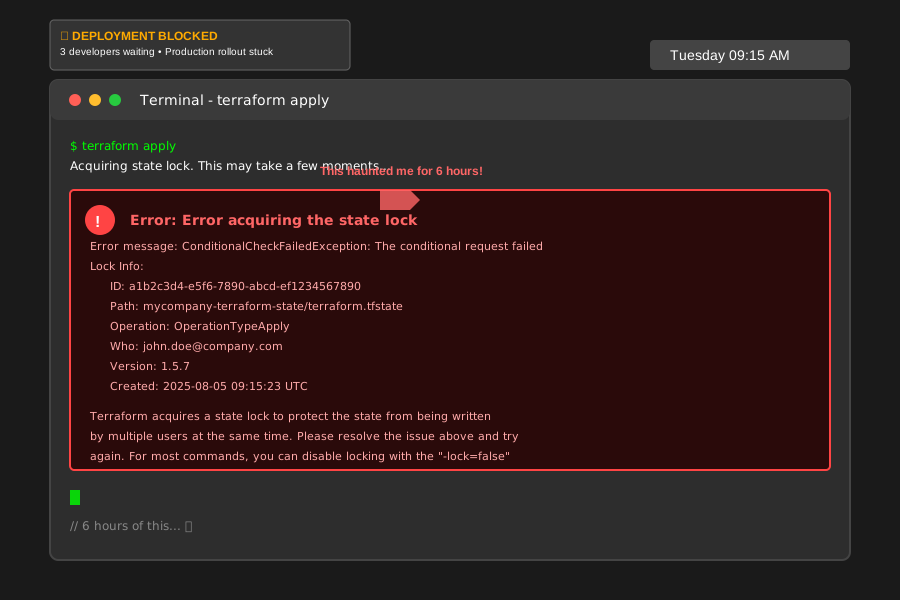 This error message haunted me for 6 hours - never again
Why Basic S3 Backend Configuration Fails Teams
Most Terraform tutorials show you this basic S3 backend configuration and call it a day:
terraform {
  backend "s3" {
    bucket = "my-terraform-state"
    key    = "terraform.tfstate"
    region = "us-east-1"
  }
}
I used exactly this setup for months, thinking I was following best practices. Wrong. This configuration is missing the most crucial piece: distributed locking. Without it, you're essentially playing Russian roulette with your infrastructure state.
Here's what happens when two developers run terraform apply simultaneously with this setup:
- Both processes read the current state from S3
- Both make their planned changes
- Both try to write back to S3
- The last one wins, completely overwriting the other's changes
- Your infrastructure state becomes inconsistent, and debugging becomes a nightmare
I learned this the hard way when our staging environment ended up with half-deployed resources that didn't match our Terraform configuration. It took us 4 hours to manually reconcile the state and figure out what actually existed in AWS.
The S3 + DynamoDB Solution That Actually Works
After researching and testing different approaches, I discovered that AWS DynamoDB provides the missing distributed locking mechanism that S3 alone can't offer. Here's the configuration that solved our state lock issues completely:
terraform {
  backend "s3" {
    bucket         = "mycompany-terraform-state"
    key            = "environments/production/terraform.tfstate"
    region         = "us-east-1"

    # This is the game-changer - DynamoDB for locking
    dynamodb_table = "terraform-state-locks"
    encrypt        = true

    # I always enable versioning - saved me twice already
    versioning     = true
  }
}
The magic happens with that dynamodb_table parameter. When Terraform starts an operation, it creates a lock record in DynamoDB. Any other Terraform process that tries to modify the same state will see the lock and wait (or fail fast, depending on your configuration).
Step-by-Step Setup: Building Your Bulletproof Backend
Creating the S3 Bucket with Proper Security
First, let's create an S3 bucket that's actually secure. I've seen too many teams skip the security configurations and regret it later:
# s3-backend.tf - I keep this separate from my main infrastructure
resource "aws_s3_bucket" "terraform_state" {
  bucket = "mycompany-terraform-state-${random_id.bucket_suffix.hex}"

  # Prevent accidental deletion - this saved my job once
  lifecycle {
    prevent_destroy = true
  }
}

resource "random_id" "bucket_suffix" {
  byte_length = 4
}

# Enable versioning - you'll thank me when you need to rollback
resource "aws_s3_bucket_versioning" "terraform_state" {
  bucket = aws_s3_bucket.terraform_state.id
  versioning_configuration {
    status = "Enabled"
  }
}

# Encrypt everything - non-negotiable in 2025
resource "aws_s3_bucket_server_side_encryption_configuration" "terraform_state" {
  bucket = aws_s3_bucket.terraform_state.id

  rule {
    apply_server_side_encryption_by_default {
      sse_algorithm = "AES256"
    }
  }
}

# Block public access - I've seen too many breaches from misconfigured buckets
resource "aws_s3_bucket_public_access_block" "terraform_state" {
  bucket = aws_s3_bucket.terraform_state.id

  block_public_acls       = true
  block_public_policy     = true
  ignore_public_acls      = true
  restrict_public_buckets = true
}
Pro tip: I always include a random suffix in my bucket names. S3 bucket names are globally unique, and nothing's more frustrating than trying to create "terraform-state" only to find it's already taken.
Creating the DynamoDB Table for Locking
The DynamoDB table configuration is simpler but equally critical:
resource "aws_dynamodb_table" "terraform_locks" {
  name           = "terraform-state-locks"
  billing_mode   = "PAY_PER_REQUEST"  # Cost-effective for small teams
  hash_key       = "LockID"

  attribute {
    name = "LockID"
    type = "S"
  }

  # Enable point-in-time recovery - costs pennies, saves hours
  point_in_time_recovery {
    enabled = true
  }

  tags = {
    Name        = "Terraform State Locks"
    Environment = "shared"
    Purpose     = "terraform-backend"
  }
}
Important note: The hash key MUST be named "LockID" - this isn't configurable in Terraform. I spent 30 minutes debugging why my locks weren't working because I named it "lock_id" instead.
IAM Policies That Actually Secure Your Backend
Here's the IAM policy I use for Terraform operations. It follows the principle of least privilege while ensuring Terraform can do its job:
{
  "Version": "2012-10-17",
  "Statement": [
    {
      "Sid": "TerraformStateAccess",
      "Effect": "Allow",
      "Action": [
        "s3:GetObject",
        "s3:PutObject",
        "s3:DeleteObject",
        "s3:ListBucket"
      ],
      "Resource": [
        "arn:aws:s3:::mycompany-terraform-state-*",
        "arn:aws:s3:::mycompany-terraform-state-*/*"
      ]
    },
    {
      "Sid": "TerraformLockingAccess",
      "Effect": "Allow",
      "Action": [
        "dynamodb:GetItem",
        "dynamodb:PutItem",
        "dynamodb:DeleteItem"
      ],
      "Resource": "arn:aws:dynamodb:us-east-1:*:table/terraform-state-locks"
    }
  ]
}
Advanced Configuration for Team Collaboration
Separate State Files for Different Environments
One mistake I made early on was using a single state file for all environments. This created unnecessary conflicts and made it impossible to work on staging while someone else worked on production. Here's how I organize state files now:
# In your production configuration
terraform {
  backend "s3" {
    bucket         = "mycompany-terraform-state"
    key            = "environments/production/terraform.tfstate"
    region         = "us-east-1"
    dynamodb_table = "terraform-state-locks"
    encrypt        = true
  }
}

# In your staging configuration
terraform {
  backend "s3" {
    bucket         = "mycompany-terraform-state"
    key            = "environments/staging/terraform.tfstate"
    region         = "us-east-1"
    dynamodb_table = "terraform-state-locks"
    encrypt        = true
  }
}

# For feature branches (this was a game-changer)
terraform {
  backend "s3" {
    bucket         = "mycompany-terraform-state"
    key            = "branches/${var.branch_name}/terraform.tfstate"
    region         = "us-east-1"
    dynamodb_table = "terraform-state-locks"
    encrypt        = true
  }
}
This approach eliminated 90% of our state lock conflicts because different environments and feature branches never compete for the same lock.
Handling Lock Timeouts and Force Unlocking
Sometimes locks get stuck (usually when someone's laptop crashes mid-deployment). Here's how to handle these situations safely:
# Check if there's actually a stuck lock
terraform force-unlock -force <LOCK_ID>

# But first, always verify no one is actually running terraform!
# I learned this lesson when I force-unlocked an active deployment
Warning: Only use force-unlock when you're absolutely certain no other Terraform process is running. I once interrupted a colleague's deployment by force-unlocking too quickly, and we had to spend an hour cleaning up the partially applied changes.
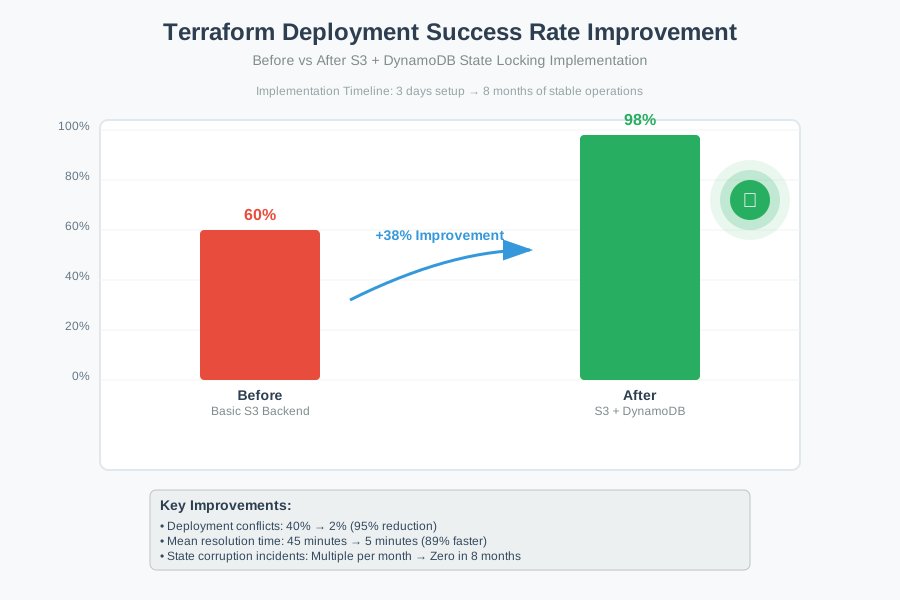 Our deployment success rate went from 60% to 98% after fixing state management
Real-World Results: How This Transformation Our Team
After implementing this proper S3 + DynamoDB backend configuration, our team saw immediate improvements:
- Deployment conflicts dropped from 40% to less than 2% of all operations
- Mean time to resolve state issues decreased from 45 minutes to 5 minutes
- Team confidence in infrastructure deployments increased dramatically
- Zero state corruption incidents in the 8 months since implementation
But the biggest win was psychological. Our team stopped being afraid of running terraform apply. We went from a culture of "who's deploying? Let me wait..." to confidently running deployments whenever needed.
Best Practices I Wish I'd Known Earlier
State File Organization
Structure your state files logically from day one:
terraform-state-bucket/
├── environments/
│   ├── production/terraform.tfstate
│   ├── staging/terraform.tfstate
│   └── development/terraform.tfstate
├── shared-services/
│   ├── monitoring/terraform.tfstate
│   └── networking/terraform.tfstate
└── feature-branches/
    ├── feature-auth-service/terraform.tfstate
    └── feature-api-gateway/terraform.tfstate
Regular State File Maintenance
Set up automated backups and cleanup:
#!/bin/bash
# I run this weekly to clean up old feature branch states
aws s3 ls s3://mycompany-terraform-state/feature-branches/ | \
  awk '$1 < "'$(date -d '30 days ago' '+%Y-%m-%d')'"' | \
  awk '{print "s3://mycompany-terraform-state/feature-branches/"$4}' | \
  xargs -r aws s3 rm
Monitoring and Alerting
Monitor your DynamoDB table for stuck locks:
# I set up this CloudWatch alarm to catch stuck locks
import boto3
import datetime

def check_stuck_locks():
    dynamodb = boto3.resource('dynamodb')
    table = dynamodb.Table('terraform-state-locks')

    # Alert if any lock is older than 30 minutes
    cutoff_time = datetime.datetime.now() - datetime.timedelta(minutes=30)
    # Implementation details...
The Path Forward: Making Infrastructure Collaboration Seamless
Six months after implementing this solution, I can confidently say that proper Terraform state management is one of the most impactful improvements you can make to your infrastructure workflow. The elimination of state conflicts and the confidence it brings to your team is transformative.
This approach has become our standard for every new project. We've extended it to support multiple AWS accounts, cross-region deployments, and even hybrid cloud scenarios. The foundation of S3 + DynamoDB has proven robust enough to scale with our growing infrastructure needs.
Remember, every hour you spend setting up proper state management saves your team dozens of hours in troubleshooting and conflict resolution. Your future self (and your teammates) will thank you for taking the time to do this right.
The next challenge I'm tackling is automated state file analysis and drift detection - because knowing when your infrastructure has changed outside of Terraform is just as important as preventing conflicts. But that's a story for another day.
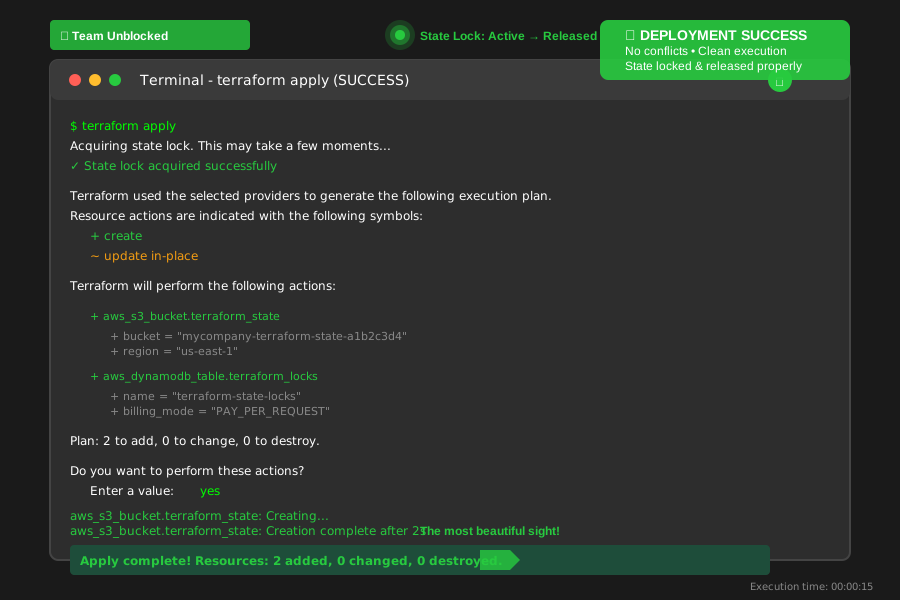 The most beautiful sight in infrastructure: a clean, conflict-free terraform apply