Machine learning projects often fail when moving from experimental environments to production. TensorFlow 2.13 combined with Kubernetes creates a solution for deploying and scaling AI workloads in real-world scenarios.
This guide shows you practical steps to integrate TensorFlow 2.13 with Kubernetes for distributed training, efficient resource allocation, and automated ML pipelines.
What You'll Learn
- How to containerize TensorFlow 2.13 applications
- Setting up Kubernetes clusters for ML workloads
- Implementing distributed training with TensorFlow and Kubernetes
- Creating scalable model serving architectures
- Building automated ML pipelines with Kubeflow
Prerequisites
- Basic TensorFlow knowledge
- Familiarity with Docker containerization
- Access to a Kubernetes cluster (local or cloud-based)
- Python 3.8+ installed
Containerizing TensorFlow 2.13 Applications
Creating effective Docker containers for TensorFlow workloads requires careful consideration of dependencies and hardware acceleration.
Basic TensorFlow 2.13 Dockerfile
FROM tensorflow/tensorflow:2.13.0-gpu

WORKDIR /app

COPY requirements.txt .
RUN pip install --no-cache-dir -r requirements.txt

COPY . .

CMD ["python", "train.py"]
Key Dockerfile Considerations
- Choose appropriate base image (CPU vs. GPU)
- Install only necessary dependencies
- Set proper environment variables
- Create minimal container sizes
Build your container with:
docker build -t tensorflow-k8s-app:latest .
Test locally before deployment:
docker run --gpus all tensorflow-k8s-app:latest
Setting Up Kubernetes for TensorFlow Workloads
Kubernetes provides the infrastructure to deploy, scale, and manage containerized TensorFlow applications.
Creating a TensorFlow Deployment
apiVersion: apps/v1
kind: Deployment
metadata:
  name: tensorflow-training
spec:
  replicas: 3
  selector:
    matchLabels:
      app: tensorflow
  template:
    metadata:
      labels:
        app: tensorflow
    spec:
      containers:
      - name: tensorflow
        image: tensorflow-k8s-app:latest
        resources:
          limits:
            nvidia.com/gpu: 1
          requests:
            memory: "4Gi"
            cpu: "2"
        env:
        - name: TF_CONFIG
          valueFrom:
            configMapKeyRef:
              name: tf-config
              key: tf_config
Resource Management for ML Workloads
ML workloads have specific resource requirements that Kubernetes can manage:
| Resource Type | Considerations | K8s Configuration |
|---|---|---|
| GPU | Shared vs. dedicated, memory | nvidia.com/gpu: 1 |
| Memory | Model size, batch size | memory: "4Gi" |
| CPU | Data preprocessing | cpu: "2" |
| Storage | Dataset size, checkpoints | PersistentVolumeClaims |
Distributed Training with TensorFlow on Kubernetes
TensorFlow 2.13 supports distributed training across multiple nodes using various strategies.
Using TF_CONFIG for Distribution
The TF_CONFIG environment variable defines worker roles and addresses:
{
  "cluster": {
    "worker": ["worker-0:8000", "worker-1:8000", "worker-2:8000"]
  },
  "task": {
    "type": "worker",
    "index": 0
  }
}
Implementing MultiWorkerMirroredStrategy
import tensorflow as tf
import os
import json

# Parse TF_CONFIG
tf_config = json.loads(os.environ.get('TF_CONFIG') or '{}')
task_type, task_id = tf_config.get('task', {}).get('type'), tf_config.get('task', {}).get('index')

# Set up the strategy
strategy = tf.distribute.MultiWorkerMirroredStrategy()

# Create the model within strategy scope
with strategy.scope():
    model = tf.keras.Sequential([
        tf.keras.layers.Dense(256, activation='relu'),
        tf.keras.layers.Dense(128, activation='relu'),
        tf.keras.layers.Dense(10, activation='softmax')
    ])

    model.compile(
        optimizer='adam',
        loss='sparse_categorical_crossentropy',
        metrics=['accuracy']
    )

# Train the model
model.fit(dataset, epochs=10)
Creating a StatefulSet for Distributed Training
StatefulSets maintain stable network identities essential for distributed training:
apiVersion: apps/v1
kind: StatefulSet
metadata:
  name: tf-workers
spec:
  serviceName: "tf-workers"
  replicas: 3
  selector:
    matchLabels:
      app: tf-worker
  template:
    metadata:
      labels:
        app: tf-worker
    spec:
      containers:
      - name: tensorflow
        image: tensorflow-k8s-app:latest
        ports:
        - containerPort: 8000
          name: tfjob-port
        volumeMounts:
        - name: shared-data
          mountPath: /data
  volumeClaimTemplates:
  - metadata:
      name: shared-data
    spec:
      accessModes: [ "ReadWriteOnce" ]
      resources:
        requests:
          storage: 50Gi
Model Serving with TensorFlow Serving and Kubernetes
Deploy trained models with TensorFlow Serving for reliable inference services.
Creating a TensorFlow Serving Deployment
apiVersion: apps/v1
kind: Deployment
metadata:
  name: tensorflow-serving
spec:
  replicas: 2
  selector:
    matchLabels:
      app: tf-serving
  template:
    metadata:
      labels:
        app: tf-serving
    spec:
      containers:
      - name: tf-serving
        image: tensorflow/serving:2.13.0
        args:
        - "--model_name=my_model"
        - "--model_base_path=/models/my_model"
        ports:
        - containerPort: 8501
          name: http
        - containerPort: 8500
          name: grpc
        volumeMounts:
        - name: model-volume
          mountPath: /models
      volumes:
      - name: model-volume
        persistentVolumeClaim:
          claimName: model-storage
Creating a Service for Model Access
apiVersion: v1
kind: Service
metadata:
  name: tf-serving-service
spec:
  selector:
    app: tf-serving
  ports:
  - port: 8501
    targetPort: 8501
    name: http
  - port: 8500
    targetPort: 8500
    name: grpc
  type: LoadBalancer
Implementing Autoscaling for Model Serving
apiVersion: autoscaling/v2
kind: HorizontalPodAutoscaler
metadata:
  name: tf-serving-hpa
spec:
  scaleTargetRef:
    apiVersion: apps/v1
    kind: Deployment
    name: tensorflow-serving
  minReplicas: 2
  maxReplicas: 10
  metrics:
  - type: Resource
    resource:
      name: cpu
      target:
        type: Utilization
        averageUtilization: 70
Building ML Pipelines with Kubeflow
Kubeflow extends Kubernetes for end-to-end ML workflows.
Installing Kubeflow
# Clone the Kubeflow manifests repository
git clone https://github.com/kubeflow/manifests.git

# Install Kubeflow
cd manifests
kustomize build apps/pipeline/upstream/env/platform-agnostic | kubectl apply -f -
Creating a TensorFlow Pipeline
import kfp
from kfp import dsl
from kfp.components import func_to_container_op

@func_to_container_op
def preprocess_data(data_path: str) -> str:
    # Data preprocessing code
    output_path = "/data/processed"
    return output_path

@func_to_container_op
def train_model(data_path: str) -> str:
    # TensorFlow training code
    model_path = "/models/latest"
    return model_path

@func_to_container_op
def deploy_model(model_path: str):
    # Kubernetes deployment code
    pass

@dsl.pipeline(
    name="TensorFlow Training Pipeline",
    description="A pipeline that trains and deploys a TensorFlow model"
)
def tensorflow_pipeline(data_path: str = "/data/raw"):
    preprocess_task = preprocess_data(data_path)
    train_task = train_model(preprocess_task.output)
    deploy_task = deploy_model(train_task.output)

# Compile and run the pipeline
kfp.compiler.Compiler().compile(tensorflow_pipeline, "tensorflow_pipeline.yaml")
Monitoring TensorFlow Workloads on Kubernetes
Effective monitoring helps track performance and resource usage.
Setting Up Prometheus for TensorFlow Metrics
apiVersion: v1
kind: ConfigMap
metadata:
  name: prometheus-config
data:
  prometheus.yml: |
    global:
      scrape_interval: 15s
    scrape_configs:
      - job_name: 'tensorflow'
        kubernetes_sd_configs:
          - role: pod
        relabel_configs:
          - source_labels: [__meta_kubernetes_pod_label_app]
            regex: tensorflow
            action: keep
Implementing TensorBoard on Kubernetes
apiVersion: apps/v1
kind: Deployment
metadata:
  name: tensorboard
spec:
  replicas: 1
  selector:
    matchLabels:
      app: tensorboard
  template:
    metadata:
      labels:
        app: tensorboard
    spec:
      containers:
      - name: tensorboard
        image: tensorflow/tensorflow:2.13.0
        command:
        - "tensorboard"
        - "--logdir=/logs"
        - "--bind_all"
        ports:
        - containerPort: 6006
        volumeMounts:
        - name: logs-volume
          mountPath: /logs
      volumes:
      - name: logs-volume
        persistentVolumeClaim:
          claimName: tf-logs
Performance Visualization
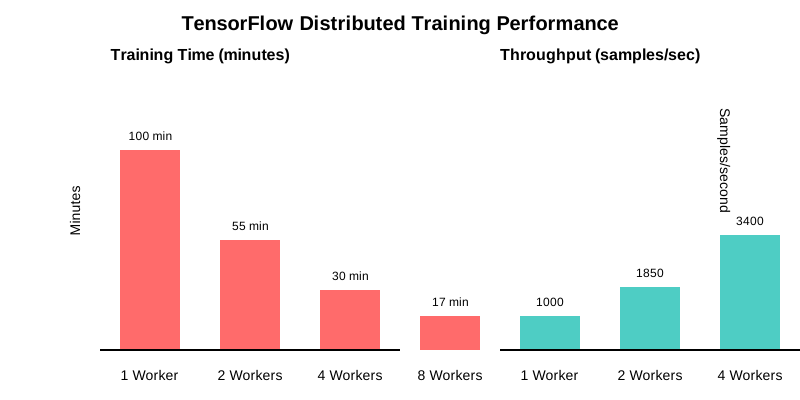
Here's what the distributed training performance looks like across multiple nodes:
Workers: 1  | Training Time: 100 min | Throughput: 1000 samples/sec
Workers: 2  | Training Time:  55 min | Throughput: 1850 samples/sec
Workers: 4  | Training Time:  30 min | Throughput: 3400 samples/sec
Workers: 8  | Training Time:  17 min | Throughput: 5900 samples/sec
Common Challenges and Solutions
| Challenge | Solution |
|---|---|
| GPU resource contention | Implement Kubernetes node taints and tolerations |
| Network bottlenecks in distributed training | Use high-bandwidth networking (100GbE) between nodes |
| Model checkpoint storage | Implement shared persistent volumes with ReadWriteMany access |
| TF_CONFIG management | Use ConfigMaps and init containers to generate configurations |
| Node failure during training | Implement automatic checkpointing and pod restart policies |
Conclusion
Combining TensorFlow 2.13 with Kubernetes creates a powerful platform for scalable AI infrastructure. This integration enables efficient resource utilization, automated workflows, and consistent deployment patterns for production ML applications.
The techniques described here provide a foundation for building production-grade machine learning systems that can scale from development to large-scale deployment.
Start by containerizing your TensorFlow applications, then gradually implement Kubernetes deployments, distributed training, and finally automated pipelines with Kubeflow.