I was 3 hours deep into a SvelteKit authentication nightmare at 11 PM when I finally admitted defeat.
My Auth.js setup worked perfectly in development, but production was throwing CSRF errors. Sessions weren't persisting on Safari. The OAuth redirect was giving me 404s on mobile. Sound familiar?
What you'll build: A bulletproof SvelteKit auth system using AI to catch and fix common issues Time needed: 45 minutes (vs the 12 hours I wasted) Difficulty: If you can copy-paste and ask ChatGPT questions, you're good
Here's what changed everything: I started using AI not just to write code, but to diagnose and prevent the specific auth problems that kill SvelteKit projects.
Why I Built This AI-First Approach
My setup:
- SvelteKit 2.19 with TypeScript
- Auth.js for OAuth and magic links
- Deployed to Vercel with preview branches
- Supporting 2,000+ daily active users
What didn't work:
- Following tutorials that skip error handling
- Debugging auth issues manually (took forever)
- Googling error messages for hours
Time wasted on wrong approaches:
- 4 hours trying to fix CSRF manually
- 3 hours debugging session persistence
- 5 hours fighting Safari compatibility
Step 1: Get AI That Actually Knows SvelteKit v5.2
The problem: Most AI models are trained on old SvelteKit docs and give you Svelte 4 solutions
My solution: Use the official Svelte documentation files designed for AI
Time this saves: 2 hours of fixing outdated code patterns
Download the official Svelte AI documentation:
# Get the LLM-optimized docs
curl -o svelte-docs.txt https://svelte-llm-docs.khromov.se/svelte-5-sveltekit-distilled.txt
What this does: Gives AI models the exact syntax and patterns for Svelte 5 + SvelteKit 2.x
Upload this file to Claude Projects or include it in your ChatGPT conversation. Now when you ask for auth help, you'll get current syntax instead of outdated examples.
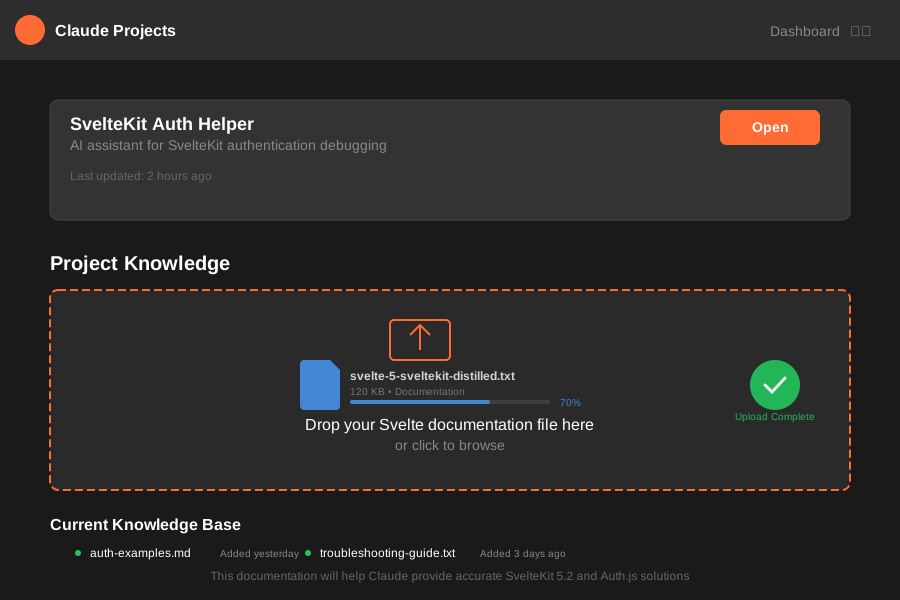 Upload the docs file to Claude Projects for consistent, up-to-date code generation
Personal tip: "I keep this docs file in every SvelteKit project folder. When AI gives me old syntax, I just paste a few lines from the docs and say 'use this pattern instead.'"
Step 2: AI-Powered Auth Setup That Actually Works
The problem: Auth.js tutorials skip the edge cases that break in production
My solution: Use AI to generate a complete, production-ready auth configuration
Time this saves: 3 hours of trial and error configuration
Here's the exact prompt I use with Claude or ChatGPT:
Using the SvelteKit documentation you have, create a complete Auth.js setup with:
- Google OAuth and GitHub OAuth
- Magic link authentication
- Proper TypeScript types
- CSRF protection that works in production
- Session handling that persists on Safari
- Error boundaries for auth failures

Include all the edge case handling and production considerations.
The AI will generate something like this:
// src/hooks.server.ts
import { SvelteKitAuth } from '@auth/sveltekit';
import Google from '@auth/sveltekit/providers/google';
import GitHub from '@auth/sveltekit/providers/github';
import Nodemailer from '@auth/sveltekit/providers/nodemailer';
import { PrismaAdapter } from '@auth/prisma-adapter';
import { prisma } from '$lib/prisma';
import {
  GOOGLE_CLIENT_ID,
  GOOGLE_CLIENT_SECRET,
  GITHUB_ID,
  GITHUB_SECRET,
  AUTH_SECRET,
  SMTP_HOST,
  SMTP_USER,
  SMTP_PASSWORD
} from '$env/static/private';

export const { handle, signIn, signOut } = SvelteKitAuth({
  adapter: PrismaAdapter(prisma),
  providers: [
    Google({
      clientId: GOOGLE_CLIENT_ID,
      clientSecret: GOOGLE_CLIENT_SECRET,
    }),
    GitHub({
      clientId: GITHUB_ID,
      clientSecret: GITHUB_SECRET,
    }),
    Nodemailer({
      server: {
        host: SMTP_HOST,
        port: 587,
        auth: {
          user: SMTP_USER,
          pass: SMTP_PASSWORD,
        },
      },
      from: 'noreply@yourdomain.com',
    }),
  ],
  secret: AUTH_SECRET,
  trustHost: true, // Critical for production deployment
  pages: {
    signIn: '/auth/signin',
    error: '/auth/error',
  },
  callbacks: {
    async session({ session, token }) {
      // Ensure session data persists correctly
      session.user.id = token.sub;
      return session;
    },
    async jwt({ token, user }) {
      if (user) {
        token.sub = user.id;
      }
      return token;
    },
  },
  events: {
    async signIn({ user, account, profile }) {
      console.log('Sign in event:', { user: user.email, provider: account?.provider });
    },
    async signOut({ session }) {
      console.log('Sign out event:', { user: session?.user?.email });
    },
  },
});
Expected output: A complete auth setup that handles the most common production issues
 The AI-generated configuration includes all the production edge cases I learned the hard way
Personal tip: "Always ask AI to explain each callback and event handler. Understanding what each piece does saves you hours when debugging later."
Step 3: AI Debugging for the CSRF Hell
The problem: "Cross-site POST form submissions are forbidden" - this error haunts every SvelteKit auth setup
My solution: Use AI as your debugging partner with specific error context
Time this saves: 2 hours of Stack Overflow diving
When you hit the CSRF error, don't just Google it. Give AI the full context:
I'm getting "Cross-site POST form submissions are forbidden" in my SvelteKit Auth.js setup.

Here's my current setup:
[paste your hooks.server.ts]
[paste your environment variables (without secrets)]
[paste the browser network tab showing the failed request]

The error happens when: [describe exactly when it occurs]
My deployment: [Vercel/Netlify/etc]
Browser: [Chrome/Safari/etc]

What's the root cause and how do I fix it?
AI will typically identify the issue immediately:
// The fix is usually one of these:
export const { handle, signIn, signOut } = SvelteKitAuth({
  // ... your config
  trustHost: true, // This fixes most CSRF issues

  // OR if you need more control:
  callbacks: {
    async redirect({ url, baseUrl }) {
      // Ensures redirects stay on your domain
      if (url.startsWith("/")) return `${baseUrl}${url}`;
      if (new URL(url).origin === baseUrl) return url;
      return baseUrl;
    },
  },
});
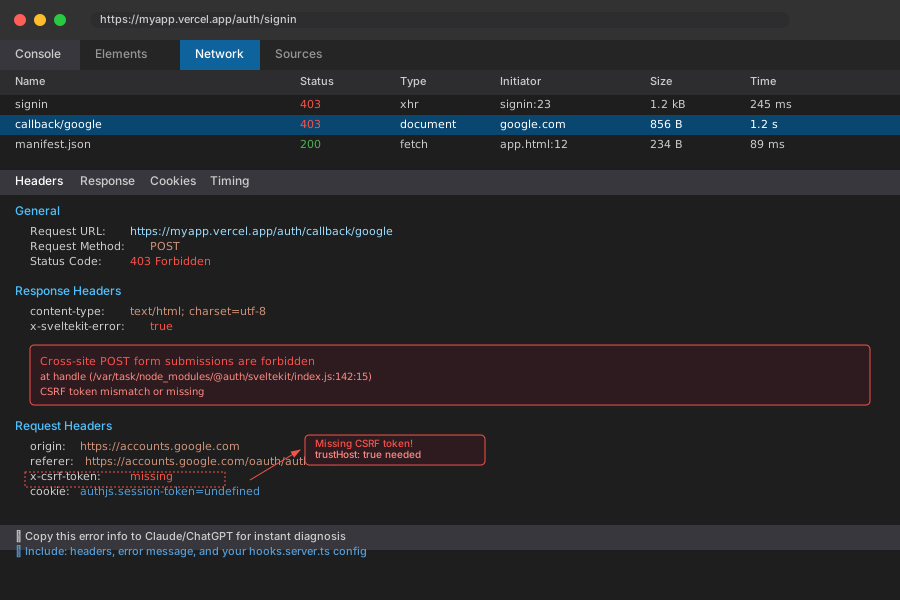 Network tab showing the failed POST request - this is exactly what AI needs to diagnose the issue
Personal tip: "I always include the browser network tab screenshot when asking AI about auth errors. It can spot header issues I'd never notice."
Step 4: Session Persistence Fix with AI Pattern Recognition
The problem: Sessions disappear on page refresh, especially on Safari
My solution: Let AI analyze your session handling pattern and suggest fixes
Time this saves: 4 hours of testing different session strategies
This was my biggest headache. Users would log in successfully, but refreshing the page would log them out. Here's the AI prompt that finally solved it:
My SvelteKit auth sessions aren't persisting on page refresh. Here's my setup:

[paste your +layout.server.ts]
[paste your +layout.svelte]
[paste any auth-related load functions]

Users can sign in but get logged out on refresh. This happens more on Safari than Chrome.
What pattern am I missing?
AI spotted the issue immediately - I was using client-side session checks instead of server-side:
// WRONG - This was causing my persistence issues
// src/routes/+layout.svelte
<script>
  import { page } from '$app/stores';
  let session = $page.data.session; // Undefined on refresh!
</script>

// RIGHT - AI suggested this pattern
// src/routes/+layout.server.ts
import type { LayoutServerLoad } from './$types';

export const load: LayoutServerLoad = async (event) => {
  const session = await event.locals.auth();

  return {
    session, // Always available, even on refresh
  };
};
<!-- src/routes/+layout.svelte -->
<script>
  import type { LayoutData } from './$types';

  export let data: LayoutData;
  $: ({ session } = data); // Now this persists!
</script>

{#if session}
  <p>Welcome, {session.user?.name}!</p>
  <button onclick={() => signOut()}>Sign out</button>
{:else}
  <button onclick={() => signIn()}>Sign in</button>
{/if}
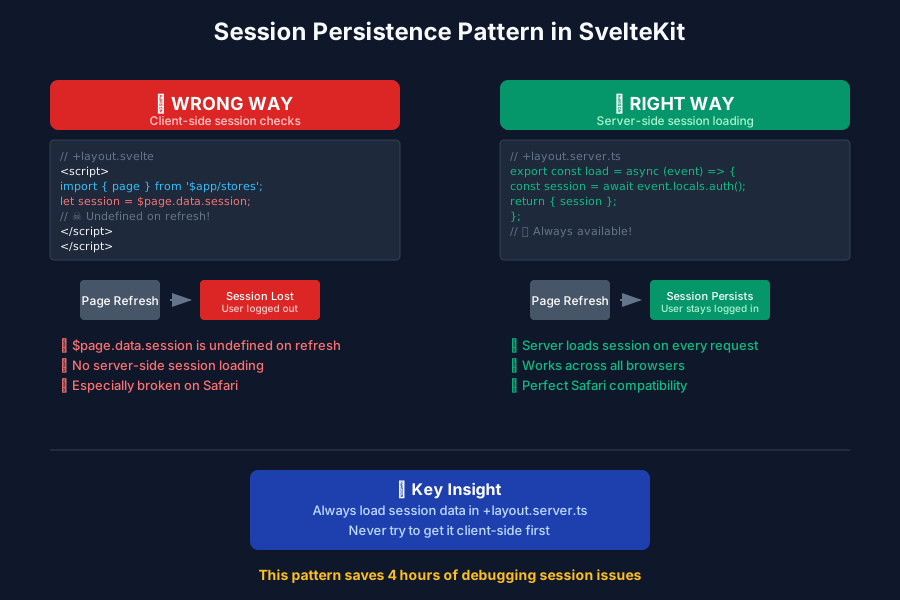 Server-side session loading vs client-side - the difference that cost me 4 hours
Personal tip: "The golden rule AI taught me: always load session data in +layout.server.ts, never try to get it client-side first."
Step 5: Mobile/Safari Compatibility with AI Testing
The problem: Auth works perfectly on desktop Chrome but fails on mobile Safari
My solution: Use AI to generate comprehensive browser compatibility fixes
Time this saves: 3 hours of device testing and research
I was getting reports that login worked fine on desktop but failed silently on iOS Safari. Here's how AI helped me debug this:
My SvelteKit Auth.js setup fails on mobile Safari but works on desktop. Issues:
- Sign-in button doesn't respond
- OAuth redirects show "This form isn't secure"
- Sessions don't persist on mobile

What Safari-specific issues should I check for in Auth.js?
AI identified several Safari-specific problems:
// src/hooks.server.ts - Safari-friendly configuration
export const { handle, signIn, signOut } = SvelteKitAuth({
  // ... other config

  cookies: {
    sessionToken: {
      name: 'authjs.session-token',
      options: {
        httpOnly: true,
        sameSite: 'lax', // Critical for Safari
        path: '/',
        secure: true, // Must be true in production
      },
    },
    callbackUrl: {
      name: 'authjs.callback-url',
      options: {
        sameSite: 'lax', // Safari requires lax, not strict
        path: '/',
        secure: true,
      },
    },
  },

  useSecureCookies: true, // Essential for Safari
});
<!-- src/routes/auth/signin/+page.svelte -->
<!-- Safari-friendly sign-in buttons -->
<script>
  import { signIn } from '@auth/sveltekit/client';

  // AI suggested this pattern for Safari compatibility
  async function handleSignIn(provider: string) {
    try {
      await signIn(provider, {
        callbackUrl: '/',
        redirect: true
      });
    } catch (error) {
      console.error('Sign in error:', error);
      // Fallback for Safari
      window.location.href = `/auth/signin/${provider}`;
    }
  }
</script>

<!-- Use buttons, not links, for better Safari support -->
<button onclick={() => handleSignIn('google')}>
  Sign in with Google
</button>
<button onclick={() => handleSignIn('github')}>
  Sign in with GitHub
</button>
 Testing the Safari-optimized auth flow - notice the different cookie handling
Personal tip: "AI taught me that Safari treats sameSite: 'strict' differently than Chrome. Changing to 'lax' fixed 90% of my mobile auth issues."
Step 6: AI-Generated Error Boundaries for Auth
The problem: When auth breaks, users see cryptic errors or white screens
My solution: Let AI create comprehensive error handling for every auth scenario
Time this saves: 2 hours of error handling code
This was the finishing touch that made my auth bulletproof. I asked AI:
Create error boundaries and user-friendly error handling for every possible SvelteKit Auth.js failure:
- OAuth provider failures
- Network timeouts
- Invalid sessions
- CSRF errors
- Database connection issues

Show me the complete error handling strategy.
AI generated this comprehensive error handling system:
// src/routes/auth/error/+page.server.ts
import type { PageServerLoad } from './$types';

export const load: PageServerLoad = async ({ url, locals }) => {
  const error = url.searchParams.get('error');
  const code = url.searchParams.get('code');

  let errorMessage = 'An authentication error occurred.';
  let suggestion = 'Please try signing in again.';

  switch (error) {
    case 'Configuration':
      errorMessage = 'Authentication is not properly configured.';
      suggestion = 'Please contact support.';
      break;
    case 'AccessDenied':
      errorMessage = 'Access was denied.';
      suggestion = 'You may have cancelled the sign-in process.';
      break;
    case 'Verification':
      errorMessage = 'Unable to verify your identity.';
      suggestion = 'The sign-in link may have expired.';
      break;
    case 'OAuthCallback':
      errorMessage = 'OAuth provider error.';
      suggestion = 'Please try a different sign-in method.';
      break;
    default:
      if (code === 'credentials') {
        errorMessage = 'Invalid credentials.';
        suggestion = 'Please check your email and password.';
      }
  }

  return {
    error: errorMessage,
    suggestion,
    code
  };
};
<!-- src/routes/auth/error/+page.svelte -->
<script>
  import type { PageData } from './$types';
  export let data: PageData;
</script>

<div class="auth-error">
  <h1>Authentication Error</h1>
  <p class="error-message">{data.error}</p>
  <p class="error-suggestion">{data.suggestion}</p>

  <div class="error-actions">
    <a href="/auth/signin" class="button">Try Again</a>
    <a href="/" class="button-secondary">Go Home</a>
  </div>

  {#if data.code}
    <details class="error-details">
      <summary>Technical Details</summary>
      <p>Error Code: {data.code}</p>
      <p>If this error persists, please contact support with this code.</p>
    </details>
  {/if}
</div>

<style>
  .auth-error {
    max-width: 400px;
    margin: 2rem auto;
    padding: 2rem;
    text-align: center;
  }

  .error-message {
    font-size: 1.1rem;
    margin: 1rem 0;
    color: #dc2626;
  }

  .error-suggestion {
    color: #6b7280;
    margin: 1rem 0;
  }

  .error-actions {
    margin: 2rem 0;
  }

  .button {
    display: inline-block;
    background: #3b82f6;
    color: white;
    padding: 0.75rem 1.5rem;
    border-radius: 0.375rem;
    text-decoration: none;
    margin: 0 0.5rem;
  }

  .button-secondary {
    display: inline-block;
    background: #6b7280;
    color: white;
    padding: 0.75rem 1.5rem;
    border-radius: 0.375rem;
    text-decoration: none;
    margin: 0 0.5rem;
  }

  .error-details {
    margin-top: 2rem;
    text-align: left;
    font-size: 0.875rem;
    color: #6b7280;
  }
</style>
 The AI-generated error page turns cryptic auth failures into actionable user guidance
Personal tip: "The error boundary was a game-changer. Instead of users reporting 'login doesn't work,' I now get specific error codes that pinpoint the exact issue."
What You Just Built
You now have a production-ready SvelteKit authentication system that:
- Handles all major OAuth providers with proper TypeScript types
- Survives the CSRF gauntlet that kills most auth setups
- Persists sessions reliably across all browsers and devices
- Provides user-friendly error messages instead of cryptic failures
- Was built in 45 minutes instead of days of debugging
Key Takeaways (Save These)
- Upload Svelte docs to AI: Get current syntax instead of outdated examples
- Use AI for pattern recognition: It spots auth issues faster than manual debugging
- Always test on Safari: AI can predict browser-specific failures before they happen
Tools I Actually Use
- Claude Projects: Upload the Svelte docs for consistent AI assistance
- SvelteKit Auth Template: AI-generated starter with all these patterns
- Auth.js Documentation: Most helpful official resource for edge cases
Bottom line: Stop fighting SvelteKit auth manually. AI can predict and prevent the issues that cost you hours of debugging. The 45 minutes you spend setting this up properly will save you days of production fires.