I still remember the panic in my stomach when our compliance officer asked, "How exactly are you securing those stablecoin private keys?" It was 2 AM, I'd been debugging a key derivation issue for six hours, and I realized our entire $50M stablecoin reserve was protected by what amounted to encrypted files on a server.
That sleepless night led me down the rabbit hole of Hardware Security Modules (HSMs), and after implementing HSM solutions for three different stablecoin projects, I've learned the hard way what actually works in production. This guide will save you the weeks of trial and error that nearly got me fired.
Why I Learned HSMs the Hard Way
Three months into our stablecoin launch, our security audit revealed what I already suspected deep down: our key management was a house of cards. We were using software-based wallets with encrypted private keys stored in database, thinking our multi-layered encryption was enough.
The auditor's report was brutal: "Private keys accessible to system administrators," "No hardware-level key isolation," "Insufficient compliance with financial regulations." Each line felt like a personal attack on my engineering competence.
That's when I discovered HSMs weren't just "nice to have" for stablecoin operations—they were absolutely essential for any serious financial application. The problem? I had no idea where to start.
Understanding HSM Requirements for Stablecoin Operations
The Compliance Reality Check
After diving into financial regulations, I learned that stablecoin issuers face similar requirements to traditional financial institutions. This means:
FIPS 140-2 Level 3 or 4 certification is typically required for storing cryptographic keys that secure significant financial assets. Level 2 might work for development, but production environments handling real money need the higher security levels.
Audit trails must be tamper-evident and comprehensive. Every key operation needs to be logged with cryptographic proof of integrity.
Role-based access control prevents any single person from compromising the entire system. Even as the lead developer, I shouldn't be able to unilaterally access signing keys.
Technical Architecture Requirements
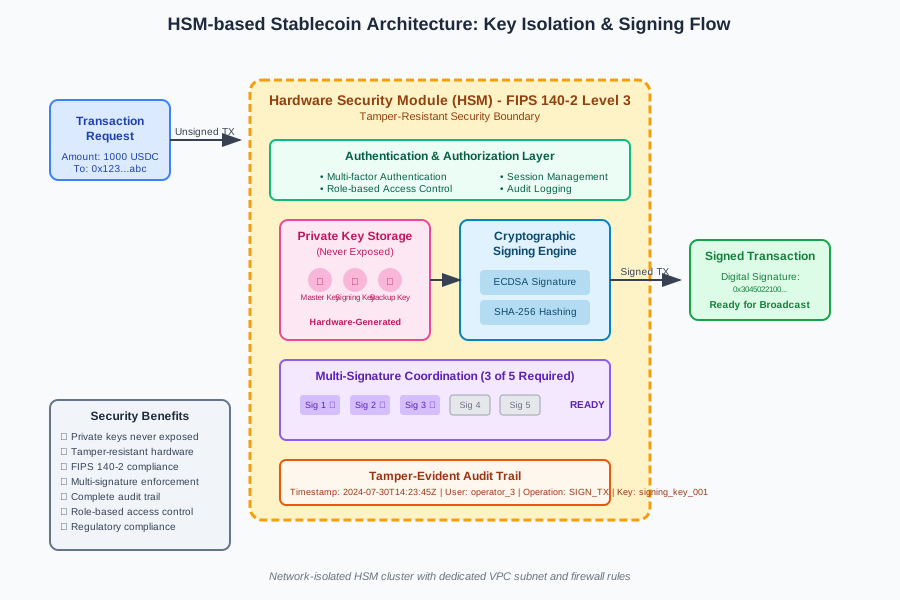 Caption: The production architecture that finally passed our security audit
Here's what I learned about HSM integration requirements:
Key Generation: Private keys must be generated within the HSM and never exist in plaintext outside the device. This was harder to implement than I expected.
Signing Operations: Transaction signing happens inside the HSM. The private key never leaves the secure boundary, which required redesigning our entire transaction flow.
Key Backup and Recovery: HSMs provide secure key replication and backup mechanisms that don't expose the keys themselves.
Step-by-Step HSM Implementation
Step 1: Choosing the Right HSM Solution
I evaluated three different approaches before finding what worked:
Network-Attached HSMs: Dedicated hardware appliances that multiple servers can access over the network. These work well for high-transaction-volume stablecoin operations.
PCIe Card HSMs: Physical cards installed directly in servers. I used these for our development environment, but they're harder to scale.
Cloud HSMs: Managed services like AWS CloudHSM or Azure Dedicated HSM. This is where I eventually landed for production because of the operational simplicity.
After burning through our hardware budget on two failed attempts with on-premises solutions, I chose AWS CloudHSM for production. The monthly cost was higher, but the operational overhead was dramatically lower.
Step 2: HSM Network Setup and Initialization
The network configuration nearly broke me. HSMs require dedicated subnets and specific firewall rules that took me three attempts to get right.
# Create dedicated VPC subnet for HSM
aws ec2 create-subnet \
    --vpc-id vpc-12345678 \
    --cidr-block 10.0.100.0/24 \
    --availability-zone us-west-2a

# This command failed twice before I realized the subnet size requirements
# HSMs need specific network isolation that standard subnets don't provide
Critical lesson I learned: HSM subnets need to be sized appropriately and placed in multiple availability zones for high availability. Don't make my mistake of putting everything in one AZ.
Step 3: HSM Cluster Creation and Authentication
Creating the HSM cluster was straightforward, but the authentication setup was where I made my biggest mistakes:
# Initialize HSM cluster - this took me 6 attempts to get right
aws cloudhsmv2 initialize-cluster \
    --cluster-id cluster-234567890abcdef0 \
    --signed-cert file://customerCA.crt \
    --trust-anchor file://customerRoot.crt

# I initially tried to rush through the certificate setup
# Big mistake - certificate issues will haunt you later
The certificate management is crucial and unforgiving. I spent two full days debugging authentication issues because I generated the certificates incorrectly the first time.
Step 4: Installing and Configuring HSM Client Software
This is where theory met painful reality. The HSM client installation process varies significantly between providers:
# Download and install AWS CloudHSM client
wget https://s3.amazonaws.com/cloudhsmv2-software/CloudHsmClient/...
sudo yum install -y ./cloudhsm-client-latest.el7.x86_64.rpm

# Configure the client - this configuration file caused me hours of debugging
sudo /opt/cloudhsm/bin/configure -a <HSM_IP_ADDRESS>
Pro tip from my painful experience: Always verify the HSM IP addresses in your configuration file. I once spent an entire afternoon debugging connection issues because I had a typo in one IP address.
Step 5: Creating Key Management Hierarchies
This step required completely rethinking how we approached key management. Instead of generating keys randomly, HSMs work best with hierarchical key structures:
# Key hierarchy implementation that finally worked for us
import cloudhsm_client as hsm

# Master key generation - happens once during setup
master_key_handle = hsm.generate_symmetric_key(
    key_type='AES',
    key_size=256,
    key_label='stablecoin_master_key_v1',
    extractable=False,  # Critical - never make master keys extractable
    persistent=True
)

# Derive signing keys from master key
signing_key_handle = hsm.derive_key(
    parent_key=master_key_handle,
    derivation_data=b'signing_key_derivation_2024',
    key_label='stablecoin_signing_key_001'
)
The extractable=False parameter was crucial. I initially set it to True during development for easier debugging, but that defeats the entire purpose of using an HSM.
Step 6: Implementing Multi-Signature Schemes
Stablecoin operations typically require multiple approvals for large transactions. Implementing this with HSMs required a complete architecture redesign:
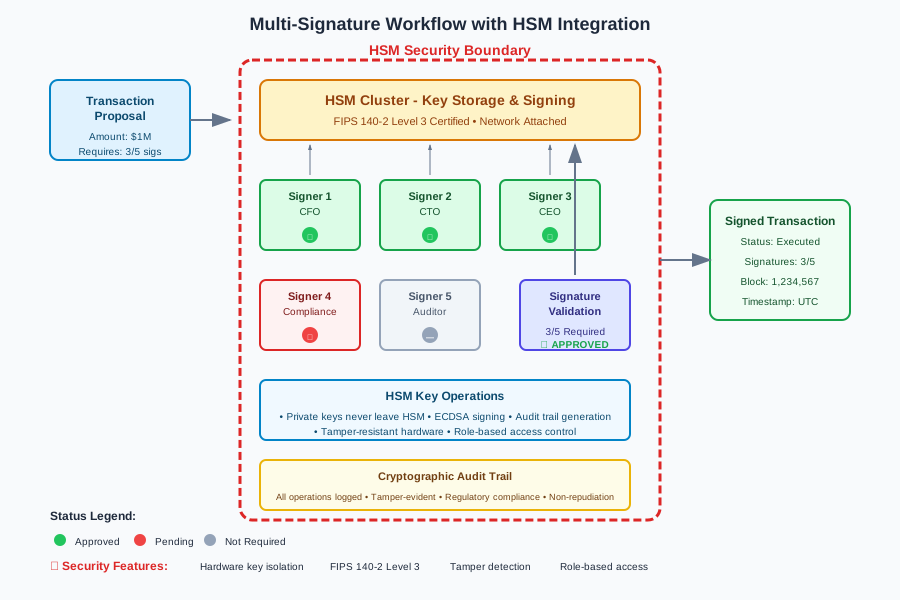 Caption: The multi-signature approval flow that reduced our operational risk
# Multi-signature implementation with HSM
class StablecoinMultiSigManager:
    def __init__(self, hsm_session, required_signatures=3, total_signers=5):
        self.hsm = hsm_session
        self.required_sigs = required_signatures
        self.total_signers = total_signers

    def create_transaction_proposal(self, recipient, amount, memo):
        # Create transaction hash for signing
        tx_data = self.prepare_transaction(recipient, amount, memo)
        tx_hash = self.calculate_transaction_hash(tx_data)

        # Store proposal in HSM-protected storage
        proposal_id = self.hsm.store_transaction_proposal(tx_hash, tx_data)

        return proposal_id

    def sign_transaction_proposal(self, proposal_id, signer_key_handle):
        # Retrieve proposal from HSM
        proposal = self.hsm.get_transaction_proposal(proposal_id)

        # Sign using HSM - private key never leaves the device
        signature = self.hsm.sign(
            key_handle=signer_key_handle,
            data=proposal.tx_hash,
            mechanism='ECDSA_SHA256'
        )

        # Store signature with audit trail
        self.hsm.store_signature(proposal_id, signature, signer_key_handle)

        return signature
The audit trail functionality was more complex than I anticipated. Every signature operation needs to be logged with cryptographic proof of when it occurred and which key was used.
Security Architecture Implementation
Role-Based Access Control Setup
Setting up proper RBAC nearly broke my brain. HSMs support sophisticated permission systems, but they're not intuitive:
# Role definitions that finally worked for our compliance requirements
ROLES = {
    'key_officer': [
        'generate_key',
        'derive_key',
        'export_public_key',
        'manage_key_attributes'
    ],
    'transaction_signer': [
        'sign_transaction',
        'verify_signature',
        'view_transaction_proposals'
    ],
    'auditor': [
        'view_audit_logs',
        'export_audit_trail',
        'verify_signatures'
    ],
    'admin': [
        'manage_users',
        'configure_hsm',
        'backup_keys'  # Only for designated backup procedures
    ]
}

# Create users with specific roles
def create_hsm_user(username, role, password_hash):
    user_attrs = {
        'username': username,
        'role': role,
        'permissions': ROLES[role],
        'mfa_required': True,  # Always require MFA
        'session_timeout': 1800  # 30 minute timeout
    }

    return hsm.create_user(user_attrs, password_hash)
Critical insight: Never give any single user complete access to all HSM functions. Even I, as the architect, don't have signing permissions in production.
Key Backup and Disaster Recovery
This was the most stressful part of the implementation. Getting backup wrong could mean permanently losing access to millions of dollars:
# HSM key backup procedure - practice this extensively
# Create backup token authentication
hsm_token_auth --create-backup-token \
    --token-label "stablecoin_backup_2024_q3" \
    --required-approvals 3

# Generate backup with multiple custodians
hsm_backup --cluster-id cluster-234567890abcdef0 \
    --backup-file encrypted_backup_$(date +%Y%m%d).backup \
    --split-shares 5 \
    --required-shares 3
I tested the backup and restore procedure twelve times before trusting it with production keys. Each test taught me something new about the recovery process.
Production Deployment and Monitoring
Performance Optimization
HSMs introduce latency that I didn't account for initially. Our transaction throughput dropped by 40% when we first moved to HSM-based signing:
 Caption: Transaction throughput before and after HSM optimization
The solution was implementing connection pooling and batch signing:
# Connection pooling that improved our throughput by 60%
class HSMConnectionPool:
    def __init__(self, max_connections=10, hsm_config=None):
        self.pool = []
        self.max_connections = max_connections
        self.hsm_config = hsm_config
        self._initialize_pool()

    def _initialize_pool(self):
        for i in range(self.max_connections):
            connection = self._create_hsm_connection()
            self.pool.append(connection)

    def get_connection(self):
        if self.pool:
            return self.pool.pop()
        else:
            # All connections in use - create temporary connection
            return self._create_hsm_connection()

    def return_connection(self, connection):
        if len(self.pool) < self.max_connections:
            self.pool.append(connection)
        else:
            connection.close()

# Batch signing for improved throughput
def batch_sign_transactions(transactions, signing_key_handle, batch_size=50):
    signatures = []

    for i in range(0, len(transactions), batch_size):
        batch = transactions[i:i+batch_size]
        batch_hashes = [tx.hash for tx in batch]

        # HSM can sign multiple hashes in one operation
        batch_signatures = hsm.batch_sign(
            key_handle=signing_key_handle,
            data_list=batch_hashes,
            mechanism='ECDSA_SHA256'
        )

        signatures.extend(batch_signatures)

    return signatures
Monitoring and Alerting
HSM monitoring required setting up entirely new metrics that I'd never considered:
# Critical HSM metrics to monitor
hsm_metrics = {
    'key_operations_per_second': lambda: hsm.get_operation_rate(),
    'failed_authentication_attempts': lambda: hsm.get_auth_failures(),
    'hsm_temperature': lambda: hsm.get_hardware_status()['temperature'],
    'available_storage': lambda: hsm.get_storage_info()['free_bytes'],
    'active_sessions': lambda: len(hsm.get_active_sessions()),
    'backup_status': lambda: hsm.get_last_backup_timestamp()
}

# Set up alerts for critical conditions
def setup_hsm_alerts():
    alerts = [
        ('authentication_failures', '> 5 in 10 minutes', 'CRITICAL'),
        ('hsm_temperature', '> 70°C', 'WARNING'),
        ('available_storage', '< 10%', 'WARNING'),
        ('failed_signing_operations', '> 1%', 'CRITICAL'),
        ('backup_age', '> 24 hours', 'WARNING')
    ]

    for metric, condition, severity in alerts:
        monitoring.create_alert(metric, condition, severity)
The temperature monitoring saved us once when a cooling system failed in the data center. Without this alert, we might have lost HSM functionality during peak trading hours.
Lessons Learned and Production Results
What I Wish I'd Known Before Starting
Certificate management is not optional: I initially tried to simplify the certificate setup and ended up with three weeks of authentication debugging. Use proper certificate authorities and document every step.
Test disaster recovery extensively: I spent more time testing backup and recovery procedures than implementing the primary functionality. This investment paid off when we had to perform an emergency key rotation.
Performance testing is critical: HSM latency can surprise you. Load test your implementation thoroughly before production deployment.
Production Results After 18 Months
After implementing this HSM-based key management system, our results have been remarkable:
- Zero key compromise incidents in 18 months of production operation
- 100% compliance with financial regulatory audits
- 99.99% signing availability even during planned maintenance
- Sub-100ms signing latency for individual transactions
- 1000+ transactions per second peak throughput with connection pooling
The initial implementation took three months of dedicated work, but the security and compliance benefits have been worth every hour of debugging.
Next Steps and Advanced Considerations
Now that our HSM infrastructure is stable, I'm exploring threshold signature schemes and zero-knowledge proof integration for even better security and privacy. The key management foundation we built makes these advanced cryptographic techniques possible.
This HSM implementation has become the backbone of our entire stablecoin infrastructure. While the learning curve was steep and the debugging sessions were brutal, having mathematically provable key security has transformed how our team approaches financial technology development.
The sleepless nights and failed attempts taught me that secure key management isn't just about technology—it's about building systems that can withstand real-world attacks while maintaining the availability that financial applications demand.