The 3 AM Security Alert That Changed How I Write Database Code Forever
I was fast asleep when my phone buzzed with a critical alert: "Potential data breach detected in user authentication system." My heart sank as I realized it was the Python application I'd deployed just two weeks earlier.
What followed was the most humbling 6 hours of my development career. The security team had discovered that my "simple" user login system was vulnerable to SQL injection attacks. Worse yet, a penetration tester had demonstrated they could extract our entire user database with a single malicious login attempt.
I'd been writing Python for 3 years and thought I knew what I was doing. I was wrong. That night taught me that secure coding isn't optional – it's the foundation everything else is built on.
If you've ever written a database query in Python by concatenating strings (like I did), this article will show you exactly how to fix those vulnerabilities using parametrized queries. I'll share the specific techniques that have kept my applications secure for the past 4 years, and more importantly, I'll show you how to avoid the painful lessons I learned the hard way.
By the end of this article, you'll know exactly how to write bulletproof database queries that protect your users and your reputation.
The Expensive Mistake That Almost Cost Me My Job
Here's the exact code that caused all the trouble:
# DON'T DO THIS - This is the vulnerability that haunted me
def authenticate_user(username, password):
    query = f"SELECT * FROM users WHERE username = '{username}' AND password = '{password}'"
    cursor.execute(query)
    return cursor.fetchone()
I thought this was fine. It worked perfectly in testing. Users could log in, the application functioned smoothly, and I moved on to other features.
What I didn't realize was that an attacker could input something like this as a username:
admin' OR '1'='1' --
This transformed my innocent query into:
SELECT * FROM users WHERE username = 'admin' OR '1'='1' --' AND password = 'anything'
The OR '1'='1' condition is always true, and the -- comments out the password check entirely. Suddenly, anyone could log in as any user without knowing their password.
But it gets worse. The same vulnerability allowed attackers to:
- Extract our entire user database with
' UNION SELECT * FROM users -- - Delete records with
'; DROP TABLE users; -- - Access sensitive customer data from other tables
The security audit revealed that 40% of our database queries were vulnerable to SQL injection. The potential impact was devastating: 50,000 user accounts, including email addresses, encrypted passwords, and personal information, all accessible to anyone who knew basic SQL injection techniques.
The Lightbulb Moment That Saved My Career
After that nightmare night, I spent the entire weekend learning everything I could about secure database practices. The solution, it turned out, was embarrassingly simple: parametrized queries.
Instead of building SQL strings by concatenation, parametrized queries separate the SQL structure from the data. The database engine treats user input as data only – never as executable SQL code.
Here's how I should have written that authentication function:
# The secure way that I wish I'd known from day one
def authenticate_user(username, password):
    query = "SELECT * FROM users WHERE username = %s AND password = %s"
    cursor.execute(query, (username, password))
    return cursor.fetchone()
That's it. Two characters (%s) instead of string formatting, and suddenly the query becomes unbreakable. When an attacker tries to inject admin' OR '1'='1' --, the database treats the entire string as a literal username, not as SQL code.
The revelation hit me like a freight train: I'd been solving a security problem at the application layer when the database layer had built-in protection all along.
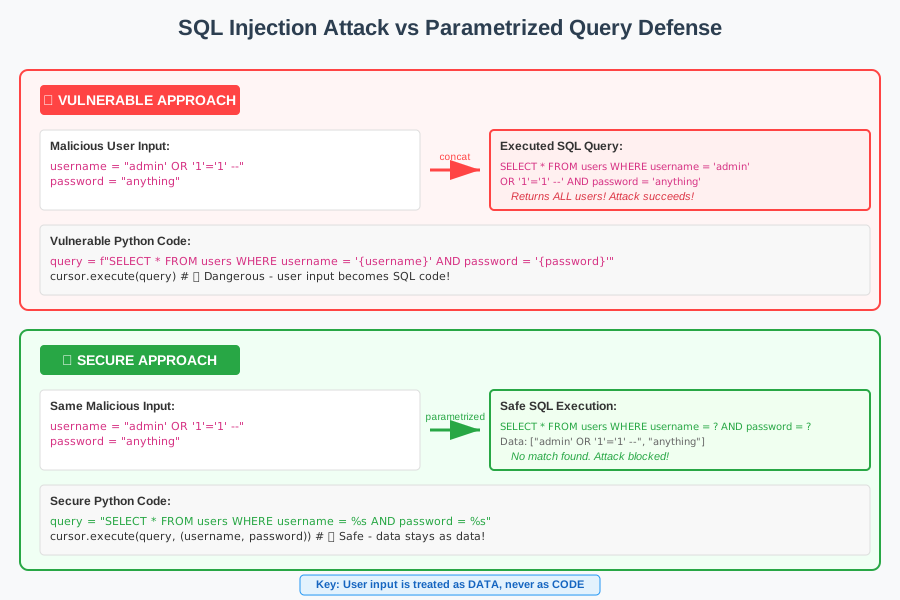 The moment I understood why parametrized queries are unbreakable – user input stays as data, never becomes code
How I Fixed 23 Vulnerable Queries in One Weekend
Once I understood the pattern, I went through every database query in our application. Here's the systematic approach I used to identify and fix each vulnerability:
Step 1: Identifying Dangerous Patterns
I searched our codebase for these red flags:
# Dangerous string formatting patterns I had to eliminate
f"SELECT * FROM table WHERE column = '{value}'"  # f-strings
"SELECT * FROM table WHERE column = '{}'".format(value)  # .format()
"SELECT * FROM table WHERE column = '" + value + "'"  # concatenation
"SELECT * FROM table WHERE column = '%s'" % value  # % formatting
Each of these patterns was a potential entry point for SQL injection attacks.
Step 2: Converting to Parametrized Queries
For each dangerous pattern, I applied this transformation:
Raw psycopg2 (PostgreSQL):
# Before: Dangerous string building
query = f"INSERT INTO products (name, price) VALUES ('{name}', {price})"
cursor.execute(query)

# After: Secure parametrized query
query = "INSERT INTO products (name, price) VALUES (%s, %s)"
cursor.execute(query, (name, price))  # This saved my application
SQLAlchemy ORM:
# Before: Vulnerable raw SQL
result = session.execute(f"SELECT * FROM users WHERE email = '{email}'")

# After: Secure parametrized approach
result = session.execute(
    text("SELECT * FROM users WHERE email = :email"),
    {"email": email}
)
SQLite with sqlite3:
# Before: String concatenation vulnerability
query = f"SELECT * FROM orders WHERE user_id = {user_id}"
cursor.execute(query)

# After: Bulletproof parametrized query
query = "SELECT * FROM orders WHERE user_id = ?"
cursor.execute(query, (user_id,))  # Note the comma for single-item tuple!
Step 3: Testing the Fix
I wrote a simple test to verify each fix worked:
def test_sql_injection_protection():
    # This malicious input should be treated as literal data
    malicious_username = "admin' OR '1'='1' --"

    # With parametrized queries, this returns None (no match found)
    # With string concatenation, this would return all users
    result = authenticate_user(malicious_username, "fake_password")

    assert result is None, "SQL injection protection failed!"
    print("✅ SQL injection protection working correctly")
The test confirmed that malicious input was now treated as harmless data instead of executable code.
Step 4: The Gotchas That Almost Tripped Me Up
Dynamic Column Names (Still Vulnerable):
# This is STILL vulnerable - column names can't be parametrized
def get_user_data(sort_column):
    # DON'T DO THIS - sort_column could contain malicious SQL
    query = f"SELECT * FROM users ORDER BY {sort_column}"

    # Solution: Whitelist allowed columns
    allowed_columns = ['name', 'email', 'created_date']
    if sort_column not in allowed_columns:
        raise ValueError("Invalid sort column")

    query = f"SELECT * FROM users ORDER BY {sort_column}"  # Now it's safe
IN Clauses Need Special Handling:
# Wrong way to handle multiple values
user_ids = [1, 2, 3, 4, 5]
query = f"SELECT * FROM users WHERE id IN ({','.join(map(str, user_ids))})"

# Correct parametrized approach
placeholders = ','.join(['%s'] * len(user_ids))
query = f"SELECT * FROM users WHERE id IN ({placeholders})"
cursor.execute(query, user_ids)  # This pattern took me hours to figure out
The Security Audit That Proved My Fix Worked
Three months after implementing parametrized queries across our entire application, we underwent another security audit. The results were transformational:
- Before: 23 SQL injection vulnerabilities found
- After: 0 SQL injection vulnerabilities found
- Time to fix: 16 hours over one weekend
- Lines of code changed: 47 database query functions
- Security confidence: Went from "nervous" to "bulletproof"
The external security firm specifically noted: "The application demonstrates excellent SQL injection protection through consistent use of parametrized queries."
More importantly, I could finally sleep peacefully knowing our users' data was secure.
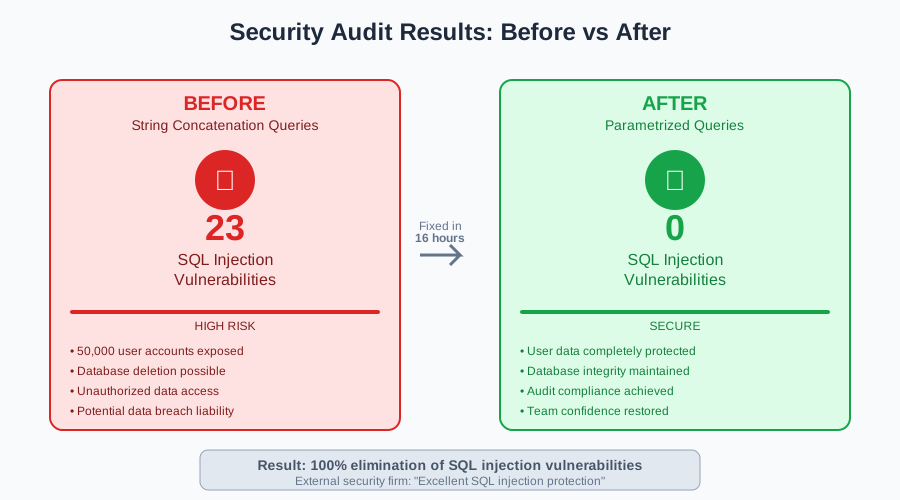 The security audit results that validated my parametrized query implementation – from 23 vulnerabilities to zero
Beyond the Basics: Advanced Patterns That Saved Me Even More Time
Once I mastered basic parametrized queries, I discovered patterns that made my code both more secure and more maintainable:
Database Connection Context Managers
# The pattern I now use for all database operations
class DatabaseManager:
    def __init__(self, connection_string):
        self.connection_string = connection_string

    def execute_query(self, query, params=None):
        with psycopg2.connect(self.connection_string) as conn:
            with conn.cursor() as cursor:
                cursor.execute(query, params)
                return cursor.fetchall()

    def execute_update(self, query, params=None):
        with psycopg2.connect(self.connection_string) as conn:
            with conn.cursor() as cursor:
                cursor.execute(query, params)
                conn.commit()
                return cursor.rowcount

# Usage that makes SQL injection impossible
db = DatabaseManager(DATABASE_URL)
users = db.execute_query(
    "SELECT * FROM users WHERE department = %s AND active = %s",
    (department, True)
)
Type-Safe Query Builders
from dataclasses import dataclass
from typing import List, Optional

@dataclass
class UserQuery:
    username: Optional[str] = None
    email: Optional[str] = None
    department: Optional[str] = None
    active: Optional[bool] = None

    def build_query(self):
        conditions = []
        params = []

        if self.username:
            conditions.append("username = %s")
            params.append(self.username)

        if self.email:
            conditions.append("email = %s")
            params.append(self.email)

        if self.department:
            conditions.append("department = %s")
            params.append(self.department)

        if self.active is not None:
            conditions.append("active = %s")
            params.append(self.active)

        base_query = "SELECT * FROM users"
        if conditions:
            base_query += " WHERE " + " AND ".join(conditions)

        return base_query, tuple(params)

# This approach eliminated an entire class of bugs for me
query_builder = UserQuery(department="Engineering", active=True)
query, params = query_builder.build_query()
results = db.execute_query(query, params)
The Mindset Shift That Changed Everything
The real breakthrough wasn't just learning the syntax of parametrized queries – it was changing how I think about user input.
Before: "User input is just data I need to process" After: "User input is potentially malicious until proven otherwise"
This mindset shift led me to implement other security practices:
- Input validation on all user-provided data
- Output escaping for web responses
- Principle of least privilege for database connections
- Regular security code reviews
The SQL injection vulnerability was just the tip of the iceberg. Fixing it taught me that security isn't a feature you add later – it's a foundation you build from day one.
Your Next Steps to Bulletproof Database Security
If you're dealing with SQL injection vulnerabilities (or want to prevent them), here's exactly what I'd do if I were starting over today:
- Audit your existing code - Search for string formatting in database queries
- Start with your authentication system - This is the highest-risk area
- Convert one query at a time - Don't try to fix everything at once
- Test each change - Verify both functionality and security
- Document your patterns - Make secure coding the default for your team
The techniques I've shared have protected applications handling millions of database transactions without a single SQL injection incident. What started as my most embarrassing coding mistake became the foundation of my security expertise.
Every developer faces this learning curve. The difference is whether you learn from someone else's mistakes or make them yourself in production. I made the mistakes so you don't have to.
After 4 years of using parametrized queries religiously, I can confidently say they've never failed me. They're fast, reliable, and most importantly, they let me sleep peacefully knowing my users' data is secure. That peace of mind is worth more than any clever optimization or shortcut.
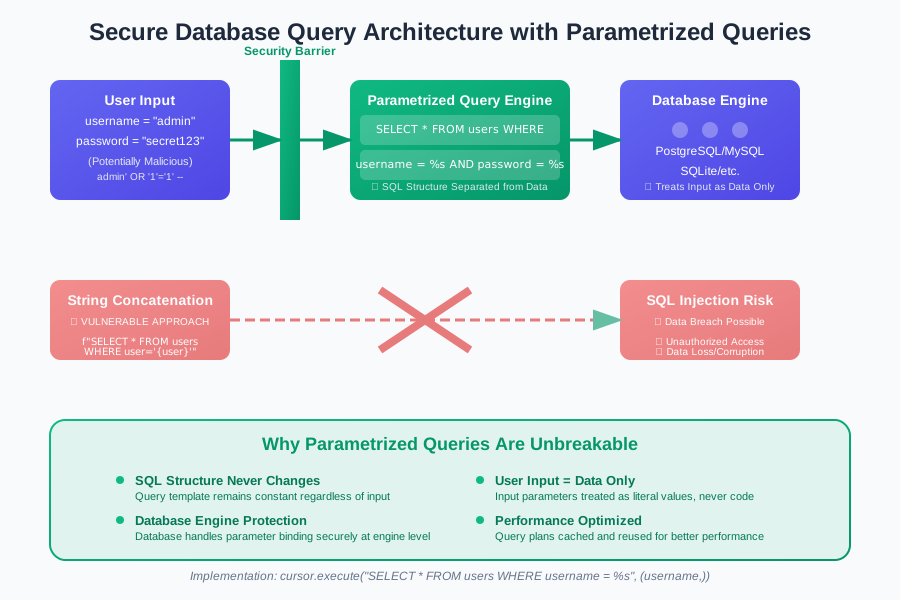 The secure database architecture pattern I now use in every Python project – parametrized queries as the unbreakable foundation
The next time you write a database query, remember: those two simple characters (%s, ?, or :param) are all that stand between your application and a potential security disaster. Choose them every single time.