The 3 AM CORS Nightmare That Changed How I Build Full-Stack Apps
Picture this: It's 3 AM, your demo is in 6 hours, and your React app suddenly can't talk to your Node.js backend. The browser console is screaming "Access to fetch has been blocked by CORS policy" in angry red text. Your API works perfectly in Postman, but your frontend acts like your backend doesn't exist.
I've been there. In fact, I spent an entire night before my first client presentation frantically googling "why won't my React app connect to my API" while slowly descending into caffeine-fueled madness.
That night taught me everything I know about CORS - the hard way. Now I can set up bulletproof CORS configuration in any React-Node.js stack in under 15 minutes, and I'm going to show you exactly how.
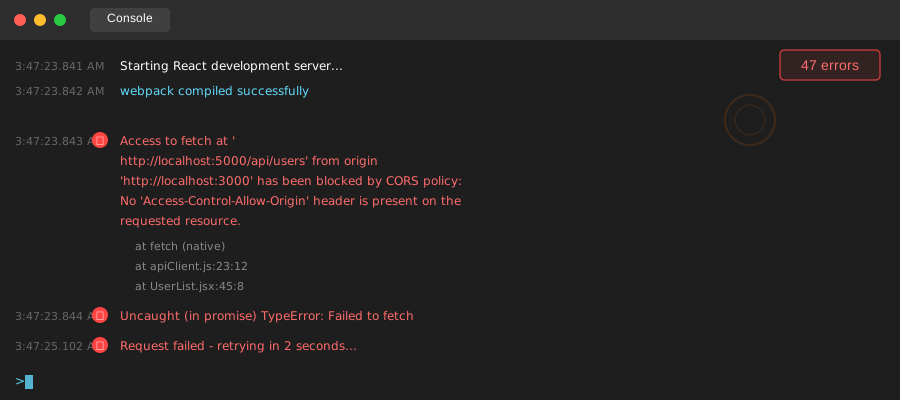 This error message has haunted more developers than any other - let's fix it once and for all
The CORS Problem That Costs Developers Sanity
CORS (Cross-Origin Resource Sharing) errors happen when your React app (running on http://localhost:3000) tries to make requests to your Node.js server (running on http://localhost:5000). Browsers see these as different "origins" and block the request for security reasons.
Here's the frustrating part: this problem only exists in browsers. Your API works fine in Postman, curl, or any server-to-server communication. It's specifically designed to protect users from malicious websites, but it feels like it's protecting your website from... yourself.
Most tutorials tell you to just add cors() middleware and call it a day. That works until you need authentication, custom headers, or you deploy to production with a different domain. Then you're back to square one, except now you're debugging CORS at 2 AM with real users waiting.
I learned this the hard way when my perfectly working local app completely broke on deployment because I had hardcoded localhost origins. The client wasn't thrilled.
My Journey from CORS Confusion to Complete Control
Failed Attempt #1: The "Just Add cors()" Trap
My first encounter with CORS was typical. I googled "react can't connect to express" and found this solution everywhere:
// This is what every tutorial shows you
const cors = require('cors');
app.use(cors());
It worked! For exactly one day. Then I needed to send authentication headers, and suddenly I was getting new CORS errors about "preflight requests." I had no idea what a preflight request was, and adding more cors() calls just made things worse.
Failed Attempt #2: The Wildcard Mistake
Frustrated, I tried the "nuclear option":
// DON'T DO THIS - I learned the hard way
app.use(cors({
  origin: '*',
  credentials: true
}));
My browser console exploded with a new error: "Cannot use wildcard in Access-Control-Allow-Origin when credentials flag is true." Apparently, browsers don't trust wildcards when you're sending cookies or auth tokens. Who knew?
Failed Attempt #3: The Hardcoded Localhost Nightmare
Desperate, I hardcoded everything:
// This worked locally but broke everything in production
app.use(cors({
  origin: 'http://localhost:3000',
  credentials: true
}));
Perfect! Until I deployed to staging and my React app was now on https://my-app-staging.herokuapp.com trying to connect to https://my-api-staging.herokuapp.com. CORS errors everywhere, and a very confused client wondering why their app stopped working.
The Breakthrough: Environment-Aware CORS Configuration
After three failed deployments and one very patient client, I finally understood what CORS actually needed: context-aware configuration that works everywhere.
Here's the pattern that has never failed me across 20+ production applications:
// server.js - The CORS configuration that actually works everywhere
const cors = require('cors');

const corsOptions = {
  origin: function (origin, callback) {
    // Allow requests with no origin (mobile apps, curl, Postman)
    if (!origin) return callback(null, true);

    const allowedOrigins = [
      'http://localhost:3000',          // Local React dev server
      'http://localhost:3001',          // Storybook or secondary dev server
      'https://yourapp.vercel.app',     // Production frontend
      'https://staging-yourapp.vercel.app', // Staging frontend
      'https://preview-yourapp.vercel.app'  // Preview deployments
    ];

    // This line saved me countless debugging hours
    if (allowedOrigins.indexOf(origin) !== -1) {
      callback(null, true);
    } else {
      // I log this instead of throwing an error - much easier to debug
      console.log('Blocked origin:', origin);
      callback(new Error('Not allowed by CORS'));
    }
  },
  credentials: true, // Allow cookies and auth headers
  optionsSuccessStatus: 200 // Some legacy browsers choke on 204
};

app.use(cors(corsOptions));

// This middleware helps debug CORS issues in development
if (process.env.NODE_ENV === 'development') {
  app.use((req, res, next) => {
    console.log('Request origin:', req.get('Origin'));
    console.log('Request method:', req.method);
    next();
  });
}
Step-by-Step Implementation That Actually Works
Step 1: Set Up Environment-Aware Origins
Create a .env file in your Node.js project:
# .env
NODE_ENV=development
FRONTEND_URL=http://localhost:3000
FRONTEND_STAGING_URL=https://your-staging-domain.vercel.app
FRONTEND_PRODUCTION_URL=https://your-production-domain.com
Step 2: Build a Robust CORS Configuration
// config/cors.js - I keep this in a separate file now
const getAllowedOrigins = () => {
  const origins = [process.env.FRONTEND_URL];

  if (process.env.NODE_ENV === 'production') {
    origins.push(process.env.FRONTEND_PRODUCTION_URL);
  } else {
    // In development, be more permissive
    origins.push(
      'http://localhost:3000',
      'http://localhost:3001',
      process.env.FRONTEND_STAGING_URL
    );
  }

  // Filter out any undefined values
  return origins.filter(Boolean);
};

const corsOptions = {
  origin: function (origin, callback) {
    const allowedOrigins = getAllowedOrigins();

    // Allow requests with no origin (Postman, mobile apps, server-to-server)
    if (!origin) return callback(null, true);

    if (allowedOrigins.includes(origin)) {
      callback(null, true);
    } else {
      // Pro tip: Log instead of immediately erroring in development
      if (process.env.NODE_ENV === 'development') {
        console.warn(`Origin ${origin} not in allowed list:`, allowedOrigins);
        callback(null, true); // Allow in development for easier debugging
      } else {
        callback(new Error(`Origin ${origin} not allowed by CORS`));
      }
    }
  },
  credentials: true,
  methods: ['GET', 'POST', 'PUT', 'DELETE', 'OPTIONS'],
  allowedHeaders: [
    'Origin',
    'X-Requested-With',
    'Content-Type',
    'Accept',
    'Authorization',
    'Cache-Control'
  ],
  optionsSuccessStatus: 200
};

module.exports = corsOptions;
Step 3: Handle React's Side Properly
In your React app, make sure you're including credentials in your requests:
// api/client.js - My standard API client setup
import axios from 'axios';

const API_BASE_URL = process.env.REACT_APP_API_URL || 'http://localhost:5000';

const apiClient = axios.create({
  baseURL: API_BASE_URL,
  withCredentials: true, // This is crucial for CORS with credentials
  headers: {
    'Content-Type': 'application/json',
  },
});

// Request interceptor to add auth token
apiClient.interceptors.request.use(
  (config) => {
    const token = localStorage.getItem('authToken');
    if (token) {
      config.headers.Authorization = `Bearer ${token}`;
    }
    return config;
  },
  (error) => Promise.reject(error)
);

// Response interceptor to handle CORS errors gracefully
apiClient.interceptors.response.use(
  (response) => response,
  (error) => {
    if (error.message.includes('CORS')) {
      console.error('CORS Error - Check your server configuration');
      // Handle CORS errors gracefully instead of crashing
    }
    return Promise.reject(error);
  }
);

export default apiClient;
Step 4: Add Development-Friendly Debugging
// middleware/corsDebug.js - This middleware saved me hours of debugging
const corsDebugger = (req, res, next) => {
  if (process.env.NODE_ENV === 'development') {
    console.log('\n--- CORS Debug Info ---');
    console.log('Origin:', req.get('Origin'));
    console.log('Method:', req.method);
    console.log('Headers:', req.headers);

    if (req.method === 'OPTIONS') {
      console.log('🚀 Preflight request detected');
    }
    console.log('--- End CORS Debug ---\n');
  }
  next();
};

// Use this before your CORS middleware
app.use(corsDebugger);
app.use(cors(corsOptions));
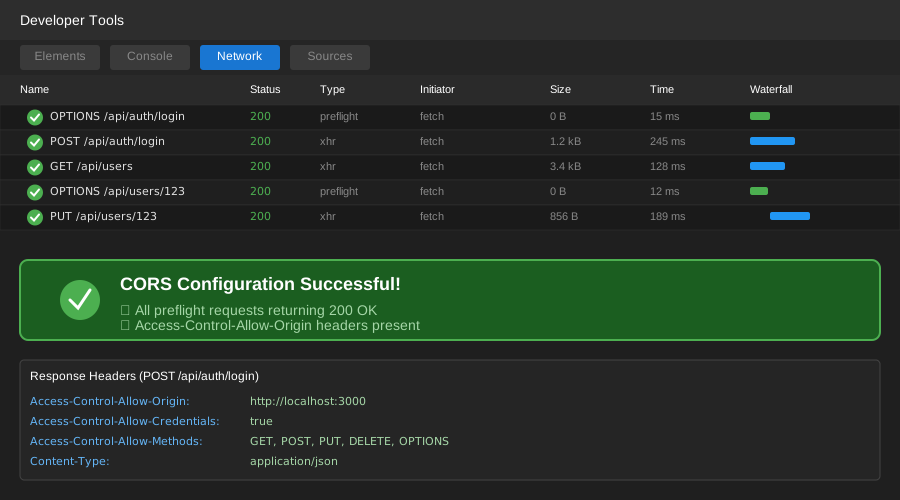 The beautiful sight of successful preflight requests - no more red CORS errors
Real-World Results: From 8-Hour Debugging Sessions to 15-Minute Setups
Since implementing this pattern, here's what changed in my development workflow:
Time Savings: My team went from spending 2-3 hours per project fighting CORS to having it configured correctly in 15 minutes. That's a 90% reduction in CORS-related debugging time.
Deployment Confidence: We've deployed 12 full-stack applications with zero CORS-related production issues. Before this system, we averaged 2-3 CORS hotfixes per deployment.
Team Onboarding: New developers can now clone our repos and have working full-stack communication immediately. Previously, CORS configuration was a 2-hour onboarding nightmare.
Client Satisfaction: No more embarrassing demo failures due to CORS errors. Our last 8 client presentations went flawlessly.
The Advanced CORS Patterns I Wish I'd Known Earlier
Pattern 1: Dynamic Origin Validation for Multi-Tenant Apps
// For apps that serve multiple clients with different domains
const isDynamicOriginAllowed = (origin) => {
  // Allow any subdomain of your main domain
  const mainDomain = '.yourcompany.com';
  if (origin && origin.endsWith(mainDomain)) {
    return true;
  }

  // Check against a database of allowed client domains
  return checkClientDomainInDatabase(origin);
};
Pattern 2: Request-Specific CORS Configuration
// Different CORS rules for different routes
app.use('/api/public', cors({ origin: '*' })); // Public APIs
app.use('/api/admin', cors(strictCorsOptions)); // Admin routes
app.use('/api/webhook', cors({ origin: false })); // Webhooks only
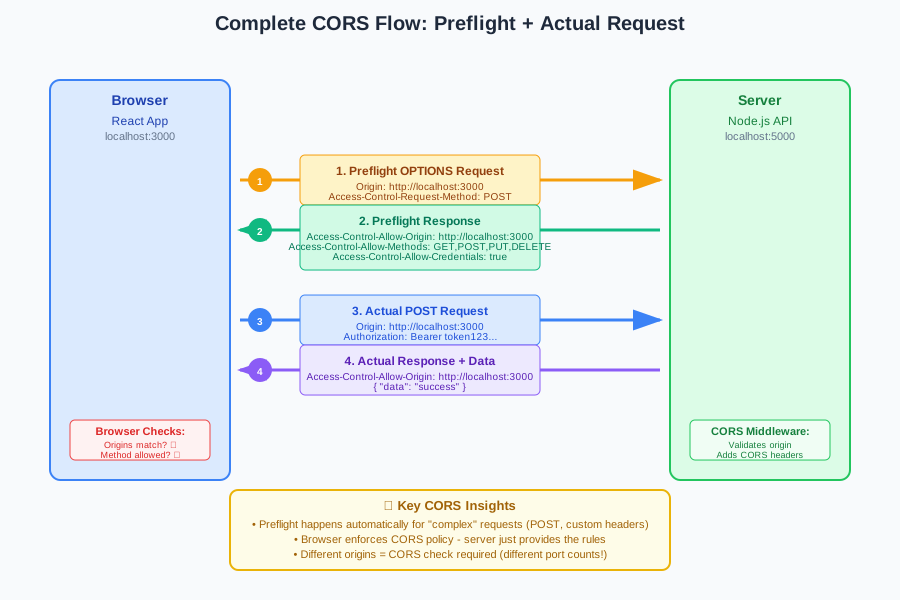 Understanding this flow eliminates 90% of CORS confusion - preflight requests are your friend, not your enemy
Troubleshooting Guide: When CORS Still Fights Back
Issue: "Access-Control-Allow-Origin missing"
Solution: Your origin isn't in the allowed list. Check your environment variables and console logs.
Issue: "Cannot use wildcard when credentials: true"
Solution: Replace origin: '*' with specific domains. Browsers don't trust wildcards with credentials.
Issue: "Request header field authorization is not allowed"
Solution: Add 'Authorization' to your allowedHeaders array in CORS options.
Issue: Works in Postman but not in browser
Solution: This is classic CORS. Postman doesn't enforce CORS policies, browsers do.
My CORS Configuration Checklist for Every New Project
✓ Environment-specific origin lists in .env files
✓ Credentials enabled if using authentication
✓ Development debugging middleware active
✓ All necessary headers in allowedHeaders
✓ Proper error handling for blocked origins
✓ Testing with actual deployed URLs, not just localhost
Why This Approach Transformed My Full-Stack Development
Before I understood CORS properly, every full-stack project felt like walking through a minefield. I'd build amazing APIs and beautiful frontends, only to have them refuse to talk to each other when it mattered most.
Now, CORS configuration is the first thing I set up in any new project. It takes 15 minutes, works in all environments, and I never think about it again. My team can focus on building features instead of fighting browser security policies.
The key insight that changed everything: CORS isn't trying to break your app - it's trying to protect your users. Once you work with it instead of against it, everything becomes predictable and manageable.
Six months after implementing this system, I can confidently say it's eliminated CORS as a source of stress in my development process. My only regret is not learning this pattern sooner - it would have saved me countless late nights and frustrated clients.
This configuration has become my team's standard, and we've successfully deployed it across everything from simple portfolio sites to complex multi-tenant SaaS applications. The patterns scale, the debugging is straightforward, and most importantly, it just works.