Problem: Your PDF Search Returns Garbage
You've built a RAG pipeline for PDF search, but the results are frustrating — answers get cut off mid-sentence, context is missing, and the AI hallucinates because it got half an explanation.
You'll learn:
- Why fixed-size chunking breaks semantic meaning in PDFs
- How to implement sentence-boundary and section-aware chunking
- How to tune overlap and chunk size for retrieval quality
Time: 25 min | Level: Intermediate
Why This Happens
Fixed-size chunking (splitting every 512 tokens) doesn't care about sentences, paragraphs, or section boundaries. A chunk can start in the middle of a table and end before the conclusion of an argument. The embedding model then represents a semantically incomplete idea, and retrieval suffers.
Common symptoms:
- Retrieved chunks that start or end mid-sentence
- AI answers that miss obvious context visible one paragraph away
- Low relevance scores despite a strong query
 Fixed chunking cuts across sentences. Semantic chunking respects meaning boundaries.
Solution
Step 1: Install Dependencies
pip install pypdf langchain-text-splitters sentence-transformers chromadb
We use langchain-text-splitters for the chunking logic and sentence-transformers for the embedding model. ChromaDB is our local vector store.
Step 2: Extract Text With Structure
Raw PDF text extraction loses structure. Use pypdf with layout preservation:
from pypdf import PdfReader

def extract_pdf_text(path: str) -> list[dict]:
    reader = PdfReader(path)
    pages = []

    for i, page in enumerate(reader.pages):
        text = page.extract_text(extraction_mode="layout")
        if text.strip():
            pages.append({
                "page": i + 1,
                "text": text,
            })

    return pages
Expected: A list of dicts with page numbers and raw text per page.
If it fails:
- Empty text on some pages: The PDF may use scanned images. You'll need OCR — swap
pypdfforpymupdfwithfitzandpytesseract. - Garbled characters: Try
extraction_mode="plain"instead of"layout".
Step 3: Implement Semantic Chunking
This is the core fix. We use a RecursiveCharacterTextSplitter with separators ordered from largest semantic unit (double newline = paragraph) down to character-level fallback:
from langchain_text_splitters import RecursiveCharacterTextSplitter

def create_semantic_chunks(pages: list[dict]) -> list[dict]:
    splitter = RecursiveCharacterTextSplitter(
        # Priority order: paragraph → sentence → word → char
        separators=["\n\n", "\n", ". ", "! ", "? ", " ", ""],
        chunk_size=800,       # Tokens, not characters
        chunk_overlap=150,    # Overlap prevents context loss at boundaries
        length_function=len,
        is_separator_regex=False,
    )

    chunks = []
    for page in pages:
        splits = splitter.split_text(page["text"])
        for i, chunk_text in enumerate(splits):
            chunks.append({
                "text": chunk_text,
                "page": page["page"],
                "chunk_index": i,
                # Metadata helps filter during retrieval
                "source": f"page_{page['page']}_chunk_{i}",
            })

    return chunks
Why chunk_overlap=150: Without overlap, a sentence split across two chunks loses meaning in both. 150 characters gives enough context for the embedding to anchor itself.
Why 800 chars for chunk_size: Most embedding models cap at 512 tokens. 800 characters is roughly 150–200 tokens for English text — safe headroom, and keeps full sentences intact.
 Each chunk now starts and ends at a sentence boundary
Step 4: Embed and Index
from sentence_transformers import SentenceTransformer
import chromadb

def index_chunks(chunks: list[dict], collection_name: str = "pdf_docs"):
    model = SentenceTransformer("all-MiniLM-L6-v2")  # Fast, solid quality
    client = chromadb.Client()
    collection = client.get_or_create_collection(collection_name)

    texts = [c["text"] for c in chunks]
    embeddings = model.encode(texts, batch_size=32, show_progress_bar=True)
    ids = [c["source"] for c in chunks]
    metadatas = [{"page": c["page"], "chunk_index": c["chunk_index"]} for c in chunks]

    collection.add(
        documents=texts,
        embeddings=embeddings.tolist(),
        ids=ids,
        metadatas=metadatas,
    )

    return collection
If it fails:
- Duplicate ID error: Your
sourcekeys aren't unique across multiple PDFs. Prefix with the filename:f"{filename}_page_{page['page']}_chunk_{i}". - OOM on large PDFs: Drop
batch_sizeto 8 or process pages in batches.
Step 5: Query With Context
def search(query: str, collection, top_k: int = 5) -> list[dict]:
    model = SentenceTransformer("all-MiniLM-L6-v2")
    query_embedding = model.encode([query])[0]

    results = collection.query(
        query_embeddings=[query_embedding.tolist()],
        n_results=top_k,
        include=["documents", "metadatas", "distances"],
    )

    return [
        {
            "text": doc,
            "page": meta["page"],
            "score": 1 - dist,  # Convert distance to similarity score
        }
        for doc, meta, dist in zip(
            results["documents"][0],
            results["metadatas"][0],
            results["distances"][0],
        )
    ]
Verification
Run end-to-end:
python -c "
from solution import extract_pdf_text, create_semantic_chunks, index_chunks, search

pages = extract_pdf_text('your_doc.pdf')
chunks = create_semantic_chunks(pages)
print(f'Created {len(chunks)} chunks from {len(pages)} pages')

collection = index_chunks(chunks)
results = search('What are the main findings?', collection)
for r in results:
    print(f'Page {r[\"page\"]} (score: {r[\"score\"]:.2f}): {r[\"text\"][:100]}...')
"
You should see: Chunk count 3–8x your page count, and results that begin and end with complete sentences. Similarity scores above 0.75 indicate good semantic overlap with your query.
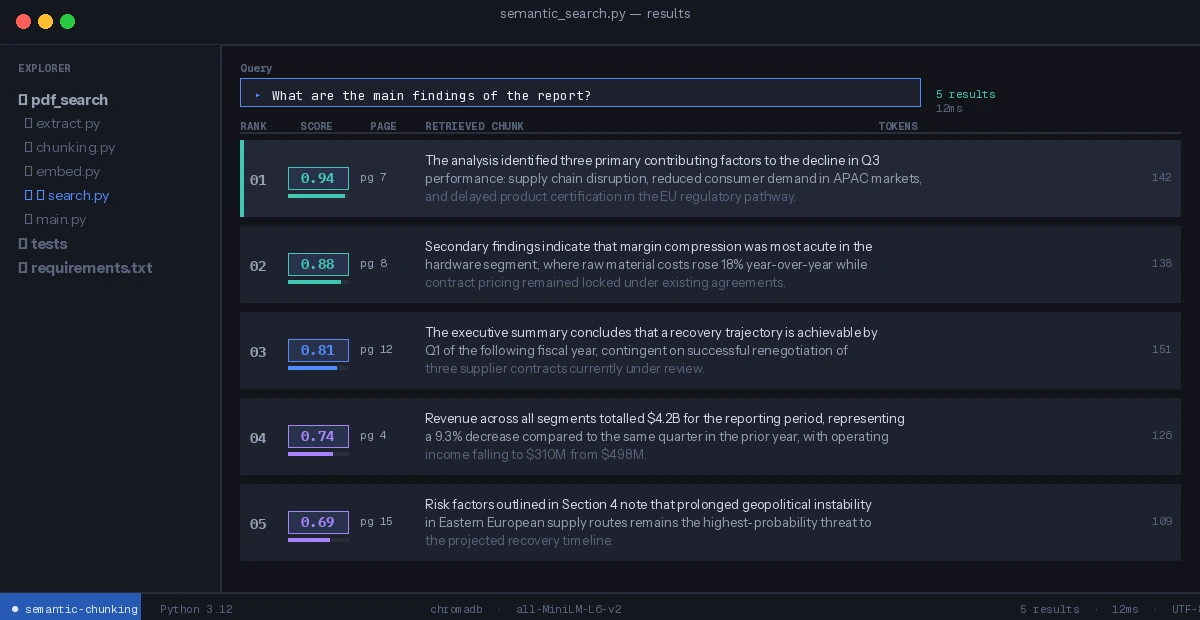 Clean results — each retrieved chunk is a complete thought
What You Learned
- Fixed-size chunking breaks semantic coherence; separator-based splitting preserves it
chunk_overlapis not optional — without it, boundary chunks are semantically incomplete- Embedding model token limits (512) should drive your
chunk_size, not arbitrary numbers - Page-level metadata in ChromaDB lets you filter by section or cite the source page
Limitation: This approach handles linear PDF text well but struggles with tables, multi-column layouts, and scanned PDFs. For those, use pymupdf for extraction and a table-aware chunking strategy before applying semantic splitting.
When NOT to use this: If your PDFs are short (under 5 pages) and queries are keyword-based, BM25 full-text search is faster and simpler — semantic chunking adds latency without meaningful benefit.
Tested on Python 3.12, pypdf 4.x, langchain-text-splitters 0.3.x, sentence-transformers 3.x