Problem: AI-Generated Code Can Destroy Your Server
Your app lets users run AI-generated code — or you're executing LLM output directly in a pipeline. Run it bare on the host and one malicious or buggy snippet can wipe /, exfiltrate secrets, or fork-bomb the system.
You'll learn:
- How to build a hardened Docker sandbox with no network, no privileges, and strict resource limits
- Which Linux security features actually stop escapes (seccomp, AppArmor, read-only filesystems)
- How to execute code, capture output, and time out cleanly
Time: 20 min | Level: Intermediate
Why This Happens
Docker alone isn't a sandbox. A plain docker run still gives the container access to the host network, unrestricted syscalls, and the ability to exhaust CPU/memory. AI-generated code is especially risky because it's unpredictable — an LLM can produce working code that happens to call os.system("rm -rf /") or open a reverse shell.
Common failure modes:
- Container eats all RAM and takes down the host
- Code reads
/procor mounts and fingerprints the system - Poorly configured images leak environment variables with API keys
Solution
Step 1: Build a Minimal Sandbox Image
Start from a distroless or slim base. Less tooling = smaller attack surface.
# sandbox.Dockerfile
FROM python:3.12-slim

# Create unprivileged user — never run as root
RUN useradd --uid 65534 --no-create-home --shell /usr/sbin/nologin sandbox

# Install only what execution requires
RUN pip install --no-cache-dir requests numpy pandas

# No shell, no curl, no wget
RUN apt-get purge -y curl wget bash && apt-get autoremove -y

WORKDIR /sandbox
USER sandbox
Why this works: Running as UID 65534 (nobody) means even if the container escapes, the process has no privileges on the host. Removing the shell blocks most one-liner exploits.
docker build -f sandbox.Dockerfile -t code-sandbox:latest .
Expected: Image builds cleanly, final size under 200MB.
Step 2: Apply a Seccomp Profile
Seccomp filters which syscalls the container can make. The default Docker profile blocks ~44 syscalls. Tighten it further for code execution.
// seccomp-sandbox.json
{
  "defaultAction": "SCMP_ACT_ERRNO",
  "architectures": ["SCMP_ARCH_X86_64", "SCMP_ARCH_AARCH64"],
  "syscalls": [
    {
      "names": [
        "read", "write", "open", "openat", "close", "stat", "fstat",
        "lstat", "poll", "lseek", "mmap", "mprotect", "munmap", "brk",
        "rt_sigaction", "rt_sigprocmask", "rt_sigreturn", "ioctl",
        "access", "pipe", "select", "dup", "dup2", "nanosleep",
        "getpid", "sendfile", "socket", "connect", "accept", "recvfrom",
        "sendmsg", "recvmsg", "shutdown", "bind", "listen", "getsockname",
        "getpeername", "socketpair", "setsockopt", "getsockopt",
        "clone", "fork", "vfork", "execve", "wait4", "exit",
        "uname", "fcntl", "fsync", "getdents", "getcwd", "chdir",
        "rename", "mkdir", "rmdir", "unlink", "readlink", "chmod",
        "getuid", "getgid", "getgroups", "getpgrp", "setsid",
        "setitimer", "getrlimit", "getrusage", "times", "futex",
        "set_tid_address", "clock_gettime", "clock_nanosleep",
        "exit_group", "epoll_wait", "epoll_ctl", "epoll_create1",
        "set_robust_list", "get_robust_list", "prlimit64",
        "getrandom", "arch_prctl", "madvise"
      ],
      "action": "SCMP_ACT_ALLOW"
    }
  ]
}
This allowlist blocks ptrace, mount, unshare, keyctl, and other dangerous syscalls while keeping Python and most libraries functional.
If it fails:
- Sandbox errors on import: Add the missing syscall to the allowlist, check
straceoutput - AppArmor conflicts on Ubuntu: Disable AppArmor for the container or add a compatible profile
Step 3: Run with Full Isolation Flags
docker run \
  --rm \                                    # Auto-remove after exit
  --network none \                          # No network access
  --read-only \                             # Read-only filesystem
  --tmpfs /tmp:size=50m,noexec \            # Writable /tmp, non-executable
  --memory 256m \                           # Hard memory limit
  --memory-swap 256m \                      # Disable swap
  --cpus 0.5 \                              # Half a CPU core max
  --pids-limit 64 \                         # Prevent fork bombs
  --cap-drop ALL \                          # Drop all Linux capabilities
  --security-opt no-new-privileges \        # Block privilege escalation
  --security-opt seccomp=seccomp-sandbox.json \
  --ulimit nofile=64:64 \                   # Limit open file descriptors
  --ulimit nproc=32:32 \                    # Limit processes
  code-sandbox:latest \
  python /sandbox/user_script.py
This is the full command. Every flag matters — --network none prevents data exfiltration, --pids-limit stops fork bombs, --cap-drop ALL removes file ownership tricks.
 Terminal output confirming all security options applied — no warnings means the host kernel supports them
Step 4: Wrap It in Code
In production you call this from your app, not manually. Here's a Python executor with timeout, output capture, and exit code handling:
import subprocess
import tempfile
import os
from pathlib import Path

def run_sandboxed(code: str, timeout: int = 10) -> dict:
    """
    Execute untrusted Python code in an isolated Docker container.
    Returns stdout, stderr, exit code, and whether it timed out.
    """
    with tempfile.NamedTemporaryFile(
        mode="w",
        suffix=".py",
        delete=False,
        dir="/tmp/sandbox-scripts"
    ) as f:
        f.write(code)
        script_path = f.name

    try:
        result = subprocess.run(
            [
                "docker", "run",
                "--rm",
                "--network", "none",
                "--read-only",
                "--tmpfs", "/tmp:size=50m,noexec",
                "--memory", "256m",
                "--memory-swap", "256m",
                "--cpus", "0.5",
                "--pids-limit", "64",
                "--cap-drop", "ALL",
                "--security-opt", "no-new-privileges",
                "--security-opt", "seccomp=/etc/sandbox/seccomp-sandbox.json",
                "--volume", f"{script_path}:/sandbox/script.py:ro",
                "code-sandbox:latest",
                "python", "/sandbox/script.py"
            ],
            capture_output=True,
            text=True,
            timeout=timeout + 2  # Docker overhead buffer
        )
        return {
            "stdout": result.stdout[:10_000],   # Cap output at 10KB
            "stderr": result.stderr[:2_000],
            "exit_code": result.returncode,
            "timed_out": False
        }
    except subprocess.TimeoutExpired:
        # Kill the container
        subprocess.run(["docker", "kill", "--signal", "SIGKILL", script_path])
        return {"stdout": "", "stderr": "Execution timed out.", "exit_code": -1, "timed_out": True}
    finally:
        os.unlink(script_path)
Why cap output at 10KB: A runaway print loop can generate gigabytes. Truncate early rather than buffering it all in memory.
Verification
# Test 1: Network is blocked
docker run --rm --network none code-sandbox:latest python -c "import urllib.request; urllib.request.urlopen('https://example.com')"
# Expected: socket.gaierror or ConnectionRefusedError

# Test 2: Fork bomb is contained
docker run --rm --pids-limit 64 code-sandbox:latest python -c "import os; [os.fork() for _ in range(1000)]"
# Expected: Exits quickly with BlockingIOError, does NOT hang

# Test 3: Read-only filesystem blocks writes outside /tmp
docker run --rm --read-only code-sandbox:latest python -c "open('/etc/pwned', 'w').write('test')"
# Expected: PermissionError or Read-only file system error
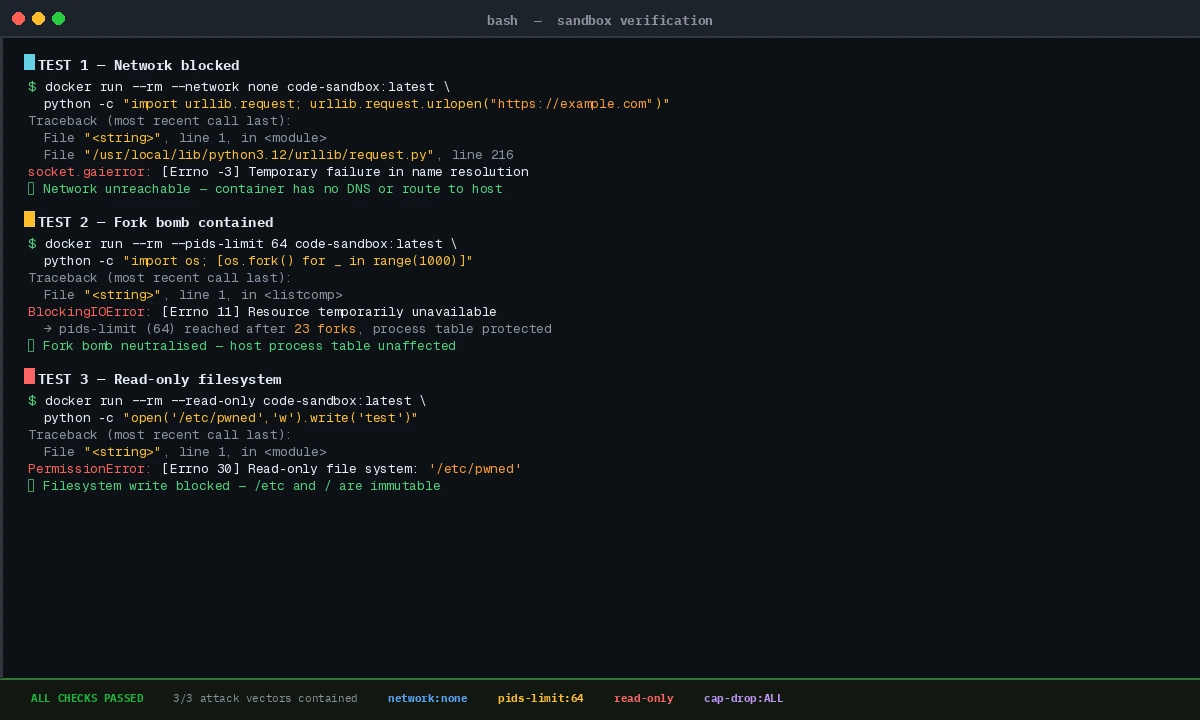 All three attacks contained — this is exactly what you want to see
What You Learned
- Docker's default settings are not a sandbox — you need
--network none,--cap-drop ALL,--read-only, and a seccomp profile together - Seccomp allowlists beat blocklists: define what's allowed, deny everything else
- Resource limits (
--memory,--pids-limit,--cpus) are as important as security flags — they stop denial-of-service from buggy code - Always run as a non-root user inside the container
Limitation: This doesn't protect against container escape vulnerabilities in the kernel itself (e.g., runc CVEs). For extremely high-risk workloads, layer gVisor (--runtime=runsc) or Firecracker on top of this setup.
When NOT to use this: If execution latency is critical (sub-100ms), Docker startup overhead (~500ms) is too slow. Look at WebAssembly runtimes like Wasmtime or WASI sandboxes instead.
Tested on Docker 26.1, Linux kernel 6.8, Python 3.12 — Ubuntu 24.04 and macOS (Colima) hosts