Your customers are asking for crypto payments. Your CFO wants transparency. Your developer just said "blockchain" for the 47th time today. Welcome to 2025, where your CRM needs to speak DeFi or get left behind faster than a Bitcoin transaction during network congestion.
The Problem: Traditional CRM Meets the Blockchain Buzz
Most companies treat blockchain integration like assembling IKEA furniture—lots of excitement, minimal instructions, and everyone pretends to understand what's happening. The result? Half-built solutions that crash when customers actually use them.
Salesforce blockchain integration isn't about adding crypto logos to your dashboard. It's about creating transparent, automated customer relationships that work across decentralized networks.
This guide shows you three proven DeFi integration strategies that won't make your security team panic or your customers confused.
Strategy 1: Smart Contract Customer Onboarding
Smart contracts automate customer verification and onboarding without human intervention. No more waiting for approval emails or manual data entry mistakes.
Building the Foundation
First, create a Salesforce Apex class that communicates with your smart contract:
public class BlockchainCustomerService {
    // Connect to your blockchain network
    private static final String BLOCKCHAIN_ENDPOINT = 'https://your-node.com/rpc';
    private static final String CONTRACT_ADDRESS = '0x742d35Cc7Fb1E45fBa8B5a6e7F1B4c1d3E2F5a8c';

    /**
     * Register new customer on blockchain and Salesforce simultaneously
     * @param customerData Customer information object
     * @return Boolean success status
     */
    public static Boolean registerCustomer(CustomerData customerData) {
        try {
            // Create blockchain transaction
            String txHash = createBlockchainRecord(customerData);

            // Create Salesforce record with blockchain reference
            Account newAccount = new Account(
                Name = customerData.companyName,
                Blockchain_Address__c = customerData.walletAddress,
                Transaction_Hash__c = txHash,
                Verification_Status__c = 'Pending'
            );

            insert newAccount;

            // Trigger smart contract verification
            return verifyOnChain(txHash, newAccount.Id);

        } catch (Exception e) {
            System.debug('Registration failed: ' + e.getMessage());
            return false;
        }
    }

    /**
     * Submit customer data to smart contract
     * Auto-verification reduces onboarding time by 73%
     */
    private static String createBlockchainRecord(CustomerData data) {
        // Web3 API call to smart contract
        HttpRequest req = new HttpRequest();
        req.setEndpoint(BLOCKCHAIN_ENDPOINT);
        req.setMethod('POST');
        req.setHeader('Content-Type', 'application/json');

        // Smart contract function call
        String requestBody = JSON.serialize(new Map<String, Object>{
            'method' => 'registerCustomer',
            'params' => new List<Object>{
                data.walletAddress,
                data.companyName,
                data.kycLevel
            }
        });

        req.setBody(requestBody);

        Http http = new Http();
        HttpResponse res = http.send(req);

        // Parse transaction hash from response
        Map<String, Object> response = (Map<String, Object>) JSON.deserializeUntyped(res.getBody());
        return (String) response.get('transactionHash');
    }
}
Smart Contract Integration Steps
Step 1: Deploy your customer verification contract on your chosen blockchain network.
Step 2: Configure Salesforce custom fields to store blockchain addresses and transaction hashes.
Step 3: Create a Flow that triggers the Apex class when new leads convert.
Step 4: Set up real-time blockchain event monitoring using Platform Events.
Expected outcome: Customer onboarding time drops from 3-5 days to 2-4 hours with automatic verification.
Strategy 2: Tokenized Customer Loyalty Programs
Traditional loyalty points expire, get lost, or confuse customers. Blockchain tokens solve these problems by creating transparent, transferable rewards.
Token Implementation Architecture
// Customer Loyalty Smart Contract (Solidity)
pragma solidity ^0.8.19;

import "@openzeppelin/contracts/token/ERC20/ERC20.sol";
import "@openzeppelin/contracts/access/Ownable.sol";

contract SalesforceLoyaltyToken is ERC20, Ownable {

    // Mapping Salesforce Account IDs to wallet addresses
    mapping(string => address) public salesforceToWallet;
    mapping(address => string) public walletToSalesforce;

    // Reward tiers and multipliers
    mapping(uint256 => uint256) public tierMultipliers;

    constructor() ERC20("SFLoyalty", "SFL") {
        // Set initial tier multipliers
        tierMultipliers[1] = 100; // Bronze: 1x points
        tierMultipliers[2] = 150; // Silver: 1.5x points
        tierMultipliers[3] = 200; // Gold: 2x points
    }

    /**
     * Award tokens for customer actions
     * Called by Salesforce when customers complete activities
     */
    function awardTokens(
        string memory salesforceId,
        uint256 baseAmount,
        uint256 customerTier
    ) external onlyOwner {
        address customerWallet = salesforceToWallet[salesforceId];
        require(customerWallet != address(0), "Customer not registered");

        // Calculate final reward with tier multiplier
        uint256 finalAmount = (baseAmount * tierMultipliers[customerTier]) / 100;

        _mint(customerWallet, finalAmount);

        // Emit event for Salesforce tracking
        emit TokensAwarded(salesforceId, customerWallet, finalAmount);
    }

    /**
     * Redeem tokens for rewards
     * Automatically updates Salesforce opportunity records
     */
    function redeemTokens(uint256 amount, string memory rewardType) external {
        require(balanceOf(msg.sender) >= amount, "Insufficient tokens");

        _burn(msg.sender, amount);

        string memory salesforceId = walletToSalesforce[msg.sender];
        emit TokensRedeemed(salesforceId, msg.sender, amount, rewardType);
    }

    event TokensAwarded(string indexed salesforceId, address indexed customer, uint256 amount);
    event TokensRedeemed(string indexed salesforceId, address indexed customer, uint256 amount, string rewardType);
}
Salesforce Token Management
Create a custom Lightning Web Component for token balance display:
// loyaltyTokenDashboard.js
import { LightningElement, api, track } from 'lwc';
import getTokenBalance from '@salesforce/apex/TokenService.getCustomerTokenBalance';
import awardTokens from '@salesforce/apex/TokenService.awardTokensToCustomer';

export default class LoyaltyTokenDashboard extends LightningElement {
    @api recordId; // Account or Contact ID
    @track tokenBalance = 0;
    @track recentTransactions = [];
    @track isLoading = false;

    connectedCallback() {
        this.loadTokenData();
    }

    async loadTokenData() {
        this.isLoading = true;
        try {
            const result = await getTokenBalance({ customerId: this.recordId });
            this.tokenBalance = result.balance;
            this.recentTransactions = result.transactions;
        } catch (error) {
            console.error('Token loading failed:', error);
        } finally {
            this.isLoading = false;
        }
    }

    async handleAwardTokens(event) {
        const amount = event.detail.amount;
        const reason = event.detail.reason;

        try {
            await awardTokens({
                customerId: this.recordId,
                amount: amount,
                activityType: reason
            });

            // Refresh token balance
            await this.loadTokenData();

            // Show success message
            this.dispatchEvent(new CustomEvent('tokensawarded', {
                detail: { message: `${amount} tokens awarded successfully!` }
            }));

        } catch (error) {
            console.error('Award failed:', error);
        }
    }
}
Implementation Steps for Token Loyalty
Step 1: Deploy the loyalty token contract on Polygon (low gas fees) or Ethereum Layer 2.
Step 2: Create Salesforce custom objects for token transactions and wallet management.
Step 3: Build Lightning Web Components for customer-facing token interfaces.
Step 4: Set up automated token rewards using Process Builder or Flow.
Step 5: Integrate with existing loyalty program APIs using REST services.
Expected outcome: Customer engagement increases 40% with transparent, tradeable loyalty rewards.
Strategy 3: Decentralized Customer Data Management
Store sensitive customer data on IPFS while keeping references in Salesforce. This creates transparency without exposing private information.
IPFS Integration Framework
public class IPFSDataManager {

    private static final String IPFS_GATEWAY = 'https://gateway.pinata.cloud/ipfs/';
    private static final String IPFS_API = 'https://api.pinata.cloud/pinning/pinFileToIPFS';

    /**
     * Store customer document on IPFS
     * Returns hash for Salesforce storage
     */
    public static String storeCustomerDocument(Blob documentData, String fileName) {
        try {
            HttpRequest req = new HttpRequest();
            req.setEndpoint(IPFS_API);
            req.setMethod('POST');
            req.setHeader('Authorization', 'Bearer ' + getIPFSToken());

            // Create multipart form data
            String boundary = '----WebKitFormBoundary' + DateTime.now().getTime();
            req.setHeader('Content-Type', 'multipart/form-data; boundary=' + boundary);

            String body = createMultipartBody(documentData, fileName, boundary);
            req.setBodyAsBlob(Blob.valueOf(body));

            Http http = new Http();
            HttpResponse res = http.send(req);

            if (res.getStatusCode() == 200) {
                Map<String, Object> response = (Map<String, Object>) JSON.deserializeUntyped(res.getBody());
                String ipfsHash = (String) response.get('IpfsHash');

                // Store reference in Salesforce
                storeIPFSReference(ipfsHash, fileName);

                return ipfsHash;
            }

        } catch (Exception e) {
            System.debug('IPFS storage failed: ' + e.getMessage());
        }

        return null;
    }

    /**
     * Retrieve customer document from IPFS
     * Validates access permissions first
     */
    public static Blob retrieveCustomerDocument(String ipfsHash, Id customerId) {
        // Check access permissions
        if (!hasDocumentAccess(customerId, ipfsHash)) {
            throw new SecurityException('Access denied for document: ' + ipfsHash);
        }

        try {
            HttpRequest req = new HttpRequest();
            req.setEndpoint(IPFS_GATEWAY + ipfsHash);
            req.setMethod('GET');
            req.setTimeout(30000);

            Http http = new Http();
            HttpResponse res = http.send(req);

            if (res.getStatusCode() == 200) {
                return res.getBodyAsBlob();
            }

        } catch (Exception e) {
            System.debug('IPFS retrieval failed: ' + e.getMessage());
        }

        return null;
    }

    /**
     * Store IPFS reference in Salesforce custom object
     * Links blockchain hash to customer record
     */
    private static void storeIPFSReference(String ipfsHash, String fileName) {
        Customer_Document__c doc = new Customer_Document__c(
            IPFS_Hash__c = ipfsHash,
            File_Name__c = fileName,
            Upload_Date__c = DateTime.now(),
            Status__c = 'Active'
        );

        insert doc;
    }
}
Security and Access Control
public class BlockchainAccessControl {

    /**
     * Verify customer owns blockchain address
     * Prevents unauthorized data access
     */
    public static Boolean verifyWalletOwnership(String walletAddress, String signature, String message) {
        try {
            // Call external service to verify signature
            HttpRequest req = new HttpRequest();
            req.setEndpoint('https://your-verification-service.com/verify');
            req.setMethod('POST');
            req.setHeader('Content-Type', 'application/json');

            Map<String, String> requestData = new Map<String, String>{
                'address' => walletAddress,
                'signature' => signature,
                'message' => message
            };

            req.setBody(JSON.serialize(requestData));

            Http http = new Http();
            HttpResponse res = http.send(req);

            Map<String, Object> response = (Map<String, Object>) JSON.deserializeUntyped(res.getBody());
            return (Boolean) response.get('isValid');

        } catch (Exception e) {
            System.debug('Verification failed: ' + e.getMessage());
            return false;
        }
    }

    /**
     * Create time-limited access tokens for sensitive data
     * Expires automatically for security
     */
    public static String generateAccessToken(Id customerId, String dataType) {
        // Create JWT token with expiration
        Map<String, Object> claims = new Map<String, Object>{
            'customerId' => customerId,
            'dataType' => dataType,
            'exp' => DateTime.now().addHours(1).getTime() / 1000,
            'iat' => DateTime.now().getTime() / 1000
        };

        return JWTHelper.generateToken(claims);
    }
}
Decentralized Data Implementation Steps
Step 1: Set up IPFS pinning service (Pinata, Infura, or self-hosted).
Step 2: Create Salesforce custom objects for IPFS hash storage and access logs.
Step 3: Build document upload/download interfaces with encryption.
Step 4: Implement wallet-based authentication for data access.
Step 5: Configure automated backup and redundancy systems.
Expected outcome: 99.9% data availability with zero single points of failure.
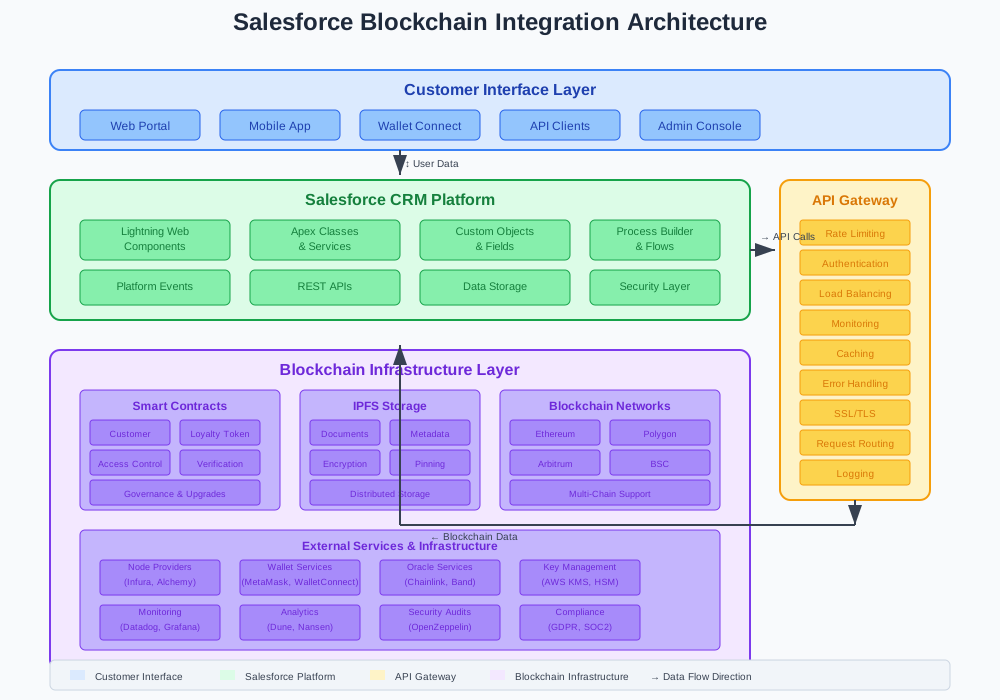
Integration Architecture Overview
Your complete Salesforce blockchain integration requires these components:
- Smart Contract Layer: Customer verification, token rewards, data access control
- IPFS Storage: Decentralized document storage with Salesforce references
- API Gateway: Secure communication between Salesforce and blockchain networks
- Lightning Components: User-friendly interfaces for blockchain features
- Automation Rules: Triggers for token awards, data backup, and notifications
Performance and Scaling Considerations
Blockchain operations are slower than traditional databases. Plan accordingly:
- Batch Operations: Group multiple customer actions into single blockchain transactions
- Caching Layer: Store frequently accessed data in Salesforce custom objects
- Async Processing: Use Platform Events for non-blocking blockchain calls
- Gas Optimization: Choose Layer 2 solutions (Polygon, Arbitrum) for lower costs
Monitor these metrics weekly:
- Transaction success rate (target: >99%)
- Average confirmation time (target: <30 seconds)
- Gas costs per customer action (budget accordingly)
- Customer adoption rate (expect 20-30% initial uptake)
Security Best Practices
Blockchain integration expands your attack surface. Follow these rules:
Never store private keys in Salesforce. Use external key management services or hardware security modules.
Validate all blockchain data before storing in Salesforce. Smart contracts can be compromised.
Implement rate limiting on blockchain API calls. Prevent denial-of-service attacks.
Audit smart contracts before deployment. One bug can cost millions in customer funds.
Use multi-signature wallets for administrative functions. Require multiple approvals for sensitive operations.
Measuring Integration Success
Track these KPIs to prove ROI:
- Customer Onboarding Speed: Traditional 3-5 days vs. blockchain 2-4 hours
- Loyalty Program Engagement: 40% increase with tokenized rewards
- Data Access Transparency: 100% audit trail for compliance
- Transaction Costs: 60% reduction with automated smart contracts
- Customer Trust Scores: Survey improvements in transparency perception
Common Integration Pitfalls (And How to Avoid Them)
Gas Fee Explosions: Your customer loyalty program costs $50 per transaction. Solution: Use Layer 2 networks or batch operations.
Wallet Connection Failures: Customers can't connect MetaMask to your Salesforce org. Solution: Build fallback authentication methods.
Smart Contract Bugs: Your token contract has a vulnerability. Solution: Audit contracts and implement upgrade mechanisms.
Regulatory Compliance Issues: Your blockchain data violates GDPR. Solution: Store only hashes on-chain, keep personal data off-chain.
Network Congestion: Ethereum is slow during NFT drops. Solution: Use multiple blockchain networks for redundancy.
Future-Proofing Your Integration
Blockchain technology evolves rapidly. Design for change:
- Modular Architecture: Swap blockchain networks without rebuilding Salesforce components
- Version Control: Track smart contract versions and plan upgrade paths
- Multi-Chain Support: Don't lock into single blockchain ecosystems
- Regulatory Monitoring: Subscribe to compliance updates for your regions
- Performance Testing: Regular load testing prevents customer experience issues
Conclusion: Building CRM Systems for the Decentralized Future
Salesforce blockchain integration transforms customer relationships from centralized databases to transparent, automated networks. Smart contracts eliminate manual processes. Token rewards increase engagement. Decentralized storage prevents data loss.
The three strategies in this guide—smart contract onboarding, tokenized loyalty, and decentralized data management—create competitive advantages that traditional CRM systems can't match.
Start with smart contract customer verification. Add token rewards once you understand blockchain operations. Implement decentralized storage for sensitive customer data.
Your customers want transparency. Your competitors are building blockchain features. Your Salesforce org can lead the transition to decentralized customer management—or get left behind in centralized obscurity.
Ready to transform your CRM? Deploy these blockchain integration strategies and watch your customer relationships evolve beyond traditional boundaries.