RunPod GPU cloud LLM fine-tuning gives you on-demand A100 and H100 access for $1.19–$3.99/hr — no reserved instance commitment, no idle billing between runs. This guide walks you from pod creation to a trained LoRA adapter in under 30 minutes.
You'll learn:
- Provision a RunPod GPU pod with the right template for fine-tuning
- Install Axolotl and configure a QLoRA run for Llama 3.1 8B
- Monitor VRAM, save checkpoints to RunPod Volume, and terminate cleanly to stop billing
Time: 30 min | Difficulty: Intermediate
Why RunPod for LLM Fine-Tuning
Most fine-tuning jobs fail at the infrastructure layer, not the model layer. Local GPUs run out of VRAM. Cloud VMs charge you while they sit idle. RunPod solves both: you rent GPU-hours, not GPU-months.
The three failure modes RunPod eliminates:
- OOM crashes mid-run — choose the exact VRAM tier (24GB / 40GB / 80GB) for your model size
- Idle billing — pods bill per second; terminate when the job finishes
- Data loss on crash — Network Volumes persist independently of pod lifecycle
RunPod's community cloud starts at $0.39/hr for an RTX 4090 (24GB). The secure cloud tier (SOC 2 Type II, US data centers in us-east-1 and us-west-2) starts at $1.19/hr for an A100 80GB — the standard for serious fine-tuning work.
GPU Selection: What VRAM You Actually Need
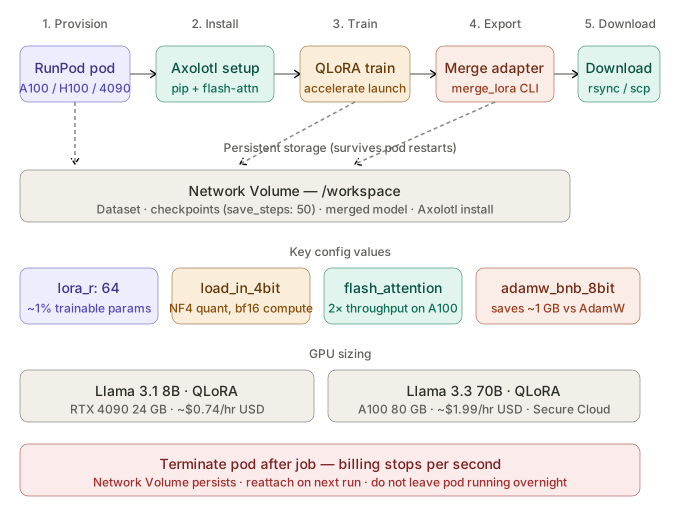 End-to-end flow: RunPod pod → Axolotl QLoRA training → checkpoint on Network Volume → adapter export
Match your model size to the right GPU before you provision. Undersizing wastes money on retries.
| Model | Precision | Technique | Min VRAM | RunPod GPU | Est. Cost/hr (USD) |
|---|---|---|---|---|---|
| Llama 3.1 8B | bfloat16 | QLoRA | 16GB | RTX 4080 | $0.74 |
| Llama 3.1 8B | bfloat16 | Full fine-tune | 40GB | A100 40GB | $1.19 |
| Llama 3.3 70B | 4-bit NF4 | QLoRA | 40GB | A100 40GB | $1.19 |
| Llama 3.3 70B | bfloat16 | QLoRA | 80GB | A100 80GB | $1.99 |
| Mixtral 8x7B | 4-bit NF4 | QLoRA | 48GB | A100 80GB | $1.99 |
Rule of thumb: QLoRA on a 7–8B model fits on 16GB VRAM. Go to 40GB when batch size or sequence length pushes you over. H100 ($3.99/hr) is only worth it for jobs over 6 hours — the speed gain rarely justifies the premium on shorter runs.
Step 1: Create a RunPod Account and Add Credits
RunPod uses prepaid credits. Add a minimum of $10 to start — a 30-minute A100 job costs under $1.00.
- Go to runpod.io and sign up
- Navigate to Billing → Add Credits → enter a USD amount
- Under Settings → SSH Public Key, paste your public key (
~/.ssh/id_ed25519.pub)
SSH access is required for reliable file transfers and terminal access. Do not skip this step.
Step 2: Create a Network Volume
Network Volumes persist your datasets, checkpoints, and final adapters across pod restarts. Without one, a pod crash wipes everything.
- Go to Storage → + Network Volume
- Set Name:
llm-finetune-vol - Set Size:
50 GB(enough for a 7B model + dataset + checkpoints) - Set Region:
US-TX-3or any US region matching your planned pod region - Click Create
Cost: $0.07/GB/month — 50GB costs $3.50/month. Terminate unused volumes after the project.
Step 3: Provision a GPU Pod
- Go to Pods → + Deploy
- Select Secure Cloud for US-based SOC 2 infrastructure, or Community Cloud to minimize cost
- Filter by GPU: select A100 80GB SXM for Llama 3.3 70B, or RTX 4090 for 8B models
- Under Template, search for and select:
RunPod PyTorch 2.4(CUDA 12.4, Python 3.12, pre-installed) - Under Volume, attach
llm-finetune-voland set mount path to/workspace - Set Container Disk:
20 GB(OS + dependencies only — data lives on the volume) - Click Deploy On-Demand
The pod reaches Running state in 60–90 seconds. Click Connect → Start Web Terminal or copy the SSH command.
Step 4: Install Axolotl
Axolotl is the standard fine-tuning framework for QLoRA on consumer and cloud GPUs. It wraps Hugging Face Transformers, PEFT, and bitsandbytes into a single YAML-driven config.
SSH into your pod:
ssh root@<pod-ip> -p <pod-port> -i ~/.ssh/id_ed25519
Install Axolotl into the persistent volume so you don't reinstall on pod restarts:
cd /workspace

# Install into /workspace so it survives pod restarts
pip install packaging ninja --quiet
pip install axolotl[flash-attn,deepspeed] --quiet

# Verify GPU is visible
python -c "import torch; print(torch.cuda.get_device_name(0), torch.cuda.get_device_properties(0).total_memory // 1e9, 'GB')"
Expected output: NVIDIA A100-SXM4-80GB 79.0 GB
If it fails:
ModuleNotFoundError: flash_attn→ the RunPod PyTorch template ships CUDA 12.4; runpip install flash-attn --no-build-isolationthen retryCUDA error: no kernel image→ you selected the wrong template; stop the pod, switch toRunPod PyTorch 2.4, and redeploy
Step 5: Prepare Your Dataset
Axolotl expects data in one of three formats: alpaca, sharegpt, or completion. The sharegpt format maps directly to chat-tuned models.
Create a minimal dataset file:
mkdir -p /workspace/data
cat > /workspace/data/train.jsonl << 'EOF'
{"conversations": [{"from": "human", "value": "Explain gradient checkpointing in one sentence."}, {"from": "gpt", "value": "Gradient checkpointing trades compute for memory by recomputing activations during the backward pass instead of storing them."}]}
{"conversations": [{"from": "human", "value": "What is LoRA?"}, {"from": "gpt", "value": "LoRA freezes base model weights and injects trainable low-rank matrices into attention layers, reducing trainable parameters by up to 10,000x."}]}
EOF
For real fine-tuning jobs, upload your dataset to the Network Volume via scp:
# Run locally — copies dataset from your machine to the pod volume
scp -P <pod-port> -i ~/.ssh/id_ed25519 ./my_dataset.jsonl root@<pod-ip>:/workspace/data/
Step 6: Write the Axolotl Config
Create /workspace/config/llama3-qlora.yml:
mkdir -p /workspace/config
# /workspace/config/llama3-qlora.yml

base_model: meta-llama/Meta-Llama-3.1-8B-Instruct

# 4-bit NF4 quantization — loads the base model in 4-bit, trains LoRA adapters in bfloat16
load_in_4bit: true
bnb_4bit_compute_dtype: bfloat16    # compute in bfloat16 even though weights are 4-bit
bnb_4bit_quant_type: nf4            # NF4 outperforms FP4 on LLM weights empirically

# LoRA adapter config
lora_r: 64                 # rank — higher = more capacity, more VRAM. 64 is the sweet spot for 8B
lora_alpha: 128            # scale = alpha/r; keeping 2x rank is standard
lora_dropout: 0.05         # small dropout prevents adapter overfitting on small datasets
lora_target_modules:
  - q_proj
  - k_proj
  - v_proj
  - o_proj
  - gate_proj
  - up_proj
  - down_proj

# Dataset
datasets:
  - path: /workspace/data/train.jsonl
    type: sharegpt

# Training
sequence_len: 2048           # reduce to 1024 to halve VRAM usage on smaller GPUs
micro_batch_size: 2          # per-GPU batch size; increase if VRAM allows
gradient_accumulation_steps: 4   # effective batch = micro_batch * grad_accum = 8
num_epochs: 3
optimizer: adamw_bnb_8bit    # 8-bit Adam — saves ~1GB VRAM vs standard AdamW
lr_scheduler: cosine
learning_rate: 2e-4

# Flash Attention 2 — mandatory on A100/H100 for 2x throughput
flash_attention: true

# Output
output_dir: /workspace/output/llama3-qlora
save_steps: 50               # checkpoint every 50 steps — safe against spot instance preemption
logging_steps: 10

# Hugging Face token for gated model access
hf_use_auth_token: true
Set your Hugging Face token (required for Llama 3 gated access):
export HF_TOKEN=hf_your_token_here # generate at huggingface.co/settings/tokens
Step 7: Launch Fine-Tuning
cd /workspace

# Start training — logs to stdout; Ctrl+C safely stops and saves the last checkpoint
accelerate launch -m axolotl.cli.train /workspace/config/llama3-qlora.yml
Expected output on first run:
[INFO] Loading model meta-llama/Meta-Llama-3.1-8B-Instruct in 4-bit...
[INFO] trainable params: 83,886,080 || all params: 8,114,774,016 || trainable%: 1.0338
[INFO] Step 10/300 | loss: 1.8432 | lr: 0.000198 | tokens/sec: 2841
The trainable%: 1.03 line confirms QLoRA is active — you're training 84M parameters, not 8B.
Monitor VRAM in a second terminal:
watch -n 2 nvidia-smi --query-gpu=memory.used,memory.free,utilization.gpu --format=csv
You should see ~18–22GB used on an A100 80GB for this config. If usage exceeds 75GB, reduce sequence_len to 1024 or micro_batch_size to 1.
Step 8: Export the Adapter
When training completes, merge the LoRA adapter into the base model for inference:
# Merge adapter weights into the base model
python -m axolotl.cli.merge_lora /workspace/config/llama3-qlora.yml \
  --lora_model_dir /workspace/output/llama3-qlora \
  --output_dir /workspace/output/llama3-merged
Expected output: Saving merged model to /workspace/output/llama3-merged
The merged model is ~16GB on disk. Download it to your local machine before terminating the pod:
# Run locally
rsync -avz -e "ssh -p <pod-port> -i ~/.ssh/id_ed25519" \
  root@<pod-ip>:/workspace/output/llama3-merged ./llama3-merged
Verification
Test the merged model with a quick inference check before downloading:
python - <<'EOF'
from transformers import AutoModelForCausalLM, AutoTokenizer
import torch

model_path = "/workspace/output/llama3-merged"
tok = AutoTokenizer.from_pretrained(model_path)
model = AutoModelForCausalLM.from_pretrained(model_path, torch_dtype=torch.bfloat16, device_map="auto")

prompt = tok.apply_chat_template(
    [{"role": "user", "content": "What is gradient checkpointing?"}],
    tokenize=False, add_generation_prompt=True
)
inputs = tok(prompt, return_tensors="pt").to("cuda")
out = model.generate(**inputs, max_new_tokens=100)
print(tok.decode(out[0], skip_special_tokens=True))
EOF
You should see: A coherent response about gradient checkpointing from your fine-tuned model.
Step 9: Terminate the Pod
This step saves money. An A100 80GB left running overnight costs ~$48.
- Go to RunPod dashboard → Pods
- Click Stop on your pod — billing pauses immediately
- Click Terminate only after confirming all outputs are on the Network Volume or downloaded locally
Your Network Volume (llm-finetune-vol) persists. The next run, attach it to a fresh pod and skip Steps 4–6.
Cost Reference (USD)
| Job | GPU | Duration | Cost |
|---|---|---|---|
| Llama 3.1 8B QLoRA, 3 epochs, 10k samples | RTX 4090 | ~45 min | ~$0.55 |
| Llama 3.1 8B QLoRA, 3 epochs, 10k samples | A100 40GB | ~25 min | ~$0.50 |
| Llama 3.3 70B QLoRA, 3 epochs, 10k samples | A100 80GB | ~3.5 hrs | ~$6.97 |
| Llama 3.3 70B full fine-tune, 1 epoch | H100 80GB × 2 | ~6 hrs | ~$47.88 |
For jobs over $20, use Spot pods (50–70% discount) with save_steps: 25 — preemption is rare but possible.
What You Learned
- RunPod bills per second; always terminate pods after the job, not just stop them
- Network Volumes are the only persistent layer — attach one before every fine-tuning run
- QLoRA at
lora_r: 64on an 8B model trains ~1% of parameters while preserving base model quality flash_attention: truein Axolotl config is mandatory on A100/H100 — disabling it halves throughput
Tested on RunPod Secure Cloud, A100 80GB SXM, Axolotl 0.5.1, Python 3.12, CUDA 12.4, PyTorch 2.4
FAQ
Q: Does RunPod work without a Hugging Face token for non-gated models?
A: Yes — set hf_use_auth_token: false in the Axolotl config. Only Llama 3, Gemma, and other gated models require a token.
Q: What is the difference between Stop and Terminate on RunPod? A: Stop pauses billing and preserves the container disk. Terminate deletes the container disk permanently. Always use Stop first, then Terminate only after your outputs are saved to the Network Volume.
Q: Minimum VRAM for Llama 3.3 70B QLoRA on RunPod?
A: 40GB VRAM with sequence_len: 1024 and micro_batch_size: 1. For sequence_len: 2048, use an 80GB A100.
Q: Can I use RunPod with DeepSpeed for multi-GPU fine-tuning?
A: Yes — set deepspeed: deepspeed_configs/zero3.json in the Axolotl config and deploy a pod with 2×A100 or 4×A100 from the RunPod multi-GPU pod type selector.