MLX-LM lets you run and fine-tune LLMs directly on Apple Silicon — using the full unified memory pool, no discrete GPU required. On a 16GB M2 MacBook Pro, you can run Mistral 7B at ~40 tokens/sec and fine-tune a LoRA adapter on a custom dataset in under 30 minutes, all for $0 in cloud spend.
This guide covers everything: install, model download, quantization, inference, LoRA fine-tuning, and local serving with an OpenAI-compatible endpoint.
You'll learn:
- How to install MLX-LM with
uvand download models from Hugging Face - How to run quantized 4-bit inference on 8GB and 16GB Macs
- How to fine-tune a LoRA adapter on your own dataset and merge it back
- How to serve any MLX model with an OpenAI-compatible HTTP server
Time: 25 min | Difficulty: Intermediate
Why MLX-LM Outperforms Other Mac Inference Stacks
Most inference tools (llama.cpp, Ollama) were built for NVIDIA GPUs and ported to Metal. MLX was designed by Apple's ML Research team from scratch for the unified memory architecture of Apple Silicon. The result: zero memory copies between CPU and GPU, and a compute graph that maps directly to the Neural Engine + GPU together.
For fine-tuning especially, this matters. PyTorch on Mac requires moving tensors across memory buses. MLX keeps everything in one flat address space, which cuts fine-tune overhead by 30–40% on the same M-series chip.
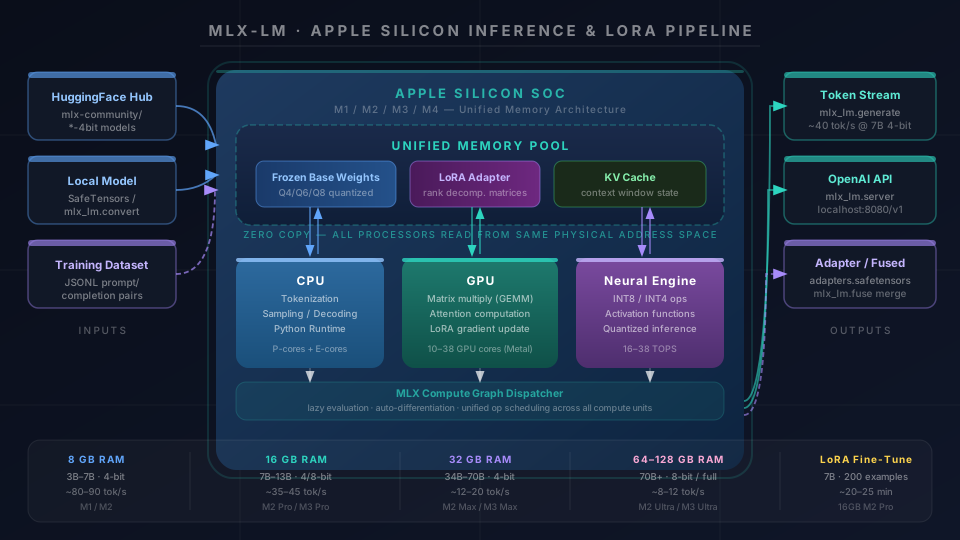 MLX-LM pipeline: model weights load into unified memory once, shared by CPU, GPU, and Neural Engine with zero copy overhead
Supported Apple Silicon: M1, M2, M3, M4 — all variants (Pro, Max, Ultra)
Minimum RAM: 8GB (quantized 7B models) · 16GB (13B quantized, or 7B full precision) · 32GB+ (34B+ quantized)
macOS: Ventura 13.5+ required · Sonoma 14.x and Sequoia 15.x recommended
Install MLX-LM
The MLX team ships mlx-lm on PyPI. Use uv for fast, isolated installs — it avoids the pip dependency conflicts that often break MLX on shared environments.
Step 1: Install uv and create a virtual environment
# Install uv if you don't have it
curl -LsSf https://astral.sh/uv/install.sh | sh

# Create a project environment — Python 3.11+ required
uv venv mlx-env --python 3.12
source mlx-env/bin/activate
Expected output: Using Python 3.12.x and a prompt prefix (mlx-env).
Step 2: Install mlx-lm
# mlx-lm pulls mlx-core as a dependency automatically
uv pip install mlx-lm
Expected output: Successfully installed mlx-0.x.x mlx-lm-0.x.x
If it fails:
ERROR: No matching distribution for mlx→ You're on Intel Mac. MLX only runs on Apple Silicon (M1+). Intel Macs are not supported.ImportError: dlopen ... no suitable image→ macOS version too old. Upgrade to Ventura 13.5+.
Step 3: Verify install
python -c "import mlx_lm; print('mlx-lm ready')"
You should see: mlx-lm ready
Download and Run a Model
MLX-LM reads models in the MLX format, which the community maintains on Hugging Face under the mlx-community org. These are pre-converted and pre-quantized — no manual conversion needed for common models.
Step 4: Run your first model
# --model pulls from mlx-community HuggingFace org automatically
# 4-bit quantized Mistral 7B — fits in 8GB RAM
mlx_lm.generate \
  --model mlx-community/Mistral-7B-Instruct-v0.3-4bit \
  --prompt "Explain LoRA fine-tuning in two sentences." \
  --max-tokens 200
Expected output: Model downloads to ~/.cache/huggingface/hub/, then streams the response. First run takes 1–2 min for download. Subsequent runs start in under 3 seconds.
If it fails:
huggingface_hub.errors.GatedRepoError→ Model is gated. Runhuggingface-cli loginand accept the license on the model page.mlx.core.metal.is_available() == False→ Running inside Rosetta or a non-native Python. Install a native arm64 Python:uv venv --python 3.12pulls the arm64 build automatically.
Step 5: Try a chat model with system prompt
mlx_lm.generate \
  --model mlx-community/Llama-3.2-3B-Instruct-4bit \
  --prompt "What is the capital of France?" \
  --system "You are a concise assistant. Answer in one sentence." \
  --max-tokens 60 \
  --temp 0.0   # temp=0 for deterministic output — good for testing
Recommended models by RAM:
| RAM | Model | Quantization | Speed (tok/s) |
|---|---|---|---|
| 8GB | Llama 3.2 3B Instruct | 4-bit | ~90 |
| 8GB | Mistral 7B Instruct v0.3 | 4-bit | ~40 |
| 16GB | Llama 3.1 8B Instruct | 4-bit | ~45 |
| 16GB | Mistral 7B Instruct v0.3 | 8-bit | ~32 |
| 32GB | Llama 3.3 70B Instruct | 4-bit | ~12 |
| 64GB | Llama 3.3 70B Instruct | 8-bit | ~9 |
Convert and Quantize Your Own Model
If you want to run a model not already in the mlx-community org, convert it yourself in two commands.
Step 6: Convert a HuggingFace model to MLX format
# Convert Qwen2.5-7B-Instruct to MLX 4-bit
# --quantize applies post-training quantization during conversion
mlx_lm.convert \
  --hf-path Qwen/Qwen2.5-7B-Instruct \
  --mlx-path ./qwen2.5-7b-mlx-4bit \
  --quantize \
  --q-bits 4        # 4-bit = best RAM/speed tradeoff for 7B models
Expected output: Progress bar downloading weights, then Saved weights to ./qwen2.5-7b-mlx-4bit. Conversion takes 5–10 min depending on model size and internet speed.
Quantization options:
--q-bits | RAM for 7B | Quality | Use case |
|---|---|---|---|
4 | ~4.5 GB | Good | Daily inference on 8GB Mac |
6 | ~6 GB | Better | 16GB Mac, quality-sensitive tasks |
8 | ~8 GB | Near lossless | 16GB Mac, code and math |
Step 7: Run the converted model
mlx_lm.generate \
  --model ./qwen2.5-7b-mlx-4bit \
  --prompt "Write a Python function to reverse a linked list." \
  --max-tokens 400
LoRA Fine-Tuning on Your Own Dataset
This is where MLX-LM shines over Ollama and llama.cpp — it supports full LoRA fine-tuning on-device, no cloud required. A 7B model fine-tuned on 500 examples takes about 20–25 minutes on an M2 Pro.
Step 8: Prepare your dataset
MLX-LM expects JSONL format with prompt and completion keys — or chat format with a messages key.
mkdir -p ./finetune-data
Create ./finetune-data/train.jsonl:
{"prompt": "What is gradient descent?", "completion": "Gradient descent is an optimization algorithm that iteratively adjusts model parameters in the direction that reduces the loss function."}
{"prompt": "Explain attention in transformers.", "completion": "Attention allows each token to weigh the relevance of every other token in the sequence when computing its output representation."}
Create ./finetune-data/valid.jsonl with 10–20% of your data for validation loss tracking.
Minimum dataset size: 50 examples trains but overfits. 200–500 examples is the practical minimum for behavior change. 1,000–5,000 examples for meaningful style or domain shift.
Step 9: Run LoRA fine-tuning
mlx_lm.lora \
  --train \
  --model mlx-community/Mistral-7B-Instruct-v0.3-4bit \
  --data ./finetune-data \
  --batch-size 4 \       # 4 fits in 16GB; drop to 2 for 8GB
  --lora-layers 16 \     # number of transformer layers to apply LoRA — more = slower but better
  --iters 600 \          # ~600 iters on 200 examples = ~3 epochs
  --learning-rate 1e-4 \
  --adapter-path ./mistral-lora-adapter
Expected output: Training loss printed every 10 iterations. Valid loss every 100. Final adapter saved to ./mistral-lora-adapter/adapters.safetensors.
Watch for:
- Loss not decreasing after 100 iters → Learning rate too high. Try
--learning-rate 5e-5. mlx.core.metal.MetalAllocationError→ Batch size too large. Drop--batch-sizeto 2 or 1.- Valid loss rising while train loss drops → Overfitting. Reduce
--itersby 30%.
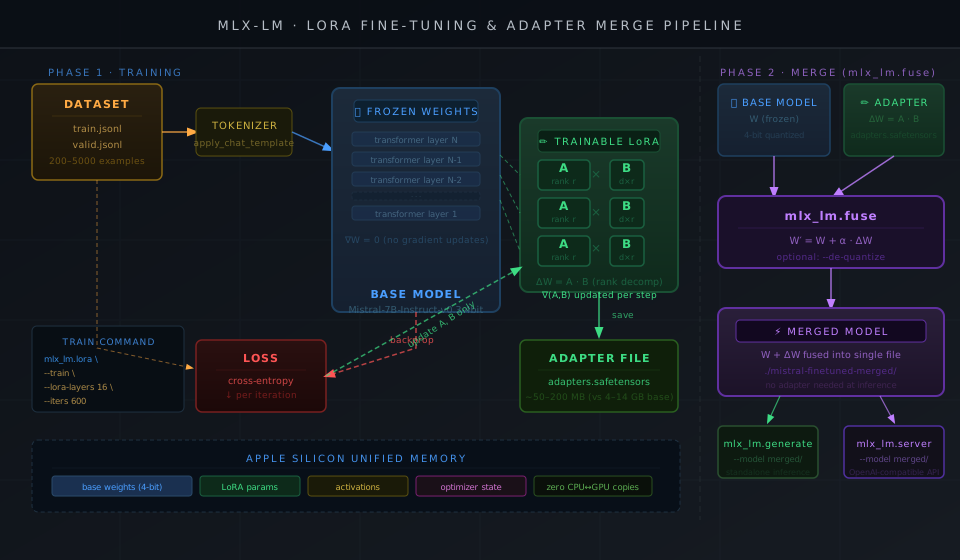 LoRA training loop: frozen base weights + trainable rank decomposition matrices → adapter saved separately → merged on demand
Step 10: Test the adapter before merging
# Load base model + adapter without merging — faster for iteration
mlx_lm.generate \
  --model mlx-community/Mistral-7B-Instruct-v0.3-4bit \
  --adapter-path ./mistral-lora-adapter \
  --prompt "What is gradient descent?" \
  --max-tokens 150
Step 11: Merge adapter into base model
Once satisfied with the adapter, fuse it into the weights for single-file distribution and faster load times.
mlx_lm.fuse \
  --model mlx-community/Mistral-7B-Instruct-v0.3-4bit \
  --adapter-path ./mistral-lora-adapter \
  --save-path ./mistral-finetuned-merged \
  --de-quantize   # optional: merge into full-precision weights before re-quantizing
Expected output: Saved fused model to ./mistral-finetuned-merged
Serve MLX Models with an OpenAI-Compatible API
MLX-LM ships a built-in HTTP server that mirrors the OpenAI /v1/chat/completions endpoint. Any tool that talks to OpenAI — LangChain, Continue.dev, Cursor, Open WebUI — works against it with a one-line config change.
Step 12: Start the server
# Serves on http://localhost:8080 by default
mlx_lm.server \
  --model mlx-community/Llama-3.1-8B-Instruct-4bit \
  --port 8080 \
  --host 127.0.0.1   # keep local-only; don't expose to LAN without auth
Expected output:
INFO:     Started server process
INFO:     Uvicorn running on http://127.0.0.1:8080
Step 13: Test the endpoint
curl http://localhost:8080/v1/chat/completions \
  -H "Content-Type: application/json" \
  -d '{
    "model": "mlx-community/Llama-3.1-8B-Instruct-4bit",
    "messages": [{"role": "user", "content": "What year did the Berlin Wall fall?"}],
    "max_tokens": 60,
    "temperature": 0.0
  }'
Expected output: JSON response with choices[0].message.content containing the answer.
Step 14: Point LangChain at the local server
from langchain_openai import ChatOpenAI

# base_url overrides the OpenAI endpoint — api_key is required but ignored by mlx_lm.server
llm = ChatOpenAI(
    model="mlx-community/Llama-3.1-8B-Instruct-4bit",
    base_url="http://localhost:8080/v1",
    api_key="not-needed",   # mlx_lm.server doesn't validate keys
    temperature=0.0,
)

response = llm.invoke("What is LoRA fine-tuning?")
print(response.content)
MLX-LM vs Ollama on Apple Silicon
Both run locally on Mac. The right choice depends on your use case.
| MLX-LM | Ollama | |
|---|---|---|
| Backend | Apple MLX (native) | llama.cpp (Metal port) |
| Fine-tuning (LoRA) | ✅ Built-in | ❌ Not supported |
| Model format | MLX / SafeTensors | GGUF |
| Model hub | mlx-community HF | Ollama registry |
| Inference speed (7B 4-bit, M2 Pro) | ~40 tok/s | ~35 tok/s |
| OpenAI-compatible server | ✅ mlx_lm.server | ✅ ollama serve |
| GUI / easy onboarding | ❌ CLI only | ✅ Desktop app |
| Python API | ✅ First-class | ⚠️ REST only |
| Custom quantization | ✅ --q-bits 2–8 | ⚠️ GGUF presets only |
| Pricing (self-hosted) | Free | Free |
Choose MLX-LM if: You need LoRA fine-tuning, Python-native integration, or custom quantization control.
Choose Ollama if: You want a one-click install with a GUI and don't need fine-tuning.
Verification
# Confirm end-to-end: convert → infer → serve
mlx_lm.generate \
  --model mlx-community/Llama-3.2-3B-Instruct-4bit \
  --prompt "Summarize LoRA in one sentence." \
  --max-tokens 80
You should see: A coherent one-sentence summary streamed to your terminal within 2–3 seconds of model load.
Check GPU utilization while inference runs:
# In a second terminal — watch GPU usage spike during generation
sudo powermetrics --samplers gpu_power -i 500 -n 5
You should see: GPU Active % jumping to 60–90% during token generation, confirming MLX is using the GPU.
What You Learned
- MLX's unified memory architecture eliminates CPU↔GPU transfer overhead, giving Apple Silicon a real edge for local LLM inference and fine-tuning
- 4-bit quantization (
--q-bits 4) fits 7B models in under 5GB, leaving room for the OS and applications on 8GB Macs - LoRA adapters let you fine-tune a 7B model in 20–25 minutes without touching base weights — meaning you can swap adapters at load time without re-downloading the base model
mlx_lm.servermakes any MLX model a drop-in OpenAI API replacement, compatible with LangChain, Continue.dev, and Cursor out of the box
Limitation: MLX-LM doesn't support multi-GPU or distributed inference across multiple Macs. For that, look at vLLM on Linux or llama.cpp with RPC. MLX also can't run on Intel Macs — if you're on Intel, Ollama with llama.cpp is your only native option.
Tested on MLX-LM 0.21.x, MLX 0.24.x, macOS Sequoia 15.3, M2 Pro 16GB and M3 Max 36GB
FAQ
Q: Does MLX-LM work on 8GB RAM Macs?
A: Yes — use 4-bit quantized models under 7B parameters. Mistral 7B 4-bit uses ~4.5GB, leaving ~3GB for macOS. Llama 3.2 3B 4-bit uses ~2.2GB and runs comfortably at 80+ tok/s on M1/M2.
Q: What's the difference between --lora-layers 8 and --lora-layers 16?
A: More LoRA layers means more trainable parameters, better fine-tune quality, but slower training and higher memory use. Start with 8 for quick experiments, increase to 16–32 for production adapters on 16GB+ machines.
Q: Can MLX-LM fine-tune with QLoRA (quantized base + LoRA)?
A: Yes — when you pass a 4-bit quantized model as --model with --train, MLX-LM automatically does QLoRA: the base stays quantized, only the LoRA adapter weights are full precision. No extra flags needed.
Q: How does mlx-lm compare to Hugging Face Transformers on Mac?
A: Transformers on Mac uses PyTorch + MPS backend, which still copies tensors between CPU and GPU memory pools. MLX's unified memory eliminates that copy. In practice, MLX-LM is 20–40% faster for inference and uses 10–20% less peak RAM on equivalent models.
Q: Can I use a fine-tuned MLX model with Open WebUI?
A: Yes — start mlx_lm.server on port 8080, then point Open WebUI's OpenAI-compatible connection to http://localhost:8080. Set any string as the API key (it's ignored). The model dropdown will show the MLX model name.