Problem: Custom Hardware Is Killing Your Momentum
You have a robotics idea. Maybe it's a warehouse bot, a inspection drone, or an agricultural rover. You start designing custom PCBs, ordering machined parts, waiting 8 weeks for PCBA runs — and you haven't written a line of control code yet.
You'll learn:
- Which off-the-shelf platforms actually work for prototyping
- How to stack components without reinventing subsystems
- When to stay off-the-shelf and when to go custom
Time: 20 min | Level: Intermediate
Why This Happens
Founders with hardware backgrounds default to "build it right the first time." Founders with software backgrounds underestimate integration complexity. Both end up in the same place: months of hardware work before validating that anyone wants the product.
Common symptoms:
- Prototype timeline stretches from 6 weeks to 6 months
- $30K spent on parts before the first demo
- Integration bugs mask whether the core concept works
The fix is to borrow proven hardware until you know what's actually hard about your problem.
Solution
Step 1: Pick a Motion Platform That Already Works
Don't build your drivetrain. Buy one. Here's a decision tree based on what you're building:
| Use Case | Platform | Cost |
|---|---|---|
| Mobile ground robot | Clearpath Husky / Jackal | $5K–$15K |
| Budget ground robot | TurtleBot 4 | ~$1,500 |
| Drone (aerial) | Holybro X500 frame + Pixhawk | ~$600 |
| Robotic arm | Trossen ReactorX 150 | ~$900 |
| Custom wheeled bot | REV Robotics + AndyMark wheels | ~$300 |
Expected: A platform that moves, has motor drivers, and ideally exposes a ROS 2 interface out of the box.
If it fails:
- No ROS 2 support: Check community packages on GitHub before writing your own driver — someone has probably already done it.
- Platform is too slow: Most ground robots top out at 1–2 m/s. If you need speed, check Clearpath's Warthog or a custom build.
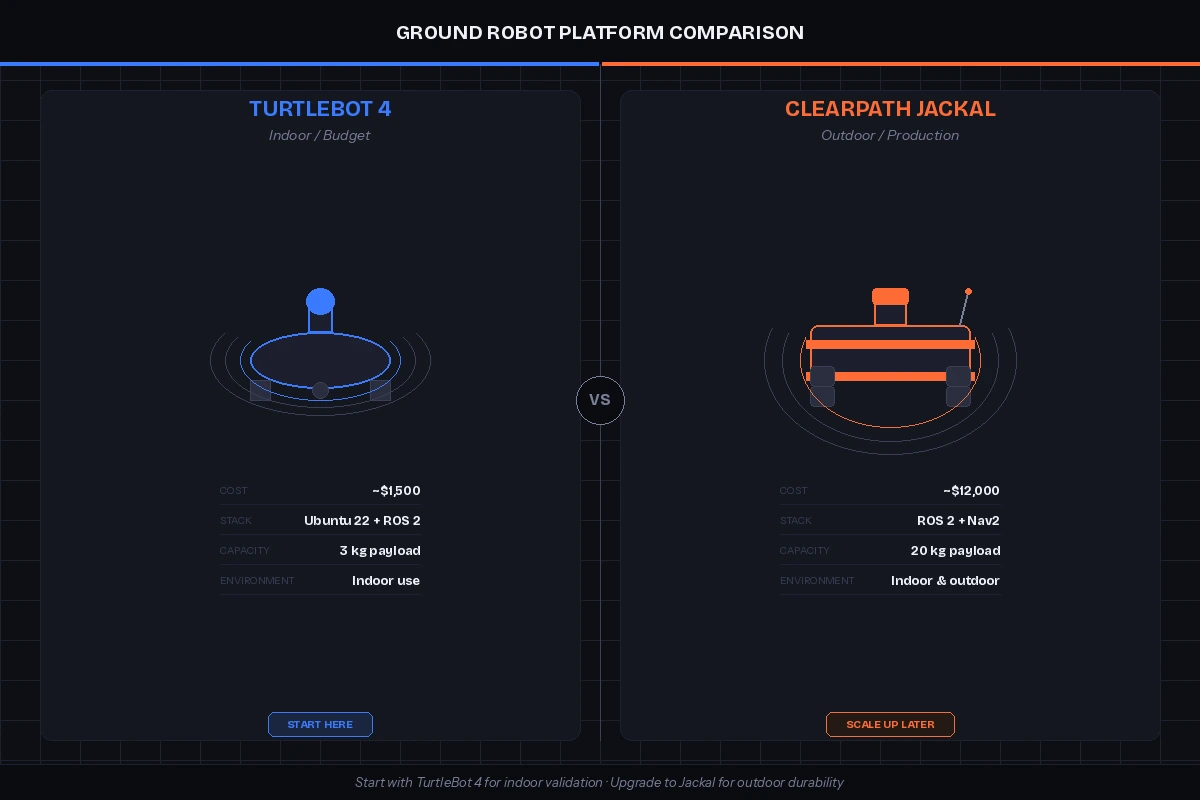 TurtleBot 4 (left) vs. Clearpath Jackal (right) — start with TurtleBot 4 unless you need outdoor durability
Step 2: Add Sensing With a Sensor Stack, Not a Sensor Project
Sensors are where startups lose weeks. A lidar driver that "should work" but doesn't. A depth camera with latency you can't explain. Avoid sensor integration hell by using known-good combinations.
Ground truth sensor stack (2026):
# Recommended ROS 2 sensor stack
lidar: Ouster OS0-32 or Livox MID-360   # ~$800–$1,500, solid SDK
depth_camera: Intel RealSense D435i      # ~$200, great community support
IMU: Vectornav VN-100                    # ~$500, USB + RS-232, plug-and-play
GPS: u-blox ZED-F9P breakout            # ~$230, RTK-capable if you need precision
Why these: All have active ROS 2 driver packages on GitHub with recent commits. You won't be debugging kernel drivers during your seed pitch.
# Install drivers for the full stack
sudo apt install ros-jazzy-ouster-ros
sudo apt install ros-jazzy-realsense2-camera
sudo apt install ros-jazzy-vectornav

# Verify each device is publishing
ros2 topic hz /ouster/points
ros2 topic hz /camera/depth/image_rect_raw
Expected: Each topic publishes at the expected Hz (10–20 Hz for lidar, 30 Hz for depth camera).
 Single-cable USB hub powers and connects all sensors to the NUC compute module
Step 3: Use a Compute Board That Has Drivers Pre-Installed
Your robot needs an onboard computer. Don't waste a week setting up CUDA drivers or fighting GPU compatibility.
Recommended options:
Intel NUC 13 Pro is the workhorse choice for indoor robots. It runs Ubuntu 24.04 out of the box, handles ROS 2 Jazzy, and fits inside most robot chassis. Expect 8–16 hours of runtime on a 19.2V battery pack.
For anything needing a GPU (vision inference, ML), use a Jetson Orin NX 16GB. Jetpack 6.x ships with CUDA 12, cuDNN, and TensorRT pre-configured. It also exposes GPIO and camera interfaces that skip a lot of USB adapter noise.
# On Jetson Orin: verify CUDA is available
python3 -c "import torch; print(torch.cuda.is_available())"
# Expected: True

# Check compute module temps under load
tegrastats --interval 1000
If it fails:
torch.cuda.is_available()returns False: You probably installed the wrong PyTorch build. Use the Jetson-specific wheel:pip install torch --index-url https://developer.download.nvidia.com/...(check Nvidia's current Jetpack compatibility matrix).
Step 4: Wire Up a Behavior Architecture in a Day
Most early-stage robots need a simple behavior loop: sense → decide → act. Don't architect a distributed microservices system yet. Use nav2 + BehaviorTree.CPP as the backbone.
# Minimal ROS 2 node: sense → act loop
import rclpy
from rclpy.node import Node
from sensor_msgs.msg import LaserScan
from geometry_msgs.msg import Twist

class MinimalController(Node):
    def __init__(self):
        super().__init__('minimal_controller')
        self.cmd_pub = self.create_publisher(Twist, '/cmd_vel', 10)
        self.create_subscription(LaserScan, '/scan', self.scan_callback, 10)

    def scan_callback(self, msg):
        cmd = Twist()
        # Stop if anything within 0.5m in front
        front_ranges = msg.ranges[len(msg.ranges)//3 : 2*len(msg.ranges)//3]
        if min(front_ranges) > 0.5:
            cmd.linear.x = 0.3  # Move forward at 0.3 m/s
        self.cmd_pub.publish(cmd)

def main():
    rclpy.init()
    rclpy.spin(MinimalController())
This is ugly. That's the point. It proves your robot moves and responds to the world before you build a proper planner.
Expected: Robot moves forward and stops before hitting obstacles.
Verification
# Launch everything and check the topic graph
ros2 launch your_robot bringup.launch.py
ros2 topic list  # Should show /scan, /cmd_vel, /odom, /tf

# Confirm transforms are connected
ros2 run tf2_tools view_frames
You should see: A connected TF tree from map → odom → base_link → sensor_frames. If transforms are broken, nothing downstream works — fix this before adding any intelligence.
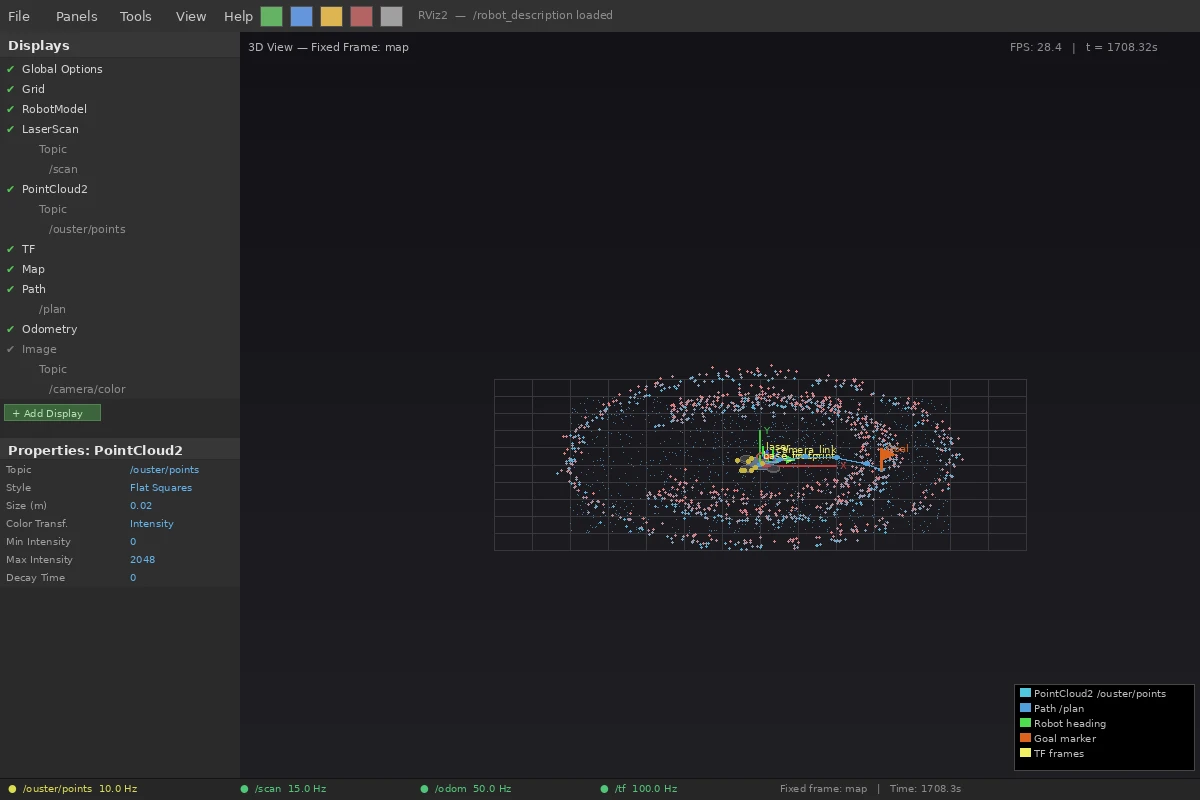 RViz showing lidar point cloud and robot model — this is your first milestone
What You Learned
- Off-the-shelf platforms buy you weeks of integration time that you can spend on your actual problem.
- The sensor stack above works. Substituting cheaper sensors is fine, but budget time for driver issues.
- Behavior architecture doesn't matter in week one — a simple loop that works beats a clean architecture that doesn't.
Limitation: Off-the-shelf hardware has a ceiling. Once you know your product needs specific form factor, weight, power budget, or cost target, you'll need custom hardware. But that's a Series A problem, not a prototype problem.
When NOT to use this approach: If your core IP is in a novel actuator, custom sensor, or proprietary mechanism — skip this guide. Your hardware is the product; you need to build it from day one.
Tested with ROS 2 Jazzy on Ubuntu 24.04, Jetpack 6.1, Python 3.12. Sensor driver versions current as of Feb 2026.