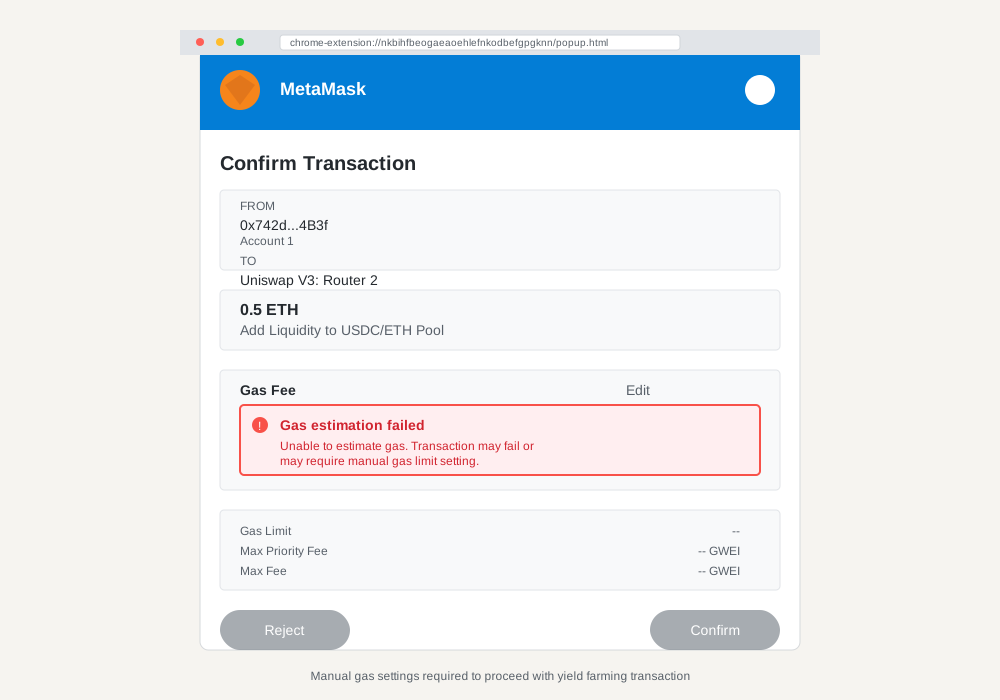
Your yield farming transaction just failed. Again. The dreaded "gas estimation failed" error mocks you from your wallet interface while potential profits slip away faster than a rug pull announcement.
Yield farming gas estimation errors plague DeFi users daily, costing millions in failed transactions and missed opportunities. These errors occur when your wallet cannot accurately predict the gas needed for complex smart contract interactions.
This guide provides practical solutions for manual gas settings that resolve estimation failures. You'll learn to configure custom gas parameters, troubleshoot common wallet issues, and optimize transaction success rates for yield farming protocols.
Here's what you'll master: understanding gas estimation mechanics, implementing manual settings across popular wallets, and preventing future transaction failures through proper configuration.
Understanding Yield Farming Gas Estimation Errors
What Causes Gas Estimation Failures
Smart contract complexity creates the primary challenge for gas estimation. Yield farming protocols execute multiple operations within single transactions: token swaps, liquidity additions, staking rewards, and protocol fee calculations.
Your wallet attempts to simulate these transactions before execution. When simulation fails due to changing network conditions or complex contract logic, you see estimation errors.
Common triggers include:
- Price slippage between estimation and execution
- Pool liquidity changes during transaction processing
- Dynamic fee structures that shift during simulation
- Nested contract calls exceeding estimation limits
- Network congestion affecting gas price volatility
Impact on DeFi Transactions
Failed gas estimation creates cascading problems beyond simple transaction rejections. Time-sensitive opportunities disappear while you troubleshoot settings. Network congestion increases costs for subsequent attempts.
Gas fee calculations become unreliable during market volatility. Your wallet may suggest insufficient gas limits, causing transactions to fail mid-execution and consume gas without completing operations.
Manual Gas Settings: Complete Solution Guide
MetaMask Manual Configuration
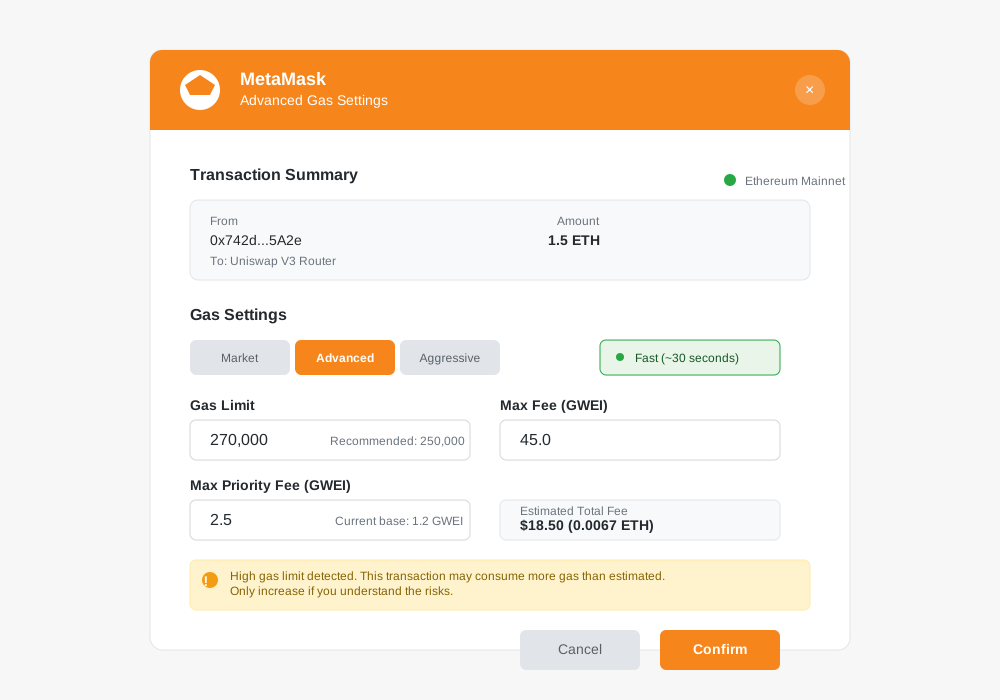
MetaMask provides the most comprehensive manual gas controls for yield farming transactions. Access advanced settings through the transaction confirmation screen.
Enable Advanced Gas Controls
// Navigate to Settings > Advanced
// Toggle "Advanced gas controls" to ON
// Toggle "Customize transaction nonce" to ON
Configure Custom Gas Parameters
- Click "Market" tab in gas fee section
- Select "Advanced" for manual input
- Set Gas Limit: Start with 250,000 for simple farming
- Set Max Priority Fee: 2-3 GWEI above current base
- Set Max Fee: 10-15% above estimated network fee
Calculate Optimal Gas Limit
// Basic yield farming transaction
const baseGasLimit = 150000;
const complexityMultiplier = 1.5; // For multi-step farming
const safetyBuffer = 1.2; // 20% extra safety margin

const recommendedLimit = baseGasLimit * complexityMultiplier * safetyBuffer;
// Result: 270,000 gas limit
Trust Wallet Gas Optimization
Trust Wallet offers simplified manual controls through transaction speed selection and custom fee inputs.
Access Custom Fees
- Confirm transaction to reach fee selection
- Tap "Custom" instead of Slow/Normal/Fast
- Input manual gas price in GWEI
Set Appropriate Gas Price
// Check current network gas prices
// Ethereum Mainnet typical ranges:
const lowTraffic = "15-25 GWEI";
const normalTraffic = "25-40 GWEI";
const highTraffic = "40-80+ GWEI";

// Add 10-20% buffer for yield farming complexity
const yieldFarmingGas = normalTraffic * 1.15;
WalletConnect Protocol Settings
WalletConnect integrations inherit gas settings from your connected wallet but allow dApp-level overrides for complex yield farming protocols.
Configure through supported wallets:
- Rainbow: Advanced settings in transaction preview
- Coinbase Wallet: Gas customization in send flow
- Argent: Smart fee suggestions with manual override
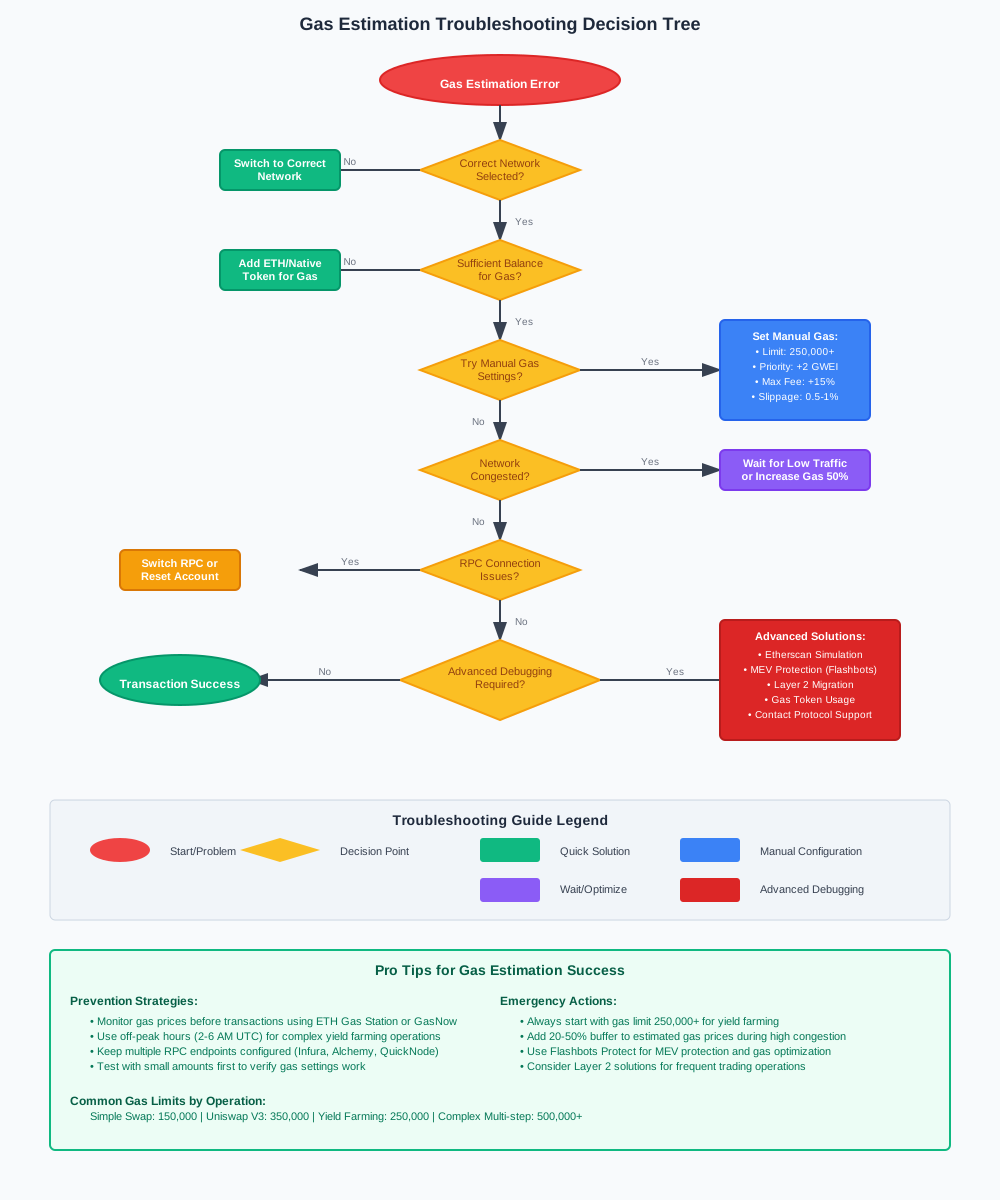
Step-by-Step Error Resolution Process
Immediate Troubleshooting Steps
When gas estimation fails, follow this systematic approach:
Step 1: Refresh Network Data
// Clear cached network data
// MetaMask: Settings > Advanced > Reset Account
// This clears transaction history but preserves wallet security
Step 2: Check Network Status
- Verify correct network selection (Ethereum, Polygon, BSC)
- Confirm RPC endpoint connectivity
- Monitor network congestion levels
Step 3: Increase Gas Limits Progressively
// Start conservative, increase systematically
const gasLimitProgression = [
  150000, // Basic transaction
  200000, // Simple yield farming
  300000, // Complex multi-step
  500000, // Emergency high limit
];
Advanced Debugging Techniques
Contract Interaction Analysis helps identify specific failure points in complex yield farming transactions.
Use Etherscan Transaction Simulator
- Copy transaction data from failed attempt
- Paste into Etherscan's simulation tool
- Identify exact failure reason and required gas
Monitor Real-Time Gas Tracker
// Recommended gas tracking resources
const gasTrackers = [
  "https://etherscan.io/gastracker",
  "https://www.gasnow.org/",
  "https://github.com/ethereum/go-ethereum/wiki/Gas-Price-Oracle"
];
Test with Minimal Viable Transaction
- Start with smallest possible farming amount
- Verify settings work before scaling up
- Document successful parameters for reuse
Protocol-Specific Gas Optimization
Uniswap V3 Yield Farming
Uniswap V3 requires higher gas limits due to concentrated liquidity calculations and multiple price tick interactions.
// Uniswap V3 recommended gas settings
const uniswapV3Settings = {
  gasLimit: 350000, // Higher due to tick calculations
  maxPriorityFee: "2 GWEI", // Fast inclusion priority
  maxFee: "50 GWEI", // Adjust based on network conditions
  slippageTolerance: "0.5%" // Tight slippage for estimation accuracy
};
Common Uniswap V3 Issues:
- Price tick boundary crossings during execution
- Concentrated liquidity position updates
- Fee collection combined with liquidity adjustments
Compound and Aave Lending
Lending protocols typically require moderate gas limits but benefit from precise timing to avoid interest rate changes affecting estimation.
// Compound/Aave gas configuration
const lendingSettings = {
  gasLimit: 200000, // Standard for supply/borrow operations
  maxPriorityFee: "1.5 GWEI", // Moderate priority sufficient
  timing: "off-peak", // Avoid high congestion periods
};
Balancer Pool Farming
Balancer weighted pool interactions need additional gas for complex pool mathematics and multi-token operations.
// Balancer pool gas settings
const balancerSettings = {
  gasLimit: 300000, // Account for weighted calculations
  slippage: "1%", // Higher tolerance for complex pools
  deadline: 1200, // 20-minute deadline for confirmation
};
Preventing Future Gas Estimation Errors
Wallet Configuration Best Practices
Optimize your wallet settings for consistent yield farming success with these permanent configurations:
- Enable Expert Mode in supported wallets
- Set Default Gas Multipliers above 1.0
- Configure RPC Endpoints for multiple network providers
- Enable Mempool Monitoring for gas price awareness
Transaction Timing Strategies
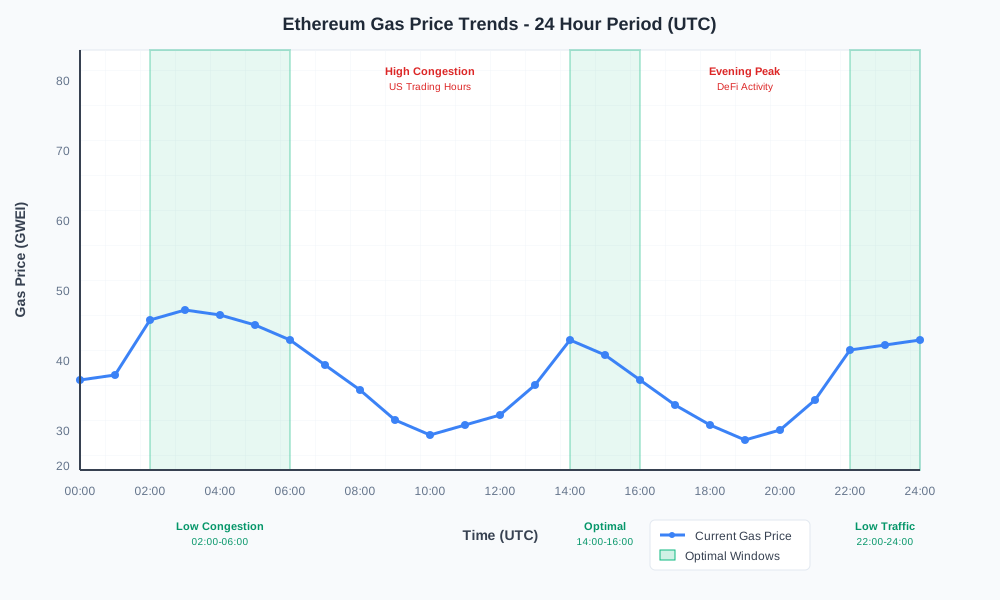
Network congestion patterns follow predictable schedules that affect gas estimation accuracy:
// Optimal transaction timing (UTC)
const lowCongestionPeriods = [
  "02:00-06:00", // Early morning UTC
  "14:00-16:00", // Early afternoon UTC
  "22:00-24:00"  // Late evening UTC
];

// Avoid high congestion periods
const avoidPeriods = [
  "12:00-14:00", // Lunch trading
  "16:00-18:00", // US market open overlap
  "20:00-22:00"  // Evening DeFi activity
];
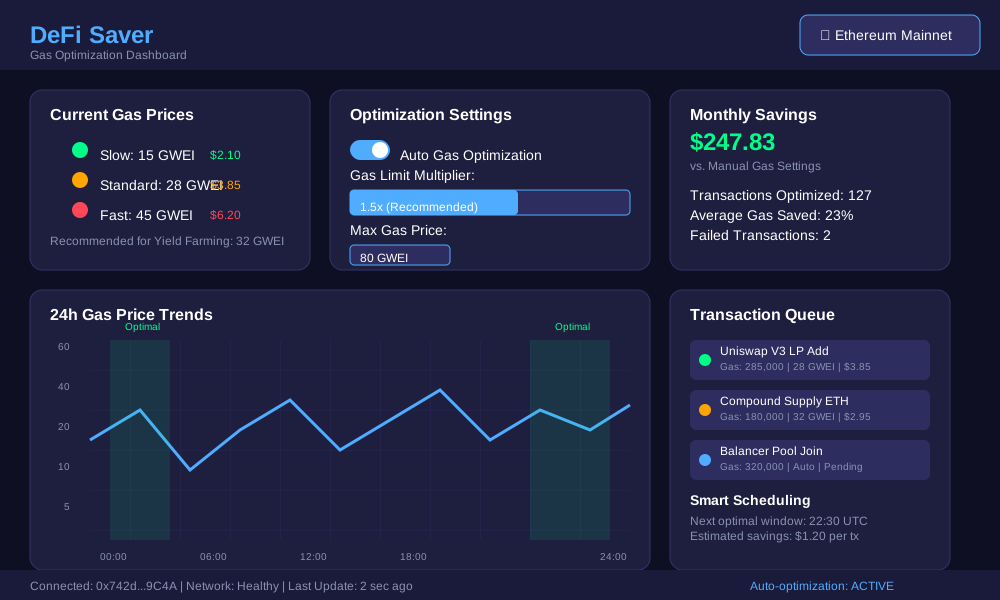
Automated Gas Management Tools
Third-party tools provide sophisticated gas management for frequent yield farmers:
- DeFi Saver: Automated gas optimization and transaction batching
- Yearn Finance: Built-in gas optimization for vault interactions
- 1inch: Chi gas token integration for reduced costs
- Flashbots: MEV protection with predictable gas pricing
Troubleshooting Common Wallet Issues
MetaMask-Specific Solutions
MetaMask gas estimation fails most commonly due to cached network data and RPC connectivity issues.
Solution 1: Network Reset
// Complete network reset procedure
// 1. Settings > Advanced > Reset Account
// 2. Switch to different network
// 3. Switch back to desired network
// 4. Refresh dApp connection
Solution 2: Custom RPC Configuration
- Add backup RPC endpoints for network redundancy
- Use Infura, Alchemy, or QuickNode for reliable connectivity
- Test RPC response times during peak hours
Trust Wallet Gas Problems
Trust Wallet gas estimation errors often stem from insufficient fee calculations for complex DeFi interactions.
Manual Override Process:
- Start transaction normally
- When gas estimation fails, select "Custom"
- Input gas price 25% above current network average
- Set gas limit to 300,000 for yield farming transactions
Hardware Wallet Integration Issues
Ledger and Trezor connections through MetaMask require special gas handling due to signing limitations.
// Hardware wallet gas considerations
const hardwareWalletSettings = {
  gasLimit: "Conservative + 50%", // Extra buffer for hardware signing
  timeouts: "Extended", // Longer confirmation windows
  batchTransactions: false, // Avoid complex multi-step operations
};
Gas Fee Optimization Strategies
Dynamic Fee Adjustment
Real-time gas price monitoring enables optimal fee setting for immediate transaction confirmation without overpaying.
// Dynamic gas price calculation
function calculateOptimalGas(basePrice, urgency, complexity) {
  const urgencyMultiplier = {
    low: 1.1,    // 10% above base
    normal: 1.25, // 25% above base
    high: 1.5     // 50% above base
  };

  const complexityBonus = complexity === 'yield_farming' ? 1.2 : 1.0;

  return basePrice * urgencyMultiplier[urgency] * complexityBonus;
}
Gas Token Strategies
Gas tokens like CHI or GST2 provide cost reduction for frequent yield farming operations during high network congestion.
Implementation Considerations:
- Mint gas tokens during low congestion periods
- Burn tokens during transaction execution for refunds
- Calculate break-even points based on transaction frequency
- Consider token contract risks and audit status
Layer 2 Migration Benefits
Polygon, Arbitrum, and Optimism offer dramatically reduced gas costs for yield farming with identical protocol interfaces.
// Layer 2 gas comparison (approximate costs)
const gasCosts = {
  ethereum: "$15-100+ per transaction",
  polygon: "$0.01-0.10 per transaction",
  arbitrum: "$0.50-2.00 per transaction",
  optimism: "$0.25-1.50 per transaction"
};
Advanced Gas Management Techniques
MEV Protection Integration
Maximum Extractable Value protection prevents frontrunning that can cause gas estimation failures through price manipulation.
Flashbots Protect Integration:
// Flashbots Protect configuration
const flashbotsConfig = {
  rpcUrl: "https://rpc.flashbots.net",
  maxPriorityFee: "0 GWEI", // No priority fee needed
  protection: "frontrunning", // Prevent sandwich attacks
  privacy: "private_mempool" // Hide transaction from public mempool
};
Gas Limit Optimization Formulas
Mathematical approaches to gas limit calculation reduce waste while ensuring transaction success.
// Scientific gas limit calculation
function calculateGasLimit(baseEstimate, protocolComplexity, networkCongestion) {
  const complexityFactors = {
    simple_swap: 1.1,
    yield_farming: 1.4,
    complex_arbitrage: 1.8,
    multi_protocol: 2.2
  };

  const congestionAdjustment = {
    low: 1.0,
    medium: 1.15,
    high: 1.3
  };

  const safetyBuffer = 1.1; // 10% final safety margin

  return Math.ceil(
    baseEstimate *
    complexityFactors[protocolComplexity] *
    congestionAdjustment[networkCongestion] *
    safetyBuffer
  );
}
Monitoring and Analytics
Transaction Success Tracking
Systematic monitoring of gas estimation accuracy improves future transaction planning and identifies optimal settings.
// Transaction analytics tracking
const transactionMetrics = {
  estimatedGas: 250000,
  actualGasUsed: 185000,
  successRate: "92%",
  averageCost: "$12.50",
  optimalTimeWindow: "02:00-04:00 UTC"
};
Gas Price Prediction Tools
Predictive analytics help time transactions for optimal gas costs and estimation accuracy.
Recommended Tools:
- GasNow API: Real-time gas price feeds
- Blocknative Gas Platform: Predictive gas pricing
- Ethereum Gas Tracker: Historical pattern analysis
- DeFiPulse Gas Tracker: DeFi-specific optimization
Conclusion
Yield farming gas estimation errors no longer need to block your DeFi success. Manual gas settings provide reliable control over transaction execution when automatic estimation fails.
The key solutions involve configuring custom gas limits 25-50% above base estimates, monitoring network congestion patterns for optimal timing, and using protocol-specific optimizations for complex yield farming operations.
Implement these manual settings immediately: enable advanced gas controls in MetaMask, set conservative gas limits for yield farming transactions, and monitor real-time gas prices through dedicated tracking tools.
Master these techniques to eliminate gas estimation failures and maintain consistent access to yield farming opportunities across all market conditions.