Problem: ROS 2 Bag Recording Is Slow and Hard to Scrub
You're recording sensor data in ROS 2 and hitting a wall: the default SQLite3 bag format is painfully slow to seek through, bloats disk fast, and can't be easily uploaded to cloud storage or opened in Foxglove Studio.
You'll learn:
- How to record topics to MCAP format instead of SQLite3
- How to replay an MCAP bag with time control
- How to inspect and filter bag contents without replaying the whole file
Time: 20 min | Level: Intermediate
Why This Happens
ROS 2 ships with SQLite3 as its default bag format. SQLite3 was chosen for portability, but it wasn't designed for high-throughput sequential writes or random-access time scrubbing. When you record a LiDAR, camera, and IMU simultaneously, write contention causes dropped messages and file sizes that grow 2–4x faster than MCAP equivalents.
MCAP (Modular Container for Autonomous Platforms) is a structured binary format designed specifically for robot data. It supports indexed seeking, LZ4 and Zstandard compression, and is natively supported by Foxglove Studio, ROS 2 Humble+, and most robotics cloud platforms.
Common symptoms with SQLite3:
- Seeking in a 10-minute bag takes 3–8 seconds instead of being instant
- Bag file balloons to 40 GB for a 20-minute drive session
ros2 bag playstutters when replaying at 2x speed- Foxglove Studio freezes loading large bags
Solution
Step 1: Install the MCAP Plugin
MCAP support ships as a plugin for rosbag2. Install it with your ROS 2 distro's package manager.
# For ROS 2 Humble / Iron / Jazzy
sudo apt install ros-$ROS_DISTRO-rosbag2-storage-mcap

# Verify install
ros2 bag info --help | grep mcap
Expected: You should see mcap listed as a valid storage option.
If it fails:
- "Package not found": Run
sudo apt updatefirst, then retry. If still missing, check your ROS 2 distro version — MCAP is supported from Humble onward. - No mcap in output: Source your ROS 2 setup:
source /opt/ros/$ROS_DISTRO/setup.bash
Step 2: Record Topics to MCAP
Pass --storage mcap to switch from the SQLite3 default. Everything else works the same.
# Record all topics
ros2 bag record -a --storage mcap -o my_session

# Record specific topics
ros2 bag record \
  /camera/image_raw \
  /lidar/points \
  /imu/data \
  --storage mcap \
  -o robot_drive_session
Why the -o flag matters: Without it, ROS 2 auto-generates a timestamped folder name. Naming it explicitly makes replay scripting much cleaner.
You can also enable compression to shrink file size by 30–60% depending on your data:
# LZ4 = faster write, moderate compression (good for real-time recording)
ros2 bag record -a --storage mcap \
  --compression-mode file \
  --compression-format lz4 \
  -o compressed_session

# Zstandard = slower write, better compression (good for post-processing)
ros2 bag record -a --storage mcap \
  --compression-mode file \
  --compression-format zstd \
  -o compressed_zstd_session
Expected: A folder named robot_drive_session/ containing a .mcap file and a metadata.yaml.
 Recording in progress — the message count should increment steadily for each topic
Step 3: Inspect the Bag Before Replaying
Before replaying, check what's inside. This is especially useful when someone hands you a bag and you don't know its contents.
# Summary: topics, duration, message counts
ros2 bag info robot_drive_session/

# List topics with message types
ros2 bag info robot_drive_session/ --verbose
Expected output:
Files:             robot_drive_session_0.mcap
Bag size:          2.4 GiB
Storage id:        mcap
Duration:          312.4s
Start:             Feb 18 2026 09:14:22.113
End:               Feb 18 2026 09:19:34.551
Messages:          1,847,203
Topic information:
  Topic: /camera/image_raw | Type: sensor_msgs/msg/Image | Count: 18721
  Topic: /lidar/points      | Type: sensor_msgs/PointCloud2  | Count: 31200
  Topic: /imu/data          | Type: sensor_msgs/msg/Imu      | Count: 1797282
Step 4: Replay the Bag
Replay works exactly like with SQLite3 bags — MCAP's indexed format just makes seeking instant.
# Basic replay
ros2 bag play robot_drive_session/

# Replay at 2x speed
ros2 bag play robot_drive_session/ --rate 2.0

# Replay only specific topics
ros2 bag play robot_drive_session/ \
  --topics /camera/image_raw /lidar/points

# Start from 60 seconds into the bag
ros2 bag play robot_drive_session/ \
  --start-offset 60.0

# Loop continuously (useful for testing)
ros2 bag play robot_drive_session/ --loop
Why MCAP seeking is fast: MCAP stores a chunk index at the end of the file. When you --start-offset, the player reads the index and jumps directly to the right byte offset — no full scan needed.
If it fails:
- "No storage plugin for mcap": The plugin isn't loaded. Source ROS 2 and verify the apt package is installed (Step 1).
- Topics published but no subscribers see data: Check your topic remapping. Use
ros2 topic echo /camera/image_rawin another Terminal while replaying.
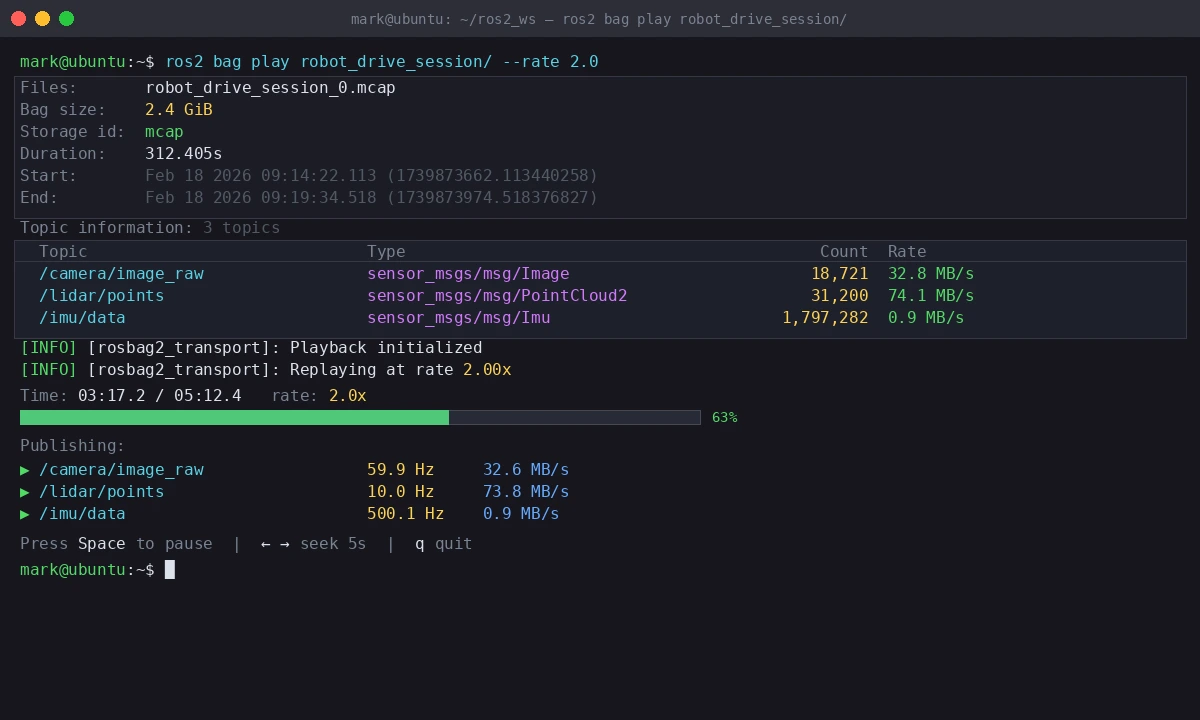 Replay output showing publish rate per topic — should match your original recording rates
Step 5: Convert an Existing SQLite3 Bag to MCAP
If you have older bags in SQLite3 format, convert them without re-recording.
ros2 bag convert \
  -i robot_drive_old/ \
  -o robot_drive_mcap/ \
  --output-options '{"storage_id": "mcap"}'
Expected: A new folder robot_drive_mcap/ with the same data in MCAP format.
Verification
Open the bag in Foxglove Studio to confirm it's readable and seekable:
# If using Foxglove's CLI tool
foxglove convert robot_drive_session/ --verify

# Or just check metadata integrity
ros2 bag info robot_drive_session/ | grep "Bag size"
You should see: Bag size, topic counts, and duration all matching what you recorded. If any topics show 0 messages, the recording was likely interrupted — re-record that session.
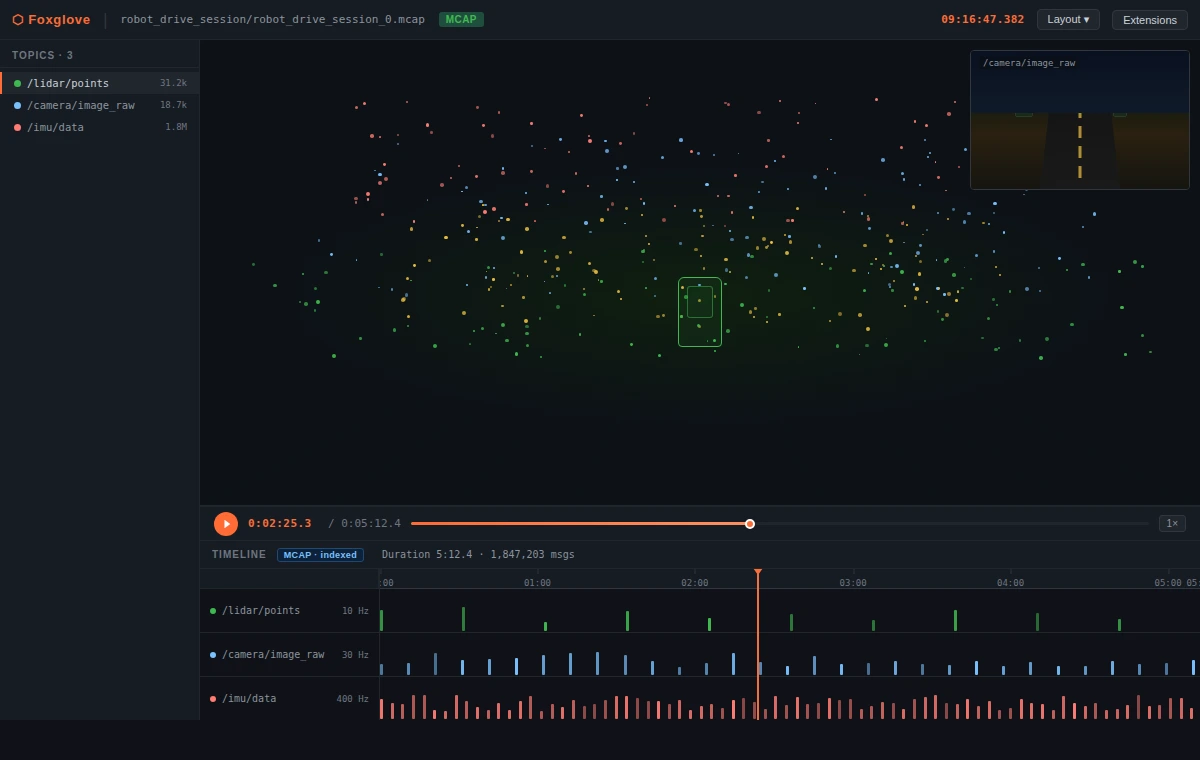 Foxglove's timeline scrubber works instantly with MCAP — drag anywhere in the session
What You Learned
- MCAP is a drop-in replacement for SQLite3 in
rosbag2— just add--storage mcap - Indexed seeking makes large bag files practical for post-analysis workflows
- LZ4 compression is safe for real-time recording; Zstandard is better for archival
- Existing SQLite3 bags can be converted with
ros2 bag convert
Limitation: MCAP support requires ROS 2 Humble or later. If you're on Galactic or Foxy, you'll need to backport the plugin or stay on SQLite3.
When NOT to use MCAP: If you need to query bag data with SQL directly (e.g., joining message fields across topics), SQLite3 gives you that for free. MCAP is better for high-frequency sensor streams where seek performance matters more than query flexibility.
Tested on ROS 2 Jazzy, Ubuntu 24.04, rosbag2-storage-mcap 0.26.x