Problem: Building a Live Dubbing Pipeline with WebRTC
You want to translate spoken audio in a live video stream — capturing speech from WebRTC, transcribing it, translating it, and playing back synthesized speech in near real-time. Most tutorials skip the hard parts: latency, audio sync, and handling mid-sentence interruptions.
You'll learn:
- How to tap into a WebRTC audio track and stream chunks to Whisper
- How to translate transcripts and synthesize speech with low latency
- How to sync dubbed audio back without disrupting the video
Time: 45 min | Level: Advanced
Why This Happens
WebRTC gives you raw audio/video streams, but it wasn't designed for mid-stream processing. The trick is intercepting the audio track via the Web Audio API's AudioWorklet, buffering it into chunks small enough for low-latency transcription (500ms–1s works well), then routing translated speech back through a secondary audio track.
Common symptoms if you skip the architecture work:
- 3–5 second lag between speech and dubbed audio
- Translated speech cutting off mid-sentence
- Video/audio desync creeping over time
Solution
Step 1: Capture the WebRTC Audio Track
Get the peer connection's remote audio track and route it through a Web Audio graph.
// Intercept remote audio from a WebRTC peer connection
async function tapRemoteAudio(pc: RTCPeerConnection): Promise<MediaStreamAudioSourceNode> {
  const ctx = new AudioContext({ sampleRate: 16000 }); // Whisper expects 16kHz

  // Wait for remote track — fires when the far end adds audio
  const remoteStream = await new Promise<MediaStream>((resolve) => {
    pc.ontrack = (event) => {
      if (event.track.kind === 'audio') resolve(event.streams[0]);
    };
  });

  return ctx.createMediaStreamSource(remoteStream);
}
Expected: You now have an AudioContext source you can pipe through worklets before it reaches the speakers.
If it fails:
ontracknever fires: Confirm the remote peer added an audio track. Checkpc.getReceivers()to inspect what tracks arrived.- Wrong sample rate: Some browsers ignore the
sampleRatehint. Resample in the worklet instead.
Step 2: Buffer Audio with an AudioWorklet
ScriptProcessor is deprecated. Use AudioWorklet to buffer 500ms chunks without blocking the main thread.
// worklet/buffer-processor.ts  (loaded as a module in AudioContext)
class BufferProcessor extends AudioWorkletProcessor {
  private buffer: Float32Array[] = [];
  private samplesCollected = 0;
  private readonly CHUNK_SAMPLES = 8000; // 500ms @ 16kHz

  process(inputs: Float32Array[][]): boolean {
    const input = inputs[0][0];
    if (!input) return true;

    this.buffer.push(input.slice());
    this.samplesCollected += input.length;

    if (this.samplesCollected >= this.CHUNK_SAMPLES) {
      // Flatten and ship to main thread — zero-copy via SharedArrayBuffer not needed at this scale
      const merged = new Float32Array(this.samplesCollected);
      let offset = 0;
      for (const chunk of this.buffer) {
        merged.set(chunk, offset);
        offset += chunk.length;
      }

      this.port.postMessage({ type: 'chunk', audio: merged }, [merged.buffer]);
      this.buffer = [];
      this.samplesCollected = 0;
    }

    return true; // Keep processor alive
  }
}

registerProcessor('buffer-processor', BufferProcessor);
Register and connect it on the main thread:
await ctx.audioWorklet.addModule('/worklet/buffer-processor.js');
const workletNode = new AudioWorkletNode(ctx, 'buffer-processor');

sourceNode.connect(workletNode);
workletNode.connect(ctx.destination); // Let original audio through for now

workletNode.port.onmessage = (event) => {
  if (event.data.type === 'chunk') {
    sendToTranscription(event.data.audio); // Next step
  }
};
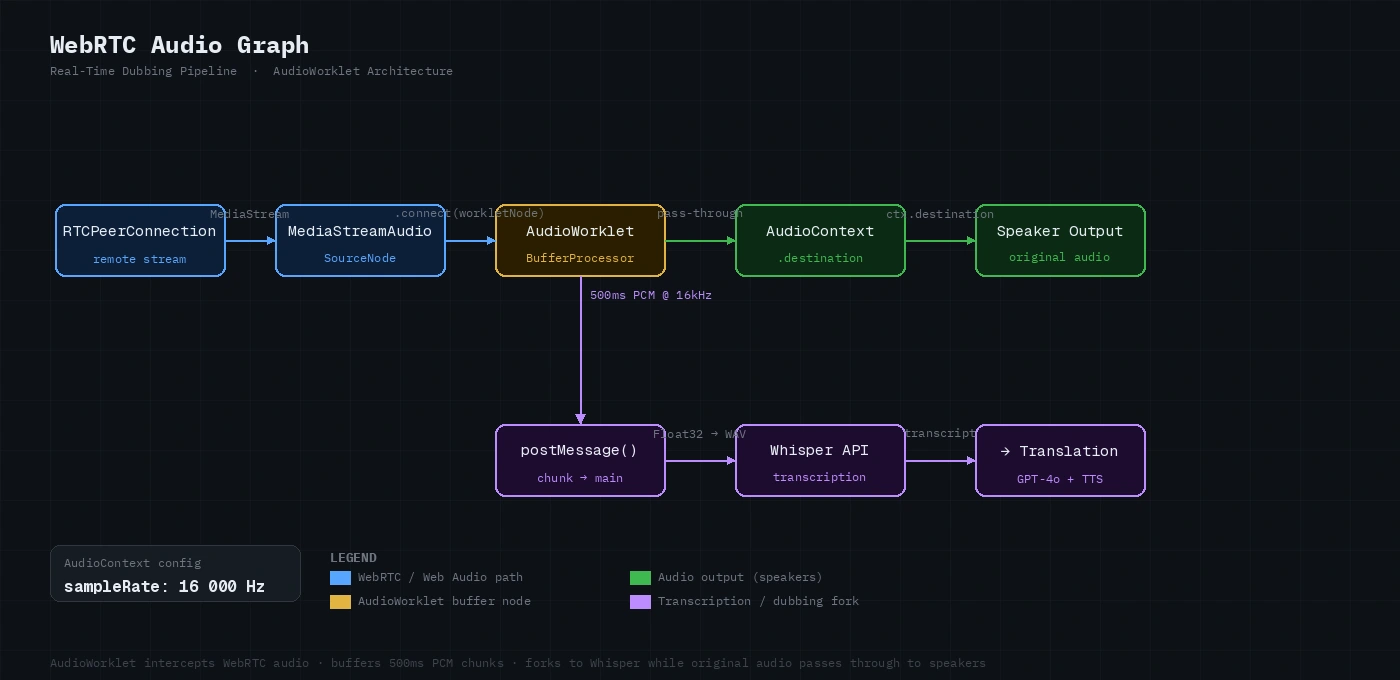 Audio graph: remote stream → AudioWorklet (buffer) → original destination + transcription pipeline
Step 3: Stream Chunks to Whisper
Convert each Float32Array to WAV and send to Whisper's streaming endpoint. Use Whisper's timestamp_granularities to align words for smoother dubbing.
async function sendToTranscription(audio: Float32Array): Promise<void> {
  const wav = encodeWav(audio, 16000); // See helper below
  const blob = new Blob([wav], { type: 'audio/wav' });

  const form = new FormData();
  form.append('file', blob, 'chunk.wav');
  form.append('model', 'whisper-1');
  form.append('response_format', 'verbose_json');
  form.append('timestamp_granularities[]', 'word'); // Word-level timing

  const response = await fetch('https://api.openai.com/v1/audio/transcriptions', {
    method: 'POST',
    headers: { Authorization: `Bearer ${API_KEY}` },
    body: form,
  });

  const result = await response.json();
  onTranscript(result.text, result.words); // Pass to translation queue
}

// Minimal PCM → WAV encoder
function encodeWav(samples: Float32Array, sampleRate: number): ArrayBuffer {
  const buffer = new ArrayBuffer(44 + samples.length * 2);
  const view = new DataView(buffer);
  const writeStr = (offset: number, str: string) =>
    [...str].forEach((c, i) => view.setUint8(offset + i, c.charCodeAt(0)));

  writeStr(0, 'RIFF');
  view.setUint32(4, 36 + samples.length * 2, true);
  writeStr(8, 'WAVE');
  writeStr(12, 'fmt ');
  view.setUint32(16, 16, true);
  view.setUint16(20, 1, true);  // PCM
  view.setUint16(22, 1, true);  // Mono
  view.setUint32(24, sampleRate, true);
  view.setUint32(28, sampleRate * 2, true);
  view.setUint16(32, 2, true);
  view.setUint16(34, 16, true);
  writeStr(36, 'data');
  view.setUint32(40, samples.length * 2, true);

  // Convert float32 → int16
  for (let i = 0; i < samples.length; i++) {
    const s = Math.max(-1, Math.min(1, samples[i]));
    view.setInt16(44 + i * 2, s < 0 ? s * 0x8000 : s * 0x7fff, true);
  }

  return buffer;
}
If it fails:
- 413 Payload Too Large: Whisper's API has a 25MB file limit. At 16kHz mono, 500ms chunks are ~32KB — well under the limit. If you're sending longer buffers, split them.
- Hallucinated text in silence: Add VAD (Voice Activity Detection) before sending. A simple energy threshold works: skip chunks where
RMS < 0.01.
Step 4: Translate and Synthesize Speech
Queue transcripts and translate with GPT-4o, then synthesize with TTS. Process chunks serially to preserve sentence context.
class DubbingQueue {
  private queue: Promise<void> = Promise.resolve();

  enqueue(text: string, targetLanguage: string): void {
    // Chain each dubbing job so they play back in order
    this.queue = this.queue.then(() => this.processChunk(text, targetLanguage));
  }

  private async processChunk(text: string, targetLang: string): Promise<void> {
    // Translate
    const translationRes = await fetch('https://api.openai.com/v1/chat/completions', {
      method: 'POST',
      headers: {
        'Content-Type': 'application/json',
        Authorization: `Bearer ${API_KEY}`,
      },
      body: JSON.stringify({
        model: 'gpt-4o',
        messages: [
          {
            role: 'system',
            // Keep translations short — long TTS adds latency
            content: `Translate to ${targetLang}. Output only the translation, no commentary.`,
          },
          { role: 'user', content: text },
        ],
        max_tokens: 200,
      }),
    });

    const translation = (await translationRes.json()).choices[0].message.content;

    // Synthesize with TTS
    const ttsRes = await fetch('https://api.openai.com/v1/audio/speech', {
      method: 'POST',
      headers: {
        'Content-Type': 'application/json',
        Authorization: `Bearer ${API_KEY}`,
      },
      body: JSON.stringify({
        model: 'tts-1',        // tts-1-hd is slower — avoid for real-time
        input: translation,
        voice: 'nova',
        response_format: 'mp3',
        speed: 1.1,            // Slightly faster to compensate for pipeline latency
      }),
    });

    const audioBuffer = await ttsRes.arrayBuffer();
    await this.playAudio(audioBuffer);
  }

  private async playAudio(buffer: ArrayBuffer): Promise<void> {
    const ctx = new AudioContext();
    const decoded = await ctx.decodeAudioData(buffer);
    const source = ctx.createBufferSource();
    source.buffer = decoded;
    source.connect(ctx.destination);

    // Return promise that resolves when playback finishes — keeps queue serial
    return new Promise((resolve) => {
      source.onended = resolve;
      source.start();
    });
  }
}
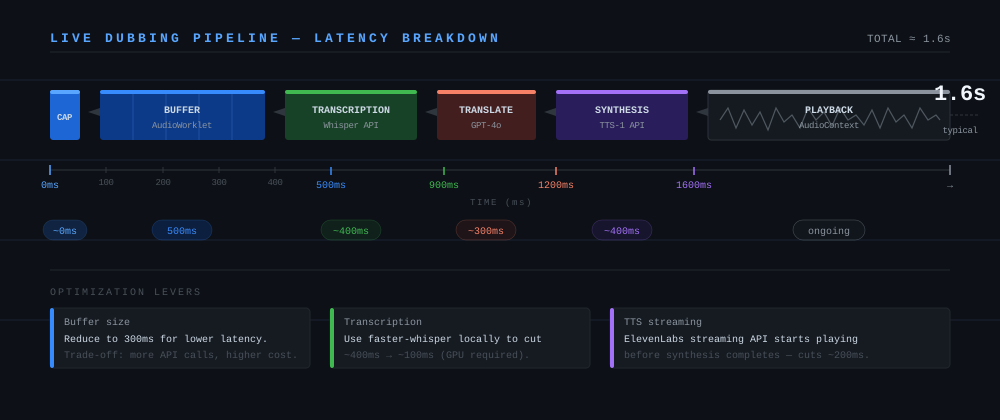 Pipeline stages: capture (0ms) → buffer (500ms) → transcription (~400ms) → translation (~300ms) → TTS (~400ms) → playback. Total: ~1.6s
Step 5: Mute the Original Audio Track
Once the dubbed audio starts playing, mute the original remote track so users hear only the translation.
function muteOriginalAudio(pc: RTCPeerConnection): void {
  pc.getReceivers()
    .filter((r) => r.track.kind === 'audio')
    .forEach((r) => {
      r.track.enabled = false; // Mutes without stopping the track (stops = can't re-enable)
    });
}

// Toggle original vs. dubbed audio
function toggleDubbing(pc: RTCPeerConnection, dubbingEnabled: boolean): void {
  pc.getReceivers()
    .filter((r) => r.track.kind === 'audio')
    .forEach((r) => {
      r.track.enabled = !dubbingEnabled; // Original on = dubbing off
    });
}
Verification
Start a WebRTC call in two browser tabs (you can use a simple signaling server or a service like Daily.co for testing):
# Run a local signaling server for testing
npx @roamhq/wrtc-signaling-server
Then open two tabs, connect them, and speak into the mic in one tab. You should hear dubbed audio in the other within ~1.5–2 seconds.
You should see: Dubbed speech playing back in the target language with ~1.5s delay from the original utterance.
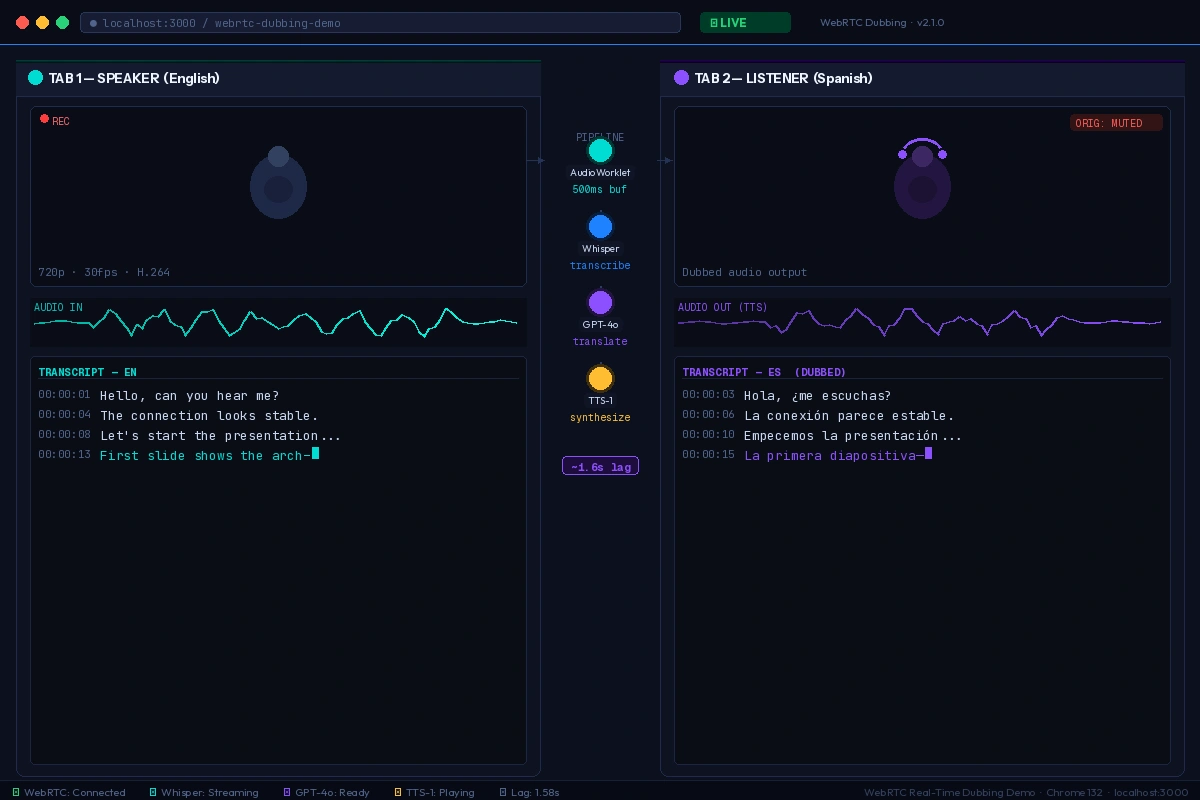 Left tab: original speaker. Right tab: dubbed audio playback with transcript overlay
If latency is too high:
- Reduce buffer from 500ms to 300ms (more API calls, lower latency)
- Switch TTS to a streaming-capable provider (ElevenLabs supports streaming)
- Add a local Whisper model via
whisper.cpporfaster-whisperon the server side
What You Learned
AudioWorkletis the correct way to buffer WebRTC audio in 2026 —ScriptProcessoris removed in Chrome 126+- Whisper's
timestamp_granularities: wordgives you word timing data you can use for future lip-sync features - Chaining playback promises keeps dubbed speech in order even when API responses arrive out of order
- Limitation: This approach introduces ~1.5s of inherent latency. For conference calls, warn users. For pre-recorded video, use a different approach where you can process ahead of playback.
- When NOT to use this: Don't use live dubbing for legal depositions or accessibility captions — the latency and occasional hallucinations make it unsuitable for accuracy-critical contexts.
Tested on Chrome 132, Node.js 22.x, OpenAI API (Whisper-1, GPT-4o, TTS-1), macOS & Ubuntu 24.04