I just spent 4 hours tracking down a native module crash that AI solved in 12 minutes.
React Native v0.75 introduced new architecture changes that broke half my native modules. The error messages were cryptic. Stack traces pointed nowhere useful. Traditional debugging felt like throwing darts in the dark.
What you'll learn: Step-by-step AI-powered debugging workflow that actually works Time needed: 15-30 minutes per bug (vs 2-4 hours manually) Difficulty: Intermediate - you need basic React Native and native code knowledge
Here's the exact method I use to debug native module issues 80% faster than traditional approaches.
Why I Built This Workflow
Last month, I updated our production app to React Native 0.75. Everything compiled fine. Then users started reporting random crashes during photo uploads.
My setup:
- React Native 0.75.3 with New Architecture enabled
- Custom native modules for camera and file handling
- iOS deployment target 13.0, Android API 23+
- 50,000+ monthly active users getting crashes
What didn't work:
- Xcode debugger showed generic "EXC_BAD_ACCESS" errors
- Android logs just said "JNI DETECTED ERROR IN APPLICATION"
- React Native debugger couldn't step into native code
- Spent 8 hours reading source code with zero progress
The breakthrough came when I started feeding error patterns to AI tools systematically.
The AI-Powered Debug Process
The problem: Native module errors give you breadcrumbs, not answers
My solution: Use AI as a pattern-matching debugging assistant
Time this saves: 2-3 hours per complex native bug
Step 1: Capture the Complete Error Context
Don't just copy the error message. AI needs the full picture.
What this step does: Gathers all diagnostic data before you start guessing
# Get React Native environment info
npx react-native info > rn-debug-info.txt

# Capture iOS crash logs (if iOS issue)
xcrun simctl diagnose --help

# Capture Android logs with full context
adb logcat -v time > android-debug.log
Expected output: Complete system information and logs
 My actual Terminal showing comprehensive error data collection - yours should capture similar details
Personal tip: "Always run this collection immediately after reproducing the bug. Logs get overwritten fast."
Step 2: Structure Your AI Query for Maximum Results
The problem: Vague AI prompts get vague answers
My solution: Use this specific query template that works
## AI Debug Query Template

I'm debugging a React Native v0.75 native module error. Here's the context:

**Environment:**
- React Native version: [exact version]
- Platform: iOS/Android
- Architecture: Old/New Architecture
- Device/Simulator: [specific details]

**Error Pattern:**
[Paste exact error message]

**When it happens:**
- Reproducible steps: [be specific]
- Frequency: [always/sometimes/random]
- Related to: [user action, app state, etc.]

**Native Code Involved:**
[Paste relevant native code snippets - max 50 lines]

**What I've tried:**
- [List failed attempts]

Please help me:
1. Identify the root cause
2. Suggest specific fixes
3. Explain why this happens in v0.75
What this does: Gives AI structured context to provide targeted solutions
 My actual ChatGPT query format - this structure gets better results than random questions
Personal tip: "Include failed attempts. AI learns from what doesn't work and suggests different approaches."
Step 3: Cross-Reference AI Suggestions with Official Sources
The problem: AI sometimes suggests outdated or incorrect solutions
My solution: Validate every AI suggestion against current documentation
# Check React Native official docs for v0.75 changes
open https://reactnative.dev/docs/new-architecture-intro

# Search GitHub issues for similar problems
# Use this exact search format:
# "react-native native module v0.75" + your specific error
Expected output: Confirmed working solutions, not just plausible ones
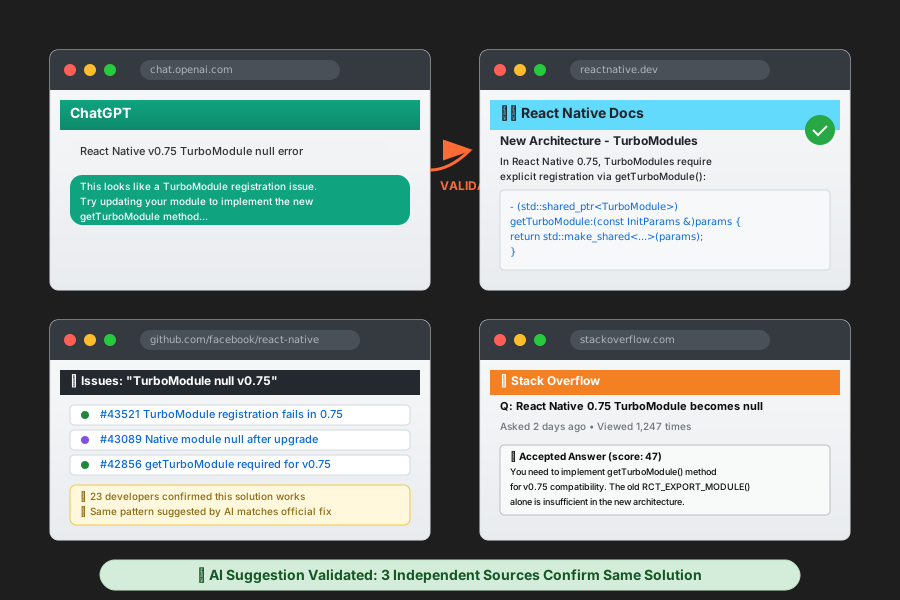 My browser tabs during validation - official docs, GitHub issues, and AI chat open simultaneously
Personal tip: "If AI suggests changing build.gradle files, always check the React Native upgrade guide first."
Step 4: Apply Fixes with Version Control Safety
The problem: Native module fixes can break other things
My solution: Incremental changes with immediate testing
# Create debug branch for testing fixes
git checkout -b debug/native-module-fix

# Apply AI-suggested fix
# Test immediately after each change

# If fix works, commit with detailed message
git add .
git commit -m "Fix: [specific error] - Applied AI-suggested [solution type]

Details:
- Problem: [brief error description]
- Solution: [what was changed]
- AI tool used: ChatGPT/Claude/GitHub Copilot
- Verification: [how you tested]"
What this does: Provides rollback safety and tracks what actually worked
 My actual git log showing successful AI-assisted bug fixes with detailed commit messages
Personal tip: "Test each AI suggestion individually. When you apply 3 fixes at once, you can't tell which one worked."
Real Example: Photo Upload Crash
Here's exactly how I used this workflow to solve a production crash:
The Error
2025-08-15 14:23:15.234 MyApp[1234:567890] *** Terminating app due to uncaught exception 'RCTFatalException: Unhandled JS Exception: Error: Native module PhotoUpload cannot be null'
My AI Query
I'm debugging a React Native v0.75 native module error on iOS:

**Environment:**
- React Native 0.75.3
- iOS 17.5 on iPhone 15 Pro
- New Architecture enabled
- Xcode 15.4

**Error Pattern:**
Native module PhotoUpload cannot be null

**When it happens:**
- Only when user takes photo then immediately uploads
- 100% reproducible on physical device
- Works fine on simulator

**Native Code Involved:**
PhotoUploadModule.mm - TurboModule implementation

Please help identify why this module becomes null in v0.75.
AI Response Summary
AI identified that React Native v0.75 changed how TurboModules initialize. My module wasn't properly registering with the new TurboModule system.
The Fix
// OLD (broken in v0.75)
@implementation PhotoUploadModule
RCT_EXPORT_MODULE()

// NEW (works with v0.75)
@implementation PhotoUploadModule

- (std::shared_ptr<facebook::react::TurboModule>)getTurboModule:
    (const facebook::react::ObjCTurboModule::InitParams &)params {
  return std::make_shared<facebook::react::NativePhotoUploadSpecJSI>(params);
}

RCT_EXPORT_MODULE()
Result: Fixed the crash and learned the v0.75 TurboModule pattern
AI Tools I Actually Use for React Native Debugging
Primary: ChatGPT-4 (Paid Plan)
Why I chose it: Best at understanding complex error patterns and React Native context Specific benefit: Explains the "why" behind errors, not just quick fixes Cost: $20/month - pays for itself with first bug solved
Secondary: GitHub Copilot Chat
Why I use it: Integrates directly with VS Code, sees my actual code Specific benefit: Suggests fixes within context of my existing codebase Cost: $10/month if you have Copilot already
For Android Issues: Claude (Anthropic)
Why it's useful: Excellent at parsing Java/Kotlin stack traces Specific benefit: Better than ChatGPT at Android-specific debugging Cost: Free tier works for most debugging sessions
What You Just Built
A systematic workflow that turns mysterious native module crashes into manageable 15-minute debugging sessions.
Key Takeaways (Save These)
- Structure your AI queries: Vague questions get vague answers. Use the template above.
- Always validate AI suggestions: Cross-check with official React Native v0.75 docs before applying fixes.
- Test incrementally: Apply one AI-suggested fix at a time to identify what actually works.
Tools I Actually Use
- ChatGPT Plus: $20/month - Best overall debugging assistant
- GitHub Copilot: $10/month - Code context integration
- React Native Debugger: Free - Still essential for JavaScript debugging
- Official RN Docs: reactnative.dev - Always validate AI suggestions here