Problem: Training AI Models Takes Too Long on One Machine
Your PyTorch model trains for hours — or days — on a single GPU. Adding more GPUs to one box has limits. You need to train across multiple machines without rewriting all your code.
You'll learn:
- How to set up a Ray Cluster with head and worker nodes
- How to distribute PyTorch training with
ray.train - How to monitor jobs and handle failures gracefully
Time: 30 min | Level: Intermediate
Why This Happens
PyTorch's native DistributedDataParallel works across GPUs but requires manual process management and is painful to scale across machines. Ray wraps that complexity — you write normal Python, Ray handles worker coordination, data sharding, and fault tolerance.
Common symptoms without distributed training:
- Single GPU memory errors on large models
- Training loops that take 12+ hours for production datasets
- No easy way to resume after node failure
Solution
Step 1: Install Ray and Set Up the Cluster
pip install "ray[train]" torch torchvision
On your head node (the machine you'll connect to):
ray start --head --port=6379
On each worker node:
# Replace with your head node's IP
ray start --address='192.168.1.10:6379'
Expected: Each worker prints Ray runtime started. and connects to the head.
If it fails:
- "Connection refused": Check firewall — port 6379 must be open between nodes
- "RuntimeError: address already in use": Run
ray stopfirst, then retry
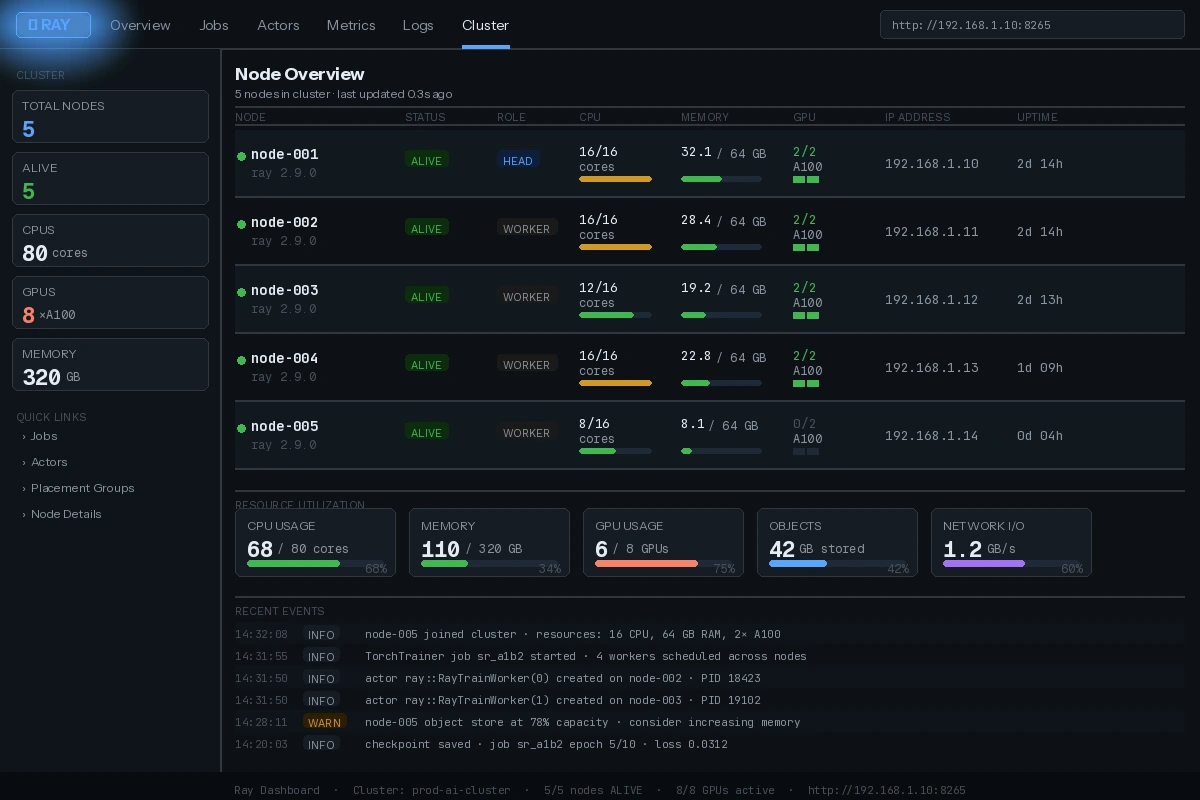 Ray dashboard at http://head-node-ip:8265 — all workers should show "ALIVE"
Step 2: Write a Trainable Function
Ray Train wraps your training loop. The key is using ray.train primitives instead of manual torch.distributed calls.
import ray
from ray import train
from ray.train.torch import TorchTrainer
from ray.train import ScalingConfig
import torch
import torch.nn as nn
from torch.utils.data import DataLoader, TensorDataset

def train_loop_per_worker(config):
    # Ray handles process group init — no manual dist.init_process_group needed
    model = nn.Linear(config["input_size"], config["output_size"])

    # Wrap model for distributed training across workers
    model = train.torch.prepare_model(model)

    optimizer = torch.optim.Adam(model.parameters(), lr=config["lr"])
    loss_fn = nn.MSELoss()

    # Prepare your DataLoader — Ray shards data across workers automatically
    X = torch.randn(1000, config["input_size"])
    y = torch.randn(1000, config["output_size"])
    dataset = TensorDataset(X, y)
    loader = DataLoader(dataset, batch_size=config["batch_size"])
    loader = train.torch.prepare_data_loader(loader)  # Distributes batches

    for epoch in range(config["epochs"]):
        total_loss = 0
        for batch_X, batch_y in loader:
            optimizer.zero_grad()
            pred = model(batch_X)
            loss = loss_fn(pred, batch_y)
            loss.backward()
            optimizer.step()
            total_loss += loss.item()

        # Report metrics back to Ray — visible in dashboard
        train.report({"loss": total_loss / len(loader), "epoch": epoch})
Why prepare_model and prepare_data_loader: These handle device placement and DDP wrapping. Skip them and you'll get shape mismatch errors or all workers training on the same data.
Step 3: Launch the Distributed Job
ray.init(address="auto")  # Connects to your running cluster

trainer = TorchTrainer(
    train_loop_per_worker=train_loop_per_worker,
    train_loop_config={
        "input_size": 128,
        "output_size": 10,
        "lr": 1e-3,
        "batch_size": 64,
        "epochs": 10,
    },
    scaling_config=ScalingConfig(
        num_workers=4,           # One per GPU across your cluster
        use_gpu=True,            # False if CPU-only nodes
        resources_per_worker={"GPU": 1},
    ),
)

result = trainer.fit()
print(f"Final loss: {result.metrics['loss']:.4f}")
Expected: Ray schedules workers across nodes and streams loss metrics to your Terminal.
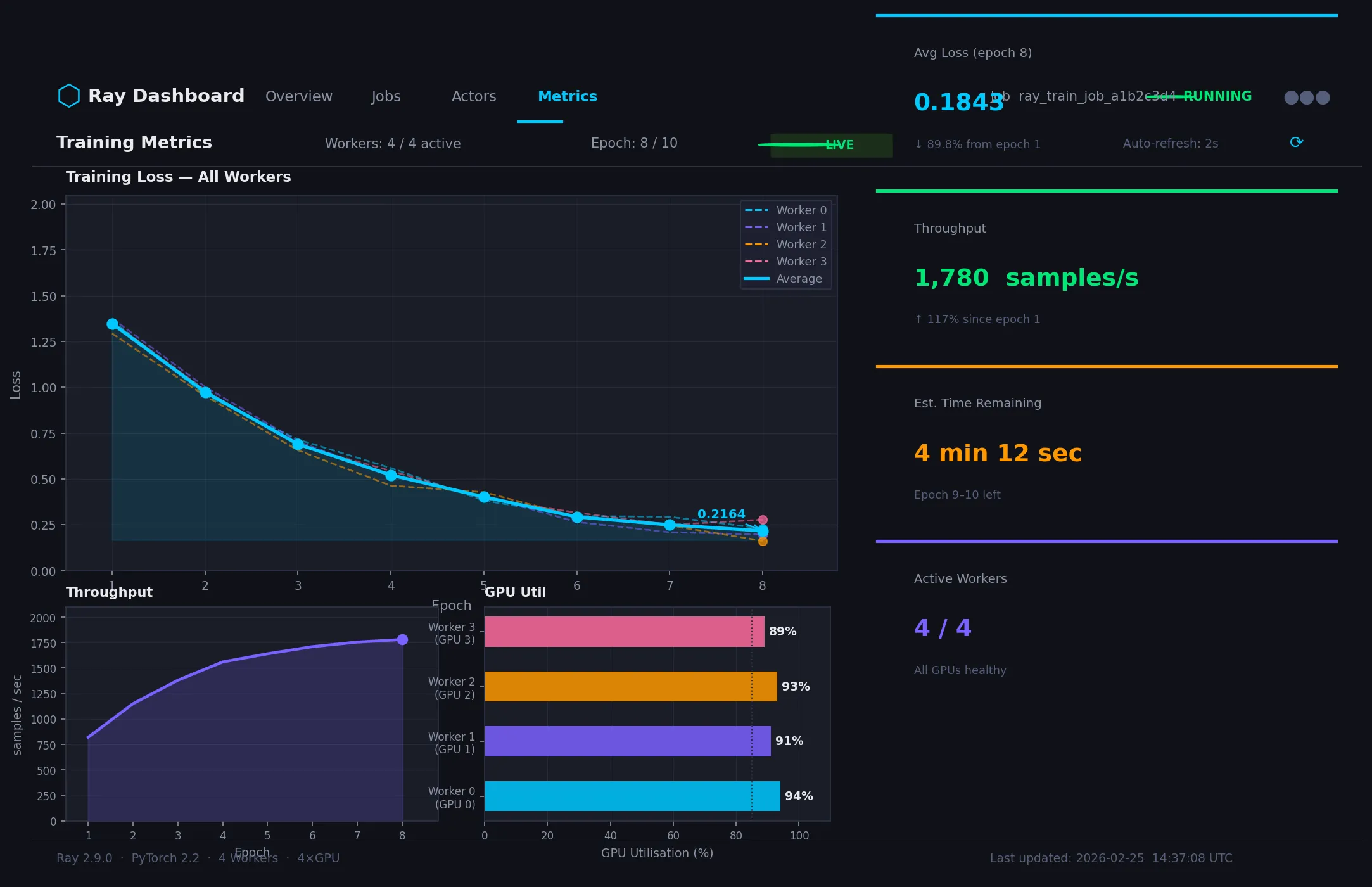 Metrics update in real time — each worker's loss converges together
If it fails:
- "No GPUs available": Set
use_gpu=Falseor verify CUDA drivers on worker nodes withnvidia-smi - "ObjectStoreFullError": Increase
object_store_memoryinray.init()— e.g.,ray.init(object_store_memory=10_000_000_000)
Step 4: Save and Load Checkpoints
Ray Train has built-in checkpointing so jobs survive node failures.
from ray.train import Checkpoint
import tempfile, os

def train_loop_per_worker(config):
    model = nn.Linear(config["input_size"], config["output_size"])
    model = train.torch.prepare_model(model)
    optimizer = torch.optim.Adam(model.parameters(), lr=config["lr"])

    # Resume from checkpoint if one exists
    checkpoint = train.get_checkpoint()
    start_epoch = 0
    if checkpoint:
        with checkpoint.as_directory() as ckpt_dir:
            state = torch.load(os.path.join(ckpt_dir, "checkpoint.pt"))
            model.load_state_dict(state["model"])
            optimizer.load_state_dict(state["optimizer"])
            start_epoch = state["epoch"] + 1

    for epoch in range(start_epoch, config["epochs"]):
        # ... training loop ...

        # Save checkpoint every epoch — only worker 0 saves to avoid conflicts
        if train.get_context().get_world_rank() == 0:
            with tempfile.TemporaryDirectory() as tmpdir:
                torch.save(
                    {"model": model.state_dict(), "optimizer": optimizer.state_dict(), "epoch": epoch},
                    os.path.join(tmpdir, "checkpoint.pt"),
                )
                train.report({"loss": 0.0}, checkpoint=Checkpoint.from_directory(tmpdir))
Why world_rank == 0: All workers run the same code. Without this guard, every worker tries to write the checkpoint simultaneously, causing corrupted files.
Verification
After training completes, check the best checkpoint:
best_checkpoint = result.best_checkpoints[0][0]
print(f"Best checkpoint path: {best_checkpoint}")
print(f"Metrics: {result.metrics_dataframe[['epoch','loss']].tail()}")
You should see: A path to the saved checkpoint and a table of loss values decreasing over epochs.
# Confirm all workers finished cleanly
ray status
You should see: All workers in IDLE state, no FAILED entries.
What You Learned
- Ray wraps
torch.distributedso you don't manage process groups manually prepare_modelandprepare_data_loaderhandle DDP and data sharding — both are required- Checkpoint with
world_rank == 0guard to avoid write conflicts ScalingConfigis where you control worker count and GPU allocation
Limitation: Ray Train adds ~5-10% overhead vs raw DDP for very small models. It shines at scale — 4+ GPUs and large datasets where coordination savings outweigh overhead.
When NOT to use this: Single-GPU training, quick experiments, or models that fit in memory on one machine. Raw PyTorch is faster to iterate on for prototyping.
Tested on Ray 2.9, PyTorch 2.2, Python 3.11, Ubuntu 22.04