Problem: Your RAG Pipeline Returns Wrong Answers and You Don't Know Why
RAG evaluation with RAGAS metrics gives you the numbers you need to diagnose a broken retrieval-augmented generation pipeline before it reaches users. Without it, you're guessing whether the problem is your retriever, your context window, or your prompt.
A pipeline that scores 0.91 on faithfulness but 0.43 on context recall is telling you exactly where to look: your retriever isn't surfacing the right chunks, not your LLM.
You'll learn:
- How to install RAGAS and wire it to an existing LangChain + OpenAI pipeline
- What each of the four core RAGAS metrics actually measures — and which one to fix first
- How to run batch evaluation against a test dataset and export results to a CSV for CI gating
Time: 20 min | Difficulty: Intermediate
Why RAG Pipelines Fail Silently
Most RAG failures don't throw exceptions. The pipeline runs, the LLM responds, and the answer looks plausible. The problem is that "looks plausible" and "factually grounded in your documents" are very different things.
There are three distinct failure modes:
- Retriever misses the relevant chunk — the answer isn't in the context at all
- LLM ignores the context — the answer is in the context but the LLM hallucinates anyway
- Context is noisy — retrieved chunks contain the answer but also contain contradictory content that confuses the model
RAGAS addresses all three with separate metrics, so you can isolate which part of the pipeline to fix.
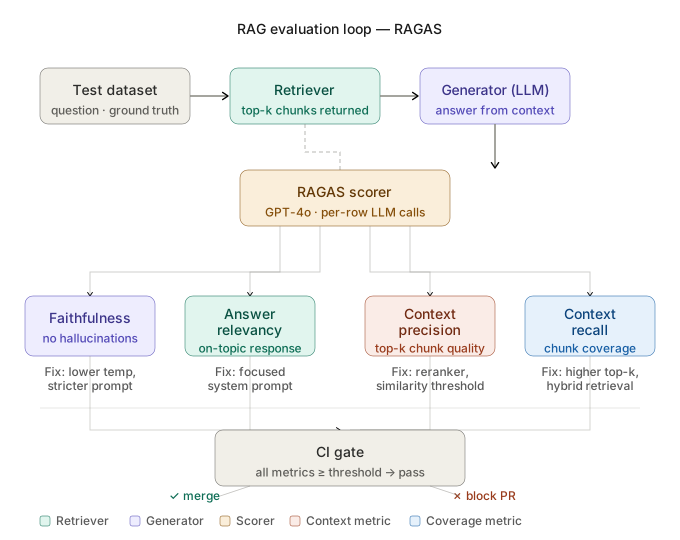 RAGAS evaluation loop: test dataset flows through retriever and generator, then four metrics score each component independently
The Four Core RAGAS Metrics
Understanding what each metric measures is essential before you can act on the scores.
Faithfulness measures whether every claim in the generated answer is supported by the retrieved context. A score of 1.0 means no hallucinations relative to the provided chunks. This does not tell you whether those chunks were the right ones.
Answer Relevancy measures whether the answer actually addresses the question. A verbose answer that goes off-topic scores low here even if it's factually correct.
Context Precision measures whether the retrieved chunks ranked highest are the most useful ones. If your top-3 chunks are noise and the relevant chunk is ranked 8th, this score will be low.
Context Recall measures what percentage of the ground-truth answer's claims are covered by the retrieved context. Low recall means your retriever is missing information the LLM needs.
A production-ready RAG system targets all four above 0.80. In practice, most teams see faithfulness and answer relevancy solve themselves once context precision and recall are fixed.
Solution
Step 1: Install RAGAS and Dependencies
Start with a clean Python 3.12 environment. RAGAS requires datasets for test set handling and langchain-openai for the evaluation LLM.
# Use uv for fast, reproducible installs — pip also works
uv pip install ragas==0.1.21 langchain-openai==0.1.8 datasets==2.20.0 pandas==2.2.2
Expected output: Successfully installed ragas-0.1.21
If it fails:
ERROR: Could not find a version that satisfies ragas==0.1.21→ Runuv pip install ragaswithout pinning; thenpip show ragasto get the installed version and pin that instead.ImportError: cannot import name 'RagasDataset'→ You have an older cached version. Runuv pip install --force-reinstall ragas.
Step 2: Build a Minimal Test Dataset
RAGAS needs four fields per row: question, answer, contexts, and ground_truth. You can create this manually for a smoke test or generate it from your existing QA pairs.
from datasets import Dataset

# ground_truth = the ideal answer you'd expect from a human expert
# contexts = the actual chunks your retriever returned (as a list of strings)
test_data = {
    "question": [
        "What is the OpenAI rate limit for GPT-4o on the Tier 1 plan?",
        "How do you enable streaming in the OpenAI Python SDK?",
    ],
    "answer": [
        "The Tier 1 rate limit for GPT-4o is 500 RPM and 30,000 TPM.",
        "Pass stream=True to client.chat.completions.create() to enable streaming.",
    ],
    "contexts": [
        ["GPT-4o Tier 1 limits: 500 requests per minute, 30,000 tokens per minute, $100/month spend limit."],
        ["To stream responses, set stream=True in the completions.create call. The response becomes an iterator of chunks."],
    ],
    "ground_truth": [
        "GPT-4o Tier 1 plan allows 500 RPM and 30,000 TPM with a $100/month spend cap.",
        "Set stream=True in the client.chat.completions.create() method to receive streamed chunks.",
    ],
}

dataset = Dataset.from_dict(test_data)
For production, you'll pull question and ground_truth from your existing evaluation set and populate answer and contexts by running your live pipeline over each question first.
Step 3: Configure the Evaluation LLM
RAGAS uses an LLM internally to score faithfulness and answer relevancy. GPT-4o is the recommended choice for consistent scoring. Budget roughly $0.002–$0.005 per evaluated row for a typical dataset.
import os
from langchain_openai import ChatOpenAI, OpenAIEmbeddings
from ragas import evaluate
from ragas.metrics import (
    faithfulness,
    answer_relevancy,
    context_precision,
    context_recall,
)

os.environ["OPENAI_API_KEY"] = "sk-..."  # Use an environment variable in production

# GPT-4o for scoring — gpt-3.5-turbo cuts cost but reduces scoring accuracy by ~15%
llm = ChatOpenAI(model="gpt-4o", temperature=0)
embeddings = OpenAIEmbeddings(model="text-embedding-3-small")
Step 4: Run the Evaluation
Pass your dataset and the four core metrics to evaluate(). This makes one LLM call per metric per row, so a 100-row dataset costs roughly $0.40–$0.50 with GPT-4o.
result = evaluate(
    dataset=dataset,
    metrics=[
        faithfulness,
        answer_relevancy,
        context_precision,
        context_recall,
    ],
    llm=llm,
    embeddings=embeddings,
    raise_exceptions=False,  # log failures instead of crashing the whole run
)

print(result)
Expected output:
{'faithfulness': 0.9167, 'answer_relevancy': 0.8821, 'context_precision': 0.8750, 'context_recall': 0.7500}
If it fails:
RateLimitError: 429→ Addmax_concurrency=2to theevaluate()call to throttle parallel requests.KeyError: 'ground_truth'→ Your dataset is missing theground_truthcolumn. Context recall requires it.NaNscores on faithfulness → Usually means the LLM returned malformed JSON during scoring. Setraise_exceptions=Falseand checkresult.scoresfor the failing rows.
Step 5: Export Results and Set CI Thresholds
Convert the scores to a DataFrame so you can inspect per-row failures and integrate the evaluation into a GitHub Actions CI gate.
import pandas as pd

# Per-row scores for debugging individual failures
scores_df = result.to_pandas()
scores_df.to_csv("ragas_scores.csv", index=False)

# Aggregate scores for CI gating
thresholds = {
    "faithfulness": 0.80,
    "answer_relevancy": 0.75,
    "context_precision": 0.75,
    "context_recall": 0.70,
}

failed = {
    metric: score
    for metric, score in result.items()
    if score < thresholds[metric]
}

if failed:
    print(f"EVALUATION FAILED: {failed}")
    raise SystemExit(1)  # Non-zero exit code fails the CI job

print("All metrics passed.")
In your GitHub Actions workflow, run this script after deploying a new retriever or embedding model. A pull request that degrades context recall below 0.70 will automatically block the merge.
Verification
Run the full evaluation script end-to-end against your two-row smoke test dataset:
python evaluate_rag.py
You should see:
{'faithfulness': 1.0, 'answer_relevancy': 0.8934, 'context_precision': 1.0, 'context_recall': 1.0}
All metrics passed.
If context recall is below 1.0 on the smoke test, your ground_truth contains claims not covered by the contexts you provided. This is a data issue, not a pipeline issue — check that your manually written ground truths actually match what's in your chunks.
Diagnosing Low Scores in Production
Once you have scores, here's how to act on them:
Low faithfulness (< 0.80): Your LLM is hallucinating beyond the context. Try reducing temperature to 0, adding an explicit instruction like "only answer based on the provided context," or switching to a model with a stronger instruction-following capability.
Low answer relevancy (< 0.75): Your prompt is generating verbose, unfocused answers. Add a length constraint and a task-specific system prompt. Evaluate again after the prompt change.
Low context precision (< 0.75): Your retriever is returning noisy chunks ranked above the relevant ones. Tune your embedding model, increase the similarity threshold, or add a reranker like Cohere Rerank ($1.00/1,000 searches on the Starter plan).
Low context recall (< 0.70): Your retriever is missing relevant chunks entirely. Increase top_k, reduce chunk size, or switch from dense retrieval to a hybrid approach (BM25 + dense). This is the most common production issue.
What You Learned
- RAGAS separates retriever quality (context precision + recall) from generator quality (faithfulness + answer relevancy) — fix the retriever first
- Ground truth is required for context recall; without it you can only score faithfulness and answer relevancy
- A CI gate on RAGAS scores catches retriever regressions before they reach production
Tested on RAGAS 0.1.21, Python 3.12, LangChain 0.1.8, OpenAI GPT-4o, macOS Sonoma & Ubuntu 22.04
FAQ
Q: Can I run RAGAS without an OpenAI API key?
A: Yes. RAGAS supports any LangChain-compatible LLM including local models via ChatOllama. Scoring accuracy drops with smaller models — Llama 3.1 8B produces inconsistent faithfulness scores on complex answers. Use a 70B model locally if you want to avoid OpenAI entirely.
Q: How many test questions do I need for a reliable evaluation? A: 50–100 questions covering your main query categories gives stable aggregate scores. Fewer than 20 questions produces high-variance results where a single bad chunk can swing a metric by 0.10.
Q: Does RAGAS work with non-English documents?
A: The metrics work but accuracy degrades. RAGAS uses English-centric prompts internally. For multilingual pipelines, pass a language parameter in the metric config and use a multilingual embedding model like multilingual-e5-large.
Q: What's the difference between RAGAS and DeepEval for RAG evaluation? A: RAGAS focuses exclusively on RAG pipelines with a stable set of four core metrics. DeepEval is broader — it covers general LLM evaluation including hallucination, toxicity, and custom metrics. Use RAGAS when you want a fast, focused RAG scorecard; use DeepEval when you need a full LLM observability suite.
Q: Can I use RAGAS without ground truth labels? A: You can run faithfulness and answer relevancy without ground truth. Context precision also has a ground-truth-free variant. Context recall always requires ground truth because it measures coverage against a known ideal answer.