Problem: Your RAG Pipeline Retrieves the Wrong Context
RAG context window management determines whether your retrieval pipeline surfaces the right information — or silently returns irrelevant chunks that confuse the LLM. A poorly chunked corpus is the most common cause of hallucinations in otherwise well-architected RAG systems.
This guide walks through every major chunk strategy, when to use each, and how to implement them in Python with LangChain and pgvector.
You'll learn:
- Why chunk size and overlap directly control retrieval accuracy
- How to choose between fixed-size, recursive, semantic, and document-aware chunking
- How to tune
chunk_sizeandchunk_overlapfor your specific use case
Time: 20 min | Difficulty: Intermediate
Why This Happens
Context windows in LLMs are finite. GPT-4o has a 128K token window; Claude 3.5 Sonnet has 200K. But your retrieval step runs before the LLM — and the top-k chunks you fetch must fit inside the prompt alongside your system instructions, conversation history, and output space.
Most RAG failures trace back to one of three chunking mistakes:
- Chunks too large — retrieved text buries the relevant sentence in noise; the LLM attends to the wrong part
- Chunks too small — relevant context is split across chunk boundaries; neither chunk alone answers the question
- No overlap — a sentence at the end of chunk N and the start of chunk N+1 loses its relationship entirely
Symptoms:
- LLM says "I don't have enough information" when the answer is clearly in your docs
- Retrieval returns the right document but wrong section
- Answers are technically correct but miss key qualifiers (e.g., version constraints, pricing tiers)
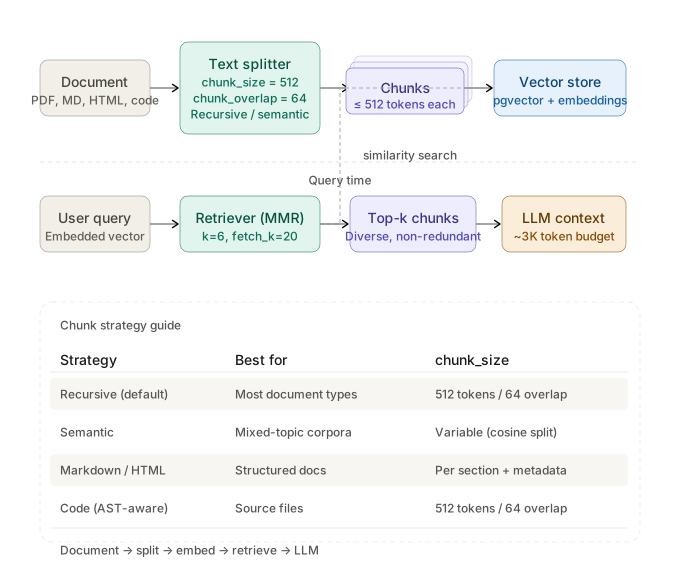 End-to-end RAG chunking pipeline: document → splitter → vector store → retriever → LLM context window
Solution
Step 1: Start With RecursiveCharacterTextSplitter
For most use cases, RecursiveCharacterTextSplitter is the correct default. It splits on \n\n, then \n, then spaces — preserving paragraph and sentence boundaries before falling back to character splits.
from langchain.text_splitter import RecursiveCharacterTextSplitter

splitter = RecursiveCharacterTextSplitter(
    chunk_size=512,      # tokens ≈ chars / 4; 512 tokens fits in most retrieval budgets
    chunk_overlap=64,    # 12% overlap prevents context loss at boundaries
    length_function=len, # swap for tiktoken if you need exact token counts
)

docs = splitter.create_documents([your_text])
Expected output: A list of Document objects, each with .page_content under 512 chars and .metadata carrying the source.
If it fails:
ImportError: langchain→pip install langchain-text-splitters --break-system-packages- Chunks are empty strings → your input has Windows line endings; normalize with
text.replace("\r\n", "\n")first
Step 2: Pick the Right Chunk Size for Your Document Type
There is no universal chunk_size. The right value depends on your document type and query pattern.
| Document type | Recommended chunk_size | chunk_overlap | Reasoning |
|---|---|---|---|
| API reference / docs | 256–512 tokens | 32–64 | Each function is self-contained; small chunks = precise retrieval |
| Long-form prose / PDFs | 512–1024 tokens | 100–128 | Paragraphs need context from surrounding text |
| Support tickets / logs | 128–256 tokens | 16–32 | Short entries; larger chunks add noise |
| Legal / compliance | 1024–2048 tokens | 256 | Clause meaning depends on surrounding clauses |
| Code files | 256–512 tokens | 64 | Function-level granularity; overlap preserves imports |
# Exact token-based sizing with tiktoken (recommended for OpenAI models)
import tiktoken
from langchain.text_splitter import RecursiveCharacterTextSplitter

enc = tiktoken.get_encoding("cl100k_base")  # GPT-4o and text-embedding-3-* encoding

splitter = RecursiveCharacterTextSplitter(
    chunk_size=512,
    chunk_overlap=64,
    length_function=lambda text: len(enc.encode(text)),  # count tokens, not chars
)
Why token-based sizing matters: OpenAI's text-embedding-3-large silently truncates inputs over 8191 tokens. If your chunks measure in characters, a dense technical paragraph can easily exceed the embedding model's limit — and you'll never see an error, just degraded retrieval.
Step 3: Use Semantic Chunking for High-Precision Use Cases
Fixed-size splitting ignores meaning. Semantic chunking groups sentences that are topically related, producing chunks that align with how humans organize information.
from langchain_experimental.text_splitter import SemanticChunker
from langchain_openai import OpenAIEmbeddings

embeddings = OpenAIEmbeddings(model="text-embedding-3-large")

chunker = SemanticChunker(
    embeddings,
    breakpoint_threshold_type="percentile",  # split where cosine distance exceeds the 95th percentile
    breakpoint_threshold_amount=95,
)

docs = chunker.create_documents([your_text])
When to use semantic chunking:
- Your corpus mixes topics within single documents (e.g., internal wikis, meeting notes)
- Retrieval precision matters more than indexing speed
- You're seeing topic bleed — chunks about pricing containing unrelated product details
When NOT to use it:
- Documents with tight token budgets (semantic chunks vary in size; some will be very large)
- Indexing millions of documents — the embedding call per chunk boundary is expensive
- Structured reference docs where fixed-size works perfectly well
Step 4: Add Document-Aware Splitting for PDFs and Code
For structured formats, use format-specific splitters that respect document semantics.
For Markdown / HTML (structure-aware):
from langchain.text_splitter import MarkdownHeaderTextSplitter

headers_to_split_on = [
    ("#", "h1"),
    ("##", "h2"),
    ("###", "h3"),
]

splitter = MarkdownHeaderTextSplitter(
    headers_to_split_on=headers_to_split_on,
    strip_headers=False,  # keep headers in chunk text for retrieval context
)

docs = splitter.split_text(markdown_text)
# Each doc.metadata now contains {"h1": "...", "h2": "..."} — filter by section at query time
For Python code (AST-aware):
from langchain.text_splitter import Language, RecursiveCharacterTextSplitter

code_splitter = RecursiveCharacterTextSplitter.from_language(
    language=Language.PYTHON,
    chunk_size=512,
    chunk_overlap=64,
)

# Splits on class/function boundaries before falling back to lines
code_docs = code_splitter.create_documents([python_source_code])
Step 5: Store and Retrieve With pgvector
Once your chunks are sized correctly, store them with metadata for filtered retrieval.
from langchain_community.vectorstores import PGVector
from langchain_openai import OpenAIEmbeddings

CONNECTION_STRING = "postgresql+psycopg2://user:pass@localhost:5432/ragdb"

db = PGVector.from_documents(
    documents=docs,
    embedding=OpenAIEmbeddings(model="text-embedding-3-large"),
    connection_string=CONNECTION_STRING,
    collection_name="docs_512",  # name encodes chunk strategy — makes A/B testing easy
)

# Filtered MMR retrieval: diversity + relevance, scoped to one doc section
retriever = db.as_retriever(
    search_type="mmr",           # Max Marginal Relevance — reduces redundant chunks
    search_kwargs={
        "k": 6,                  # fetch 6 chunks; fits ~3K tokens in most prompts
        "fetch_k": 20,           # MMR candidate pool before re-ranking
        "filter": {"h2": "API Reference"},  # metadata filter from MarkdownHeaderTextSplitter
    },
)
Why MMR matters for context windows: similarity_search often returns 5 nearly identical chunks from the same paragraph. MMR explicitly penalizes redundancy — you get 6 diverse chunks instead of 6 copies of the same sentence, which uses your context window budget far more efficiently.
Verification
Run this script to confirm your chunk distribution is healthy before indexing at scale:
import statistics

chunk_lengths = [len(doc.page_content) for doc in docs]

print(f"Total chunks:  {len(chunk_lengths)}")
print(f"Mean length:   {statistics.mean(chunk_lengths):.0f} chars")
print(f"Median length: {statistics.median(chunk_lengths):.0f} chars")
print(f"Max length:    {max(chunk_lengths)} chars")
print(f"Min length:    {min(chunk_lengths)} chars")
print(f"Chunks > 2000 chars: {sum(1 for l in chunk_lengths if l > 2000)}")  # flag oversized
print(f"Chunks < 50 chars:   {sum(1 for l in chunk_lengths if l < 50)}")    # flag fragments
You should see:
- Mean close to your target
chunk_size - Fewer than 5% of chunks flagged as oversized or fragments
- Max length under 2× your target (a spike means a paragraph with no natural split points)
What You Learned
RecursiveCharacterTextSplitterwithchunk_size=512andchunk_overlap=64is the correct starting point for most RAG pipelines- Token-based length functions prevent silent truncation by embedding models like
text-embedding-3-large - Semantic chunking improves precision on mixed-topic corpora but costs more at index time
- Structure-aware splitters (
MarkdownHeaderTextSplitter,from_language) preserve document hierarchy as metadata you can filter on at query time - MMR retrieval maximizes context window efficiency by penalizing redundant chunks
Tested on LangChain 0.3, LangChain Experimental 0.3, Python 3.12, pgvector 0.7, macOS & Ubuntu 24.04
FAQ
Q: What chunk size should I start with if I have no idea what my documents look like?
A: Start with chunk_size=512 and chunk_overlap=64. Index 100 documents, run 20 representative queries, and inspect which chunks get retrieved. Adjust from there — this is always an empirical process.
Q: Does chunk overlap cost extra on embedding APIs?
A: Yes — overlap increases total tokens ingested. At chunk_overlap=64 on a 512-token chunk, you're adding roughly 12% to your embedding bill. For most corpora this is negligible; for millions of documents, consider reducing overlap to 32 tokens.
Q: Can I mix chunk strategies in the same vector store?
A: Yes, but store them in separate collections (e.g., docs_512_fixed vs docs_semantic). Mixed-strategy collections make A/B testing and debugging much harder.
Q: What's the minimum VRAM needed to run a self-hosted embedding model for chunking?
A: nomic-embed-text via Ollama runs on 4GB VRAM and produces 768-dimensional embeddings suitable for most RAG workloads. For production on AWS us-east-1, a g4dn.xlarge (16GB VRAM, ~$0.526/hour USD) handles embedding throughput for most mid-size corpora.
Q: How does chunk strategy affect reranking? A: Rerankers like Cohere Rerank ($1.00 per 1,000 searches USD) operate on your retrieved top-k chunks. Smaller, more precise chunks give the reranker cleaner signal — oversized chunks tend to score inconsistently because the relevant sentence is diluted by surrounding noise.