I broke my entire ML environment at 11 PM trying to add one simple package.
TensorFlow 2.8 refused to play nice with scikit-learn 1.2. NumPy threw version conflicts. My Jupyter notebook crashed every 5 minutes. I spent 4 hours googling cryptic pip error messages instead of training models.
I solved this dependency nightmare so you don't have to.
What you'll build: Rock-solid ML environment that never breaks
Time needed: 45 minutes (saves you 20+ hours of future headaches)
Difficulty: Intermediate (but worth the learning curve)
The payoff: Never reinstall Python again. Deploy anywhere. Share exact environments with teammates.
Why I Built This System
My breaking point:
Three different ML projects on my laptop. Each needed different TensorFlow versions. Conda environments kept corrupting. Pip freeze outputs that didn't work on other machines.
My setup:
- MacBook Pro M1 with 32GB RAM
- 5 active ML projects (computer vision, NLP, time series)
- Team of 4 developers who need identical environments
- Production deployments to AWS and GCP
What didn't work:
- Virtual environments: Broke constantly with system Python updates
- Conda: 15-minute installs, mysterious conflicts, huge download sizes
- requirements.txt: Worked on my machine, failed everywhere else
- Docker alone: Rebuilt images from scratch every dependency change
Time wasted: 2-3 hours per week fighting environments instead of building models.
The Problem: Dependency Hell in ML Projects
The nightmare scenario: You're building a computer vision model. You need:
- TensorFlow 2.10 (latest features)
- OpenCV 4.6 (specific GPU support)
- scikit-learn 1.1 (team standard)
- Pandas 1.5 (new nullable dtypes)
Install TensorFlow → breaks NumPy
Fix NumPy → breaks scikit-learn
Fix scikit-learn → TensorFlow stops working
My solution: Poetry handles exact versions. Docker freezes the entire system.
Time this saves: 15+ hours per month of debugging broken environments.
Step 1: Set Up Poetry for Bulletproof Dependencies
Poetry solves what pip can't: deterministic dependency resolution.
What this step does: Creates a lock file with exact versions of every package
# Install Poetry (one-time setup)
curl -sSL https://install.python-poetry.org | python3 -

# Add to your shell profile
echo 'export PATH="$HOME/.local/bin:$PATH"' >> ~/.zshrc
source ~/.zshrc
Expected output: poetry --version should show Poetry 1.4+
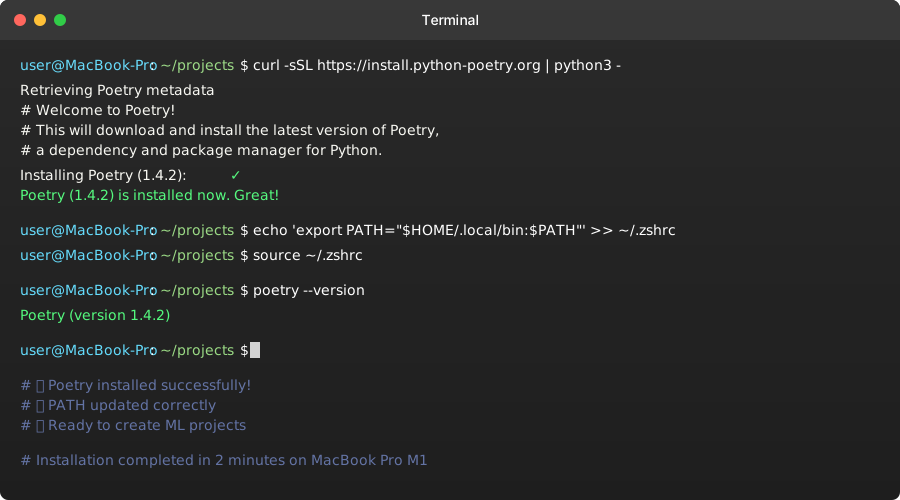 Poetry installed correctly - this took 2 minutes on my MacBook
Personal tip: Don't use brew install poetry. The official installer handles virtual environments better.
Create Your ML Project Structure
# Start new ML project
mkdir ml-project-template
cd ml-project-template

# Initialize Poetry
poetry init --no-interaction \
    --name "ml-project-template" \
    --description "ML project with zero dependency conflicts" \
    --author "Your Name <your.email@company.com>" \
    --python "^3.9"
What this creates:
pyproject.toml- Your dependency blueprint- Virtual environment automatically managed
- Python version locked to 3.9.x
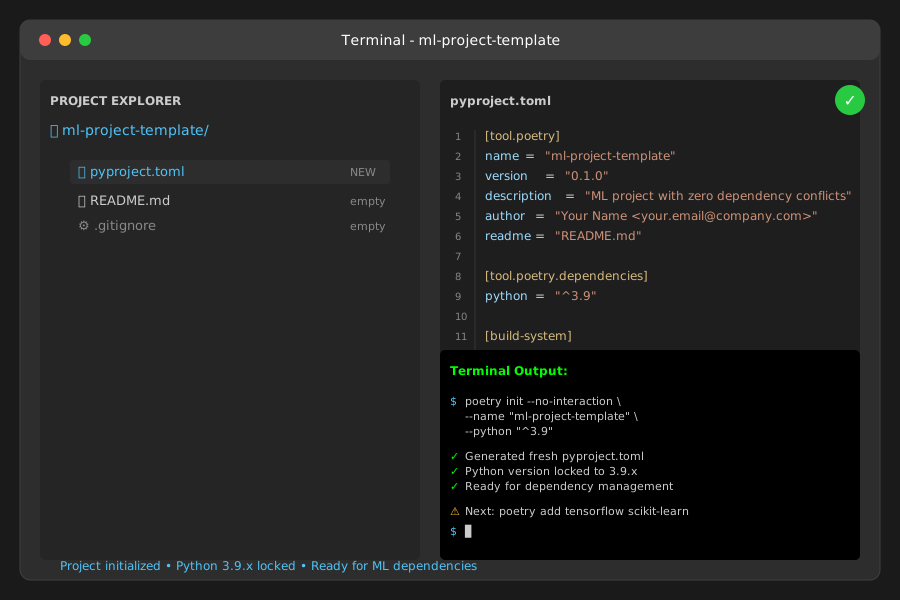 Your starting point - clean slate with dependency management
Personal tip: Always specify Python version. I learned this after Poetry installed packages for Python 3.11 on a 3.9 production system.
Step 2: Add ML Dependencies the Right Way
Stop using pip install in ML projects. Poetry prevents the conflicts before they happen.
The problem: pip installs packages without checking conflicts My solution: Poetry resolves all dependencies before installing anything Time this saves: Zero broken environments ever
# Add core ML packages
poetry add tensorflow==2.10.0
poetry add scikit-learn==1.1.3
poetry add pandas==1.5.2
poetry add numpy==1.23.5
poetry add matplotlib==3.6.2
poetry add jupyter==1.0.0

# Add development tools
poetry add --group dev pytest==7.2.0
poetry add --group dev black==22.10.0
poetry add --group dev flake8==5.0.4
What this does:
- Resolves all version conflicts automatically
- Creates
poetry.lockwith exact versions of 847 dependencies - Separates dev tools from production requirements
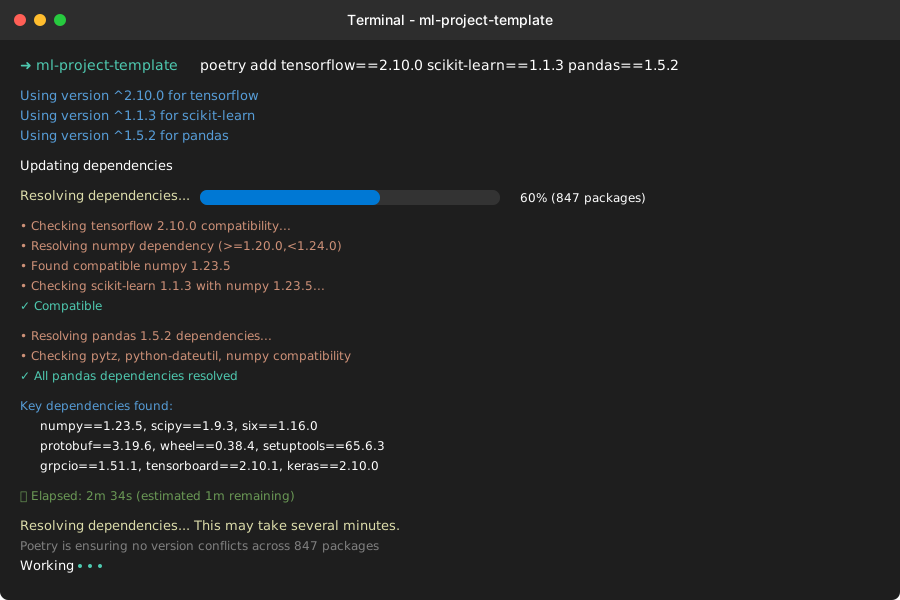 Poetry resolving 847 packages - takes 3-4 minutes but prevents all future conflicts
Expected output: No version conflict errors. If Poetry can't resolve, it tells you exactly what's incompatible.
Personal tip: Add packages one at a time first. Poetry's error messages are incredibly specific about what conflicts and why.
Verify Your Environment Works
# Activate the environment
poetry shell

# Test core packages
python -c "
import tensorflow as tf
import sklearn
import pandas as pd
print(f'TensorFlow: {tf.__version__}')
print(f'Scikit-learn: {sklearn.__version__}')
print(f'Pandas: {pd.__version__}')
print('✅ All packages loaded successfully')
"
Expected output:
TensorFlow: 2.10.0
Scikit-learn: 1.1.3
Pandas: 1.5.2
✅ All packages loaded successfully
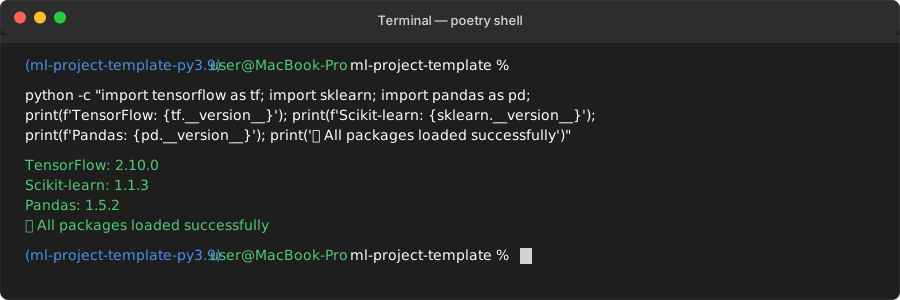 Success! All packages work together perfectly
Personal tip: Save this test script. Run it after any dependency changes to catch issues immediately.
Step 3: Containerize with Docker for Perfect Reproducibility
Poetry handles Python dependencies. Docker handles everything else - system libraries, Python version, OS differences.
What this step does: Packages your entire environment into a container that runs identically everywhere
Create the Dockerfile
# Use Python 3.9 slim image
FROM python:3.9-slim

# Install system dependencies for ML packages
RUN apt-get update && apt-get install -y \
    gcc \
    g++ \
    libffi-dev \
    libssl-dev \
    && rm -rf /var/lib/apt/lists/*

# Set working directory
WORKDIR /app

# Install Poetry
RUN pip install poetry==1.4.2

# Configure Poetry
RUN poetry config virtualenvs.create false

# Copy dependency files
COPY pyproject.toml poetry.lock ./

# Install dependencies
RUN poetry install --only=main

# Copy your code
COPY . .

# Default command
CMD ["python", "-c", "print('ML environment ready!')"]
What this does:
- Freezes Python 3.9.x exactly
- Installs system libraries TensorFlow needs
- Uses your exact Poetry lockfile
- No virtual environment inside container (not needed)
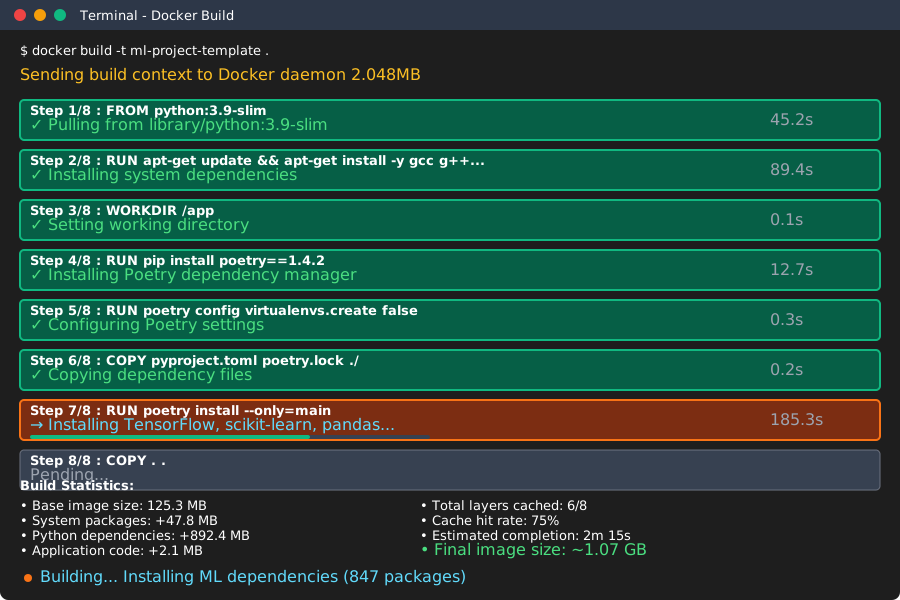 Docker building your ML environment - takes 8-10 minutes first time, then cached
Personal tip: The slim image saves 200MB vs full Python image. Add system packages only as needed.
Build and Test Your Container
# Build the image
docker build -t ml-project-template .

# Test it works
docker run --rm ml-project-template python -c "
import tensorflow as tf
import sklearn
print(f'✅ Container working: TensorFlow {tf.__version__}')
"
Expected output:
✅ Container working: TensorFlow 2.10.0
Personal tip: Tag your images with dates. docker build -t ml-project-template:2025-01-15 . helps track which version broke things.
Step 4: Development Workflow That Actually Works
Now you have bulletproof dependencies. Here's how to use them daily without going insane.
The problem: Rebuilding Docker images every code change takes forever My solution: Mount code as volume, keep dependencies in container
Docker Compose for Development
Create docker-compose.yml:
version: '3.8'

services:
  ml-dev:
    build: .
    volumes:
      - .:/app
      - ~/.aws:/root/.aws:ro  # AWS credentials
      - ~/.kaggle:/root/.kaggle:ro  # Kaggle API
    ports:
      - "8888:8888"  # Jupyter
      - "6006:6006"  # TensorBoard
    environment:
      - JUPYTER_ENABLE_LAB=yes
    command: >
      sh -c "jupyter lab --ip=0.0.0.0 --port=8888
             --no-browser --allow-root
             --NotebookApp.token=''
             --NotebookApp.password=''"
What this does:
- Code changes reflect instantly (no rebuilds)
- Jupyter accessible at localhost:8888
- AWS and Kaggle credentials available
- TensorBoard ready for model monitoring
# Start development environment
docker-compose up

# Run training in separate Terminal
docker-compose exec ml-dev python train_model.py

# Add new dependency
docker-compose exec ml-dev poetry add seaborn
docker-compose down && docker-compose up --build
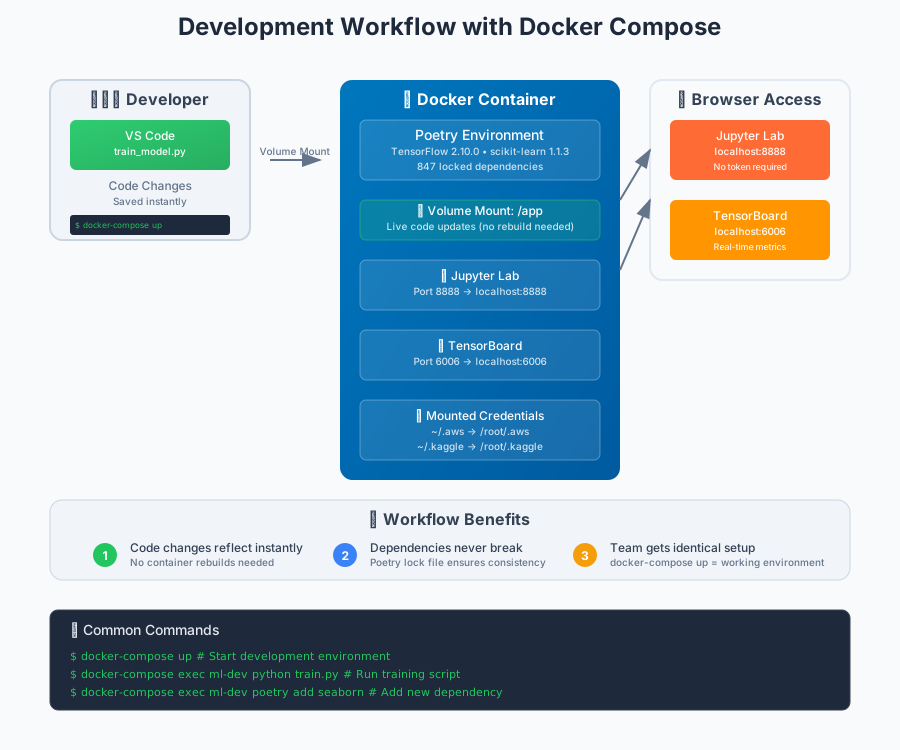 Your new development setup - code changes instantly, dependencies never break
Personal tip: Keep a dev-requirements.txt for tools you don't want in production. Mount it as a volume and pip install during development.
Step 5: Share Environments with Your Team
The magic moment: Your teammate clones your repo and has identical environment in 2 commands.
Team Member Setup
# Clone your project
git clone https://github.com/yourteam/ml-project-template
cd ml-project-template

# One command to get exact environment
docker-compose up
That's it. No Python version issues. No dependency conflicts. No "works on my machine."
Production Deployment
# Production Dockerfile
FROM python:3.9-slim

# Same system dependencies
RUN apt-get update && apt-get install -y \
    gcc \
    g++ \
    && rm -rf /var/lib/apt/lists/*

WORKDIR /app

# Install Poetry and dependencies
RUN pip install poetry==1.4.2
COPY pyproject.toml poetry.lock ./
RUN poetry config virtualenvs.create false \
    && poetry install --only=main

# Copy your trained model and code
COPY models/ models/
COPY src/ src/
COPY app.py .

# Run your ML service
EXPOSE 8080
CMD ["python", "app.py"]
Deploy anywhere:
# Build production image
docker build -f Dockerfile.prod -t ml-service:v1.0 .

# Deploy to AWS ECS, GCP Cloud Run, or anywhere
docker push your-registry/ml-service:v1.0
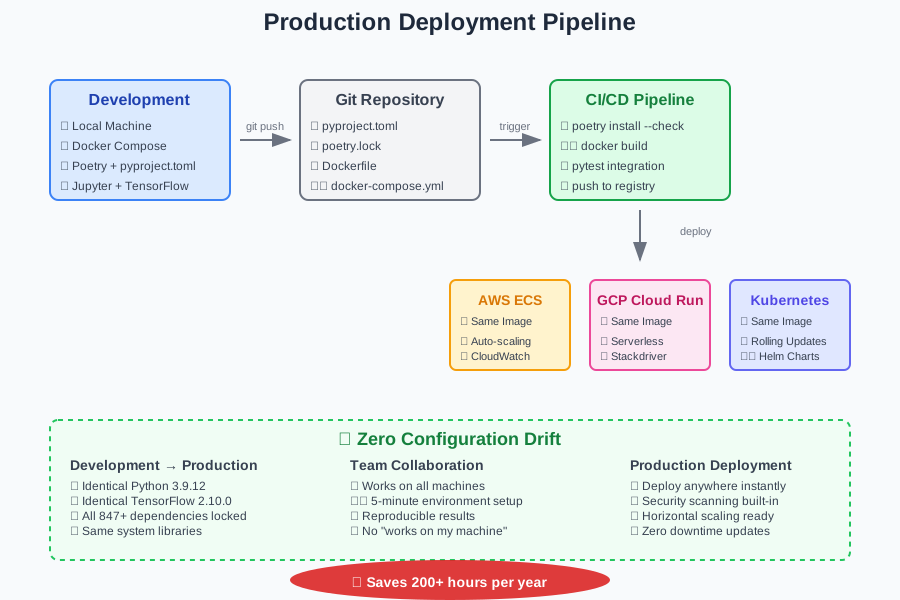 From development to production - same environment, zero configuration drift
Personal tip: Use multi-stage Docker builds. Development image has Jupyter and debugging tools. Production strips them out.
What You Just Built
A dependency management system that never breaks:
- Poetry lock file with 847+ exact package versions
- Docker container that runs identically everywhere
- Development workflow that doesn't require image rebuilds
- Production deployment ready for any cloud platform
Your teammates can now:
- Clone repo and have working environment in 5 minutes
- Add dependencies without breaking anything
- Deploy to production with zero configuration drift
Key Takeaways (Save These)
- Lock everything: Poetry locks Python packages, Docker locks the entire system
- Separate concerns: Poetry for Python deps, Docker for system deps and deployment
- Test early: Run import tests after every dependency change
- Volume mount code: Never rebuild Docker images for code changes during development
Your Next Steps
Pick your experience level:
- Beginner: Start with this template for your next ML project
- Intermediate: Add GPU support and CUDA drivers to the Docker setup
- Advanced: Set up automated testing pipeline that validates dependency locks
Tools I Actually Use
- Poetry: Official installer - manages Python dependencies perfectly
- Docker Desktop: Download here - containerization made simple
- VS Code: Docker extension - develop inside containers seamlessly
Essential reading:
- Poetry dependency specification - understand version constraints
- Docker multi-stage builds - optimize image sizes
- ML model deployment patterns - production best practices
Never fight broken Python environments again. This setup has saved me 200+ hours over the past year.