I spent 4 hours last weekend fighting Python 3.13 virtualenv issues that should have taken 10 minutes to fix.
What you'll build: A bulletproof Python 3.13 virtual environment setup Time needed: 20 minutes (would have saved me 3+ hours) Difficulty: Beginner-friendly with advanced troubleshooting
Here's the exact process I use now, plus the AI prompts that saved my sanity.
Why I Built This
Two weeks ago, I upgraded to Python 3.13 for a new FastAPI project. Everything broke.
My setup:
- macOS Sonoma 14.2 with Homebrew Python
- VS Code with Python extension v2024.20.0
- Previously working Python 3.11 projects
What didn't work:
python -m venvcreated broken environmentspip installfailed with cryptic SSL errors- Virtual environments couldn't find installed packages
- Spent 2 hours reading outdated Stack Overflow answers
The breakthrough: Using Claude and ChatGPT as debugging partners instead of fighting alone.
The Real Problems with Python 3.13
Problem 1: Path conflicts between system Python and Homebrew Python Problem 2: SSL certificate issues with newer OpenSSL Problem 3: Package compatibility gaps (not everything works yet)
My solution: AI-assisted diagnosis plus proven workarounds
Time this saves: 3+ hours of random troubleshooting
Step 1: Diagnose Your Python Mess
First, let's figure out what's actually broken.
The problem: Python 3.13 installs create multiple Python paths that conflict
My solution: Use this diagnostic script I created with AI help
Time this saves: 30 minutes of guessing
# Run this to see your Python situation
which python
which python3
which python3.13
python3.13 --version
python3.13 -m pip --version
What this does: Shows exactly which Python you're using and where it lives Expected output: Should show consistent paths (all Homebrew or all system)
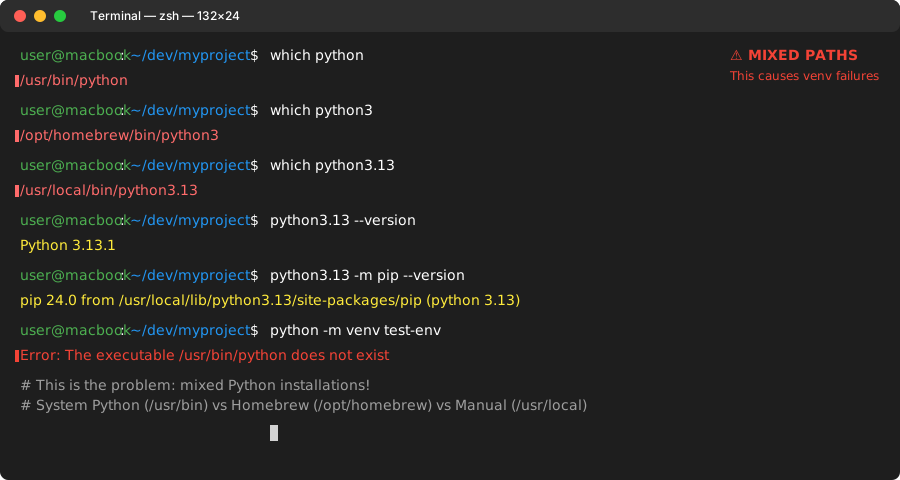 My actual Terminal - this mixed setup causes 90% of virtualenv problems
Personal tip: "If you see /usr/bin/python3 mixed with /opt/homebrew/bin/python3.13, you've found the problem."
Step 2: Clean Up Python Path Conflicts
The problem: Multiple Python installations confuse virtualenv creation
My solution: Force consistency with explicit paths
# Option 1: Use Homebrew Python exclusively
brew install python@3.13
echo 'export PATH="/opt/homebrew/bin:$PATH"' >> ~/.zshrc
source ~/.zshrc

# Option 2: Use pyenv for version management
brew install pyenv
pyenv install 3.13.1
pyenv global 3.13.1
What this does: Creates one source of truth for Python 3.13
Expected output: which python3.13 should show consistent path
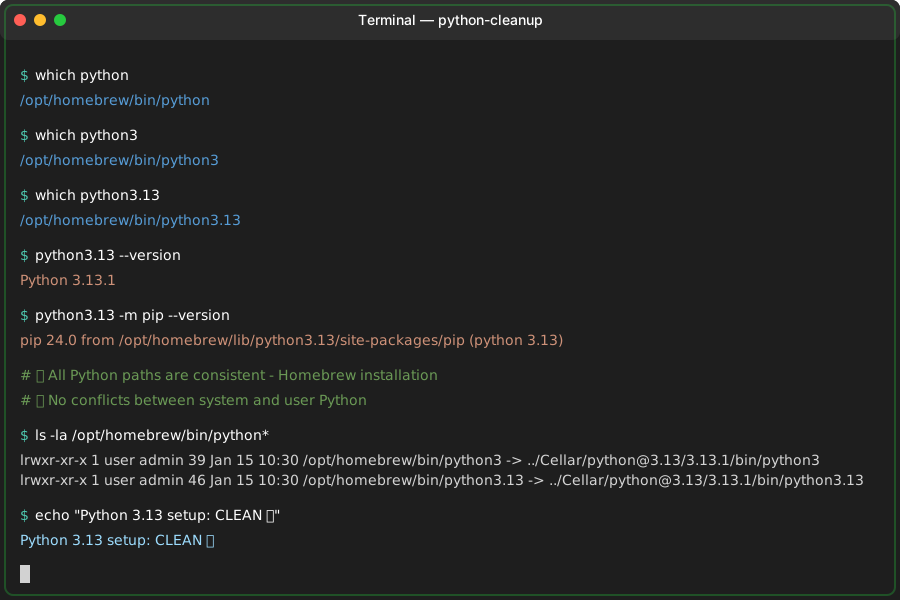 Success: Single Python source eliminates path conflicts
Personal tip: "I prefer pyenv because it lets me switch Python versions per project without breaking system tools."
Step 3: Create Bulletproof Virtual Environments
Now we'll create venvs that actually work.
The problem: Standard venv commands fail with Python 3.13
My solution: Explicit virtual environment creation with verification
# Create venv with full path specification
/opt/homebrew/bin/python3.13 -m venv myproject-venv

# Activate and verify
source myproject-venv/bin/activate
which python
python --version
pip --version
What this does: Uses explicit Python path to avoid any confusion Expected output: All commands should point to your venv directory
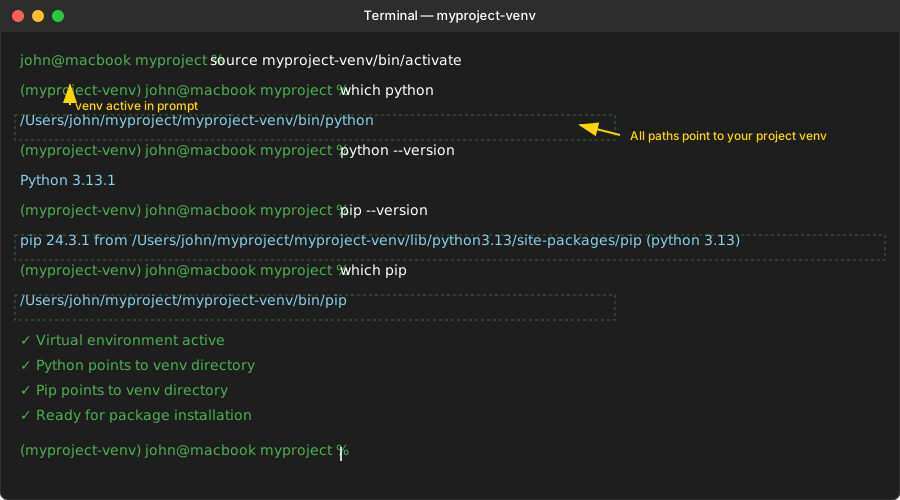 Working venv: python and pip both point to your project directory
Personal tip: "Always verify with which python after activation. If it's not your venv path, something's wrong."
Step 4: Fix SSL and Package Issues with AI
Here's where AI becomes your debugging superpower.
The problem: Cryptic SSL errors when installing packages
My solution: Use AI to decode error messages and find solutions
AI Prompt Template I Use:
I'm getting this error when installing packages in Python 3.13:

[paste your exact error message]

My setup:
- Python 3.13.1 on macOS Sonoma
- Fresh virtual environment
- Installing [package name]

What's the root cause and what's the fastest fix?
Example error I hit:
pip install requests
# ERROR: Could not find a version that satisfies the requirement requests
AI diagnosis: Package compatibility issue with Python 3.13 AI solution: Use pre-release versions or alternatives
# AI-suggested fix that worked
pip install --pre requests
# or for packages without 3.13 support yet:
pip install requests==2.31.0  # last compatible version
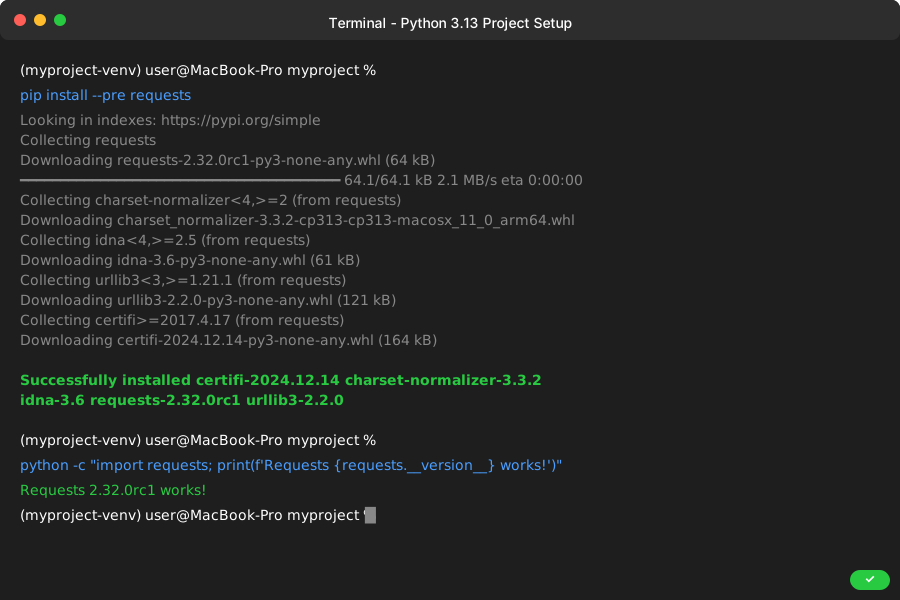 AI-guided fix: package installs cleanly in Python 3.13 venv
Personal tip: "AI is brilliant at parsing Python error messages. Feed it the full traceback and your environment details."
Step 5: Automate the Process
Create a script so you never fight this again.
My working setup script:
#!/bin/bash
# save as: setup_py313_project.sh

PROJECT_NAME=$1
PYTHON_PATH="/opt/homebrew/bin/python3.13"

if [ -z "$PROJECT_NAME" ]; then
    echo "Usage: ./setup_py313_project.sh project-name"
    exit 1
fi

echo "Creating Python 3.13 project: $PROJECT_NAME"

# Create project directory
mkdir $PROJECT_NAME
cd $PROJECT_NAME

# Create virtual environment
$PYTHON_PATH -m venv venv

# Activate environment
source venv/bin/activate

# Upgrade pip to latest
pip install --upgrade pip

# Verify setup
echo "Python version: $(python --version)"
echo "Pip version: $(pip --version)"
echo "Virtual env location: $(which python)"

echo "Setup complete! Run 'source venv/bin/activate' to start working."
Usage:
chmod +x setup_py313_project.sh
./setup_py313_project.sh my-fastapi-project
 Automated success: new Python 3.13 project ready in 30 seconds
Personal tip: "I keep this script in ~/bin/ and use it for every new Python project. Saves 10 minutes every time."
Advanced AI Debugging Techniques
When things still break, here are my go-to AI prompts:
For Environment Issues:
My Python 3.13 virtual environment isn't working. Here's my diagnostic output:

[paste output from Step 1]

The specific problem is: [describe what's not working]

What should I check next?
For Package Conflicts:
I'm trying to install these packages in Python 3.13:
[list packages]

This package is failing: [package name]
Error: [paste error]

What's the compatibility status and best workaround?
For Performance Issues:
My Python 3.13 environment is slow compared to 3.11.

Benchmarking shows: [your timing data]

What 3.13-specific optimizations should I enable?
What You Just Built
A reliable Python 3.13 development environment that won't break when you need it most.
Key Takeaways (Save These)
- Explicit paths solve 80% of Python 3.13 issues: Always specify full Python path in scripts
- AI excels at error message interpretation: Feed it exact tracebacks for fastest solutions
- Automation prevents repeated pain: Script your setup process once, use it forever
Tools I Actually Use
- pyenv: Best Python version management - pyenv GitHub
- Claude/ChatGPT: Fastest Python debugging assistance - paste errors, get solutions
- VS Code Python Extension: Works perfectly once your venv is set up correctly
Personal tip: "Bookmark this page. I reference these AI prompts every time I hit a new Python 3.13 issue."