Your users are checking their yield farming positions while waiting for coffee. They're panic-selling during lunch breaks. They're definitely not sitting at desktop computers like it's 2015.
Yet most DeFi apps still treat mobile users like second-class citizens. Slow loading times, terrible UX, and zero offline functionality. Time to fix this mess with Progressive Web Apps.
Why Your DeFi App Needs PWA Technology
Traditional web apps fail mobile users. They load slowly, drain batteries, and disappear when network connections hiccup. Progressive Web Apps solve these problems with three key features:
- Service Workers: Background scripts that cache data and enable offline functionality
- App Shell Architecture: Fast loading skeleton UI that appears instantly
- Push Notifications: Real-time alerts for price changes and transaction confirmations
Mobile users represent 70% of DeFi traffic. PWAs can boost your conversion rates by 20-30% compared to standard web apps.
Building the Foundation: Service Worker Setup
Service workers power PWA functionality. They intercept network requests, cache critical resources, and enable offline features.
// sw.js - Service Worker Registration
const CACHE_NAME = 'defi-app-v1';
const urlsToCache = [
  '/',
  '/static/js/bundle.js',
  '/static/css/main.css',
  '/manifest.json'
];

// Install event - cache critical resources
self.addEventListener('install', (event) => {
  event.waitUntil(
    caches.open(CACHE_NAME)
      .then((cache) => {
        console.log('Caching app shell');
        return cache.addAll(urlsToCache);
      })
  );
});

// Fetch event - serve cached content when offline
self.addEventListener('fetch', (event) => {
  event.respondWith(
    caches.match(event.request)
      .then((response) => {
        // Return cached version or fetch from network
        return response || fetch(event.request);
      }
    )
  );
});
Register your service worker in your main app file:
// App.js - Service Worker Registration
useEffect(() => {
  if ('serviceWorker' in navigator) {
    navigator.serviceWorker.register('/sw.js')
      .then((registration) => {
        console.log('SW registered successfully');
      })
      .catch((error) => {
        console.log('SW registration failed');
      });
  }
}, []);
Mobile-First Yield Farming Interface
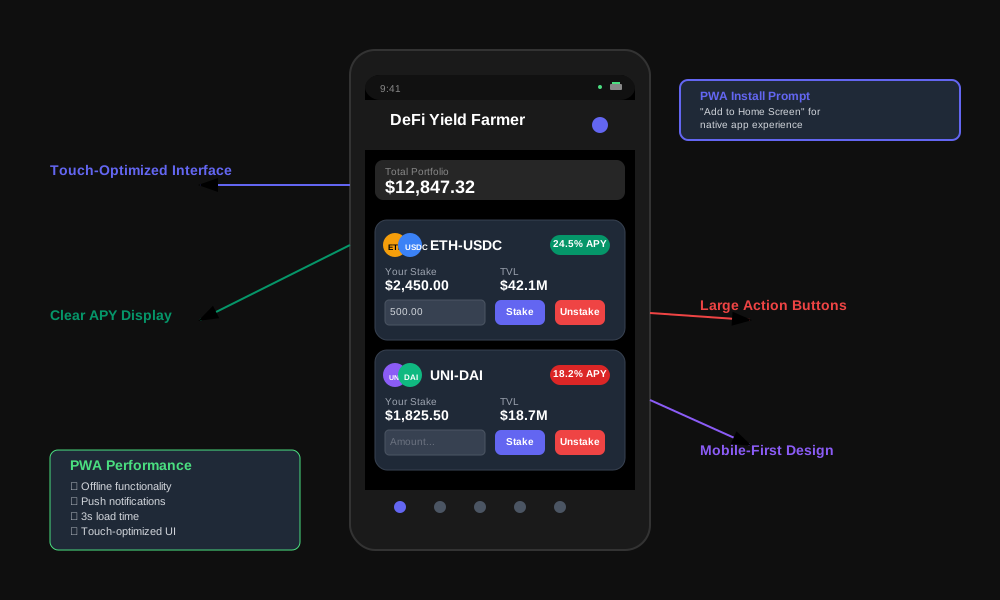
Mobile screens demand different UX patterns. Desktop interfaces with tiny buttons and complex layouts fail on touch devices.
// components/YieldFarmCard.jsx
import React, { useState } from 'react';
import { formatNumber } from '../utils/formatting';

const YieldFarmCard = ({ pool, userStake, onStake, onUnstake }) => {
  const [amount, setAmount] = useState('');
  const [isStaking, setIsStaking] = useState(false);

  // Mobile-optimized card design
  return (
    <div className="yield-card">
      {/* Large, touch-friendly header */}
      <div className="yield-header">
        <div className="token-pair">
          <img src={pool.token0.logo} alt={pool.token0.symbol} />
          <img src={pool.token1.logo} alt={pool.token1.symbol} />
          <span>{pool.token0.symbol}-{pool.token1.symbol}</span>
        </div>
        <div className="apy-badge">
          {formatNumber(pool.apy)}% APY
        </div>
      </div>

      {/* Key metrics in scannable format */}
      <div className="yield-metrics">
        <div className="metric">
          <span className="label">Your Stake</span>
          <span className="value">${formatNumber(userStake)}</span>
        </div>
        <div className="metric">
          <span className="label">Total Locked</span>
          <span className="value">${formatNumber(pool.tvl)}</span>
        </div>
      </div>

      {/* Touch-optimized input and buttons */}
      <div className="yield-actions">
        <input
          type="number"
          placeholder="Amount to stake"
          value={amount}
          onChange={(e) => setAmount(e.target.value)}
          className="amount-input"
        />
        <div className="action-buttons">
          <button
            className="btn-primary"
            onClick={() => handleStake(amount)}
            disabled={isStaking || !amount}
          >
            {isStaking ? 'Staking...' : 'Stake'}
          </button>
          <button
            className="btn-secondary"
            onClick={() => handleUnstake(amount)}
            disabled={isStaking || userStake === 0}
          >
            Unstake
          </button>
        </div>
      </div>
    </div>
  );
};
Offline Data Management Strategy
DeFi apps need real-time data, but networks fail. Smart caching strategies keep your app functional during connectivity issues.
// utils/offlineManager.js
class OfflineManager {
  constructor() {
    this.cache = new Map();
    this.syncQueue = [];
  }

  // Cache critical pool data
  async cachePoolData(pools) {
    const poolData = {
      timestamp: Date.now(),
      pools: pools,
      ttl: 300000 // 5 minutes
    };

    localStorage.setItem('cached_pools', JSON.stringify(poolData));
    this.cache.set('pools', poolData);
  }

  // Get cached data when offline
  getCachedPools() {
    const cached = localStorage.getItem('cached_pools');
    if (!cached) return null;

    const data = JSON.parse(cached);
    const isExpired = Date.now() - data.timestamp > data.ttl;

    return isExpired ? null : data.pools;
  }

  // Queue transactions for when connection returns
  queueTransaction(transaction) {
    this.syncQueue.push({
      ...transaction,
      timestamp: Date.now(),
      status: 'pending'
    });

    localStorage.setItem('sync_queue', JSON.stringify(this.syncQueue));
  }

  // Process queued transactions when online
  async processSyncQueue() {
    if (!navigator.onLine || this.syncQueue.length === 0) return;

    for (const transaction of this.syncQueue) {
      try {
        await this.submitTransaction(transaction);
        this.removeFromQueue(transaction.id);
      } catch (error) {
        console.error('Failed to sync transaction:', error);
      }
    }
  }
}

export default new OfflineManager();
Push Notifications for Price Alerts
Mobile users expect instant notifications. Web Push API enables real-time alerts without app store deployment.
// utils/notificationManager.js
class NotificationManager {
  constructor() {
    this.isSupported = 'Notification' in window && 'serviceWorker' in navigator;
  }

  // Request permission and subscribe to push notifications
  async subscribe() {
    if (!this.isSupported) return false;

    // Request notification permission
    const permission = await Notification.requestPermission();
    if (permission !== 'granted') return false;

    // Get service worker registration
    const registration = await navigator.serviceWorker.ready;

    // Subscribe to push notifications
    const subscription = await registration.pushManager.subscribe({
      userVisibleOnly: true,
      applicationServerKey: this.urlBase64ToUint8Array(process.env.REACT_APP_VAPID_PUBLIC_KEY)
    });

    // Send subscription to your backend
    await this.sendSubscriptionToServer(subscription);
    return true;
  }

  // Show local notification for immediate alerts
  showNotification(title, options = {}) {
    if (!this.isSupported || Notification.permission !== 'granted') return;

    const notification = new Notification(title, {
      body: options.body,
      icon: '/icon-192x192.png',
      badge: '/badge-72x72.png',
      tag: options.tag || 'default',
      ...options
    });

    // Auto-close after 5 seconds
    setTimeout(() => notification.close(), 5000);

    return notification;
  }

  // Monitor price changes and trigger alerts
  setupPriceAlerts(pools, thresholds) {
    pools.forEach(pool => {
      const threshold = thresholds[pool.id];
      if (!threshold) return;

      if (pool.apy >= threshold.maxApy) {
        this.showNotification(
          `High APY Alert!`,
          {
            body: `${pool.name} reached ${pool.apy}% APY`,
            tag: `apy-alert-${pool.id}`
          }
        );
      }
    });
  }

  urlBase64ToUint8Array(base64String) {
    const padding = '='.repeat((4 - base64String.length % 4) % 4);
    const base64 = (base64String + padding)
      .replace(/-/g, '+')
      .replace(/_/g, '/');

    const rawData = window.atob(base64);
    const outputArray = new Uint8Array(rawData.length);

    for (let i = 0; i < rawData.length; ++i) {
      outputArray[i] = rawData.charCodeAt(i);
    }
    return outputArray;
  }
}

export default new NotificationManager();
Web App Manifest Configuration
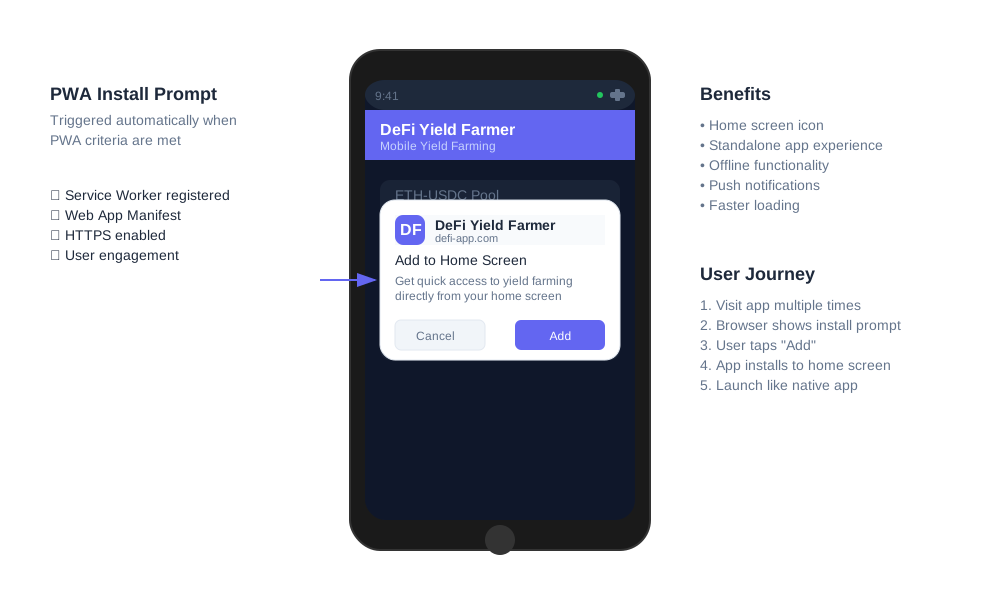
The manifest file transforms your web app into an installable PWA. Users can add your DeFi app to their home screen.
{
  "name": "DeFi Yield Farmer",
  "short_name": "YieldFarm",
  "description": "Mobile-first yield farming platform",
  "start_url": "/",
  "display": "standalone",
  "background_color": "#1a1a1a",
  "theme_color": "#6366f1",
  "orientation": "portrait-primary",
  "icons": [
    {
      "src": "/icon-72x72.png",
      "sizes": "72x72",
      "type": "image/png",
      "purpose": "maskable any"
    },
    {
      "src": "/icon-192x192.png",
      "sizes": "192x192",
      "type": "image/png",
      "purpose": "maskable any"
    },
    {
      "src": "/icon-512x512.png",
      "sizes": "512x512",
      "type": "image/png",
      "purpose": "maskable any"
    }
  ],
  "shortcuts": [
    {
      "name": "Quick Stake",
      "short_name": "Stake",
      "description": "Stake tokens quickly",
      "url": "/stake",
      "icons": [{ "src": "/stake-icon.png", "sizes": "96x96" }]
    }
  ]
}
Performance Optimization for Mobile
Mobile devices have limited resources. Optimize your PWA for battery life and slow networks.
// utils/performanceOptimizer.js
class PerformanceOptimizer {
  constructor() {
    this.isLowPowerMode = this.detectLowPowerMode();
    this.connectionSpeed = this.getConnectionSpeed();
  }

  // Detect low power mode and adjust features
  detectLowPowerMode() {
    // Check various indicators
    const battery = navigator.battery || navigator.webkitBattery;
    if (battery && battery.level < 0.2) return true;

    // Check for data saver mode
    if (navigator.connection && navigator.connection.saveData) return true;

    return false;
  }

  // Lazy load components based on connection speed
  shouldLazyLoad() {
    return this.connectionSpeed === 'slow' || this.isLowPowerMode;
  }

  // Reduce animation complexity on slow devices
  getAnimationConfig() {
    if (this.isLowPowerMode) {
      return {
        duration: 0,
        easing: 'linear'
      };
    }

    return {
      duration: 300,
      easing: 'cubic-bezier(0.4, 0, 0.2, 1)'
    };
  }

  // Batch API requests to reduce battery drain
  batchRequests(requests, maxBatchSize = 5) {
    const batches = [];
    for (let i = 0; i < requests.length; i += maxBatchSize) {
      batches.push(requests.slice(i, i + maxBatchSize));
    }
    return batches;
  }

  getConnectionSpeed() {
    const connection = navigator.connection || navigator.webkitConnection;
    if (!connection) return 'unknown';

    const speed = connection.downlink;
    if (speed < 1.5) return 'slow';
    if (speed < 10) return 'medium';
    return 'fast';
  }
}

export default new PerformanceOptimizer();
Testing Your PWA DeFi App
PWAs require specific testing approaches. Use Lighthouse audits and mobile device testing.
// tests/pwa.test.js
describe('PWA Functionality', () => {
  beforeEach(() => {
    // Mock service worker registration
    global.navigator.serviceWorker = {
      register: jest.fn(() => Promise.resolve({
        installing: null,
        waiting: null,
        active: null
      }))
    };
  });

  test('service worker registers successfully', async () => {
    const registration = await navigator.serviceWorker.register('/sw.js');
    expect(navigator.serviceWorker.register).toHaveBeenCalledWith('/sw.js');
  });

  test('app works offline', async () => {
    // Simulate offline mode
    Object.defineProperty(navigator, 'onLine', {
      writable: true,
      value: false
    });

    const cachedPools = offlineManager.getCachedPools();
    expect(cachedPools).toBeTruthy();
  });

  test('push notifications work', async () => {
    // Mock Notification API
    global.Notification = {
      permission: 'granted',
      requestPermission: jest.fn(() => Promise.resolve('granted'))
    };

    const result = await notificationManager.subscribe();
    expect(result).toBe(true);
  });
});
Run Lighthouse audits to verify PWA compliance:
# Install Lighthouse CLI
npm install -g lighthouse

# Run PWA audit
lighthouse https://your-defi-app.com --only-categories=pwa --chrome-flags="--headless"

# Check for PWA criteria:
# ✓ Service Worker registered
# ✓ Web App Manifest present
# ✓ HTTPS enabled
# ✓ Responsive design
# ✓ Fast load times
Deployment and Distribution
Deploy your PWA DeFi app with proper headers and caching strategies.
# nginx.conf - PWA deployment configuration
server {
    listen 443 ssl http2;
    server_name your-defi-app.com;

    # PWA requires HTTPS
    ssl_certificate /path/to/certificate.crt;
    ssl_certificate_key /path/to/private.key;

    location / {
        root /var/www/defi-app;
        try_files $uri $uri/ /index.html;

        # Cache static assets
        location ~* \.(js|css|png|jpg|jpeg|gif|ico|svg)$ {
            expires 1y;
            add_header Cache-Control "public, immutable";
        }
    }

    # Service Worker - no cache
    location /sw.js {
        add_header Cache-Control "no-cache, no-store, must-revalidate";
        add_header Pragma "no-cache";
        add_header Expires "0";
    }

    # Web App Manifest
    location /manifest.json {
        add_header Content-Type "application/manifest+json";
    }
}
Measuring PWA Success
Track PWA-specific metrics to understand user engagement improvements.
// analytics/pwaMetrics.js
class PWAMetrics {
  constructor() {
    this.startTime = performance.now();
    this.isStandalone = window.matchMedia('(display-mode: standalone)').matches;
  }

  // Track PWA installation
  trackInstallation() {
    window.addEventListener('beforeinstallprompt', (e) => {
      // Track install prompt shown
      this.sendEvent('pwa_install_prompt_shown');

      e.userChoice.then((choiceResult) => {
        if (choiceResult.outcome === 'accepted') {
          this.sendEvent('pwa_installed');
        } else {
          this.sendEvent('pwa_install_dismissed');
        }
      });
    });
  }

  // Track offline usage
  trackOfflineUsage() {
    window.addEventListener('online', () => {
      this.sendEvent('connection_restored');
    });

    window.addEventListener('offline', () => {
      this.sendEvent('went_offline');
    });
  }

  // Track service worker performance
  trackServiceWorkerPerformance() {
    if ('serviceWorker' in navigator) {
      navigator.serviceWorker.addEventListener('message', (event) => {
        if (event.data.type === 'CACHE_HIT') {
          this.sendEvent('cache_hit', { resource: event.data.resource });
        }
      });
    }
  }

  sendEvent(eventName, data = {}) {
    // Send to your analytics service
    gtag('event', eventName, {
      custom_parameter_1: this.isStandalone ? 'standalone' : 'browser',
      ...data
    });
  }
}

const pwaMetrics = new PWAMetrics();
pwaMetrics.trackInstallation();
pwaMetrics.trackOfflineUsage();
Conclusion
Progressive Web Apps solve the mobile DeFi experience problem. Service workers enable offline functionality. Push notifications keep users engaged. Mobile-first design improves usability.
Your yield farming platform can compete with native apps without app store restrictions. Users get instant loading, offline access, and push notifications. You get better engagement metrics and lower development costs.
Start with service worker registration and mobile-optimized components. Add offline data caching and push notifications. Test thoroughly on actual mobile devices. Deploy with proper PWA headers and manifest configuration.
Mobile DeFi users deserve better than slow web apps. Give them PWA experiences that actually work.