Problem: Repeated System Prompts and Few-Shot Examples Kill Latency and Budget
Prompt caching patterns for system prompts and few-shot examples are the fastest way to cut Claude API costs by up to 90% and time-to-first-token by up to 80% — without changing a single line of your application logic.
If you're sending a 2,000-token system prompt on every request, you're paying full price each time. Same story with few-shot examples: five 500-token demonstrations re-processed on every call adds up fast at production scale.
You'll learn:
- How to add
cache_controlto system prompts, few-shot messages, and tool definitions - Exact patterns for multi-turn conversations, RAG contexts, and tool-heavy agents
- How to measure cache hit rate and validate savings in production on AWS us-east-1
Time: 20 min | Difficulty: Intermediate
Why This Happens
Every Claude API call processes your entire input from scratch — unless you tell it not to. The Anthropic API's prompt caching feature lets you mark message prefixes as cacheable. When the same prefix arrives again within the TTL window, Claude skips reprocessing it and charges you 10% of the normal input token price.
Symptoms that signal you need caching:
- Time-to-first-token consistently above 1.5s on moderate-length prompts
- Input token costs growing linearly with request volume despite identical system prompts
- Staging vs production cost gap you can't explain — staging uses short prompts, production uses full ones
The cache lives server-side. You don't store anything. You just mark the boundary.
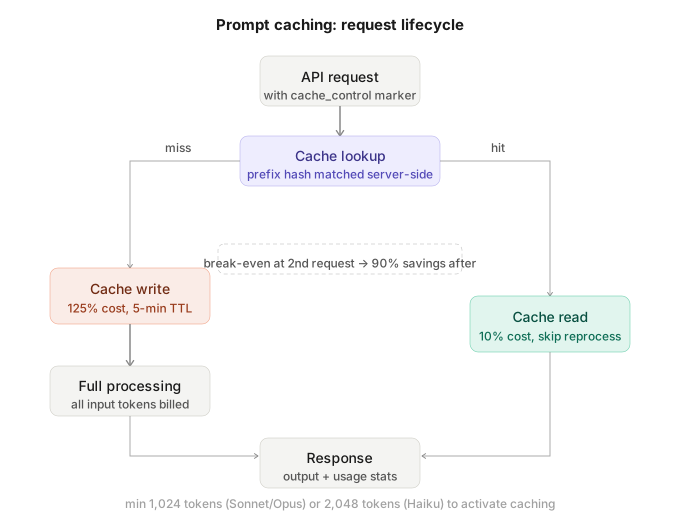 How the Anthropic API checks the cache prefix before processing: cached tokens are read at 10% cost, new tokens are written at 125% on first hit.
Cache Basics Before You Start
Three things to know before writing code:
Minimum cacheable block: 1,024 tokens for Claude claude-sonnet-4-20250514 and Opus. 2,048 tokens for Haiku. Smaller blocks are silently ignored — no error, no savings.
Cache TTL: 5 minutes, refreshed on each hit. For long-running agents, you need to re-hit the cache within that window or pay full price again.
Cache write cost: 125% of normal input token price on the first request. Break-even is the second request. Everything after that is 90% off.
Solution
Step 1: Install the SDK and Set Your Key
# Use uv for fast, reproducible installs — avoids pip dependency conflicts
uv pip install anthropic>=0.40.0
export ANTHROPIC_API_KEY="sk-ant-..."
Expected output: Silent install. Verify with python -c "import anthropic; print(anthropic.__version__)" — you should see 0.40.0 or higher.
Step 2: Cache a System Prompt
This is the highest-ROI change you can make. Add one key to your system prompt dict.
import anthropic

client = anthropic.Anthropic()

# A realistic system prompt: role definition + behavior rules + output format
SYSTEM_PROMPT = """You are a senior Python code reviewer with 10 years of experience.
Your job is to identify bugs, performance issues, and security vulnerabilities.

Rules:
- Always cite the specific line number
- Explain the risk level: LOW / MEDIUM / HIGH / CRITICAL
- Suggest the exact fix, not just the problem
- If the code is clean, say so explicitly — don't invent issues

Output format:
## Finding [N]: [SHORT TITLE]
**Line:** [N]
**Risk:** [LEVEL]
**Issue:** [Description]
**Fix:** [Code snippet or instruction]
""" * 3  # Repeat to exceed 1,024-token minimum for this example

response = client.messages.create(
    model="claude-sonnet-4-20250514",
    max_tokens=1024,
    system=[
        {
            "type": "text",
            "text": SYSTEM_PROMPT,
            "cache_control": {"type": "ephemeral"},  # Mark this block as cacheable
        }
    ],
    messages=[
        {"role": "user", "content": "Review this: def get_user(id): return db.query(f'SELECT * FROM users WHERE id={id}')"}
    ],
)

# Check cache performance
usage = response.usage
print(f"Input tokens:          {usage.input_tokens}")
print(f"Cache creation tokens: {usage.cache_creation_input_tokens}")  # 125% cost — first hit
print(f"Cache read tokens:     {usage.cache_read_input_tokens}")       # 10% cost — subsequent hits
Expected output on first call:
Input tokens:          0
Cache creation tokens: 312
Cache read tokens:     0
Expected output on second call (within 5 min):
Input tokens:          0
Cache creation tokens: 0
Cache read tokens:     312
If it fails:
cache_creation_input_tokensstays at 0 on every call → Your system prompt is under 1,024 tokens. Add more content or combine with few-shot examples in the same cacheable block.AttributeError: 'Usage' object has no attribute 'cache_read_input_tokens'→ SDK version below 0.40.0. Runuv pip install --upgrade anthropic.
Step 3: Cache Few-Shot Examples in the Messages Array
Few-shot examples live in your messages array, not system. You mark the last few-shot turn with cache_control.
# Few-shot examples that teach the model your exact output format
FEW_SHOT = [
    {
        "role": "user",
        "content": "Classify this support ticket: 'My payment failed with error code 4003'"
    },
    {
        "role": "assistant",
        "content": '{"category": "billing", "priority": "high", "error_code": "4003", "requires_human": true}'
    },
    {
        "role": "user",
        "content": "Classify this support ticket: 'How do I export my data to CSV?'"
    },
    {
        "role": "assistant",
        # cache_control on the LAST message in the static prefix
        # Everything before this point will be cached as one block
        "content": [
            {
                "type": "text",
                "text": '{"category": "feature_request", "priority": "low", "error_code": null, "requires_human": false}',
                "cache_control": {"type": "ephemeral"},
            }
        ],
    },
]

def classify_ticket(ticket_text: str) -> dict:
    response = client.messages.create(
        model="claude-sonnet-4-20250514",
        max_tokens=256,
        messages=[
            *FEW_SHOT,  # Cached prefix — only processed once per 5-min window
            {"role": "user", "content": f"Classify this support ticket: '{ticket_text}'"},  # Dynamic suffix
        ],
    )
    return response.content[0].text

# First call: cache write (125% cost on FEW_SHOT tokens)
result = classify_ticket("I can't log in, keeps saying invalid password")
print(result)

# Second call: cache hit (10% cost on FEW_SHOT tokens)
result = classify_ticket("Does your API support webhooks?")
print(result)
The rule: cache_control goes on the last message of your static prefix. Everything before that marker is cached as one block. The new user message after it is the dynamic suffix — never cached, always processed fresh.
Step 4: Cache Tool Definitions for Agents
Tool schemas are often 500–2,000 tokens each. If your agent has 10 tools, that's up to 20,000 tokens per call. Cache them.
TOOLS = [
    {
        "name": "search_codebase",
        "description": "Search the codebase for files matching a pattern or containing specific text.",
        "input_schema": {
            "type": "object",
            "properties": {
                "query": {"type": "string", "description": "Search query or regex pattern"},
                "file_type": {"type": "string", "enum": ["py", "ts", "go", "rs", "all"]},
                "max_results": {"type": "integer", "default": 10}
            },
            "required": ["query"]
        }
    },
    # ... more tools ...
    {
        "name": "run_tests",
        "description": "Execute the test suite for a given module and return results.",
        "input_schema": {
            "type": "object",
            "properties": {
                "module": {"type": "string"},
                "verbose": {"type": "boolean", "default": False}
            },
            "required": ["module"]
        },
        # cache_control on the LAST tool in the array
        "cache_control": {"type": "ephemeral"},
    }
]

response = client.messages.create(
    model="claude-sonnet-4-20250514",
    max_tokens=1024,
    tools=TOOLS,
    messages=[{"role": "user", "content": "Find all files that import requests and run their tests"}],
)
If it fails:
ValidationErroroncache_controlin tools → SDK below 0.40.0 doesn't support tool caching. Upgrade.- No cache savings despite many tools → Total tool schema is under 1,024 tokens. Combine with a system prompt in the same request to reach the minimum.
Step 5: Multi-Turn Conversations with a Growing Context
For chat applications, you want to cache the system prompt + initial context and let the conversation grow beyond it.
def chat_with_cache(conversation_history: list, new_message: str) -> str:
    """
    conversation_history: list of {"role": ..., "content": ...} dicts
    The FIRST message in history has cache_control — it marks the end of the static prefix.
    """

    # Mark the first assistant turn as the cache boundary
    # This caches: system prompt + first user message + first assistant response
    # Everything after is dynamic and processed fresh
    cached_prefix = []
    for i, msg in enumerate(conversation_history):
        if i == 0 and msg["role"] == "assistant":
            cached_prefix.append({
                **msg,
                "content": [{"type": "text", "text": msg["content"], "cache_control": {"type": "ephemeral"}}]
                if isinstance(msg["content"], str) else msg["content"]
            })
        else:
            cached_prefix.append(msg)

    response = client.messages.create(
        model="claude-sonnet-4-20250514",
        max_tokens=1024,
        system=[{"type": "text", "text": SYSTEM_PROMPT, "cache_control": {"type": "ephemeral"}}],
        messages=[*cached_prefix, {"role": "user", "content": new_message}],
    )
    return response.content[0].text
The key insight: cache the stable beginning of the conversation. Let the tail grow uncached. Each user turn only charges full price for the new tokens, not the entire history.
Verification
Run this script to confirm cache is working and calculate your actual savings:
import time

def benchmark_cache(prompt_func, label: str, runs: int = 3):
    timings = []
    cache_reads = []

    for i in range(runs):
        start = time.perf_counter()
        response = prompt_func()
        elapsed = time.perf_counter() - start

        timings.append(elapsed)
        cache_reads.append(response.usage.cache_read_input_tokens)
        print(f"  Run {i+1}: {elapsed:.2f}s | cache_read={response.usage.cache_read_input_tokens}")
        time.sleep(1)  # Avoid rate limits

    print(f"\n{label} summary:")
    print(f"  Avg latency:    {sum(timings)/len(timings):.2f}s")
    print(f"  Avg cache read: {sum(cache_reads)/len(cache_reads):.0f} tokens")
    print(f"  Cache active:   {'YES' if cache_reads[-1] > 0 else 'NO — check token minimum'}")

benchmark_cache(
    lambda: client.messages.create(
        model="claude-sonnet-4-20250514",
        max_tokens=128,
        system=[{"type": "text", "text": SYSTEM_PROMPT, "cache_control": {"type": "ephemeral"}}],
        messages=[{"role": "user", "content": "Ping"}],
    ),
    label="System prompt cache"
)
You should see: cache_read tokens on run 2 and 3, with latency dropping 30–80% vs run 1.
What You Learned
cache_control: {type: ephemeral}marks the end of a cacheable prefix — it goes on the last item in the static block, not the first- Cache breaks even on the second request; everything after is 90% cheaper on input tokens
- The 1,024-token minimum is a hard floor — silent failures are the most common gotcha
- Tool definitions are high-value cache targets in agent workloads — often 10,000+ tokens per call
- Multi-turn caching requires anchoring the cache boundary at the stable prefix, not the growing tail
Tested on Anthropic SDK 0.40.0, Python 3.12, Claude claude-sonnet-4-20250514 — macOS Sequoia & Ubuntu 24.04 LTS
FAQ
Q: Does prompt caching work with streaming responses?
A: Yes. Add cache_control the same way. The usage object with cache stats is returned in the final stream event, not the first.
Q: What is the minimum token count to trigger caching?
A: 1,024 tokens for Claude Sonnet and Opus models. 2,048 tokens for Haiku. Requests below these thresholds are processed normally with no error — you just won't see cache_creation_input_tokens increment.
Q: Can I cache multiple blocks in one request?
A: Yes, up to four cache breakpoints per request. Place cache_control on the last item of each distinct static block — for example, one on your system prompt and one on your few-shot examples.
Q: Does the cache persist across different API keys or regions? A: No. The cache is scoped to your API key and Anthropic's server-side infrastructure. Requests routed to different backend nodes (rare but possible) may miss the cache on first hit. In production on AWS us-east-1, you'll typically see consistent hits after the first request within the 5-minute TTL window.
Q: What happens if I change one word in a cached system prompt? A: The entire cache entry is invalidated. Even a single character change creates a new cache entry and charges the 125% write cost again. Keep your static prefix truly static — move any dynamic content to the uncached suffix.