Problem: Pushing Software to Robots Without Bricking Them
Your robot fleet is deployed across warehouses, job sites, or customer locations. You need to push a firmware or application update — but a bad deploy could leave machines offline, stuck mid-task, or worse, unsafe. OTA updates in robotics are a reliability problem, not just a DevOps one.
You'll learn:
- How to structure a safe OTA pipeline with atomic updates and rollback
- How to sign and verify update payloads before applying them
- How to stage rollouts across a fleet to catch failures early
Time: 15 min | Level: Intermediate
Why This Happens
Robotics deployments have unique failure modes that standard web deployment patterns don't anticipate. Robots may lose connectivity mid-update. Storage can be corrupted by power loss. A bad update can prevent the robot from rebooting into a working state — and there's no engineer physically on-site to fix it.
Common symptoms:
- Robot boots into a broken state after update and can't self-recover
- Update partially applied because connection dropped mid-transfer
- No way to tell which robots in the fleet have the new version
- Malicious or corrupted update packages applied without verification
The solution is an update pipeline built around three guarantees: atomicity (all-or-nothing), authenticity (cryptographic signing), and observability (fleet-wide version tracking).
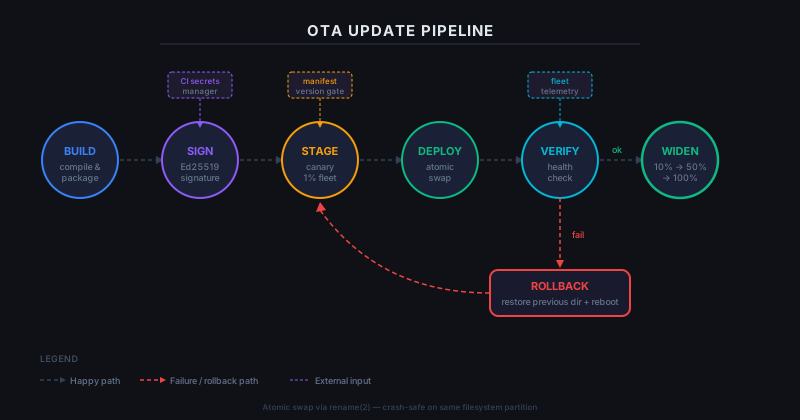 The safe OTA pipeline — every step has a failure exit that rolls back cleanly
Solution
Step 1: Structure Your Update Package
Use a versioned, self-describing bundle format. The robot needs to verify the package before touching the filesystem.
# Create update bundle structure
mkdir -p update-bundle/v1.4.2
cd update-bundle/v1.4.2

# Required files
touch manifest.json       # Version, checksum, target arch
touch payload.tar.gz      # Compressed application or firmware
touch signature.sig       # Ed25519 signature over manifest + payload hash
Your manifest.json must include enough information for the robot to make a go/no-go decision before applying anything:
{
  "version": "1.4.2",
  "min_current_version": "1.2.0",
  "target_arch": "aarch64",
  "payload_sha256": "e3b0c44298fc1c149afb...",
  "rollback_version": "1.4.1",
  "apply_strategy": "atomic_swap"
}
Why min_current_version matters: Robots running versions too old to safely apply the delta should refuse the update and request a full package instead. This prevents silent corruption from skipped migrations.
Step 2: Sign the Payload
Use Ed25519 — it's fast, produces small signatures, and is well-supported on embedded targets.
# sign_bundle.py - run in your CI pipeline, never on the robot
from cryptography.hazmat.primitives.asymmetric.ed25519 import Ed25519PrivateKey
from cryptography.hazmat.primitives.serialization import (
    Encoding, PrivateFormat, PublicFormat, NoEncryption
)
import hashlib, json

def sign_bundle(manifest_path: str, payload_path: str, key_path: str) -> bytes:
    # Load the signing key from a secrets manager, never from disk in prod
    with open(key_path, "rb") as f:
        private_key = Ed25519PrivateKey.from_private_bytes(f.read())

    # Sign over manifest + payload hash combined — prevents substitution attacks
    manifest_bytes = open(manifest_path, "rb").read()
    payload_hash = hashlib.sha256(open(payload_path, "rb").read()).digest()

    message = manifest_bytes + payload_hash
    signature = private_key.sign(message)

    return signature

sig = sign_bundle("manifest.json", "payload.tar.gz", "/secrets/ota_signing_key")
with open("signature.sig", "wb") as f:
    f.write(sig)
Expected: A 64-byte signature.sig file is created. Commit the corresponding public key to your robot firmware at build time — not fetched at runtime.
If it fails:
ValueError: Invalid key: Key must be raw 32-byte seed, not PEM format. Convert withopenssl pkey -in key.pem -outform DER | tail -c 32- Signature changes on re-run: Good — Ed25519 is deterministic, so if signatures differ, your input files changed
Step 3: Implement Atomic Apply on the Robot
The robot's update agent must apply updates without ever leaving the system in a half-written state. The standard approach is an A/B partition scheme or a staged directory swap.
# update_agent.py — runs on the robot
import os, shutil, hashlib, subprocess
from pathlib import Path
from cryptography.hazmat.primitives.asymmetric.ed25519 import Ed25519PublicKey

ACTIVE_APP_DIR  = Path("/opt/robot/active")
STAGING_DIR     = Path("/opt/robot/staging")
ROLLBACK_DIR    = Path("/opt/robot/rollback")
# Public key baked in at build time
PUBLIC_KEY_BYTES = bytes.fromhex("YOUR_PUBLIC_KEY_HEX_HERE")

def verify_and_apply(bundle_path: str) -> bool:
    bundle = Path(bundle_path)

    # 1. Verify signature BEFORE extracting anything
    public_key = Ed25519PublicKey.from_public_bytes(PUBLIC_KEY_BYTES)
    manifest_bytes = (bundle / "manifest.json").read_bytes()
    payload_hash   = hashlib.sha256((bundle / "payload.tar.gz").read_bytes()).digest()
    signature      = (bundle / "signature.sig").read_bytes()

    try:
        public_key.verify(signature, manifest_bytes + payload_hash)
    except Exception:
        print("Signature verification failed — rejecting update")
        return False  # Never apply an unverified bundle

    # 2. Extract to staging, not directly to active
    if STAGING_DIR.exists():
        shutil.rmtree(STAGING_DIR)
    subprocess.run(["tar", "-xzf", str(bundle / "payload.tar.gz"), "-C", str(STAGING_DIR)], check=True)

    # 3. Atomic swap: preserve rollback copy, then rename
    if ACTIVE_APP_DIR.exists():
        if ROLLBACK_DIR.exists():
            shutil.rmtree(ROLLBACK_DIR)
        ACTIVE_APP_DIR.rename(ROLLBACK_DIR)   # Rollback is now available

    STAGING_DIR.rename(ACTIVE_APP_DIR)        # Atomic on same filesystem

    print(f"Update applied. Rollback available at {ROLLBACK_DIR}")
    return True
Why rename instead of copy: On Linux, rename() is atomic at the kernel level on the same filesystem. A copy followed by delete can leave you with two partial versions if power is lost mid-copy.
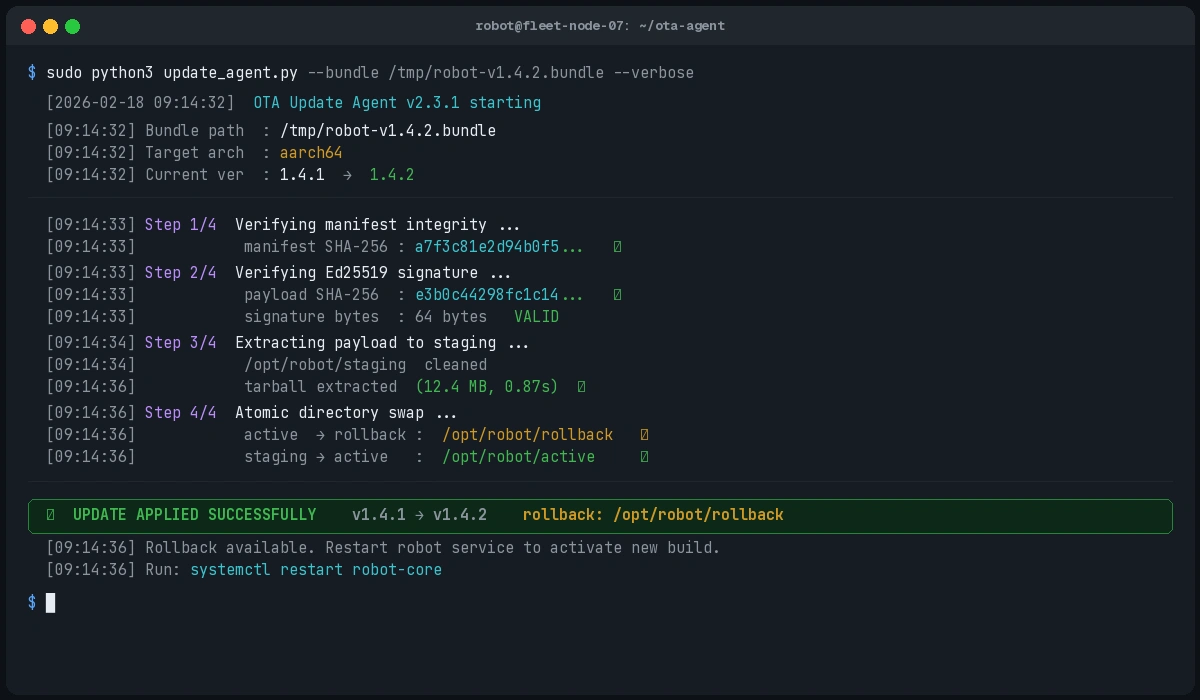 The agent logs: signature verified, staging extracted, atomic swap complete
Step 4: Staged Rollout with Fleet Telemetry
Never push to your full fleet at once. Use canary groups — typically 1%, 10%, 50%, 100%.
# fleet_rollout.py — runs server-side
import random

def should_receive_update(robot_id: str, rollout_percent: int) -> bool:
    # Deterministic assignment: same robot always in same cohort
    # Uses robot_id as seed so assignment is stable across calls
    rng = random.Random(robot_id)
    return rng.random() * 100 < rollout_percent

def get_rollout_targets(robot_ids: list[str], current_percent: int) -> list[str]:
    return [r for r in robot_ids if should_receive_update(r, current_percent)]

# Usage: start at 1%, monitor error rates, then widen
wave_1 = get_rollout_targets(fleet, rollout_percent=1)
Monitor these metrics after each wave before proceeding: crash rate, task completion rate, update apply success rate. If any metric regresses beyond a threshold, halt the rollout and trigger automatic rollback on affected units.
Verification
After deploying to your canary group, query version state across the fleet:
# Query fleet version distribution
curl https://your-fleet-api/robots/versions \
  -H "Authorization: Bearer $TOKEN" | jq '.versions | group_by(.version) | map({version: .[0].version, count: length})'
You should see:
[
  { "version": "1.4.1", "count": 98 },
  { "version": "1.4.2", "count": 2 }
]
Canary robots are on 1.4.2. Monitor for 30–60 minutes before widening to 10%.
What You Learned
- Bundle signing must cover both the manifest and the payload hash together — signing only the payload allows manifest substitution attacks
- Atomic directory swaps (via
rename) are safe against power loss; file copies are not - Deterministic cohort assignment ensures rollout percentages are stable across re-evaluations
- A
min_current_versionfield in the manifest prevents silent failures on robots that missed intermediate updates
Limitation: This guide assumes robots can pull updates from a reachable endpoint. For robots behind strict firewalls or air-gapped, you'll need a push model with a local update broker — a different pattern entirely.
When NOT to use staged rollout: If your update patches a critical safety vulnerability, you may need to push to 100% immediately. Have an emergency override path in your rollout tooling that bypasses cohort assignment but still enforces signature verification.
Tested with Python 3.12, cryptography 42.x, on Ubuntu 24.04 (robot) and Debian Bookworm (fleet server)