Problem: AI Workloads Are Eating Your Cluster
You've deployed a model inference service or training job on Kubernetes — and it's either crashing from OOM errors, stalling on pending GPU pods, or consuming resources that starve everything else.
You'll learn:
- How to configure GPU resource requests and limits correctly
- How to use node affinity and taints to isolate AI workloads
- How to autoscale inference pods with KEDA based on queue depth
Time: 30 min | Level: Advanced
Why This Happens
Kubernetes doesn't know an AI workload is special — it treats a PyTorch training job the same as a web server. Without explicit GPU scheduling, resource quotas, and isolation, the scheduler places pods wherever capacity exists, GPUs go unrequested, and a single runaway training job can starve the entire cluster.
Common symptoms:
- Inference pods stuck in
Pendingstate despite available nodes OOMKilledrestarts on model-loading containers- CPU-only pods scheduled on expensive GPU nodes
- Training jobs blocking autoscaler from scaling down
Solution
Step 1: Install the NVIDIA Device Plugin
Kubernetes needs the NVIDIA device plugin to expose GPUs as schedulable resources.
# Apply the official DaemonSet
kubectl apply -f https://raw.githubusercontent.com/NVIDIA/k8s-device-plugin/v0.16.0/deployments/static/nvidia-device-plugin.yml

# Verify GPUs are visible on nodes
kubectl get nodes -o=custom-columns=NAME:.metadata.name,GPU:.status.allocatable.nvidia\\.com/gpu
Expected: Each GPU node should show a count under the GPU column (e.g., 4).
If it fails:
- Plugin pod in
CrashLoopBackOff: Check that NVIDIA drivers are installed on the node withnvidia-smi. - GPU column shows
<none>: The node labels may be missing — check withkubectl describe node <node-name>.
Step 2: Taint GPU Nodes and Add Labels
Prevent CPU-only workloads from landing on expensive GPU nodes using taints, and label nodes for targeted scheduling.
# Taint all GPU nodes so only AI workloads land there
kubectl taint nodes -l cloud.google.com/gke-accelerator=nvidia-tesla-a100 \
  workload=ai:NoSchedule

# Label them for affinity rules
kubectl label nodes -l cloud.google.com/gke-accelerator=nvidia-tesla-a100 \
  workload-type=gpu-inference
Now update your AI workload manifests to tolerate the taint and prefer those nodes:
# inference-deployment.yaml
spec:
  template:
    spec:
      tolerations:
        - key: "workload"
          operator: "Equal"
          value: "ai"
          effect: "NoSchedule"
      affinity:
        nodeAffinity:
          requiredDuringSchedulingIgnoredDuringExecution:
            nodeSelectorTerms:
              - matchExpressions:
                  - key: workload-type
                    operator: In
                    values:
                      - gpu-inference
      containers:
        - name: inference
          image: your-model-server:latest
          resources:
            requests:
              memory: "16Gi"
              cpu: "4"
              nvidia.com/gpu: "1"   # Request exactly what you need
            limits:
              memory: "24Gi"
              cpu: "8"
              nvidia.com/gpu: "1"   # Limits must equal requests for GPUs
Why limits equal requests for GPUs: Kubernetes GPU scheduling is all-or-nothing. Unlike CPU/memory, you can't burst GPU allocation — setting limits higher than requests causes undefined behavior.
 GPU nodes accept only AI workloads via taint/toleration. General nodes receive everything else.
Step 3: Set Namespace Resource Quotas
Prevent any single team or job from monopolizing GPU resources across the cluster.
# ai-namespace-quota.yaml
apiVersion: v1
kind: ResourceQuota
metadata:
  name: ai-workload-quota
  namespace: ai-workloads
spec:
  hard:
    requests.nvidia.com/gpu: "8"     # Max GPUs requestable in this namespace
    limits.nvidia.com/gpu: "8"
    requests.memory: "128Gi"
    limits.memory: "256Gi"
    pods: "50"
kubectl apply -f ai-namespace-quota.yaml

# Verify it's enforced
kubectl describe resourcequota ai-workload-quota -n ai-workloads
Expected: You'll see Used vs Hard columns showing current consumption against limits.
Step 4: Autoscale Inference with KEDA
Static replicas waste GPU resources during off-peak hours. KEDA lets you scale inference pods based on actual queue depth (e.g., a Redis list or Kafka topic).
# Install KEDA
helm repo add kedacore https://kedacore.github.io/charts
helm install keda kedacore/keda --namespace keda --create-namespace
Create a ScaledObject that ties your inference deployment to a Redis queue:
# inference-scaledobject.yaml
apiVersion: keda.sh/v1alpha1
kind: ScaledObject
metadata:
  name: inference-scaler
  namespace: ai-workloads
spec:
  scaleTargetRef:
    name: inference-deployment
  minReplicaCount: 1      # Keep 1 warm pod — cold starts on GPU are expensive
  maxReplicaCount: 8      # Capped by your GPU quota above
  cooldownPeriod: 120     # Seconds to wait before scaling down — avoid thrashing
  triggers:
    - type: redis
      metadata:
        address: redis-service.ai-workloads.svc.cluster.local:6379
        listName: inference-queue
        listLength: "5"   # One pod per 5 queued items
kubectl apply -f inference-scaledobject.yaml

# Watch it scale
kubectl get hpa -n ai-workloads -w
Expected: When queue depth rises above 5 items, KEDA triggers scale-up. When it drains, pods scale back to 1 after 120 seconds.
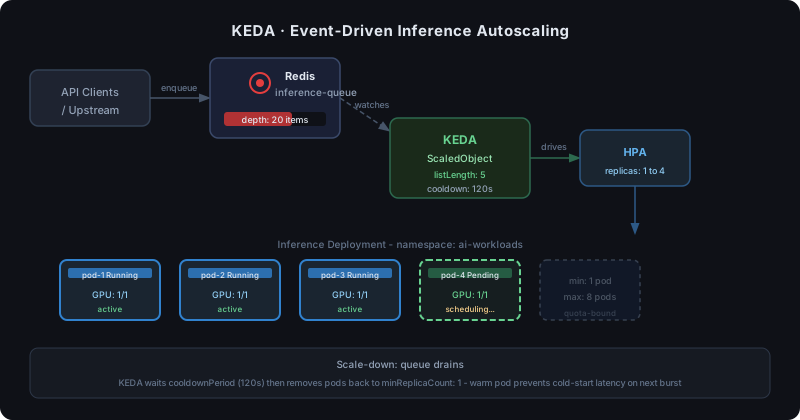 KEDA watches the Redis queue and drives the HPA. Pods scale out as requests accumulate.
Step 5: Add GPU Utilization Monitoring
Without metrics, you can't tell if GPUs are sitting idle or being fully utilized. Deploy the NVIDIA DCGM Exporter to surface GPU metrics to Prometheus.
helm repo add gpu-helm-charts https://nvidia.github.io/dcgm-exporter/helm-charts
helm install dcgm-exporter gpu-helm-charts/dcgm-exporter \
  --namespace monitoring \
  --set serviceMonitor.enabled=true
Then add a Prometheus alert to catch idle GPUs:
# gpu-idle-alert.yaml
groups:
  - name: gpu-utilization
    rules:
      - alert: GPUIdleForTooLong
        expr: DCGM_FI_DEV_GPU_UTIL < 10
        for: 15m
        labels:
          severity: warning
        annotations:
          summary: "GPU {{ $labels.gpu }} on {{ $labels.instance }} is under 10% utilization for 15 minutes"
Why this matters: An idle GPU node costs the same as a busy one. This alert surfaces opportunities to scale down or reschedule workloads.
Verification
Run this full health check after applying all changes:
# Check GPU allocation across nodes
kubectl get nodes -o=custom-columns=\
  NAME:.metadata.name,\
  ALLOC_GPU:.status.allocatable.'nvidia\.com/gpu',\
  CAP_GPU:.status.capacity.'nvidia\.com/gpu'

# Confirm no CPU pods landed on GPU nodes
kubectl get pods --all-namespaces -o wide | grep <your-gpu-node-name>

# Check KEDA scaler status
kubectl describe scaledobject inference-scaler -n ai-workloads
You should see: GPU nodes with correct allocatable counts, only AI pods on GPU nodes, and the ScaledObject reporting IsActive: true when the queue has items.
What You Learned
- GPU resource requests and limits must always be equal in Kubernetes — no bursting
- Taints and tolerations are the cleanest way to isolate expensive GPU nodes from general workloads
- KEDA enables event-driven autoscaling tied to real queue depth, not CPU/memory proxies
- DCGM Exporter gives you GPU utilization visibility that Kubernetes doesn't provide out of the box
Limitation: This guide targets NVIDIA GPUs. AMD ROCm and Intel Gaudi require different device plugins and the KEDA patterns still apply, but driver setup differs significantly.
When NOT to use this: If you're running occasional batch training jobs rather than persistent inference, consider Kubernetes Jobs with completions and parallelism instead of Deployments — autoscaling a Job is handled differently.
Tested on Kubernetes 1.30, KEDA 2.14, NVIDIA Device Plugin 0.16.0, GKE and self-managed clusters.