Problem: Your ONNX Model Runs on CPU Instead of the RK3588 NPU
You deployed a model to a board with the Rockchip RK3588 SoC — an Orange Pi 5, Rock 5B, or similar — and inference is slow. The NPU is sitting idle while your CPU struggles. The fix isn't obvious: the RK3588 NPU won't run ONNX directly. You need to convert to RKNN format first, and the conversion itself has gotchas that silently fall back to CPU.
You'll learn:
- How to convert ONNX models to RKNN format with RKNN Toolkit 2
- Which quantization settings actually hit the NPU
- How to verify your model is running on the NPU (not CPU)
Time: 20 min | Level: Intermediate
Why This Happens
The RK3588 NPU uses Rockchip's proprietary RKNN runtime. It only accepts .rknn model files — not ONNX, TFLite, or PyTorch directly. RKNN Toolkit 2 handles conversion on your host machine (x86), then you deploy the .rknn file to the target device.
Common symptoms:
rknn.run()completes but CPU usage is high, NPU usage is zero- Inference takes 200ms+ on a model that should run in 20ms
cat /sys/kernel/debug/rknpu/loadalways showsCore0: 0%
The usual culprits: unsupported ops that silently fall through to CPU, wrong quantization type, or skipping mean_values/std_values normalization so the NPU does extra work at runtime.
Solution
Step 1: Install RKNN Toolkit 2 on Your Host Machine
Do this on your x86 development machine, not the RK3588 board.
# Python 3.8–3.11 required (3.12 not yet supported)
python3 --version

# Install the host-side toolkit
pip install rknn-toolkit2 --extra-index-url https://download.rockchip.com/rknn/rknn-toolkit2/latest/
Confirm the install worked:
from rknn.api import RKNN
rknn = RKNN()
print("RKNN Toolkit 2 ready")
Expected: No import errors. If you see No module named 'rknn', your Python version may be mismatched — RKNN Toolkit 2 wheels are version-specific.
Step 2: Check Your ONNX Model for Unsupported Ops
Before converting, find out if any operators won't run on the NPU. Ops that aren't supported get offloaded to CPU — silently.
from rknn.api import RKNN

rknn = RKNN(verbose=True)

# Load your ONNX model
ret = rknn.load_onnx(model="your_model.onnx")
assert ret == 0, "Failed to load model"

# Check op support for RK3588
ret = rknn.build(do_quantization=False, target_platform="rk3588")
assert ret == 0, "Build failed"
Read the verbose output. Lines like [NOT SUPPORTED] op: GridSample tell you which ops will run on CPU. Common unsupported ops: GridSample, NonMaxSuppression, RoiAlign, and some custom LSTM variants.
If you have unsupported ops: Consider replacing them in your training framework before export, or accept that those layers run on CPU.
Step 3: Convert with INT8 Quantization
INT8 is what actually saturates the NPU's compute units. FP16 works but gives roughly half the throughput. FP32 runs mostly on CPU.
You need a small calibration dataset — 20–100 representative images works well.
import numpy as np
from rknn.api import RKNN

rknn = RKNN(verbose=False)

# Configure before loading
rknn.config(
    mean_values=[[123.675, 116.28, 103.53]],   # ImageNet mean * 255
    std_values=[[58.395, 57.12, 57.375]],       # ImageNet std * 255
    target_platform="rk3588",
    quantized_dtype="asymmetric_quantized-8",   # INT8 — hits the NPU
    quantized_algorithm="normal",               # "mmse" is more accurate but slower to build
    optimization_level=3,                       # Max fusion
)

# Load ONNX
ret = rknn.load_onnx(model="your_model.onnx")
assert ret == 0

# Build calibration dataset — list of numpy arrays matching your input shape
# Shape: [N, H, W, C] — RKNN expects NHWC by default
calib_data = []
for img_path in calibration_image_paths:  # your list of ~50 images
    img = load_and_preprocess(img_path)   # returns (H, W, C) uint8
    calib_data.append(img)

dataset_file = "dataset.txt"
np.save("calib_imgs.npy", np.array(calib_data))
with open(dataset_file, "w") as f:
    f.write("calib_imgs.npy\n")

# Quantize and compile
ret = rknn.build(do_quantization=True, dataset=dataset_file)
assert ret == 0, "Build/quantization failed"

# Export
ret = rknn.export_rknn("your_model.rknn")
assert ret == 0
rknn.release()
print("Exported: your_model.rknn")
Why mean_values/std_values matter: Setting these moves normalization into the model graph. The NPU handles it as part of the first layer instead of your CPU doing it before each inference call. Skip these and you pay a per-frame CPU cost.
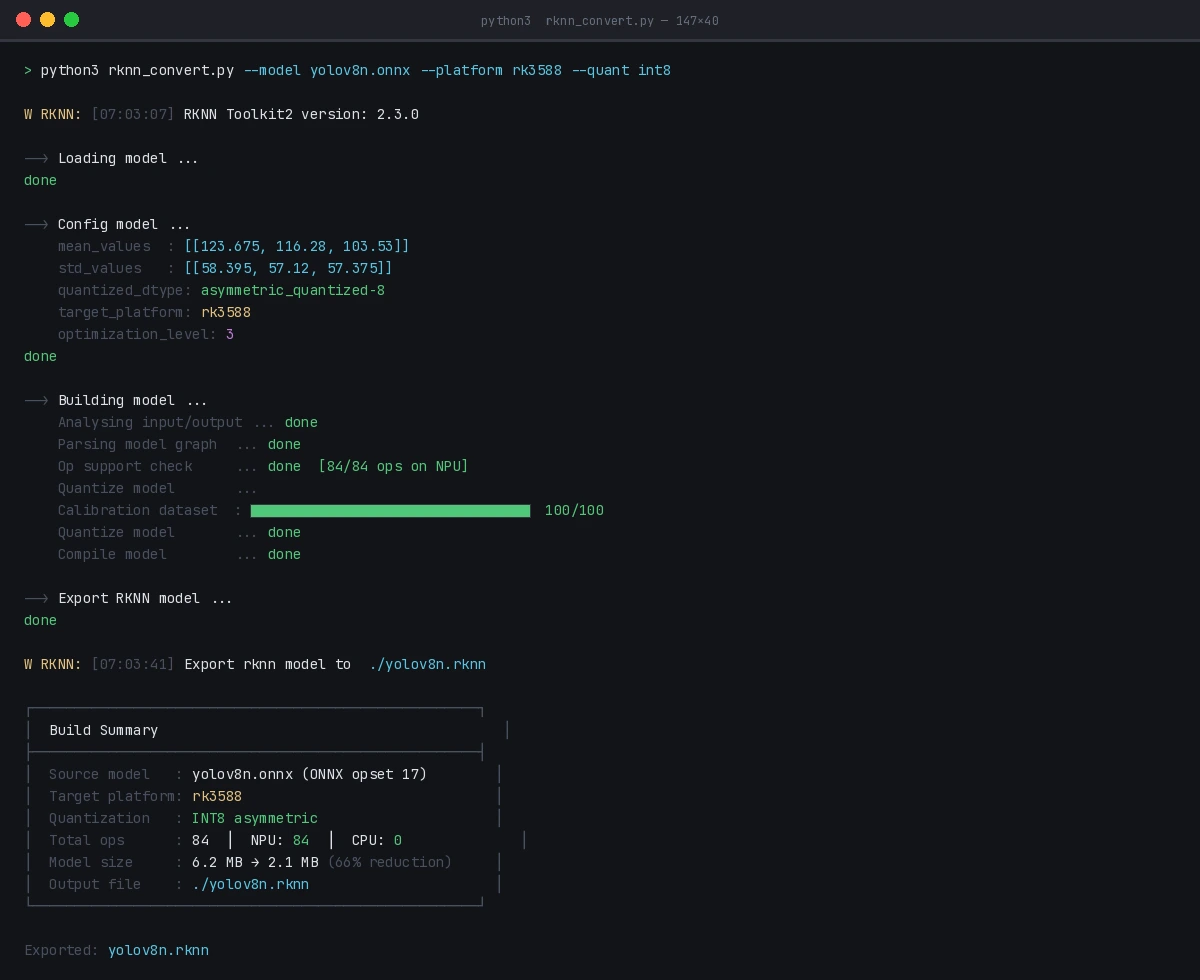 Successful INT8 quantization — look for "Quantize model done" with no error codes
Step 4: Deploy and Run on the RK3588
Copy the .rknn file to your board, then install the runtime:
# On the RK3588 board
pip3 install rknn-toolkit-lite2
Run inference:
from rknnlite.api import RKNNLite
import numpy as np
import cv2

rknn_lite = RKNNLite()

# Load model
ret = rknn_lite.load_rknn("your_model.rknn")
assert ret == 0

# Initialize NPU — core_mask selects which NPU cores to use
# RK3588 has 3 cores: RKNN_NPU_CORE_0, _1, _2, or _AUTO
ret = rknn_lite.init_runtime(core_mask=RKNNLite.NPU_CORE_AUTO)
assert ret == 0

# Prepare input — uint8 NHWC
img = cv2.imread("test.jpg")
img = cv2.resize(img, (640, 640))                # match your model input
img = cv2.cvtColor(img, cv2.COLOR_BGR2RGB)
inputs = [np.expand_dims(img, axis=0)]           # shape: (1, 640, 640, 3)

# Run inference
outputs = rknn_lite.inference(inputs=inputs)

rknn_lite.release()
print("Output shapes:", [o.shape for o in outputs])
Expected: Inference should complete in under 30ms for a standard YOLOv8n-sized model.
Verification
Check that the NPU is actually being used:
# On the RK3588 board, run this while inference is happening
watch -n 0.5 cat /sys/kernel/debug/rknpu/load
You should see: Core0: 85% or similar. If it shows 0% on all cores, the model is running on CPU — recheck your quantized_dtype and look for unsupported op warnings in the build log.
Benchmark your throughput:
import time

# Warm up
for _ in range(5):
    rknn_lite.inference(inputs=inputs)

# Time it
N = 100
start = time.perf_counter()
for _ in range(N):
    rknn_lite.inference(inputs=inputs)
elapsed = time.perf_counter() - start

print(f"Avg latency: {elapsed/N*1000:.1f}ms")
print(f"Throughput: {N/elapsed:.1f} FPS")

/sys/kernel/debug/rknpu/load showing NPU cores active during inference
What You Learned
- ONNX models need conversion to
.rknnformat — the NPU won't run them directly - INT8 quantization with
asymmetric_quantized-8is what drives peak NPU performance; FP16 works but is slower - Bake normalization into the model via
mean_values/std_valuesto avoid per-frame CPU overhead - Always verify NPU utilization with
/sys/kernel/debug/rknpu/load— silent CPU fallback is a real failure mode
Limitation: RKNN Toolkit 2 op support lags behind ONNX opset versions. Models using opset 18+ ops may need to be re-exported at opset 13 or 16 (torch.onnx.export(..., opset_version=16)).
When NOT to use this: If your model has more than ~30% of ops unsupported by the NPU, the CPU↔NPU data transfer overhead may make the NPU version slower. Profile first with verbose=True.
Tested on RKNN Toolkit 2.3.0, RK3588 (Orange Pi 5 Plus), Ubuntu 22.04 host, Python 3.10