Problem: Every API Call Re-Processes the Same Context
OpenAI prompt caching lets the API reuse a previously computed KV cache for any prompt prefix that exceeds 1,024 tokens — instead of re-processing the full input on every request.
Without it, a 10,000-token system prompt gets fully tokenized and processed on every single call. At scale, that's wasted compute, ballooning latency, and unnecessary cost.
You'll learn:
- Exactly how OpenAI's automatic prompt caching works under the hood
- How to structure prompts to maximize cache hit rate
- How to verify cache hits in API responses and track savings
- When caching helps — and when it doesn't
Time: 15 min | Difficulty: Intermediate
How OpenAI Prompt Caching Works
OpenAI enables prompt caching automatically on all supported models — no configuration required. When you send a request, the API checks whether the leading prefix of your prompt matches a cached KV (key-value) state from a recent prior request.
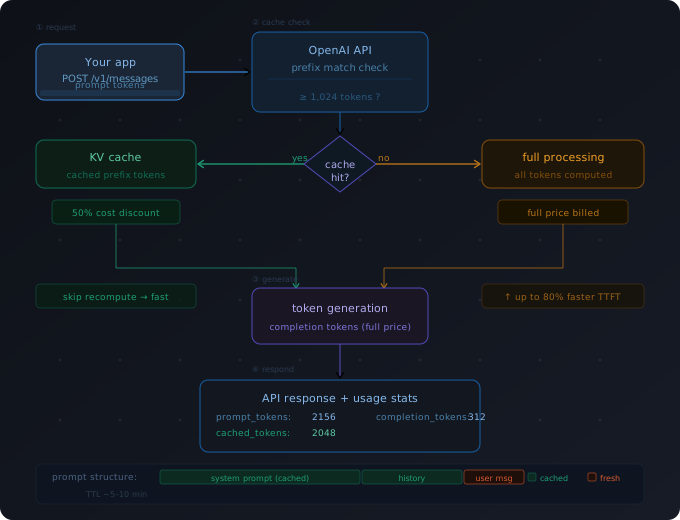 How a cache hit works: the API skips re-processing cached prefix tokens and jumps straight to generating new completion tokens.
Cache hit conditions — all must be true:
- The prompt prefix is identical to a prior request (byte-for-byte)
- The cached prefix is at least 1,024 tokens long
- The cache entry is still warm (within ~5–10 minutes of last use, though OpenAI does not publish a fixed TTL)
- You are using a supported model (see below)
When a cache hit occurs, the cached tokens are billed at a 50% discount and processed with significantly reduced latency — OpenAI reports up to 80% faster time-to-first-token on long cached prefixes.
Supported Models (as of 2026)
| Model | Prompt Caching | Min Prefix |
|---|---|---|
| gpt-4o | ✅ | 1,024 tokens |
| gpt-4o-mini | ✅ | 1,024 tokens |
| o1 | ✅ | 1,024 tokens |
| o3-mini | ✅ | 1,024 tokens |
| gpt-4-turbo | ❌ | — |
| gpt-3.5-turbo | ❌ | — |
Cache granularity is in 128-token increments above the 1,024-token floor. A 1,500-token prefix will cache 1,024 tokens; a 1,200-token prefix will also cache 1,024. The next increment kicks in at 1,152.
Step-by-Step: Structuring Prompts for Maximum Cache Hits
The core rule: stable content goes first, dynamic content goes last.
The API can only match prefixes — it cannot skip around in the middle of a prompt. If you place the user's unique query before your 5,000-token system prompt, you get zero cache benefit.
Step 1: Order Your Prompt Layers
Structure every request in this order:
[1] System prompt (static, rarely changes)
[2] Reference documents / RAG context (semi-static per session)
[3] Conversation history (grows, but oldest turns are stable)
[4] Current user message (always dynamic)
# WHY this order: OpenAI matches the longest stable prefix
# Putting system prompt first maximizes the cached token count

import openai

client = openai.OpenAI()

SYSTEM_PROMPT = """
You are a senior Python engineer at a fintech company.
[... 2000 tokens of style guide, coding standards, tool preferences ...]
"""

def chat(user_message: str, history: list[dict]) -> str:
    messages = [
        {"role": "system", "content": SYSTEM_PROMPT},  # ← cached after first call
        *history,                                        # ← older turns also cached
        {"role": "user", "content": user_message},      # ← always fresh
    ]

    response = client.chat.completions.create(
        model="gpt-4o",
        messages=messages,
    )

    # Inspect cache hit
    usage = response.usage
    cached = usage.prompt_tokens_details.cached_tokens
    total_prompt = usage.prompt_tokens
    print(f"Cached: {cached}/{total_prompt} prompt tokens ({cached/total_prompt*100:.0f}%)")

    return response.choices[0].message.content
Expected output on second call:
Cached: 2048/2156 prompt tokens (95%)
Step 2: Check Cache Hit Data in the Response
OpenAI returns cache statistics inside usage.prompt_tokens_details:
usage = response.usage

print(usage.prompt_tokens)                        # total input tokens billed
print(usage.prompt_tokens_details.cached_tokens)  # tokens served from cache (50% discount)
print(usage.completion_tokens)                    # output tokens (always full price)
A cached_tokens value of 0 on the first request is expected — there is no cache entry yet. On subsequent requests with the same prefix, you will see the count rise.
# WHY check this: cached_tokens = 0 on first call is not a bug
# The cache is populated by the first call and hit by the second

assert usage.prompt_tokens_details.cached_tokens == 0  # first call: cold
# second call with same prefix → cached_tokens > 0
Step 3: Node.js Implementation
// WHY typed response: prompt_tokens_details is nested and easy to miss
import OpenAI from "openai";

const client = new OpenAI();

const SYSTEM = `You are a technical documentation assistant...
[... 1500+ tokens of content ...]`;

async function complete(userMessage: string): Promise<string> {
  const response = await client.chat.completions.create({
    model: "gpt-4o",
    messages: [
      { role: "system", content: SYSTEM },
      { role: "user", content: userMessage },
    ],
  });

  const cached = response.usage?.prompt_tokens_details?.cached_tokens ?? 0;
  const total = response.usage?.prompt_tokens ?? 0;

  console.log(`Cache hit: ${cached}/${total} tokens`);
  return response.choices[0].message.content ?? "";
}
When Prompt Caching Helps (and When It Doesn't)
High-impact use cases
RAG and document Q&A — you load the same 8,000-token document for every user question in a session. The document gets cached after the first query; every follow-up is fast and cheap.
Multi-turn chat with a long system prompt — a coding assistant with a detailed system prompt hits the cache on every turn after the first.
Batch processing with shared context — you process 500 user emails all evaluated against the same 2,000-token policy document. The policy is cached after the first item.
Few-shot prompts — a 20-example few-shot block stays constant; only the test input changes.
Low-impact or zero-impact use cases
| Scenario | Why caching doesn't help |
|---|---|
| Short system prompts (< 1,024 tokens) | Below the minimum threshold |
| Every request has a unique prefix | No stable prefix to match |
| Low-volume or infrequent calls | Cache expires before next request |
| Streaming with long prefixes on cold start | First request is always uncached |
Cost example (USD)
GPT-4o pricing as of early 2026: $2.50 / 1M input tokens, $1.25 / 1M cached input tokens.
A RAG pipeline sending 10,000 input tokens per query at 1,000 queries/day:
| Without caching | With caching (90% hit) | |
|---|---|---|
| Daily token cost | $25.00 | ~$3.75 |
| Monthly | $750/mo | ~$112/mo |
Numbers are illustrative. Actual savings depend on cache hit rate and prefix length. Verify current pricing at platform.openai.com/pricing.
Verification
Run two identical requests back-to-back and compare cached_tokens:
import openai
import time

client = openai.OpenAI()

LONG_SYSTEM = "You are a helpful assistant. " + ("Context. " * 300)  # ~1,200 tokens

def probe(label: str):
    r = client.chat.completions.create(
        model="gpt-4o",
        messages=[
            {"role": "system", "content": LONG_SYSTEM},
            {"role": "user", "content": "Hello"},
        ],
        max_tokens=5,
    )
    cached = r.usage.prompt_tokens_details.cached_tokens
    print(f"{label}: cached_tokens={cached}")

probe("Call 1 (cold)")
time.sleep(1)
probe("Call 2 (warm)")
You should see:
Call 1 (cold): cached_tokens=0
Call 2 (warm): cached_tokens=1152
If both show 0, the prefix is under 1,024 tokens — pad your system prompt or use a real document.
What You Learned
- OpenAI prompt caching is automatic — no API flag, no configuration. Just structure your prompts correctly.
- The cache matches leading prefixes only — stable content must always come before dynamic content.
usage.prompt_tokens_details.cached_tokensis the only reliable way to confirm a cache hit.- Caching is most valuable for RAG, long system prompts, and batch jobs — not for short or highly variable prompts.
- Cache entries are ephemeral — they expire after a few minutes of inactivity. For scheduled batch jobs, keep requests close together.
Tested on gpt-4o (2025-01-01), openai-python 1.x, Node.js 22, macOS & Ubuntu 24.04
FAQ
Q: Do I need to enable prompt caching in the API request? A: No. Caching is automatic on all supported models. There is no parameter to set — OpenAI handles it server-side.
Q: Is cached content stored permanently on OpenAI's servers? A: No. Cache entries are ephemeral and tied to your organization. OpenAI states they are not used for training and expire after a short TTL (approximately 5–10 minutes of inactivity, though this is not guaranteed).
Q: What is the minimum system prompt length to get a cache hit?
A: 1,024 tokens is the hard floor. Use tiktoken to count: len(tiktoken.encoding_for_model("gpt-4o").encode(your_prompt)).
Q: Does prompt caching work with streaming responses? A: Yes. Streaming affects only how completion tokens are returned — cache hit behavior on input tokens is identical.
Q: How does OpenAI prompt caching compare to Anthropic's?
A: Both offer roughly 50% cost reduction on cached tokens. Anthropic requires explicit cache_control markers; OpenAI is fully automatic. Anthropic's cache TTL is longer (5 minutes base, extendable to 1 hour). OpenAI's is shorter but requires zero implementation effort.