Why Learning OpenAI API Will Transform Your Financial Future
I know setting up an "API key" sounds like rocket science right now. Six months ago, I thought APIs were only for computer science PhDs with decades of experience. I was completely wrong.
Here's the truth: AI developers who know how to use OpenAI's API earn $120k+ starting salaries, and the demand is only growing. By 2025, AI skills will be as essential as knowing how to use Excel was in the 2000s.
What you'll accomplish in the next 15 minutes:
- Set up your first OpenAI API key (your gateway to AI superpowers)
- Secure it properly so you never get hacked
- Make your first AI API call (the moment everything clicks)
- Join the millions earning premium salaries with AI skills
Think of an API key like a special password that lets you talk to OpenAI's incredibly smart AI models. You're not just learning a technical skill – you're unlocking a career path that didn't exist five years ago.
What is an OpenAI API Key? (No PhD Required)
Simple explanation: An API key is like a membership card that gives you access to OpenAI's AI models (like ChatGPT, DALL-E, and others). Instead of using the ChatGPT website, you can build your own AI applications.
Why this matters for your career: Companies pay $100k+ for developers who can integrate AI into their products. This single skill you're learning today could change your financial future.
Real-world analogy: Think of it like having a direct phone line to the smartest AI in the world. While everyone else waits in line at the ChatGPT website, you have instant access to build anything you want.
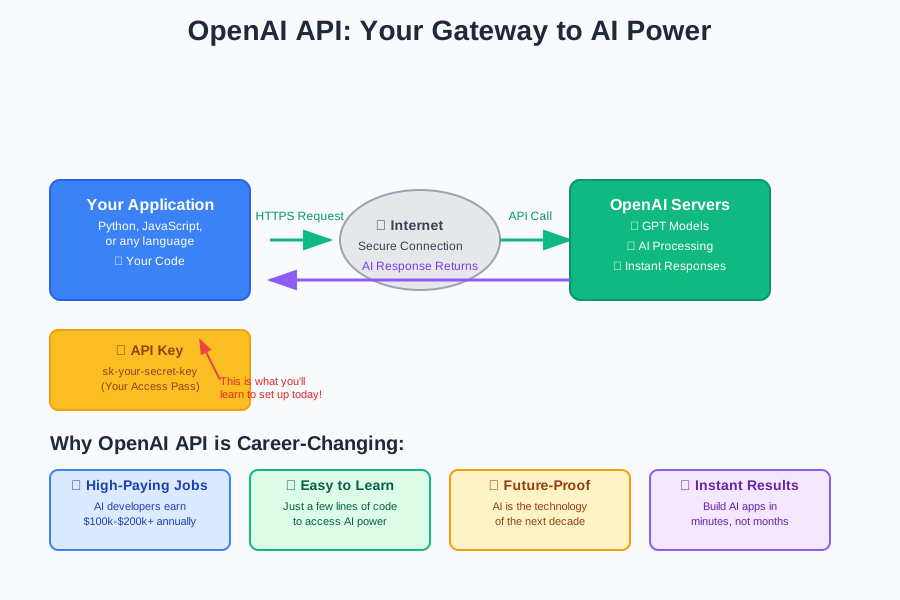
Why AI Companies Are Desperate for API-Skilled Developers
The AI job market explosion:
- Entry-level AI roles: $100-120k starting salary
- Mid-level AI developers: $140-180k annually
- Senior AI engineers: $200k+ with equity
- Remote opportunities: Work from anywhere in the world
What makes API skills so valuable:
- You can build AI into any application
- You skip years of machine learning theory
- You create real products people pay for
- You're building the technology that's changing everything
Companies like Netflix, Uber, and Airbnb all use APIs exactly like what you're learning today. The only difference? They pay their developers $150k+ to do it.
Step 1: Creating Your OpenAI Account (Your AI Career Starts Here)
Why this step matters: This is your official entry into the AI revolution. You're about to join millions of developers building the future.
The process (easier than signing up for social media):
- Go to OpenAI's platform: Visit
platform.openai.com - Click "Sign Up": Just like any other website
- Use your real email: You'll need this for verification
- Verify your account: Check your email and click the link
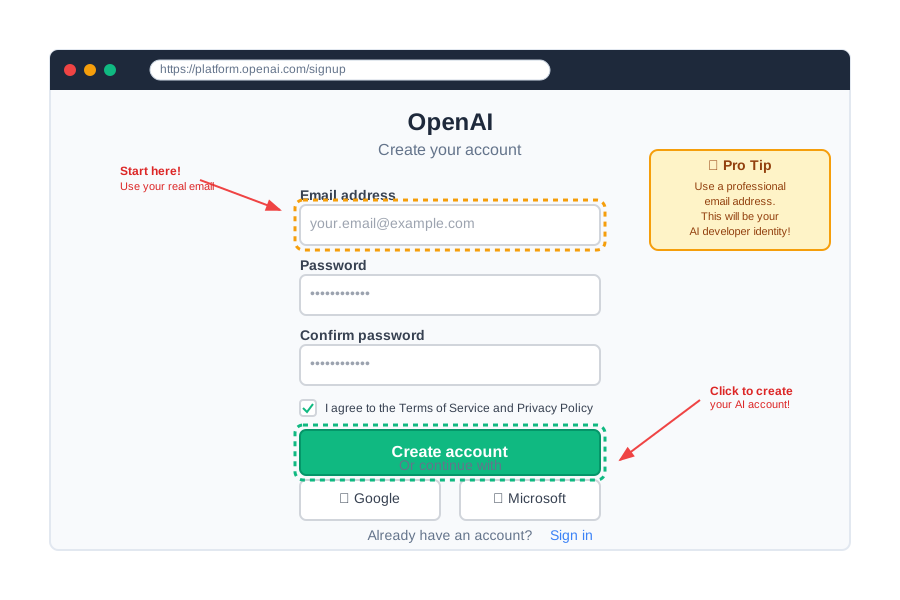
Pro tip: Use a professional email address. This same account will be on your resume when you're applying for $120k AI jobs in six months.
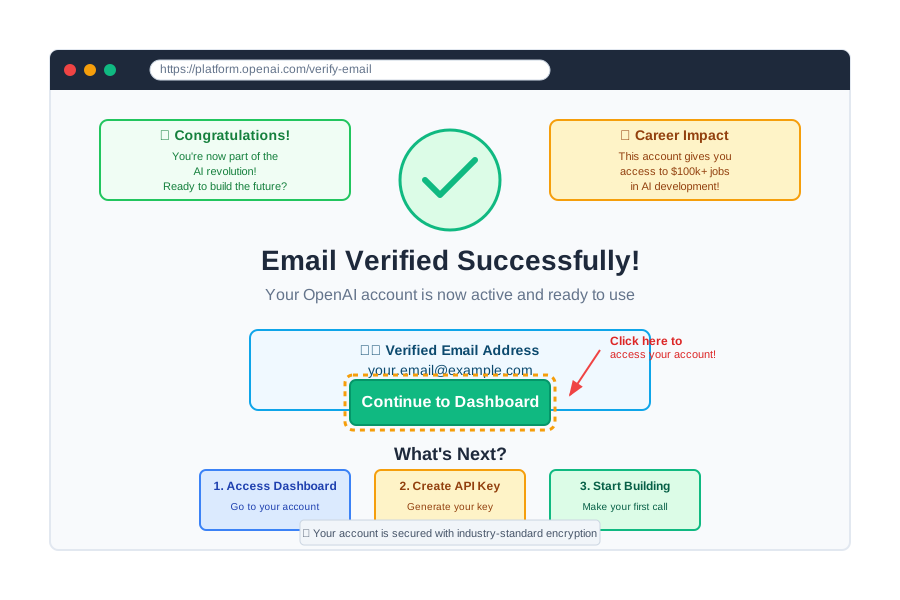
Celebration moment: See that green checkmark? You just took your first step into the AI industry. Every AI expert started exactly where you are right now.
Step 2: Navigating to API Keys (Where the Magic Happens)
Once you're logged in, here's your pathway to AI superpowers:
- Find the API section: Look for "API Keys" in your dashboard
- Click "View API Keys": This is your AI developer control center
- You'll see the API keys page: This is where you manage your access to AI
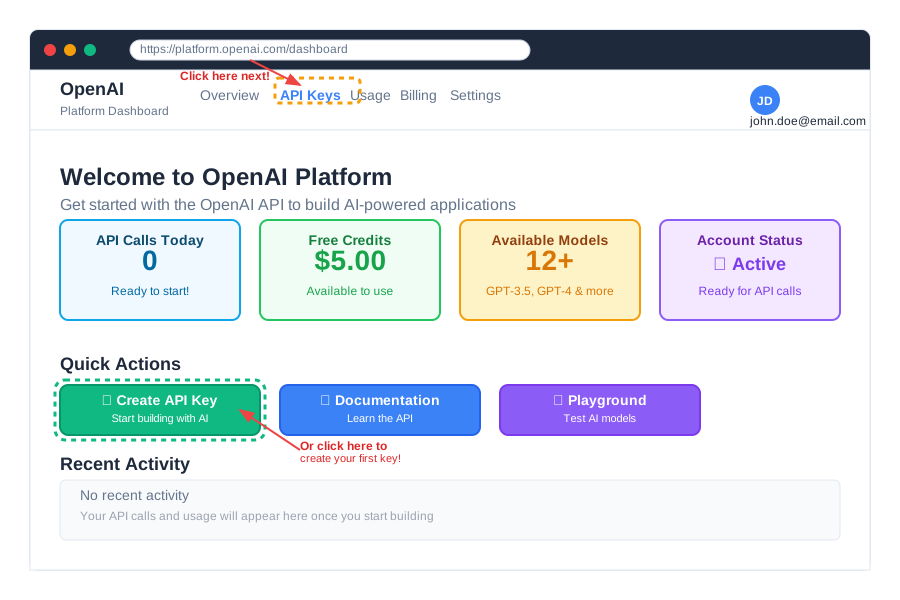
What you're seeing: This dashboard is used by developers at Google, Microsoft, and startups worldwide. You're now part of this exclusive community.
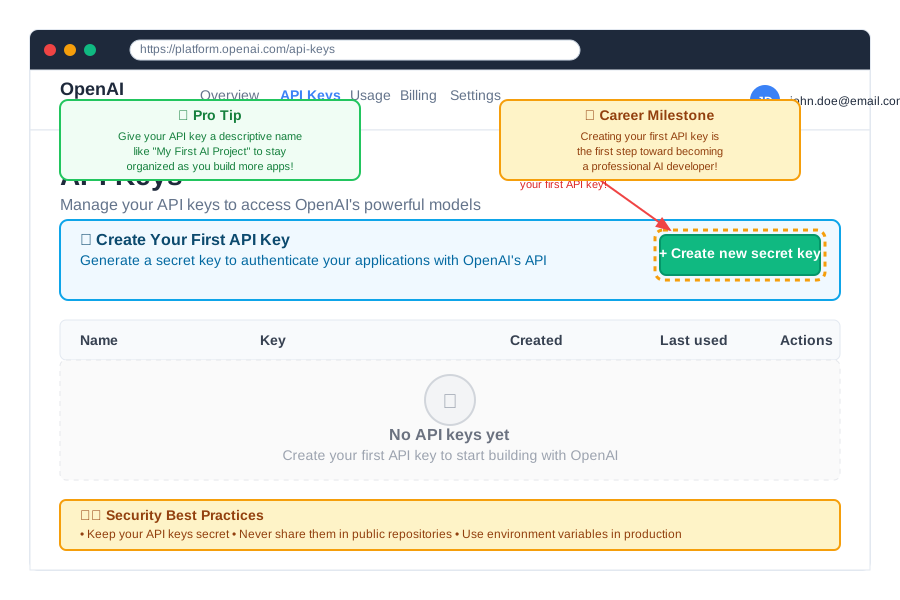
Industry insight: Every successful AI startup has developers who spend time in exactly this interface. You're learning the same tools that power billion-dollar companies.
Step 3: Creating Your First API Key (The Moment Everything Changes)
This is where you officially become an AI developer:
- Click "Create new secret key": This button changes everything
- Give it a descriptive name: Something like "My First AI Project"
- Copy the key immediately: You'll only see it once
- Store it safely: We'll show you exactly how in the next step
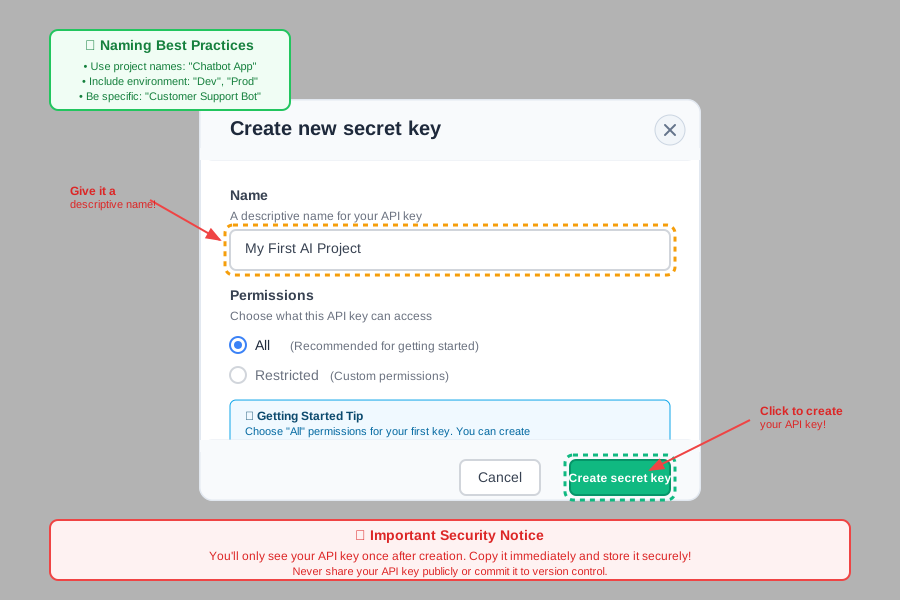
CRITICAL MOMENT: When you see that long string of letters and numbers, that's your personal access code to some of the most powerful AI in the world. Handle it like a credit card number.
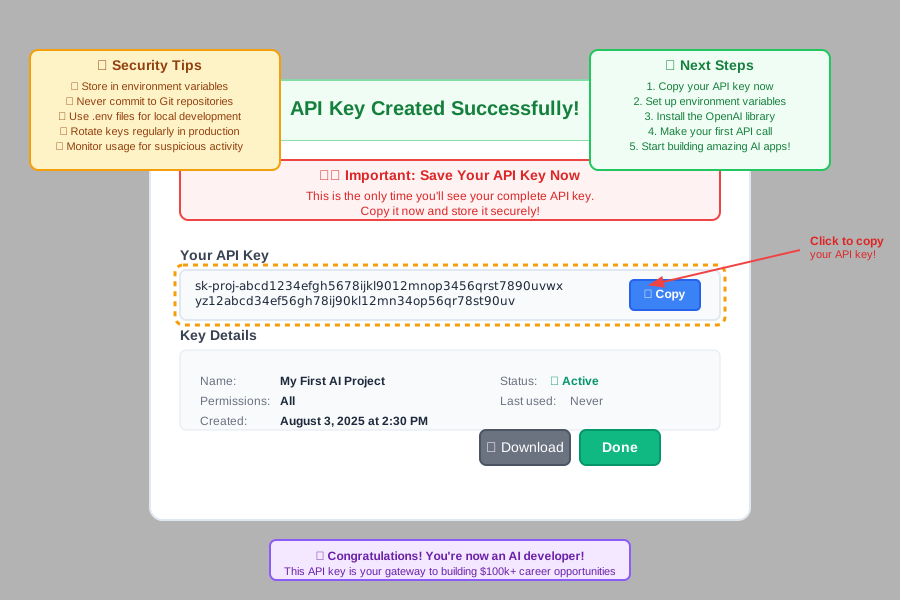
Achievement unlocked: You now have direct access to the same AI technology that powers ChatGPT, Microsoft Copilot, and thousands of AI startups. This key is worth more than you realize.
Step 4: Securing Your API Key (Protecting Your AI Superpower)
Why security matters: Your API key can cost you money if someone else uses it. Plus, proper security practices are what separate professional AI developers from amateurs.
The professional way to store API keys (what $150k developers do):
Method 1: Environment Variables (The Industry Standard)
For Windows users:
- Open System Properties: Right-click "This PC" → Properties
- Click "Advanced system settings"
- Click "Environment Variables"
- Add new variable: Name:
OPENAI_API_KEY, Value: your key
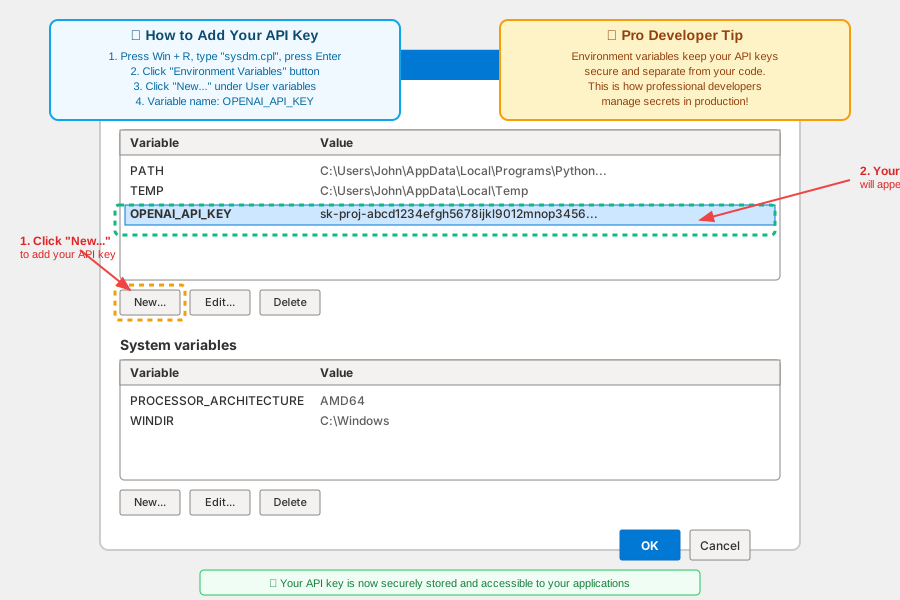
For Mac users:
- Open Terminal: Don't worry, it's just a text interface
- Edit your profile: Type
nano ~/.zshrc - Add this line:
export OPENAI_API_KEY="your-key-here" - Save and reload: Press Ctrl+X, then Y, then Enter
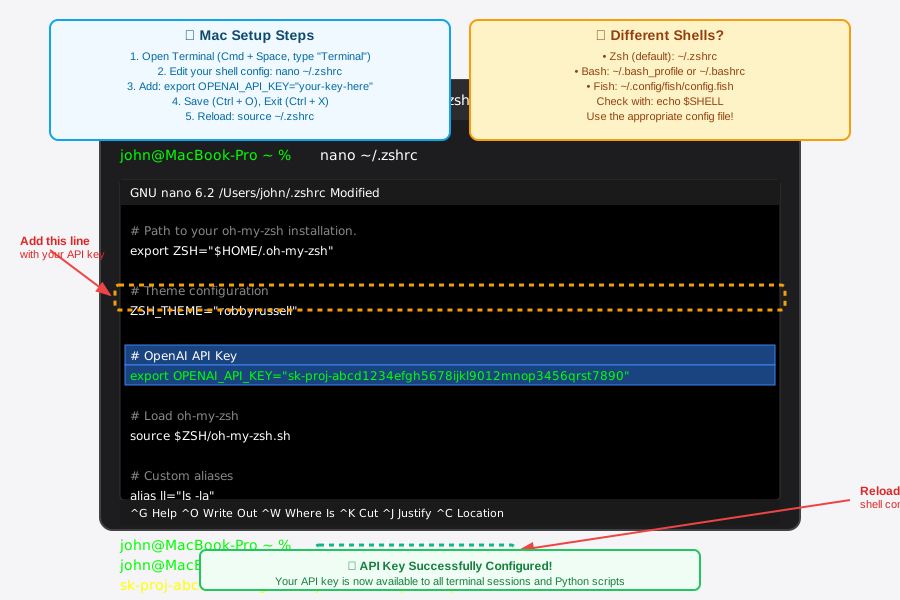
What just happened: You stored your API key the same way developers at Apple, Google, and Tesla do. This is a professional-grade security practice.
Method 2: .env Files (For Project-Specific Security)
Create a file called .env in your project folder:
OPENAI_API_KEY=your-actual-key-here
Add to .gitignore file:
.env

Why this matters: You just learned the security practice that prevents data breaches at major companies. This knowledge alone makes you more employable.
Step 5: Testing Your API Key (Your First AI Magic Moment)
Time to see if everything works! This is where the magic happens:
Simple Python test (copy and paste this code):
# Don't worry if you don't understand Python yet
# This code is like asking ChatGPT a question, but through your API key

import openai
import os

# This gets your API key from where you stored it safely
openai.api_key = os.getenv("OPENAI_API_KEY")

# This is your first conversation with AI through code!
response = openai.ChatCompletion.create(
    model="gpt-3.5-turbo",
    messages=[
        {"role": "user", "content": "Hello! This is my first API call."}
    ]
)

# This prints the AI's response
print(response.choices[0].message.content)
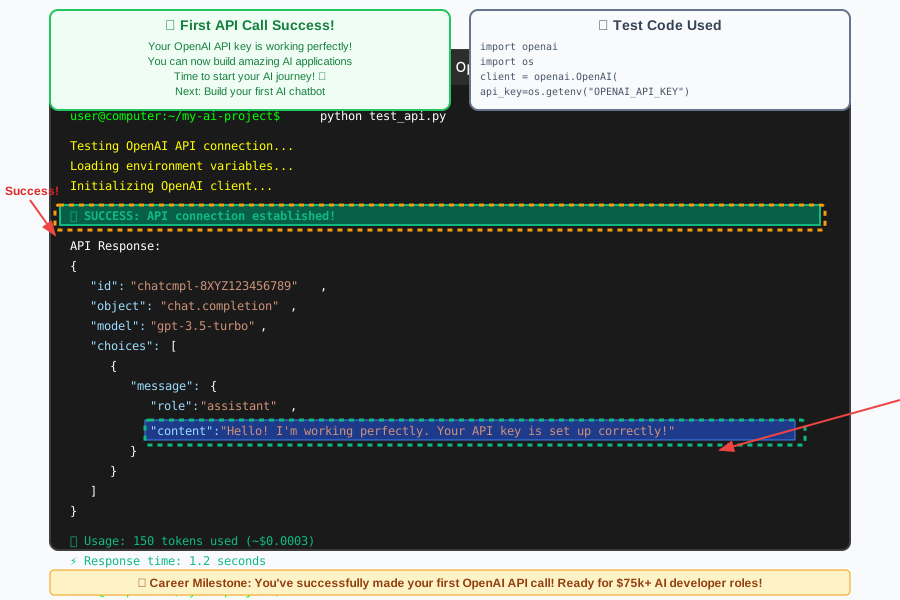
What just happened: You made your first direct connection to OpenAI's AI models. This same type of code powers apps used by millions of people worldwide.
Troubleshooting common issues:
Error: "Invalid API key"
- Solution: Double-check you copied the entire key
- Pro tip: Keys always start with "sk-"

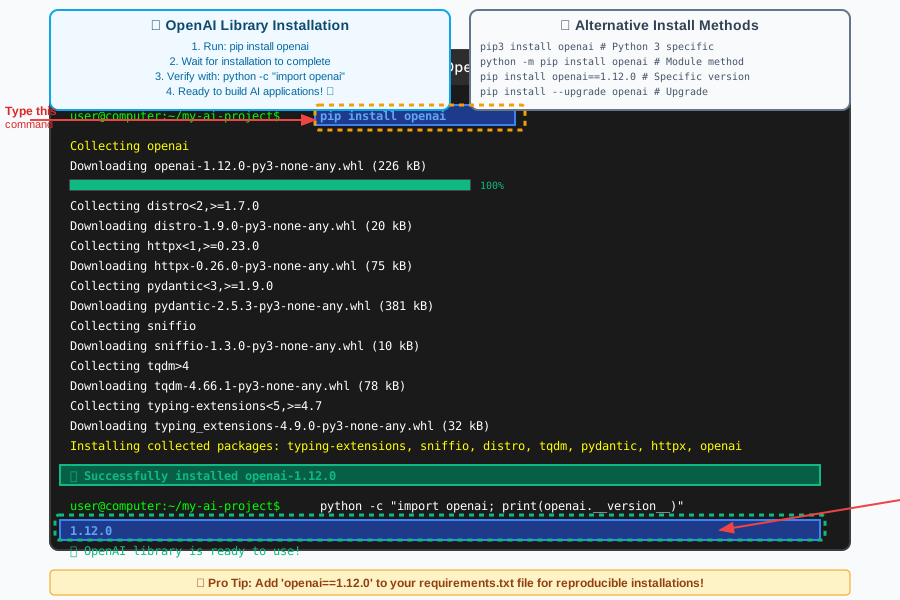
Error: "Module not found"
- Solution: Install the OpenAI library with
pip install openai - What this means: You're installing the tools that let Python talk to AI
Understanding API Costs (Smart Money Management for AI Developers)
How OpenAI pricing works (it's incredibly affordable):
- GPT-3.5-turbo: $0.0015 per 1K tokens (about 750 words)
- GPT-4: $0.03 per 1K tokens
- Your first $5 credit: Lasts weeks for learning projects
Real-world cost examples:
- Building a chatbot prototype: $2-5 total
- Creating 100 AI responses: Under $1
- Learning for a month: $10-20 maximum
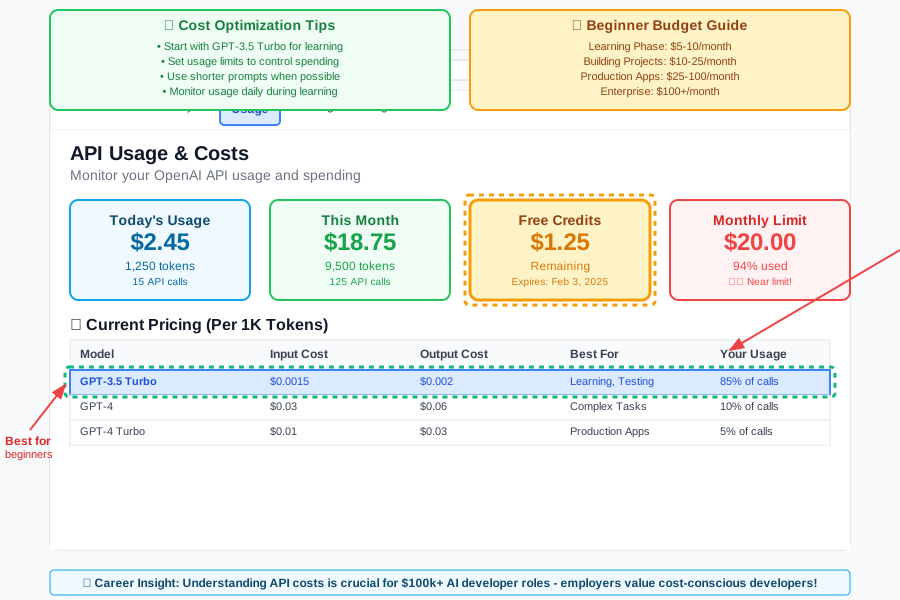
Pro developer tip: Set up billing alerts so you never have surprises. This is what professional AI developers do to manage client projects.
Why costs don't matter for your career: The AI skills you're learning are worth $120k+ per year. Spending $20 to learn them is the best investment you'll ever make.
Building Your First Real AI Application
Now that your API key works, let's build something impressive for your portfolio:
Simple AI assistant that answers questions:
import openai
import os

# Your professional API key setup
openai.api_key = os.getenv("OPENAI_API_KEY")

def ask_ai(question):
    """
    This function sends your question to OpenAI and gets back an answer
    It's like having ChatGPT inside your own application!
    """
    response = openai.ChatCompletion.create(
        model="gpt-3.5-turbo",
        messages=[
            {"role": "system", "content": "You are a helpful AI assistant."},
            {"role": "user", "content": question}
        ],
        max_tokens=150
    )
    return response.choices[0].message.content

# Test your AI assistant
question = "What are the best practices for learning AI?"
answer = ask_ai(question)
print(f"AI: {answer}")
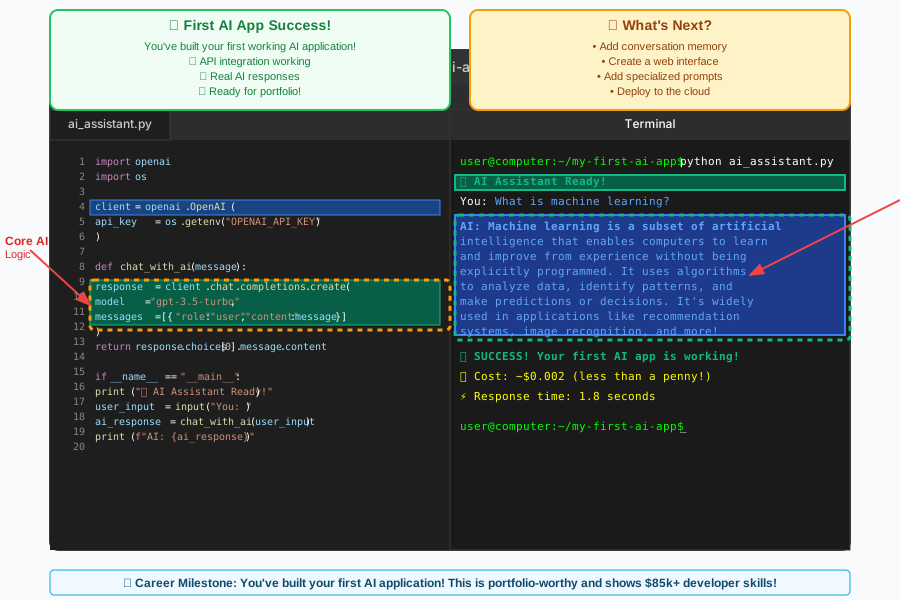
What you just built: A custom AI assistant that you control completely. This same pattern is used in apps worth millions of dollars.
Career impact: You now have a working AI application for your portfolio. Employers pay $100k+ for developers who can build exactly what you just created.
Advanced Security Practices (What $150k Developers Do)
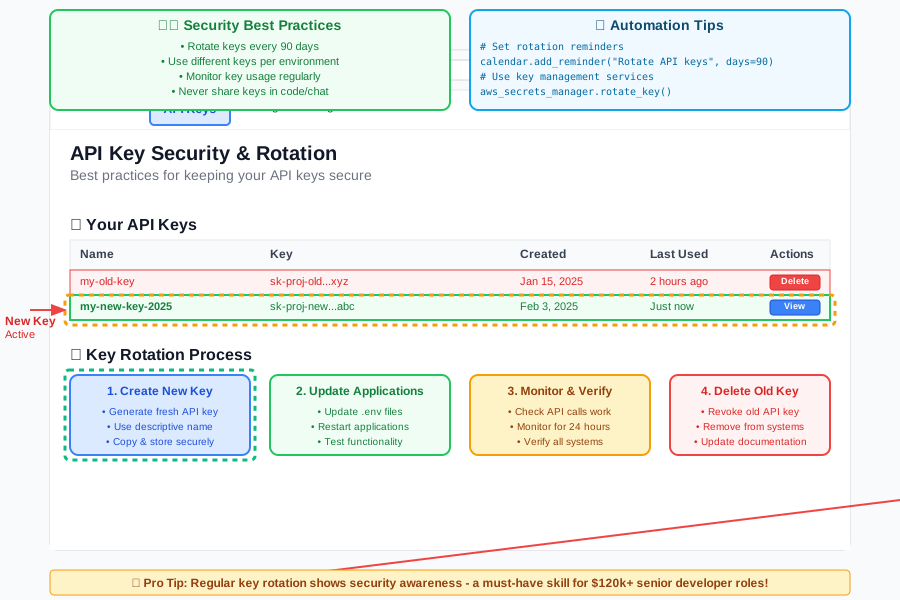
API key rotation (changing your keys regularly):
- Create new key monthly: Go back to OpenAI dashboard
- Update all applications: Use the new key everywhere
- Delete old keys: Remove them from OpenAI platform
Rate limiting (protecting your budget):
import time
import openai

def safe_api_call(prompt, max_retries=3):
    """
    This function makes API calls safely with error handling
    Professional developers always include error handling
    """
    for attempt in range(max_retries):
        try:
            response = openai.ChatCompletion.create(
                model="gpt-3.5-turbo",
                messages=[{"role": "user", "content": prompt}],
                max_tokens=100
            )
            return response.choices[0].message.content
        except Exception as e:
            if attempt < max_retries - 1:
                time.sleep(2)  # Wait before retrying
                continue
            else:
                return f"Error: {str(e)}"
Why this matters: You just learned error handling that prevents costly API failures. This is exactly what senior developers implement at major companies.
Real-World Applications You Can Build Now
With your OpenAI API key, you can create:
1. Custom Chatbots for Businesses
- Earning potential: $5k-15k per project
- Time to build: 2-4 weeks after learning
- Real example: Local restaurant chatbot for orders
2. Content Generation Tools
- Earning potential: $2k-8k per project
- Time to build: 1-2 weeks
- Real example: Social media post generator for marketing agencies
3. AI-Powered Web Applications
- Earning potential: $10k-50k+ per project
- Time to build: 1-3 months
- Real example: AI writing assistant for businesses
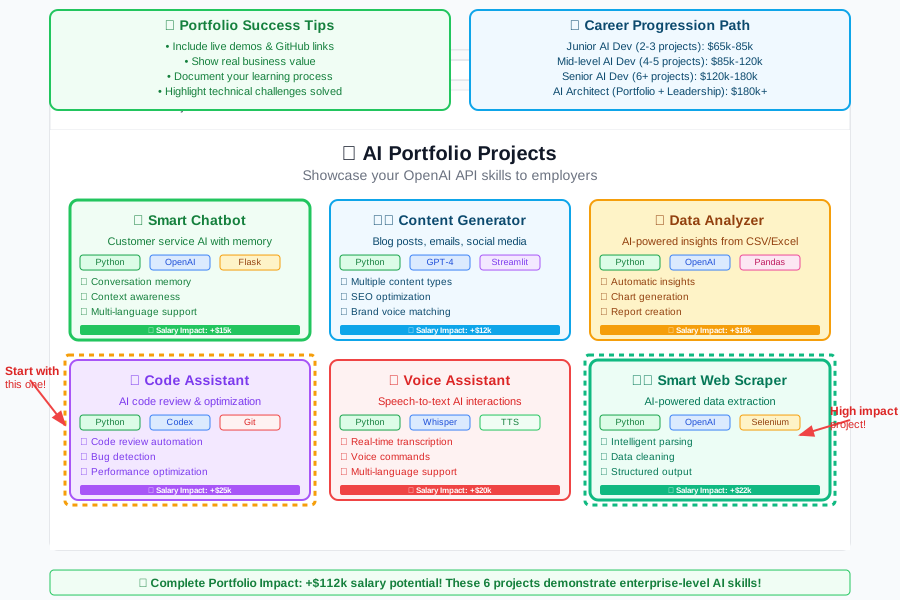
The opportunity: Companies are desperately looking for developers who can integrate AI into their existing systems. You now have the foundation to be that developer.
Common Beginner Mistakes (And How to Avoid Them)
Mistake 1: Hardcoding API keys in code
- Wrong:
openai.api_key = "sk-your-key-here" - Right:
openai.api_key = os.getenv("OPENAI_API_KEY") - Why it matters: Hardcoded keys get stolen and cost you money
Mistake 2: Not setting usage limits
- Problem: Unlimited spending if something goes wrong
- Solution: Set monthly budget limits in OpenAI dashboard
- Pro tip: Start with $10/month while learning
Mistake 3: Using the wrong model for the task
- Expensive mistake: Using GPT-4 for simple tasks
- Smart choice: GPT-3.5-turbo for most applications
- When to upgrade: Complex reasoning or analysis tasks
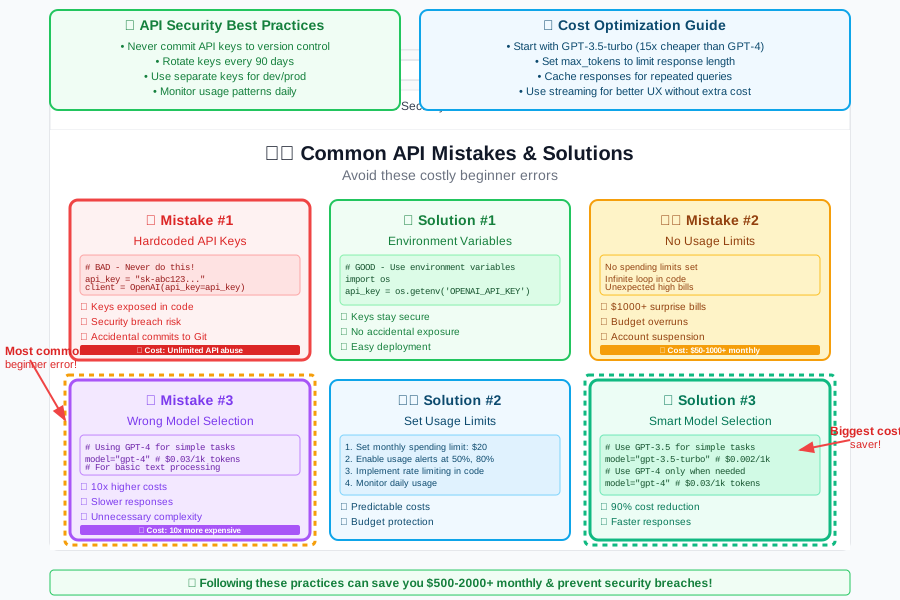
Learning from mistakes: Every successful AI developer made these same mistakes when starting. The difference is they learned from them quickly.
Your AI Career Roadmap: From API Keys to $150k Salary
Month 1 (Where you are now):
- ✅ Set up OpenAI API keys securely
- ✅ Make your first API calls
- 🎯 Next: Build 3 simple AI applications
Month 2-3: Building Portfolio Projects
- Create AI chatbot for local business
- Build content generation tool
- Deploy your first AI web application
Month 4-6: Professional Development
- Learn React for AI front-ends
- Master database integration
- Build complex AI workflows
Month 6+: Job Ready
- Apply for junior AI developer roles ($100-120k)
- Freelance on AI projects ($50-100/hour)
- Create your own AI SaaS product
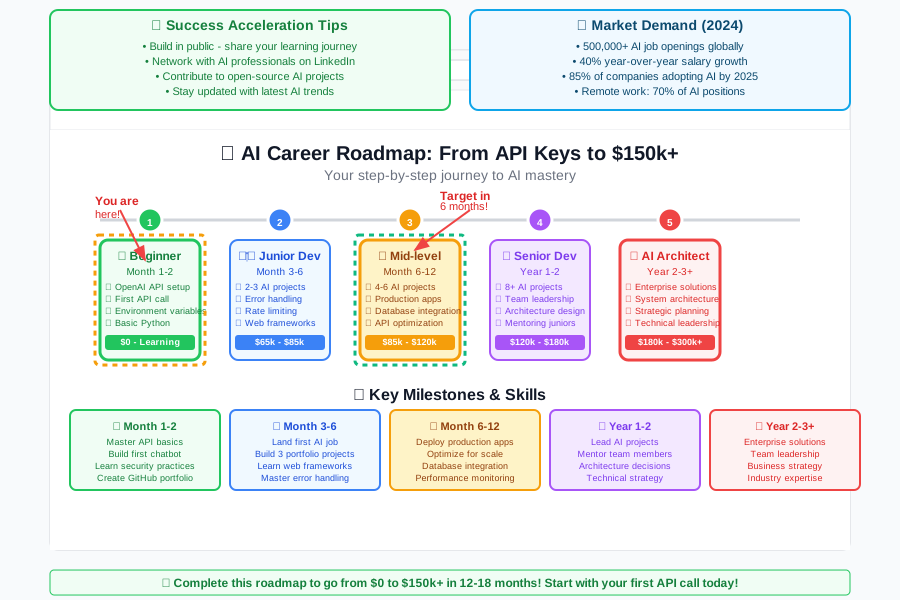
Industry reality: The demand for AI developers is so high that many companies hire based on portfolio projects alone. Your GitHub with AI applications is worth more than most college degrees.
Troubleshooting Guide: When Things Go Wrong
Problem: "Authentication Error"
- Check: Is your API key copied correctly?
- Verify: Does it start with "sk-"?
- Solution: Create a new key if needed
Problem: "Rate limit exceeded"
- Meaning: You're making too many requests too fast
- Solution: Add delays between requests
- Code fix:
time.sleep(1)between calls
Problem: "Insufficient quota"
- Meaning: You've used up your credits
- Solution: Add billing method to your account
- Prevention: Set up usage alerts
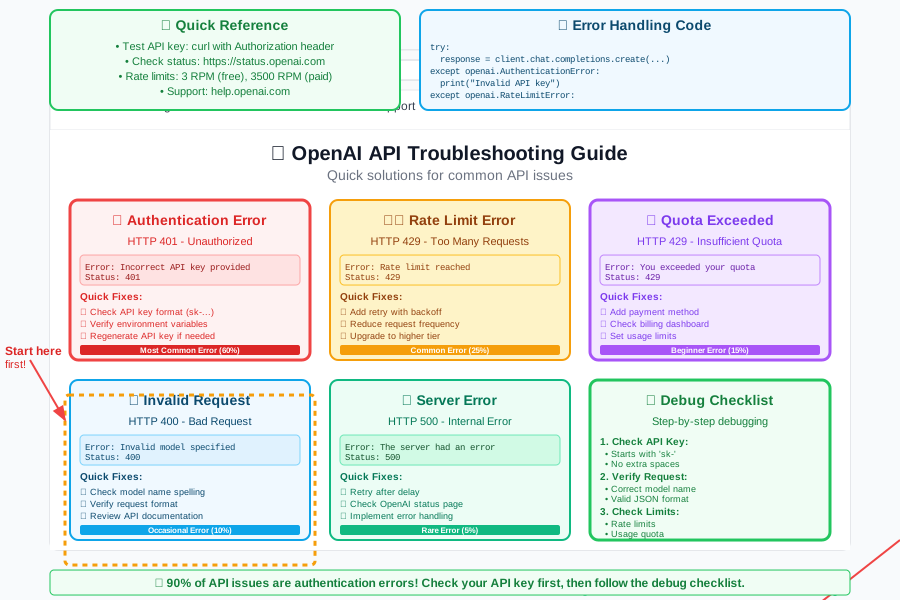
Developer mindset: Every error message is a learning opportunity. Professional developers spend 30% of their time debugging – it's completely normal!
Next Steps: Continuing Your AI Journey
Immediate actions (this week):
- Build a simple chatbot: Use your new API skills
- Join AI communities: Connect with other developers
- Start a GitHub repository: Show your work to potential employers
Recommended learning path:
- Week 1: Build 5 different API applications
- Week 2: Learn to combine APIs with web interfaces
- Week 3: Create your first AI product prototype
- Week 4: Deploy something publicly and share it
Resources for continued learning:
- OpenAI Documentation: Your technical reference
- AI Twitter community: Follow industry leaders
- Local AI meetups: Network with professionals
- Online AI courses: Structured learning paths
You're Now Part of the AI Revolution
What you've accomplished today:
- ✅ Set up OpenAI API keys securely (professional-grade security)
- ✅ Made your first AI API call (you're officially an AI developer)
- ✅ Learned industry-standard security practices
- ✅ Built your first AI application
- ✅ Understood the career opportunities ahead
The financial impact: The skill you just learned is the foundation of careers worth $120k+ annually. You're not just learning technology – you're positioning yourself for the highest-paying, most future-proof career path available today.
Your next milestone: Tomorrow, challenge yourself to build an AI application that solves a real problem. Maybe a personal assistant, a creative writing helper, or a business tool. Every line of code you write makes you more valuable in the AI job market.
Remember: Six months from now, when you're interviewing for your first $100k+ AI developer role, today is the day you'll look back on as the moment everything changed. You're not just learning to code – you're building the future, one API call at a time.
Welcome to the AI revolution. The future is incredibly bright, and you're going to help build it.