Your AI models just became the new crown jewels. Hackers know this. Do you?
Traditional network security treats your internal systems like a gated community—once you're inside, you can wander freely. But modern threats laugh at perimeter defenses. Zero-trust architecture assumes every request is potentially malicious, even from inside your network.
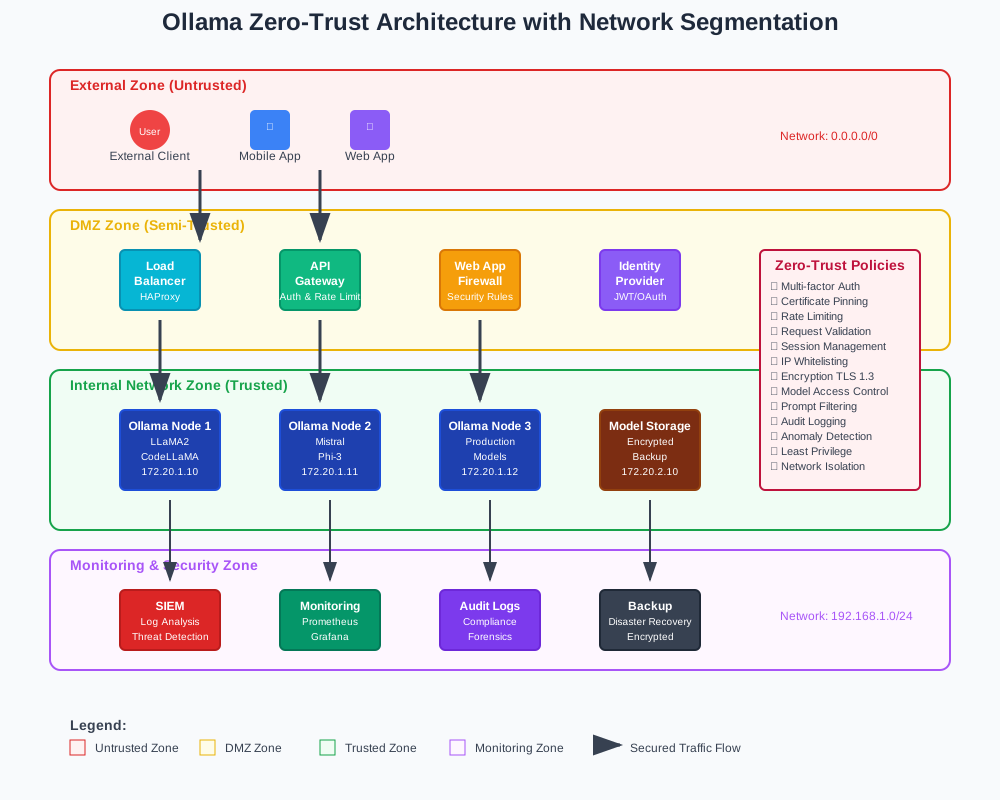
This guide shows you how to implement Ollama zero-trust architecture for enterprise security. You'll learn to secure AI model deployments, control access granularly, and monitor every interaction.
Why Enterprise Ollama Deployments Need Zero-Trust Security
The Problem: AI Models Are High-Value Targets
Enterprise AI models contain sensitive business logic and training data. Attackers target these systems because they offer multiple attack vectors:
- Model theft: Competitors steal proprietary algorithms
- Data extraction: Sensitive training data gets exposed
- Prompt injection: Malicious inputs manipulate model behavior
- Resource abuse: Unauthorized usage drives up costs
The Solution: Zero-Trust Architecture
Zero-trust architecture verifies every user and device before granting access. This approach provides:
- Continuous verification: Every request gets authenticated
- Least privilege access: Users receive minimum required permissions
- Micro-segmentation: Network traffic gets isolated by function
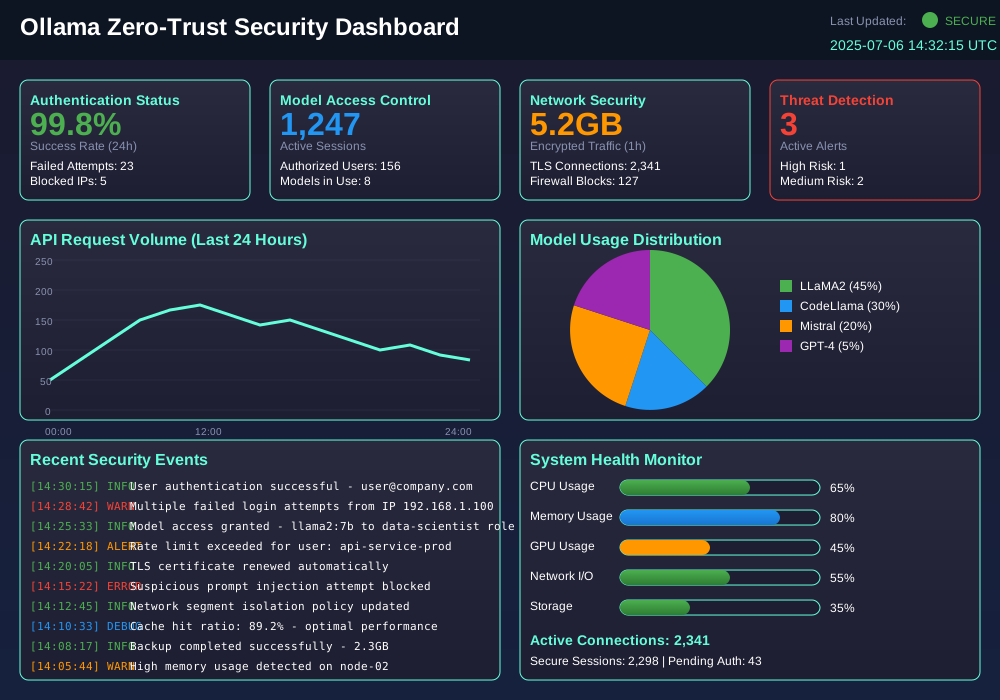
- Comprehensive monitoring: All interactions get logged and analyzed
Core Components of Ollama Zero-Trust Implementation
1. Identity and Access Management (IAM)
Your IAM system becomes the foundation of zero-trust security. It authenticates users and authorizes access to specific Ollama models.
# iam-policy.yaml
apiVersion: v1
kind: ConfigMap
metadata:
  name: ollama-iam-policy
data:
  policy.json: |
    {
      "roles": [
        {
          "name": "data-scientist",
          "permissions": [
            "ollama:pull",
            "ollama:run",
            "ollama:list"
          ],
          "models": ["llama2", "codellama"],
          "resources": ["dev-cluster"]
        },
        {
          "name": "production-user",
          "permissions": [
            "ollama:run"
          ],
          "models": ["approved-model-v1"],
          "resources": ["prod-cluster"]
        }
      ]
    }
2. Network Segmentation
Isolate Ollama services in dedicated network segments. This prevents lateral movement if attackers breach one component.
# Create isolated network for Ollama services
docker network create --driver bridge \
  --subnet=172.20.0.0/16 \
  --ip-range=172.20.240.0/20 \
  ollama-secure-network

# Deploy Ollama with network isolation
docker run -d \
  --name ollama-secure \
  --network ollama-secure-network \
  --ip 172.20.240.10 \
  -p 11434:11434 \
  -v ollama-data:/root/.ollama \
  ollama/ollama
3. API Gateway with Authentication
Deploy an API gateway that enforces authentication and authorization policies for all Ollama requests.
# secure-gateway.py
from flask import Flask, request, jsonify
import requests
import jwt
import os

app = Flask(__name__)

class OllamaSecureGateway:
    def __init__(self):
        self.ollama_url = os.getenv('OLLAMA_URL', 'http://localhost:11434')
        self.jwt_secret = os.getenv('JWT_SECRET', 'your-secret-key')

    def verify_token(self, token):
        """Verify JWT token and extract user permissions"""
        try:
            payload = jwt.decode(token, self.jwt_secret, algorithms=['HS256'])
            return payload
        except jwt.ExpiredSignatureError:
            return None
        except jwt.InvalidTokenError:
            return None

    def check_model_access(self, user_data, model_name):
        """Check if user has access to specific model"""
        allowed_models = user_data.get('models', [])
        return model_name in allowed_models

    @app.route('/api/generate', methods=['POST'])
    def generate(self):
        # Extract and verify authorization token
        auth_header = request.headers.get('Authorization')
        if not auth_header or not auth_header.startswith('Bearer '):
            return jsonify({'error': 'Missing or invalid authorization header'}), 401

        token = auth_header.split(' ')[1]
        user_data = self.verify_token(token)

        if not user_data:
            return jsonify({'error': 'Invalid or expired token'}), 401

        # Check model access permissions
        request_data = request.get_json()
        model_name = request_data.get('model')

        if not self.check_model_access(user_data, model_name):
            return jsonify({'error': f'Access denied for model: {model_name}'}), 403

        # Forward request to Ollama with additional security headers
        response = requests.post(
            f'{self.ollama_url}/api/generate',
            json=request_data,
            headers={'Content-Type': 'application/json'}
        )

        return response.json(), response.status_code

if __name__ == '__main__':
    gateway = OllamaSecureGateway()
    app.run(host='0.0.0.0', port=8080, debug=False)
Step-by-Step Ollama Zero-Trust Deployment
Step 1: Set Up Certificate Authority
Create a private certificate authority for internal SSL/TLS certificates.
# Generate CA private key
openssl genrsa -out ca-key.pem 4096

# Create CA certificate
openssl req -new -x509 -days 365 -key ca-key.pem -out ca-cert.pem \
  -subj "/C=US/ST=CA/L=San Francisco/O=Your Company/CN=Ollama CA"

# Generate server private key
openssl genrsa -out server-key.pem 4096

# Create certificate signing request
openssl req -new -key server-key.pem -out server-csr.pem \
  -subj "/C=US/ST=CA/L=San Francisco/O=Your Company/CN=ollama.company.com"

# Sign server certificate with CA
openssl x509 -req -days 365 -in server-csr.pem -CA ca-cert.pem \
  -CAkey ca-key.pem -CAcreateserial -out server-cert.pem
Step 2: Configure Secure Ollama Container
Deploy Ollama with SSL/TLS encryption and resource limits.
# docker-compose.yml
version: '3.8'
services:
  ollama-secure:
    image: ollama/ollama:latest
    container_name: ollama-zero-trust
    ports:
      - "11434:11434"
    volumes:
      - ollama-data:/root/.ollama
      - ./certs:/etc/ssl/certs
    environment:
      - OLLAMA_HOST=0.0.0.0:11434
      - OLLAMA_ORIGINS=https://ollama.company.com
      - OLLAMA_TLS_CERT=/etc/ssl/certs/server-cert.pem
      - OLLAMA_TLS_KEY=/etc/ssl/certs/server-key.pem
    deploy:
      resources:
        limits:
          cpus: '4.0'
          memory: 8G
        reservations:
          cpus: '2.0'
          memory: 4G
    restart: unless-stopped
    networks:
      - ollama-secure-network

  nginx-proxy:
    image: nginx:alpine
    container_name: ollama-proxy
    ports:
      - "443:443"
    volumes:
      - ./nginx.conf:/etc/nginx/nginx.conf
      - ./certs:/etc/ssl/certs
    depends_on:
      - ollama-secure
    networks:
      - ollama-secure-network

volumes:
  ollama-data:

networks:
  ollama-secure-network:
    driver: bridge
Step 3: Implement Request Monitoring
Set up comprehensive logging and monitoring for all Ollama interactions.
# monitoring.py
import logging
import json
from datetime import datetime
from functools import wraps

class OllamaSecurityMonitor:
    def __init__(self, log_file='ollama-security.log'):
        self.logger = logging.getLogger('ollama-security')
        self.logger.setLevel(logging.INFO)

        # Create file handler
        handler = logging.FileHandler(log_file)
        handler.setLevel(logging.INFO)

        # Create formatter
        formatter = logging.Formatter(
            '%(asctime)s - %(name)s - %(levelname)s - %(message)s'
        )
        handler.setFormatter(formatter)

        self.logger.addHandler(handler)

    def log_request(self, user_id, model_name, prompt_length, response_length):
        """Log Ollama request details"""
        log_data = {
            'timestamp': datetime.utcnow().isoformat(),
            'user_id': user_id,
            'model_name': model_name,
            'prompt_length': prompt_length,
            'response_length': response_length,
            'event_type': 'ollama_request'
        }
        self.logger.info(json.dumps(log_data))

    def log_security_event(self, event_type, user_id, details):
        """Log security events"""
        log_data = {
            'timestamp': datetime.utcnow().isoformat(),
            'event_type': event_type,
            'user_id': user_id,
            'details': details
        }
        self.logger.warning(json.dumps(log_data))

    def monitor_requests(self, func):
        """Decorator to monitor Ollama requests"""
        @wraps(func)
        def wrapper(*args, **kwargs):
            # Extract request details
            user_id = kwargs.get('user_id')
            model_name = kwargs.get('model_name')
            prompt = kwargs.get('prompt', '')

            # Execute request
            response = func(*args, **kwargs)

            # Log request
            self.log_request(
                user_id=user_id,
                model_name=model_name,
                prompt_length=len(prompt),
                response_length=len(response) if response else 0
            )

            return response
        return wrapper

# Usage example
monitor = OllamaSecurityMonitor()

@monitor.monitor_requests
def secure_ollama_request(user_id, model_name, prompt):
    """Secure wrapper for Ollama requests"""
    # Your Ollama request logic here
    pass
Step 4: Configure Access Control Lists
Define granular access control policies for different user roles.
{
  "access_control": {
    "policies": [
      {
        "name": "data-scientist-policy",
        "subjects": ["group:data-scientists"],
        "resources": [
          "ollama:model:llama2",
          "ollama:model:codellama",
          "ollama:model:mistral"
        ],
        "actions": ["pull", "run", "list"],
        "conditions": {
          "time_range": "09:00-17:00",
          "ip_range": "10.0.0.0/24"
        }
      },
      {
        "name": "production-api-policy",
        "subjects": ["service:production-api"],
        "resources": [
          "ollama:model:approved-model-v1"
        ],
        "actions": ["run"],
        "conditions": {
          "rate_limit": "100/minute",
          "max_tokens": 1000
        }
      }
    ]
  }
}
Advanced Security Features
Prompt Injection Protection
Implement input validation to prevent malicious prompts from compromising your models.
# prompt-security.py
import re
from typing import List, Dict

class PromptSecurityValidator:
    def __init__(self):
        # Define suspicious patterns
        self.suspicious_patterns = [
            r'ignore\s+previous\s+instructions',
            r'system\s+prompt',
            r'jailbreak',
            r'act\s+as\s+if',
            r'pretend\s+to\s+be',
            r'roleplay\s+as',
            r'<script>',
            r'eval\(',
            r'exec\(',
        ]

        # Compile patterns for efficiency
        self.compiled_patterns = [
            re.compile(pattern, re.IGNORECASE) for pattern in self.suspicious_patterns
        ]

    def validate_prompt(self, prompt: str) -> Dict[str, any]:
        """Validate prompt for security issues"""
        results = {
            'is_safe': True,
            'violations': [],
            'risk_score': 0
        }

        # Check for suspicious patterns
        for i, pattern in enumerate(self.compiled_patterns):
            matches = pattern.findall(prompt)
            if matches:
                results['is_safe'] = False
                results['violations'].append({
                    'pattern': self.suspicious_patterns[i],
                    'matches': matches
                })
                results['risk_score'] += 10

        # Check prompt length
        if len(prompt) > 10000:
            results['is_safe'] = False
            results['violations'].append({
                'type': 'length_violation',
                'length': len(prompt)
            })
            results['risk_score'] += 5

        return results

    def sanitize_prompt(self, prompt: str) -> str:
        """Sanitize prompt by removing dangerous content"""
        # Remove HTML/JavaScript tags
        prompt = re.sub(r'<[^>]*>', '', prompt)

        # Remove potential command injection attempts
        prompt = re.sub(r'[;&|`$()]', '', prompt)

        # Limit prompt length
        if len(prompt) > 5000:
            prompt = prompt[:5000] + "..."

        return prompt.strip()
Model Access Auditing
Track and audit all model access for compliance and security analysis.
# audit-logger.py
import sqlite3
from datetime import datetime
import json

class ModelAccessAuditor:
    def __init__(self, db_path='ollama-audit.db'):
        self.db_path = db_path
        self.init_database()

    def init_database(self):
        """Initialize audit database"""
        conn = sqlite3.connect(self.db_path)
        cursor = conn.cursor()

        cursor.execute('''
            CREATE TABLE IF NOT EXISTS model_access_log (
                id INTEGER PRIMARY KEY AUTOINCREMENT,
                timestamp DATETIME DEFAULT CURRENT_TIMESTAMP,
                user_id TEXT NOT NULL,
                model_name TEXT NOT NULL,
                action TEXT NOT NULL,
                ip_address TEXT,
                user_agent TEXT,
                prompt_hash TEXT,
                response_hash TEXT,
                success BOOLEAN,
                error_message TEXT
            )
        ''')

        conn.commit()
        conn.close()

    def log_access(self, user_id, model_name, action, ip_address,
                   user_agent, prompt_hash, response_hash, success, error_message=None):
        """Log model access event"""
        conn = sqlite3.connect(self.db_path)
        cursor = conn.cursor()

        cursor.execute('''
            INSERT INTO model_access_log
            (user_id, model_name, action, ip_address, user_agent,
             prompt_hash, response_hash, success, error_message)
            VALUES (?, ?, ?, ?, ?, ?, ?, ?, ?)
        ''', (user_id, model_name, action, ip_address, user_agent,
              prompt_hash, response_hash, success, error_message))

        conn.commit()
        conn.close()

    def generate_audit_report(self, start_date, end_date):
        """Generate audit report for specified date range"""
        conn = sqlite3.connect(self.db_path)
        cursor = conn.cursor()

        cursor.execute('''
            SELECT user_id, model_name, COUNT(*) as access_count,
                   SUM(CASE WHEN success = 1 THEN 1 ELSE 0 END) as successful_requests,
                   SUM(CASE WHEN success = 0 THEN 1 ELSE 0 END) as failed_requests
            FROM model_access_log
            WHERE timestamp BETWEEN ? AND ?
            GROUP BY user_id, model_name
        ''', (start_date, end_date))

        results = cursor.fetchall()
        conn.close()

        return results
Performance Optimization for Zero-Trust
Caching Strategies
Implement intelligent caching to reduce authentication overhead without compromising security.
# cache-manager.py
import redis
import json
import hashlib
from datetime import datetime, timedelta

class SecureCache:
    def __init__(self, redis_host='localhost', redis_port=6379):
        self.redis_client = redis.Redis(host=redis_host, port=redis_port, decode_responses=True)
        self.cache_ttl = 300  # 5 minutes

    def generate_cache_key(self, user_id, model_name, prompt):
        """Generate secure cache key"""
        content = f"{user_id}:{model_name}:{prompt}"
        return hashlib.sha256(content.encode()).hexdigest()

    def cache_response(self, user_id, model_name, prompt, response):
        """Cache model response securely"""
        cache_key = self.generate_cache_key(user_id, model_name, prompt)

        cache_data = {
            'response': response,
            'timestamp': datetime.utcnow().isoformat(),
            'user_id': user_id,
            'model_name': model_name
        }

        # Store with TTL
        self.redis_client.setex(
            cache_key,
            self.cache_ttl,
            json.dumps(cache_data)
        )

    def get_cached_response(self, user_id, model_name, prompt):
        """Retrieve cached response if available"""
        cache_key = self.generate_cache_key(user_id, model_name, prompt)

        cached_data = self.redis_client.get(cache_key)
        if cached_data:
            return json.loads(cached_data)

        return None
Monitoring and Alerting
Real-time Threat Detection
Set up automated threat detection for suspicious activities.
# threat-detection.py
import time
from collections import defaultdict, deque
from datetime import datetime, timedelta

class ThreatDetector:
    def __init__(self):
        self.request_history = defaultdict(deque)
        self.failed_attempts = defaultdict(int)
        self.rate_limits = {
            'requests_per_minute': 60,
            'failed_attempts_threshold': 5
        }

    def check_rate_limit(self, user_id):
        """Check if user exceeds rate limits"""
        now = datetime.utcnow()
        minute_ago = now - timedelta(minutes=1)

        # Clean old entries
        user_requests = self.request_history[user_id]
        while user_requests and user_requests[0] < minute_ago:
            user_requests.popleft()

        # Check rate limit
        if len(user_requests) >= self.rate_limits['requests_per_minute']:
            return False

        # Add current request
        user_requests.append(now)
        return True

    def record_failed_attempt(self, user_id):
        """Record failed authentication attempt"""
        self.failed_attempts[user_id] += 1

        if self.failed_attempts[user_id] >= self.rate_limits['failed_attempts_threshold']:
            self.trigger_security_alert(user_id, 'multiple_failed_attempts')

    def trigger_security_alert(self, user_id, alert_type):
        """Trigger security alert"""
        alert_data = {
            'timestamp': datetime.utcnow().isoformat(),
            'user_id': user_id,
            'alert_type': alert_type,
            'severity': 'high'
        }

        # Send alert to security team
        print(f"SECURITY ALERT: {json.dumps(alert_data)}")
Deployment Screenshots

Common Implementation Challenges
Certificate Management
Managing SSL/TLS certificates across multiple environments requires automation:
# automated-cert-renewal.sh
#!/bin/bash

# Check certificate expiration
check_cert_expiry() {
    cert_file=$1
    expiry_date=$(openssl x509 -enddate -noout -in "$cert_file" | cut -d= -f2)
    expiry_epoch=$(date -d "$expiry_date" +%s)
    current_epoch=$(date +%s)
    days_until_expiry=$(( (expiry_epoch - current_epoch) / 86400 ))

    if [ $days_until_expiry -lt 30 ]; then
        echo "Certificate expires in $days_until_expiry days - renewing"
        return 0
    else
        echo "Certificate valid for $days_until_expiry days"
        return 1
    fi
}

# Renew certificate if needed
if check_cert_expiry "/etc/ssl/certs/server-cert.pem"; then
    # Trigger certificate renewal process
    ./generate-new-cert.sh
    docker-compose restart ollama-secure
fi
Load Balancing
Distribute traffic across multiple Ollama instances while maintaining security:
# load-balancer.yml
version: '3.8'
services:
  haproxy:
    image: haproxy:alpine
    ports:
      - "443:443"
    volumes:
      - ./haproxy.cfg:/usr/local/etc/haproxy/haproxy.cfg
      - ./certs:/etc/ssl/certs
    depends_on:
      - ollama-1
      - ollama-2
      - ollama-3

  ollama-1:
    image: ollama/ollama:latest
    environment:
      - OLLAMA_HOST=0.0.0.0:11434
    volumes:
      - ollama-data-1:/root/.ollama

  ollama-2:
    image: ollama/ollama:latest
    environment:
      - OLLAMA_HOST=0.0.0.0:11434
    volumes:
      - ollama-data-2:/root/.ollama

  ollama-3:
    image: ollama/ollama:latest
    environment:
      - OLLAMA_HOST=0.0.0.0:11434
    volumes:
      - ollama-data-3:/root/.ollama
Best Practices Summary
Security Hardening Checklist
- ✅ Use strong authentication: Implement multi-factor authentication
- ✅ Encrypt all traffic: Use TLS 1.3 for all communications
- ✅ Implement rate limiting: Prevent abuse and DoS attacks
- ✅ Monitor continuously: Log all access and analyze patterns
- ✅ Regular updates: Keep Ollama and dependencies updated
- ✅ Backup regularly: Secure model data and configurations
- ✅ Test disaster recovery: Validate backup restoration procedures
Performance Optimization
- ✅ Cache frequently used models: Reduce model loading time
- ✅ Use connection pooling: Minimize authentication overhead
- ✅ Implement circuit breakers: Prevent cascade failures
- ✅ Monitor resource usage: Track CPU, memory, and GPU utilization
Conclusion
Implementing Ollama zero-trust architecture protects your enterprise AI infrastructure from modern threats. This comprehensive approach combines strong authentication, network segmentation, continuous monitoring, and granular access controls.
The security investment pays dividends through reduced breach risk, regulatory compliance, and stakeholder confidence. Your AI models remain protected while maintaining the performance and accessibility your organization needs.
Start with the basic implementation and gradually add advanced features. Remember that security is an ongoing process—regularly review and update your zero-trust policies as your infrastructure evolves.
Ready to secure your Ollama deployment? Begin with the certificate authority setup and build your zero-trust foundation today.