Problem: Calling Ollama's REST API from Your App
The Ollama REST API is the fastest way to integrate local LLMs into any app — no Python SDK required, no cloud dependency, no per-token cost.
Most tutorials stop at ollama run llama3.2 in the terminal. That's fine for testing, but your app needs HTTP endpoints it can call programmatically: generate text, stream responses, embed documents, and manage models — all from Node.js, Python, Go, or a plain curl command.
You'll learn:
- How every core Ollama endpoint works (
/api/generate,/api/chat,/api/embeddings) - How to stream responses token-by-token in Python and Node.js
- How to swap in Ollama as an OpenAI-compatible drop-in via
/v1/chat/completions - How to run Ollama in Docker and expose its API safely on a remote server
Time: 20 min | Difficulty: Intermediate
Why Ollama Exposes a REST API
Ollama runs as a local HTTP server on http://localhost:11434 the moment you install it. Every ollama run command is just a thin CLI wrapper around that same API.
This design means your app talks to Ollama the same way it would talk to any cloud LLM API — except the model runs on your machine, costs $0 per token, and never sends data to a third party.
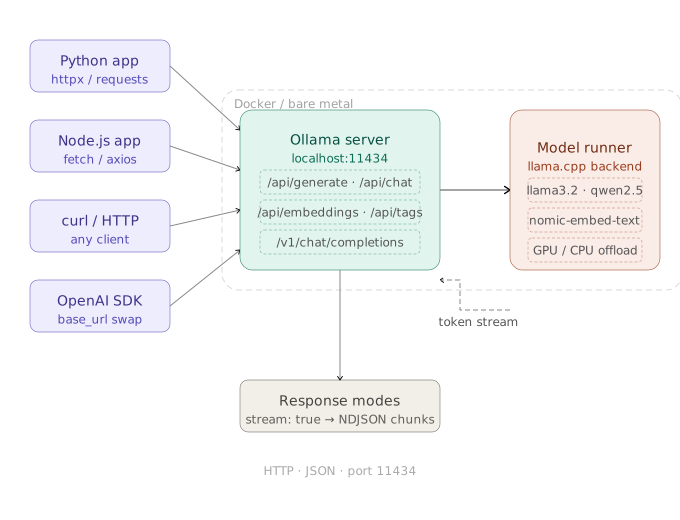 How your app reaches the model: HTTP request → Ollama server (port 11434) → model runner → streamed token response
Core Endpoints Cheat Sheet
| Endpoint | Method | What it does |
|---|---|---|
/api/generate | POST | Single-turn completion (raw prompt) |
/api/chat | POST | Multi-turn chat with message history |
/api/embeddings | POST | Generate embedding vectors |
/api/tags | GET | List downloaded models |
/api/pull | POST | Download a model |
/api/delete | DELETE | Remove a model |
/v1/chat/completions | POST | OpenAI-compatible chat (drop-in replacement) |
All endpoints accept and return JSON. Authentication is off by default on localhost.
Step 1: Install Ollama and Pull a Model
[One sentence: get the server running before any API call.]
# macOS / Linux one-liner
curl -fsSL https://ollama.com/install.sh | sh

# Verify the server started automatically
curl http://localhost:11434
# Expected: "Ollama is running"

# Pull a lean model for testing (2.0 GB, runs on 8 GB RAM)
ollama pull llama3.2:3b
Expected output: pulling manifest … success
If you see connection refused:
- Run
ollama servemanually in a separate terminal — the background daemon may not have started.
Step 2: /api/generate — Single-Turn Completion
/api/generate is the simplest endpoint: send a prompt string, get text back.
curl http://localhost:11434/api/generate \
  -d '{
    "model": "llama3.2:3b",
    "prompt": "Explain DNS in one sentence.",
    "stream": false
  }'
Key fields in the response:
{
  "model": "llama3.2:3b",
  "response": "DNS translates human-readable domain names...",
  "done": true,
  "total_duration": 1843201000,
  "eval_count": 38
}
Setting "stream": false buffers the full response before returning. Use this for short completions where latency doesn't matter.
Step 3: /api/chat — Multi-Turn Conversations
/api/chat accepts a messages array — the same shape as OpenAI's chat API. This is what you want for chatbots, agents, and any stateful exchange.
import httpx
import json

OLLAMA_URL = "http://localhost:11434/api/chat"

messages = [
    {"role": "system", "content": "You are a concise technical assistant."},
    {"role": "user",   "content": "What is a VLAN?"},
]

response = httpx.post(OLLAMA_URL, json={
    "model": "llama3.2:3b",
    "messages": messages,
    "stream": False,
})

data = response.json()
reply = data["message"]["content"]
print(reply)

# Append assistant reply to maintain history
messages.append({"role": "assistant", "content": reply})
messages.append({"role": "user", "content": "Give me a real-world example."})
You own the message history — append each turn yourself before the next call.
Step 4: Streaming Responses Token by Token
Streaming cuts time-to-first-token from seconds to milliseconds. Set "stream": true (the default) and read newline-delimited JSON chunks.
Python (httpx streaming)
import httpx
import json

def stream_ollama(prompt: str, model: str = "llama3.2:3b"):
    with httpx.stream("POST", "http://localhost:11434/api/generate", json={
        "model": model,
        "prompt": prompt,
        "stream": True,
    }) as r:
        for line in r.iter_lines():
            if line:
                chunk = json.loads(line)
                print(chunk["response"], end="", flush=True)  # flush keeps output live
                if chunk.get("done"):
                    break

stream_ollama("Write a haiku about distributed systems.")
Node.js (fetch + ReadableStream)
async function streamOllama(prompt) {
  const res = await fetch("http://localhost:11434/api/generate", {
    method: "POST",
    headers: { "Content-Type": "application/json" },
    body: JSON.stringify({ model: "llama3.2:3b", prompt, stream: true }),
  });

  const reader = res.body.getReader();
  const decoder = new TextDecoder();

  while (true) {
    const { done, value } = await reader.read();
    if (done) break;

    // Each chunk may contain multiple newline-delimited JSON objects
    const lines = decoder.decode(value).split("\n").filter(Boolean);
    for (const line of lines) {
      const chunk = JSON.parse(line);
      process.stdout.write(chunk.response ?? "");
      if (chunk.done) return;
    }
  }
}

streamOllama("What is the CAP theorem?");
Expected output: tokens printing one by one, no buffering lag.
Step 5: /api/embeddings — Vectors for RAG
Generate embedding vectors for semantic search, RAG pipelines, or clustering.
import httpx
import numpy as np

def embed(text: str, model: str = "nomic-embed-text") -> list[float]:
    # nomic-embed-text is optimized for embeddings — don't use a chat model here
    r = httpx.post("http://localhost:11434/api/embeddings", json={
        "model": model,
        "prompt": text,
    })
    return r.json()["embedding"]

# Pull the embedding model first
# ollama pull nomic-embed-text

vec_a = embed("How do I configure Nginx?")
vec_b = embed("Nginx reverse proxy setup guide")

# Cosine similarity — higher = more similar
dot   = np.dot(vec_a, vec_b)
norms = np.linalg.norm(vec_a) * np.linalg.norm(vec_b)
print(f"Similarity: {dot / norms:.4f}")  # typically 0.88–0.95 for related docs
Pull the right model first:
ollama pull nomic-embed-text # 274 MB — dedicated embedding model
Do not use llama3.2 for embeddings — chat models produce lower-quality vectors than purpose-built embedding models.
Step 6: OpenAI-Compatible Drop-In via /v1/chat/completions
Ollama 0.1.24+ ships an OpenAI-compatible endpoint. Swap the base URL and you're done — zero code changes needed in apps already using the OpenAI SDK.
from openai import OpenAI

# Point the OpenAI client at your local Ollama server
client = OpenAI(
    base_url="http://localhost:11434/v1",
    api_key="ollama",          # any non-empty string — Ollama ignores it
)

completion = client.chat.completions.create(
    model="llama3.2:3b",       # must be a pulled Ollama model name
    messages=[
        {"role": "user", "content": "What is a merkle tree?"}
    ],
)

print(completion.choices[0].message.content)
This works with any library that accepts an OpenAI-compatible base URL: LangChain, LlamaIndex, Instructor, Mirascope, and more.
Step 7: Run Ollama in Docker and Expose the API
For staging servers, CI pipelines, or a shared team instance, run Ollama as a container.
# CPU-only (works on any Linux server)
docker run -d \
  --name ollama \
  -p 11434:11434 \                          # expose API to host
  -v ollama_data:/root/.ollama \            # persist downloaded models
  ollama/ollama

# Nvidia GPU passthrough (requires nvidia-container-toolkit)
docker run -d \
  --name ollama \
  --gpus all \
  -p 11434:11434 \
  -v ollama_data:/root/.ollama \
  ollama/ollama

# Pull a model inside the container
docker exec ollama ollama pull llama3.2:3b
Bind to a specific network interface if you need remote access (e.g., on AWS us-east-1):
# Set before starting — binds API to all interfaces
OLLAMA_HOST=0.0.0.0:11434 ollama serve
Security note: Port 11434 has no auth by default. Put Nginx or Caddy in front with basic auth before exposing to the internet. Never bind
0.0.0.0on a public IP without a reverse proxy.
Model Parameters: Controlling Output Quality
Pass a options object to tune inference behavior per request:
curl http://localhost:11434/api/generate \
  -d '{
    "model": "llama3.2:3b",
    "prompt": "Write a Python function to debounce events.",
    "stream": false,
    "options": {
      "temperature": 0.2,      # lower = more deterministic; 0.0–1.0
      "top_p": 0.9,            # nucleus sampling threshold
      "num_predict": 512,      # max tokens to generate
      "num_ctx": 4096,         # context window size (match your model max)
      "seed": 42               # reproducible output for testing
    }
  }'
| Parameter | Default | When to change |
|---|---|---|
temperature | 0.8 | Lower for code/facts, higher for creative tasks |
num_predict | 128 | Increase for long-form output |
num_ctx | model default | Increase for long documents (uses more VRAM) |
seed | random | Set to a fixed int for reproducible CI tests |
Verification
Run this end-to-end health check after setup:
# 1. Server alive?
curl -s http://localhost:11434 | grep "Ollama"

# 2. Model available?
curl -s http://localhost:11434/api/tags | python3 -m json.tool | grep '"name"'

# 3. Generate works?
curl -s http://localhost:11434/api/generate \
  -d '{"model":"llama3.2:3b","prompt":"ping","stream":false}' \
  | python3 -c "import sys,json; print(json.load(sys.stdin)['response'])"
You should see: your model listed, and a short text response to "ping".
What You Learned
/api/generatehandles single-turn prompts;/api/chathandles stateful multi-turn sessions with amessagesarray you manage yourself.- Streaming (
"stream": true) uses newline-delimited JSON — parse each line individually, not the full body. /v1/chat/completionsmakes Ollama a zero-change drop-in for any OpenAI SDK integration.- For embeddings, always pull a dedicated model like
nomic-embed-text— chat models produce weaker vectors. - Bind to
0.0.0.0only behind a reverse proxy with auth. Default localhost is safe; a raw public bind is not.
Tested on Ollama 0.6.x, Python 3.12 + httpx 0.27, Node.js 22, Docker 26, macOS Sonoma & Ubuntu 24.04
FAQ
Q: Does the Ollama API require an API key? A: No. Running on localhost, Ollama has no authentication. If you expose port 11434 remotely, add a reverse proxy with basic auth or an API key header before going live.
Q: What is the difference between /api/generate and /api/chat?
A: /api/generate takes a raw prompt string and has no message history — it's stateless. /api/chat takes a messages array (system / user / assistant turns) and is designed for conversational agents that need to track context across multiple exchanges.
Q: How much RAM does running the Ollama API server use on its own?
A: The server idle process uses under 100 MB. RAM usage spikes only when a model is loaded — llama3.2:3b needs roughly 3.5 GB, and a 7B model needs around 6–8 GB depending on quantization. Models are unloaded after 5 minutes of inactivity by default.
Q: Can I run multiple models simultaneously via the API? A: Yes, but each loaded model consumes its full VRAM/RAM allocation. Ollama queues concurrent requests to the same model. If you call two different models at once and lack the memory to hold both, Ollama will unload the first to serve the second — causing a cold-start delay.
Q: Does the OpenAI-compatible /v1 endpoint support function calling / tool use?
A: Yes, for models that support tool use (like llama3.1, mistral-nemo, qwen2.5). Pass a tools array in the same format as OpenAI's API. Not all models handle tool calls reliably — test with llama3.1:8b or qwen2.5:7b as a starting point.