Problem: Calling Ollama's REST API With Python Requests (No SDK)
Ollama's Python requests REST API lets you drive local LLM inference from any Python script — no ollama SDK package required, no version pinning, no import overhead.
You'll learn:
- How to hit
/api/generateand/api/chatwithrequests - How to stream tokens line-by-line without blocking
- How to call
/api/embeddingsfor vector workflows - How to handle errors, timeouts, and retries in production
Time: 20 min | Difficulty: Intermediate
Why Skip the SDK?
The official ollama Python package is convenient, but it adds a dependency and abstracts away the raw HTTP layer. That matters when you're:
- Vendoring code into a constrained environment (Lambda, a Docker scratch image, an internal tool with a locked
requirements.txt) - Debugging exactly what JSON is going over the wire
- Integrating Ollama alongside other REST clients in a unified HTTP layer
- Running on Python 3.11 in a legacy system where the SDK's minimum version differs
Ollama's REST API is stable, fully documented, and only needs requests — which is already in virtually every Python environment.
How the Ollama REST API Works
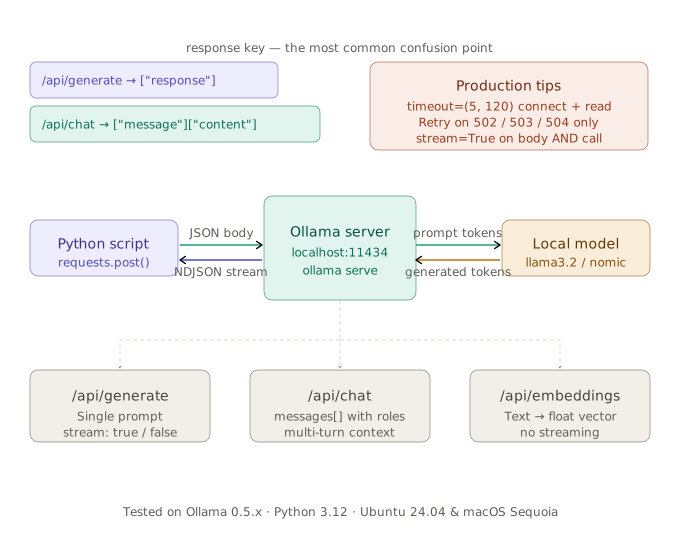 Three endpoints, one base URL: requests posts JSON, Ollama streams NDJSON back, your script reassembles tokens.
Ollama runs a local HTTP server (default http://localhost:11434). Every call is a POST with a JSON body. Responses are either a single JSON object or newline-delimited JSON (NDJSON) when streaming is enabled.
The three endpoints you'll use most:
| Endpoint | Purpose | Streams |
|---|---|---|
POST /api/generate | Raw text completion | Yes |
POST /api/chat | Multi-turn conversation with roles | Yes |
POST /api/embeddings | Vector embedding of a string | No |
Prerequisites
- Ollama installed and running (
ollama serve) - At least one model pulled:
ollama pull llama3.2(3B, fits in 4 GB VRAM) - Python 3.11+ with
requestsinstalled
pip install requests --break-system-packages
ollama pull llama3.2
Confirm Ollama is up:
curl http://localhost:11434/api/tags
Expected output: JSON list of your pulled models.
Solution
Step 1: Basic Text Generation With /api/generate
The simplest call: send a prompt, get a completion. Setting "stream": false waits for the full response before returning — good for scripts, bad for UX.
import requests

OLLAMA_BASE = "http://localhost:11434"

def generate(prompt: str, model: str = "llama3.2") -> str:
    response = requests.post(
        f"{OLLAMA_BASE}/api/generate",
        json={
            "model": model,
            "prompt": prompt,
            "stream": False,          # block until done; swap to True for streaming
        },
        timeout=120,                  # 120s covers cold-start model loading on CPU
    )
    response.raise_for_status()       # raises HTTPError on 4xx/5xx — don't swallow this
    return response.json()["response"]


if __name__ == "__main__":
    print(generate("Explain what a transformer attention head does in two sentences."))
Expected output: Two sentences of explanation, printed to stdout.
If it fails:
ConnectionRefusedError→ Ollama isn't running. Runollama servein a separate terminal.HTTPError 404→ Model name typo. Checkollama list.ReadTimeout→ Increasetimeout; first inference on a cold model can take 30–60 s on CPU.
Step 2: Streaming Tokens With /api/generate
Streaming returns NDJSON — one JSON object per line, each with "done": false until the final chunk. Use stream=True on the requests call and iterate response.iter_lines().
import requests
import json

OLLAMA_BASE = "http://localhost:11434"

def generate_stream(prompt: str, model: str = "llama3.2") -> None:
    with requests.post(
        f"{OLLAMA_BASE}/api/generate",
        json={"model": model, "prompt": prompt, "stream": True},
        stream=True,                  # keep TCP connection open for chunked transfer
        timeout=120,
    ) as response:
        response.raise_for_status()
        for raw_line in response.iter_lines():
            if not raw_line:
                continue              # skip keepalive blank lines
            chunk = json.loads(raw_line)
            print(chunk["response"], end="", flush=True)
            if chunk.get("done"):
                print()               # newline after final token
                break


if __name__ == "__main__":
    generate_stream("Write a haiku about gradient descent.")
Expected output: Tokens printed one-by-one as Ollama generates them.
Step 3: Multi-Turn Chat With /api/chat
/api/chat accepts a messages list with role and content — identical to the OpenAI chat format. Maintain the list yourself between turns to preserve context.
import requests
import json

OLLAMA_BASE = "http://localhost:11434"

def chat(messages: list[dict], model: str = "llama3.2") -> str:
    response = requests.post(
        f"{OLLAMA_BASE}/api/chat",
        json={
            "model": model,
            "messages": messages,
            "stream": False,
        },
        timeout=120,
    )
    response.raise_for_status()
    return response.json()["message"]["content"]   # nested under "message", not "response"


def run_conversation() -> None:
    history: list[dict] = [
        {"role": "system", "content": "You are a concise Python tutor."}
    ]

    turns = [
        "What is a list comprehension?",
        "Show me an example that filters even numbers from 1 to 20.",
    ]

    for user_input in turns:
        history.append({"role": "user", "content": user_input})
        reply = chat(history, model="llama3.2")
        history.append({"role": "assistant", "content": reply})
        print(f"User: {user_input}")
        print(f"Assistant: {reply}\n")


if __name__ == "__main__":
    run_conversation()
Key difference from /api/generate: the response token is at response.json()["message"]["content"], not ["response"]. Missing this is the #1 bug when switching endpoints.
Step 4: Embeddings With /api/embeddings
Use this to generate a vector for a string — useful for semantic search, RAG chunking, or similarity scoring without pulling in a full embedding library.
import requests

OLLAMA_BASE = "http://localhost:11434"

def embed(text: str, model: str = "nomic-embed-text") -> list[float]:
    # nomic-embed-text is Ollama's best embedding model — pull it first:
    # ollama pull nomic-embed-text
    response = requests.post(
        f"{OLLAMA_BASE}/api/embeddings",
        json={"model": model, "prompt": text},
        timeout=30,
    )
    response.raise_for_status()
    return response.json()["embedding"]    # 768-dim float list for nomic-embed-text


if __name__ == "__main__":
    vec = embed("The quick brown fox")
    print(f"Dimensions: {len(vec)}")       # 768
    print(f"First 5 values: {vec[:5]}")
Expected output:
Dimensions: 768
First 5 values: [0.123, -0.456, ...]
Step 5: Retries and Timeout Handling for Production
A bare requests.post fails hard on transient errors. Wrap calls with urllib3 retry logic for any script that runs unattended.
import requests
from requests.adapters import HTTPAdapter
from urllib3.util.retry import Retry

OLLAMA_BASE = "http://localhost:11434"

def build_session() -> requests.Session:
    session = requests.Session()
    retry = Retry(
        total=3,                        # 3 attempts total
        backoff_factor=1.0,             # 1 s, 2 s, 4 s between retries
        status_forcelist=[502, 503, 504],  # only retry on gateway errors, not 404
    )
    adapter = HTTPAdapter(max_retries=retry)
    session.mount("http://", adapter)
    return session


SESSION = build_session()


def generate_reliable(prompt: str, model: str = "llama3.2") -> str:
    response = SESSION.post(
        f"{OLLAMA_BASE}/api/generate",
        json={"model": model, "prompt": prompt, "stream": False},
        timeout=(5, 120),               # (connect timeout, read timeout) tuple
    )
    response.raise_for_status()
    return response.json()["response"]
The (connect, read) timeout tuple is the correct pattern here — a 5-second connect timeout catches a downed Ollama process fast, while 120 seconds covers slow CPU inference without a premature ReadTimeout.
Verification
Run all four patterns end-to-end:
python generate.py
python stream.py
python chat.py
python embed.py
You should see:
generate.py— full text response printed after a pausestream.py— tokens printed incrementally, no pausechat.py— two conversational turns with context carried overembed.py—Dimensions: 768and a float list
Check Ollama's server log for request traces:
ollama serve 2>&1 | grep "POST /api"
SDK vs Raw Requests: When to Use Each
ollama SDK | requests direct | |
|---|---|---|
| Setup | pip install ollama | pip install requests (usually pre-installed) |
| Streaming | Handled automatically | Manual iter_lines() loop |
| Type hints | Full typed responses | Raw dict — add Pydantic if needed |
| Custom headers / auth proxy | Awkward | Native |
| Vendoring into locked env | Adds dependency | Zero new deps |
| OpenAI drop-in compat | Via ollama.Client | Roll your own or use httpx |
Use the SDK for fast iteration and greenfield projects. Use raw requests when dependency surface matters, or when you're unifying multiple REST clients in one HTTP layer.
What You Learned
/api/generatereturnsresponse.json()["response"];/api/chatreturnsresponse.json()["message"]["content"]— mixing these up is the most common bugstream=Trueon both the JSON body and therequests.post()call are both required for streaming; either alone does not work/api/embeddingswithnomic-embed-textgives you 768-dimensional vectors locally at $0.00/month vs. OpenAI'stext-embedding-3-smallat $0.02 per 1 M tokens
Tested on Ollama 0.5.x, Python 3.12, Ubuntu 24.04 and macOS Sequoia.
FAQ
Q: Does this work if Ollama is running in Docker instead of locally?
A: Yes — replace http://localhost:11434 with the container's host IP and exposed port, e.g. http://192.168.1.50:11434. Set OLLAMA_HOST=0.0.0.0 in the container environment so Ollama binds to all interfaces, not just loopback.
Q: What is the difference between /api/generate and /api/chat?
A: /api/generate is a stateless single-prompt completion — you manage history yourself by concatenating text. /api/chat accepts a structured messages array with roles, which lets the model's system prompt and chat template work correctly for instruction-tuned models.
Q: Can I use httpx instead of requests for async support?
A: Yes. The JSON bodies and endpoints are identical — swap requests.post(...) for await httpx.AsyncClient().post(...) and use async for line in response.aiter_lines() for streaming. No other changes needed.
Q: What is the minimum RAM to run this on a US cloud VM?
A: For llama3.2 (3B Q4), a t3.large on AWS us-east-1 (8 GB RAM, no GPU, ~$0.08/hr) works for development. For production throughput, use a g4dn.xlarge (16 GB RAM + T4 GPU, ~$0.53/hr) to keep latency under 200 ms per token.
Q: Does Ollama's /api/chat endpoint accept the same JSON as the OpenAI API?
A: The messages array format is the same, but the wrapper keys differ. OpenAI uses {"model": ..., "messages": ...} at the top level and returns choices[0].message.content. Ollama uses the same top-level keys but returns message.content directly — no choices array.