Ollama Python Library: The Complete API Reference
The Ollama Python library is the official client for programmatic access to any model running locally via Ollama. This reference covers every method, parameter, and return type — so you stop guessing and start shipping.
You'll learn:
- Every top-level method:
chat,generate,embeddings,pull,push,create,list,show,copy,delete - Streaming vs. non-streaming response handling
- Async usage with
AsyncClient - OpenAI-compatible client mode
- Common errors and exact fixes
Time: 20 min | Difficulty: Intermediate
Why the Ollama Python Library Exists
Calling Ollama via raw httpx or requests works, but you'd re-implement response parsing, streaming, and error handling every time. The official library wraps the Ollama REST API into a typed, Pythonic interface — with sync and async clients out of the box.
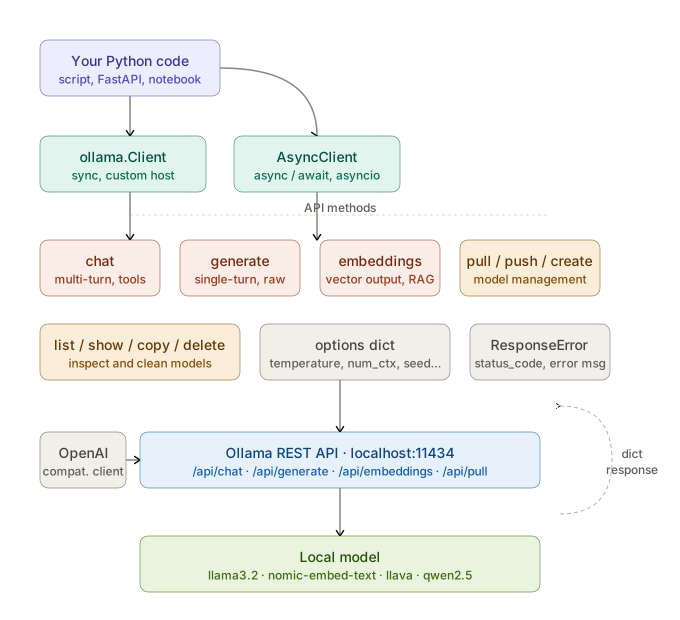 Request flow: your Python code →
 ollama.Client → Ollama REST API → local model → typed response dict
Install or update before starting:
# Requires Python 3.9+ — tested on 3.12
pip install ollama --upgrade
Verify the install:
python -c "import ollama; print(ollama.__version__)"
Core Concepts
The library ships two clients:
ollamamodule (sync) — module-level functions backed by a defaultClientinstance. Use this for scripts and notebooks.ollama.Client— explicit sync client. Use when you need a non-default host or custom headers.ollama.AsyncClient— async client with the same method signatures. Use inside FastAPI, async scripts, or anyasyncioevent loop.
Every method returns a plain Python dict (or a generator of dicts when streaming). No custom wrapper objects — you access data with standard key lookups.
ollama.chat — Conversational Inference
chat sends a list of messages and returns the model's reply. It maps to POST /api/chat.
import ollama

response = ollama.chat(
    model="llama3.2",
    messages=[
        {"role": "system", "content": "You are a helpful assistant."},
        {"role": "user",   "content": "What is the capital of France?"},
    ],
)

print(response["message"]["content"])
# → "The capital of France is Paris."
Parameters
| Parameter | Type | Required | Description |
|---|---|---|---|
model | str | ✅ | Model name — must match ollama list output |
messages | list[dict] | ✅ | Conversation history. Each dict requires role and content. |
stream | bool | ❌ | False (default) returns full response; True returns a generator |
format | str | ❌ | "json" forces JSON output (model must support it) |
options | dict | ❌ | Model parameters: temperature, top_p, num_ctx, etc. |
keep_alive | str | ❌ | How long to keep model in VRAM after request (e.g. "5m", "0") |
tools | list[dict] | ❌ | Tool definitions for function calling (Ollama 0.3+) |
Message Roles
messages = [
    {"role": "system",    "content": "..."},  # Sets model behavior
    {"role": "user",      "content": "..."},  # Human turn
    {"role": "assistant", "content": "..."},  # Prior model turn (for multi-turn)
    {"role": "tool",      "content": "..."},  # Tool call result (function calling)
]
Response Structure
{
    "model": "llama3.2",
    "created_at": "2026-03-12T10:00:00Z",
    "message": {
        "role": "assistant",
        "content": "The capital of France is Paris."
    },
    "done": True,
    "total_duration": 1234567890,   # nanoseconds
    "load_duration": 123456789,
    "prompt_eval_count": 18,
    "prompt_eval_duration": 456789012,
    "eval_count": 9,
    "eval_duration": 654321098
}
Streaming Chat
When stream=True, the method returns a generator. Each chunk has the same structure as the full response but with partial content.
stream = ollama.chat(
    model="llama3.2",
    messages=[{"role": "user", "content": "Tell me a short story."}],
    stream=True,
)

for chunk in stream:
    # chunk["message"]["content"] is the new token(s) in this chunk
    print(chunk["message"]["content"], end="", flush=True)
The final chunk has "done": True and includes the timing fields.
Function Calling
Tool use requires a model that supports it (e.g. llama3.2, qwen2.5).
tools = [
    {
        "type": "function",
        "function": {
            "name": "get_weather",
            "description": "Get current weather for a city",
            "parameters": {
                "type": "object",
                "properties": {
                    "city": {"type": "string", "description": "City name"}
                },
                "required": ["city"],
            },
        },
    }
]

response = ollama.chat(
    model="llama3.2",
    messages=[{"role": "user", "content": "What's the weather in Austin?"}],
    tools=tools,
)

# Model returns a tool_calls list instead of plain content
tool_calls = response["message"].get("tool_calls", [])
for call in tool_calls:
    print(call["function"]["name"])    # → "get_weather"
    print(call["function"]["arguments"])  # → {"city": "Austin"}
ollama.generate — Single-Turn Completion
generate is a lower-level completion endpoint. No message history — just a raw prompt in, raw completion out. Maps to POST /api/generate.
response = ollama.generate(
    model="llama3.2",
    prompt="The Pythagorean theorem states that",
)

print(response["response"])
Parameters
| Parameter | Type | Required | Description |
|---|---|---|---|
model | str | ✅ | Model name |
prompt | str | ✅ | Input text |
suffix | str | ❌ | Text appended after the model's response (fill-in-middle) |
images | list[str] | ❌ | Base64-encoded images for multimodal models (e.g. llava) |
format | str | ❌ | "json" forces JSON output |
options | dict | ❌ | Model parameters |
system | str | ❌ | System prompt (overrides Modelfile default) |
template | str | ❌ | Custom prompt template (overrides Modelfile default) |
context | list[int] | ❌ | Token context from a previous generate call — enables stateful generation without resending text |
stream | bool | ❌ | Default False |
raw | bool | ❌ | True disables prompt template formatting — useful for testing raw model output |
keep_alive | str | ❌ | VRAM retention duration |
Response Structure
{
    "model": "llama3.2",
    "created_at": "2026-03-12T10:00:00Z",
    "response": "...generated text...",
    "done": True,
    "context": [1, 2, 3, ...],   # Pass back in next call for continuity
    "total_duration": 1234567890,
    "load_duration": 123456789,
    "prompt_eval_count": 10,
    "prompt_eval_duration": 234567890,
    "eval_count": 50,
    "eval_duration": 876543210
}
Multimodal Generation
import base64

with open("chart.png", "rb") as f:
    image_b64 = base64.b64encode(f.read()).decode()

response = ollama.generate(
    model="llava",  # or bakllava, moondream
    prompt="Describe this chart in detail.",
    images=[image_b64],
)
print(response["response"])
ollama.embeddings — Vector Embeddings
embeddings converts text into a vector representation. Use it to build RAG pipelines, semantic search, or similarity scoring. Maps to POST /api/embeddings.
response = ollama.embeddings(
    model="nomic-embed-text",  # Dedicated embedding model — don't use chat models here
    prompt="The quick brown fox jumps over the lazy dog.",
)

vector = response["embedding"]
print(len(vector))  # → 768 for nomic-embed-text
Parameters
| Parameter | Type | Required | Description |
|---|---|---|---|
model | str | ✅ | Model name — use a dedicated embedding model |
prompt | str | ✅ | Text to embed |
options | dict | ❌ | Model parameters |
keep_alive | str | ❌ | VRAM retention duration |
Batch Embeddings Pattern
The library doesn't batch natively — loop and collect:
texts = ["document one", "document two", "document three"]

vectors = [
    ollama.embeddings(model="nomic-embed-text", prompt=t)["embedding"]
    for t in texts
]

# Now store in a vector DB (pgvector, Chroma, Qdrant, etc.)
For large batches, use AsyncClient with asyncio.gather to parallelize.
ollama.pull — Download a Model
# Blocking pull — waits until download is complete
ollama.pull("llama3.2")

# Streaming pull — shows download progress
for progress in ollama.pull("llama3.2:70b", stream=True):
    status = progress.get("status", "")
    completed = progress.get("completed", 0)
    total = progress.get("total", 0)
    if total:
        pct = round(completed / total * 100, 1)
        print(f"{status} — {pct}%", end="\r")
ollama.push — Upload a Model to a Registry
# Requires: ollama.com account + `ollama.com/` prefix in model name
for progress in ollama.push("yourname/mymodel:latest", stream=True):
    print(progress.get("status", ""))
ollama.create — Build a Model from a Modelfile
modelfile = """
FROM llama3.2
SYSTEM You are a senior Python engineer who writes concise, idiomatic code.
PARAMETER temperature 0.3
"""

for status in ollama.create(model="code-assistant", modelfile=modelfile, stream=True):
    print(status.get("status", ""))
ollama.list — Inspect Local Models
models = ollama.list()

for m in models["models"]:
    print(m["name"], m["size"], m["modified_at"])
    # → "llama3.2:latest  2147483648  2026-03-10T..."
ollama.show — Model Details and Modelfile
info = ollama.show("llama3.2")

print(info["modelfile"])   # Full Modelfile content
print(info["parameters"])  # Parameter block from Modelfile
print(info["template"])    # Prompt template
print(info["details"])     # Family, quantization, parameter count
ollama.copy — Duplicate a Model Locally
# Useful before destructive Modelfile edits
ollama.copy("llama3.2", "llama3.2-backup")
ollama.delete — Remove a Model
ollama.delete("llama3.2-backup")
Custom Client: Non-Default Host
The module-level functions connect to http://localhost:11434 by default. Override with an explicit Client:
from ollama import Client

client = Client(
    host="http://192.168.1.50:11434",  # Remote Ollama server on your LAN
    headers={"Authorization": "Bearer my-token"},  # If behind a proxy
)

response = client.chat(
    model="llama3.2",
    messages=[{"role": "user", "content": "Hello"}],
)
AsyncClient — Full Async Support
Every sync method has an async equivalent under AsyncClient. Use this inside FastAPI routes, async scripts, or anywhere you're running an asyncio event loop.
import asyncio
from ollama import AsyncClient

async def main():
    client = AsyncClient()

    # Async chat
    response = await client.chat(
        model="llama3.2",
        messages=[{"role": "user", "content": "What is 12 * 12?"}],
    )
    print(response["message"]["content"])

    # Async streaming
    async for chunk in await client.chat(
        model="llama3.2",
        messages=[{"role": "user", "content": "Count to 5."}],
        stream=True,
    ):
        print(chunk["message"]["content"], end="", flush=True)

    # Async batch embeddings — parallelized
    texts = ["doc one", "doc two", "doc three"]
    tasks = [
        client.embeddings(model="nomic-embed-text", prompt=t)
        for t in texts
    ]
    results = await asyncio.gather(*tasks)
    vectors = [r["embedding"] for r in results]
    print(f"Got {len(vectors)} vectors")

asyncio.run(main())
FastAPI Integration
from fastapi import FastAPI
from fastapi.responses import StreamingResponse
from ollama import AsyncClient

app = FastAPI()
client = AsyncClient()

@app.post("/chat")
async def chat(prompt: str):
    async def token_stream():
        async for chunk in await client.chat(
            model="llama3.2",
            messages=[{"role": "user", "content": prompt}],
            stream=True,
        ):
            yield chunk["message"]["content"]

    return StreamingResponse(token_stream(), media_type="text/plain")
OpenAI-Compatible Client Mode
If your codebase already uses the OpenAI Python SDK, Ollama exposes an OpenAI-compatible endpoint. No need to switch to the Ollama client:
from openai import OpenAI

client = OpenAI(
    base_url="http://localhost:11434/v1",
    api_key="ollama",  # Required by the SDK — value is ignored by Ollama
)

response = client.chat.completions.create(
    model="llama3.2",
    messages=[{"role": "user", "content": "Hello"}],
)

print(response.choices[0].message.content)
This is useful when migrating from OpenAI to local models without rewriting call sites. The tradeoff: you lose Ollama-specific features like context reuse and keep_alive control.
Model Options Reference
Pass any of these in the options dict to override Modelfile defaults:
| Option | Type | Default | Notes |
|---|---|---|---|
temperature | float | 0.8 | Creativity vs. determinism. 0.0 = fully deterministic |
top_p | float | 0.9 | Nucleus sampling threshold |
top_k | int | 40 | Limits vocabulary to top-k tokens per step |
num_ctx | int | 2048 | Context window in tokens — increase for long docs |
num_predict | int | -1 | Max tokens to generate; -1 = unlimited |
repeat_penalty | float | 1.1 | Penalizes recently used tokens |
seed | int | 0 | Set a fixed seed for reproducible output |
stop | list[str] | [] | Stop generation at these strings |
num_gpu | int | auto | GPU layers to offload — reduce if VRAM is tight |
num_thread | int | auto | CPU threads for inference |
response = ollama.chat(
    model="llama3.2",
    messages=[{"role": "user", "content": "Write a haiku."}],
    options={
        "temperature": 0.9,    # Higher creativity for creative writing
        "num_ctx": 4096,       # Enough context for long conversations
        "seed": 42,            # Reproducible output for testing
    },
)
Error Handling
The library raises ollama.ResponseError for API-level errors and standard Python exceptions for connection issues.
import ollama

try:
    response = ollama.chat(
        model="llama3.2",
        messages=[{"role": "user", "content": "Hello"}],
    )
except ollama.ResponseError as e:
    # e.status_code: HTTP status (404, 500, etc.)
    # e.error: error message string from Ollama
    print(f"Ollama error {e.status_code}: {e.error}")
except Exception as e:
    # ConnectionRefusedError if Ollama is not running
    print(f"Connection error: {e}")
Common Errors
| Error | Status | Cause | Fix |
|---|---|---|---|
model 'X' not found | 404 | Model not downloaded | ollama.pull("X") |
connection refused | — | Ollama not running | ollama serve in terminal |
context length exceeded | 400 | Prompt exceeds num_ctx | Increase num_ctx in options |
out of memory | 500 | Model too large for VRAM | Reduce num_gpu or use a smaller quant |
Verification
After wiring up your integration, run this end-to-end check:
python - <<'EOF'
import ollama

# 1. List local models
models = ollama.list()
print("Models:", [m["name"] for m in models["models"]])

# 2. Chat
r = ollama.chat("llama3.2", messages=[{"role":"user","content":"Say OK"}])
print("Chat:", r["message"]["content"])

# 3. Embeddings
e = ollama.embeddings("nomic-embed-text", prompt="test")
print("Embedding dims:", len(e["embedding"]))
EOF
You should see:
Models: ['llama3.2:latest', 'nomic-embed-text:latest']
Chat: OK
Embedding dims: 768
What You Learned
chatis for multi-turn conversation;generateis for single-turn raw completion — pick the right one for your use case.- Streaming requires iterating the generator immediately; storing it and iterating later works too, but the connection stays open until exhausted.
AsyncClientis a drop-in async replacement — same method signatures, justawaiteach call.- The OpenAI-compatible endpoint lets you swap providers without rewriting call sites, but you lose Ollama-specific controls.
- Always use a dedicated embedding model (
nomic-embed-text,mxbai-embed-large) — chat models produce embeddings but they are lower quality.
Tested on Ollama 0.4, Python 3.12, macOS Sequoia and Ubuntu 24.04
FAQ
Q: Does the Ollama Python library work with models on a remote server?
A: Yes — pass host="http://your-server:11434" to Client or AsyncClient. Make sure port 11434 is open on the server's firewall.
Q: What is the difference between chat and generate?
A: chat manages message history in a structured role/content format and is required for function calling. generate takes a raw string prompt and is lower-level — useful for custom templating or fill-in-middle via the suffix parameter.
Q: Can I run ollama Python library calls inside a Jupyter notebook?
A: Yes for sync calls. For async calls, use nest_asyncio or await directly if your Jupyter kernel supports it (JupyterLab 4+ does).
Q: How do I keep a model loaded in VRAM between requests?
A: Set keep_alive="10m" (or any duration) on your first request. Ollama unloads the model after the duration elapses with no requests. Use keep_alive="0" to unload immediately after a request.
Q: Does ollama.embeddings support batch input like OpenAI's embeddings endpoint?
A: No — the Ollama embeddings endpoint takes a single string. Use AsyncClient with asyncio.gather to parallelize multiple embedding calls efficiently.