Ever deployed the wrong AI model to production and watched your chatbot start speaking ancient Sumerian? You're not alone. Without proper Ollama model version control, teams face deployment chaos, broken integrations, and those dreaded 3 AM emergency rollbacks.
This guide shows you how to implement a bulletproof Ollama version control strategy. You'll learn systematic release management, avoid deployment disasters, and sleep better at night.
The Hidden Cost of Poor Ollama Model Management
Most AI teams treat model deployment like throwing spaghetti at a wall. They push models without tracking, deploy without testing, and pray nothing breaks. This approach costs organizations thousands in downtime and developer hours.
Common problems include:
- Models disappearing from production servers
- No way to rollback problematic deployments
- Multiple team members overwriting each other's work
- Zero visibility into which model version runs where
A structured Ollama model version control system eliminates these headaches. Let's build one.
Understanding Ollama Model Versioning Fundamentals
Ollama stores models with tags that function like version labels. Each model gets a unique identifier combining the base name and version tag.
# Standard Ollama model naming convention
ollama pull llama2:latest
ollama pull llama2:7b-chat-v1.0
ollama pull codellama:13b-instruct-v2.1
Key concepts for Ollama versioning:
- Base model: The foundational model (llama2, codellama, mistral)
- Version tag: Specific release identifier (latest, v1.0, 7b-chat)
- Model registry: Central storage location for all model versions
- Deployment target: Environment where models run (dev, staging, prod)
Setting Up Your Ollama Version Control Repository
Create a dedicated repository to track model versions, configurations, and deployment scripts. This becomes your single source of truth.
# Initialize your model management repository
mkdir ollama-model-registry
cd ollama-model-registry
git init

# Create directory structure
mkdir -p {models,configs,scripts,docs}
touch README.md
Model Registry Structure
ollama-model-registry/
├── models/
│   ├── llama2/
│   │   ├── v1.0/
│   │   │   ├── Modelfile
│   │   │   ├── metadata.json
│   │   │   └── deployment.yaml
│   │   └── v1.1/
│   └── codellama/
├── configs/
│   ├── development.yaml
│   ├── staging.yaml
│   └── production.yaml
├── scripts/
│   ├── deploy.sh
│   ├── rollback.sh
│   └── health-check.sh
└── docs/
    └── deployment-guide.md
Creating Model Metadata Files
Track essential information about each model version using structured metadata files.
{
  "model_name": "llama2",
  "version": "v1.0",
  "base_model": "llama2:7b-chat",
  "created_date": "2025-07-07",
  "created_by": "dev-team",
  "description": "Customer service chatbot optimized for technical support",
  "performance_metrics": {
    "response_time_ms": 450,
    "accuracy_score": 0.92,
    "memory_usage_gb": 4.2
  },
  "dependencies": {
    "ollama_version": "0.1.47",
    "system_requirements": {
      "min_memory_gb": 8,
      "gpu_required": false
    }
  },
  "deployment_config": {
    "port": 11434,
    "max_concurrent_requests": 10,
    "timeout_seconds": 30
  }
}
Implementing Model Build Scripts
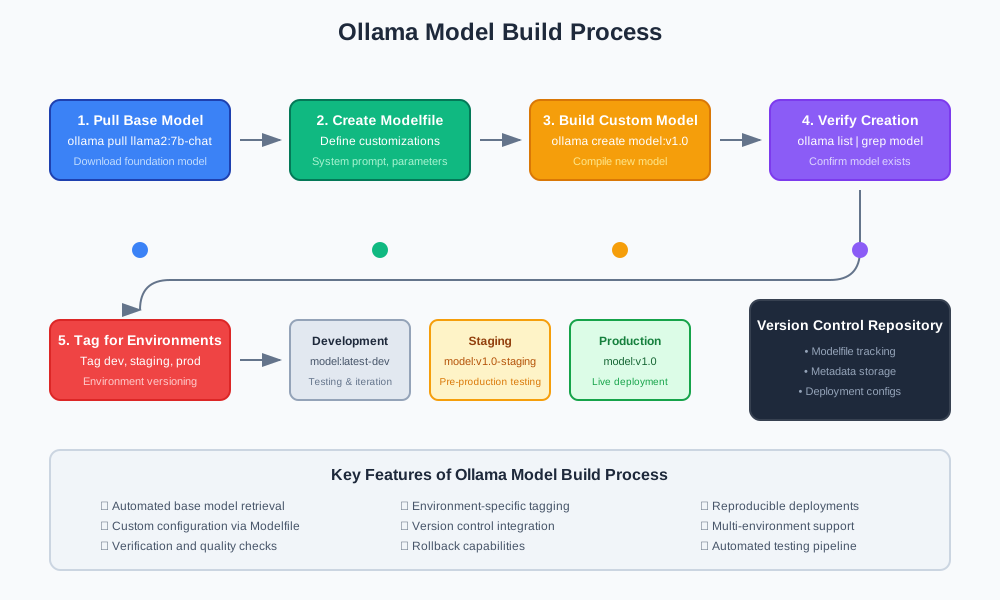
Automate model creation with repeatable build scripts. This ensures consistent deployments across environments.
#!/bin/bash
# build-model.sh - Create and tag Ollama models

set -e

MODEL_NAME=$1
VERSION=$2
BASE_MODEL=$3

if [ -z "$MODEL_NAME" ] || [ -z "$VERSION" ] || [ -z "$BASE_MODEL" ]; then
    echo "Usage: ./build-model.sh <model_name> <version> <base_model>"
    exit 1
fi

echo "Building model: $MODEL_NAME:$VERSION"

# Pull base model
ollama pull $BASE_MODEL

# Create custom Modelfile
cat > Modelfile << EOF
FROM $BASE_MODEL

SYSTEM "You are a helpful assistant specialized in technical support."

PARAMETER temperature 0.7
PARAMETER top_p 0.9
PARAMETER stop "<|im_end|>"
EOF

# Build custom model
ollama create $MODEL_NAME:$VERSION -f Modelfile

# Verify model creation
ollama list | grep $MODEL_NAME:$VERSION

echo "Model $MODEL_NAME:$VERSION built successfully"

# Tag for deployment environments
ollama tag $MODEL_NAME:$VERSION $MODEL_NAME:latest-dev
Deployment Environment Configuration
Configure different environments with specific model versions and settings.
# configs/production.yaml
environment: production
models:
  - name: customer-support
    version: v1.0
    port: 11434
    replicas: 3
    resources:
      memory: "8Gi"
      cpu: "2"
  - name: code-assistant
    version: v2.1
    port: 11435
    replicas: 2
    resources:
      memory: "12Gi"
      cpu: "4"

monitoring:
  health_check_interval: 30s
  metrics_endpoint: "/metrics"
  log_level: "info"

security:
  api_key_required: true
  rate_limit: "100/minute"
Automated Deployment Pipeline
Create deployment scripts that pull specific model versions and configure them correctly.
#!/bin/bash
# deploy.sh - Deploy models to target environment

ENVIRONMENT=$1
CONFIG_FILE="configs/${ENVIRONMENT}.yaml"

if [ ! -f "$CONFIG_FILE" ]; then
    echo "Configuration file not found: $CONFIG_FILE"
    exit 1
fi

echo "Deploying to $ENVIRONMENT environment"

# Parse YAML and deploy each model
yq eval '.models[]' $CONFIG_FILE | while read -r model; do
    MODEL_NAME=$(echo $model | yq eval '.name')
    VERSION=$(echo $model | yq eval '.version')
    PORT=$(echo $model | yq eval '.port')

    echo "Deploying $MODEL_NAME:$VERSION on port $PORT"

    # Pull model if not exists
    if ! ollama list | grep -q "$MODEL_NAME:$VERSION"; then
        echo "Model not found locally, pulling from registry"
        ollama pull $MODEL_NAME:$VERSION
    fi

    # Stop existing model instance
    pkill -f "ollama serve.*$PORT" || true

    # Start model on specified port
    OLLAMA_HOST=0.0.0.0:$PORT ollama serve &

    # Wait for service to start
    sleep 5

    # Load model
    curl -X POST http://localhost:$PORT/api/generate \
         -H "Content-Type: application/json" \
         -d '{"model": "'$MODEL_NAME:$VERSION'", "prompt": "test"}' \
         --max-time 30

    echo "$MODEL_NAME:$VERSION deployed successfully"
done

echo "Deployment to $ENVIRONMENT completed"
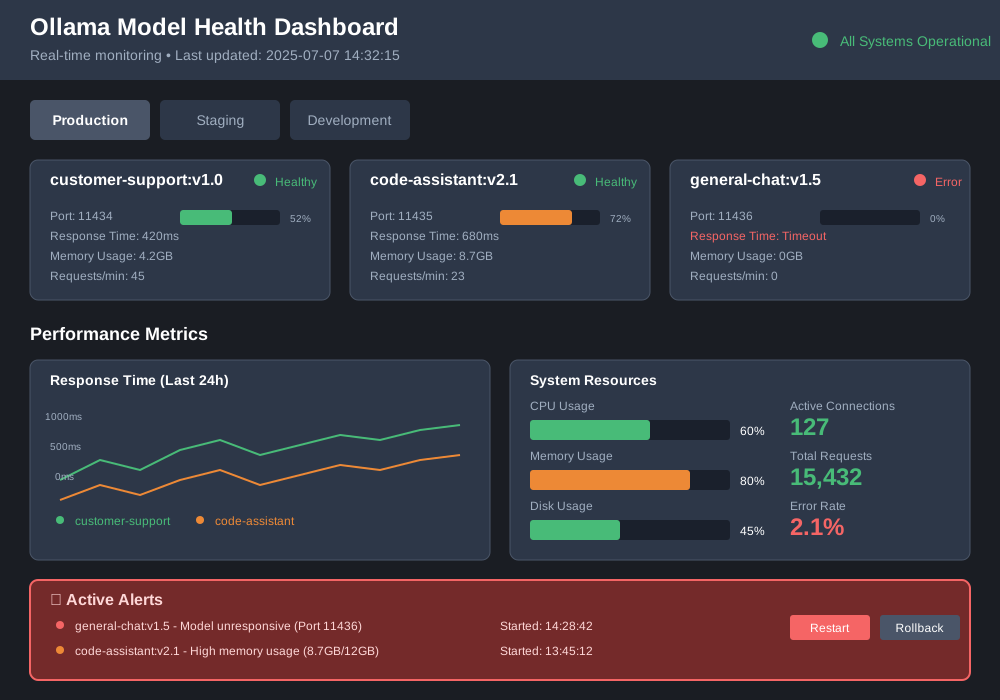
Model Health Monitoring
Implement health checks to ensure deployed models function correctly.
#!/bin/bash
# health-check.sh - Monitor model health across environments

check_model_health() {
    local host=$1
    local port=$2
    local model=$3

    echo "Checking health for $model at $host:$port"

    response=$(curl -s -X POST "http://$host:$port/api/generate" \
        -H "Content-Type: application/json" \
        -d "{\"model\": \"$model\", \"prompt\": \"Hello\", \"stream\": false}" \
        --max-time 10)

    if echo "$response" | grep -q "response"; then
        echo "✅ $model is healthy"
        return 0
    else
        echo "❌ $model is unhealthy: $response"
        return 1
    fi
}

# Read configuration and check each model
ENVIRONMENT=${1:-production}
CONFIG_FILE="configs/${ENVIRONMENT}.yaml"

yq eval '.models[]' $CONFIG_FILE | while read -r model; do
    MODEL_NAME=$(echo $model | yq eval '.name')
    VERSION=$(echo $model | yq eval '.version')
    PORT=$(echo $model | yq eval '.port')

    if ! check_model_health "localhost" "$PORT" "$MODEL_NAME:$VERSION"; then
        echo "Model health check failed, attempting restart..."
        # Trigger restart or alert
    fi
done
Rollback Strategy Implementation
Create a reliable rollback mechanism for when deployments go wrong.
#!/bin/bash
# rollback.sh - Rollback to previous model version

ENVIRONMENT=$1
MODEL_NAME=$2

if [ -z "$ENVIRONMENT" ] || [ -z "$MODEL_NAME" ]; then
    echo "Usage: ./rollback.sh <environment> <model_name>"
    exit 1
fi

# Get current and previous versions from deployment history
CURRENT_VERSION=$(git log --oneline --grep="Deploy $MODEL_NAME" -1 --pretty=format:"%s" | grep -o 'v[0-9.]*')
PREVIOUS_VERSION=$(git log --oneline --grep="Deploy $MODEL_NAME" -2 --skip=1 --pretty=format:"%s" | grep -o 'v[0-9.]*')

echo "Rolling back $MODEL_NAME from $CURRENT_VERSION to $PREVIOUS_VERSION"

# Update configuration file
sed -i "s/$MODEL_NAME:$CURRENT_VERSION/$MODEL_NAME:$PREVIOUS_VERSION/g" "configs/${ENVIRONMENT}.yaml"

# Redeploy with previous version
./deploy.sh $ENVIRONMENT

# Verify rollback success
if ./health-check.sh $ENVIRONMENT; then
    echo "Rollback completed successfully"

    # Commit rollback change
    git add configs/${ENVIRONMENT}.yaml
    git commit -m "Rollback $MODEL_NAME to $PREVIOUS_VERSION in $ENVIRONMENT"
else
    echo "Rollback verification failed"
    exit 1
fi
Best Practices for Ollama Version Control
Semantic Versioning for Models
Use semantic versioning (MAJOR.MINOR.PATCH) to communicate changes clearly:
- MAJOR: Breaking changes requiring code updates
- MINOR: New features maintaining backward compatibility
- PATCH: Bug fixes and performance improvements
# Example version progression
llama2:v1.0.0  # Initial release
llama2:v1.1.0  # Added new capabilities
llama2:v1.1.1  # Fixed response accuracy
llama2:v2.0.0  # Breaking API changes
Environment Promotion Strategy
Promote models through environments systematically:
Development → Staging → Production
     ↓           ↓          ↓
  v1.0-dev → v1.0-staging → v1.0
Model Testing Pipeline
Test models before promoting to higher environments:
# test-model.sh - Automated model testing
MODEL_NAME=$1
VERSION=$2

echo "Testing $MODEL_NAME:$VERSION"

# Functional tests
curl -X POST http://localhost:11434/api/generate \
     -d '{"model": "'$MODEL_NAME:$VERSION'", "prompt": "What is 2+2?"}' \
     | grep -q "4" || exit 1

# Performance tests
response_time=$(curl -w "%{time_total}" -X POST http://localhost:11434/api/generate \
     -d '{"model": "'$MODEL_NAME:$VERSION'", "prompt": "Hello"}' -o /dev/null -s)

if (( $(echo "$response_time > 2.0" | bc -l) )); then
    echo "Performance test failed: ${response_time}s > 2.0s"
    exit 1
fi

echo "All tests passed for $MODEL_NAME:$VERSION"
Integration with CI/CD Platforms
GitHub Actions Workflow
# .github/workflows/model-deployment.yml
name: Model Deployment

on:
  push:
    branches: [main]
    paths: ['models/**']

jobs:
  deploy:
    runs-on: ubuntu-latest
    steps:
      - uses: actions/checkout@v3

      - name: Install Ollama
        run: |
          curl -fsSL https://ollama.ai/install.sh | sh

      - name: Build Model
        run: |
          ./scripts/build-model.sh customer-support v1.0 llama2:7b-chat

      - name: Test Model
        run: |
          ./scripts/test-model.sh customer-support v1.0

      - name: Deploy to Staging
        run: |
          ./scripts/deploy.sh staging

      - name: Deploy to Production
        if: github.ref == 'refs/heads/main'
        run: |
          ./scripts/deploy.sh production
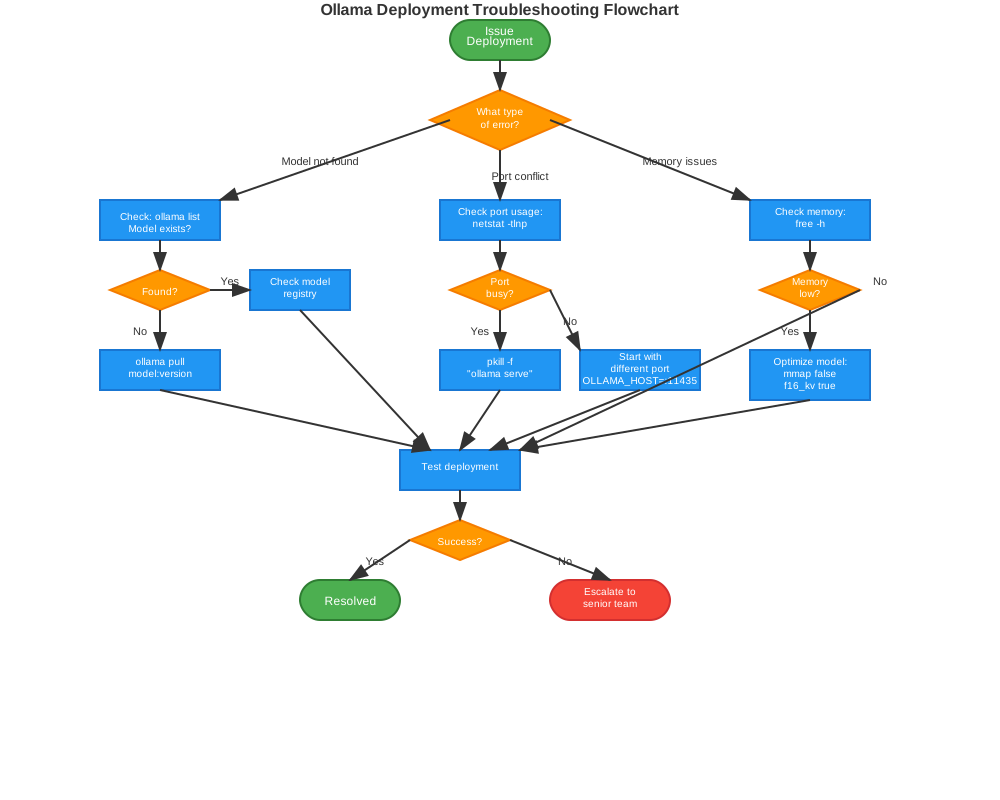
Troubleshooting Common Issues
Model Not Found Errors
When Ollama cannot find a model version:
# Check available models
ollama list

# Pull missing model
ollama pull model-name:version

# Verify model exists in registry
ls models/model-name/version/
Port Conflicts
Resolve port conflicts in multi-model deployments:
# Check port usage
netstat -tlnp | grep :11434

# Kill conflicting processes
pkill -f "ollama serve"

# Start with specific port
OLLAMA_HOST=0.0.0.0:11435 ollama serve
Memory Issues
Handle insufficient memory for large models:
# Check available memory
free -h

# Optimize model parameters
echo "PARAMETER mmap false" >> Modelfile
echo "PARAMETER f16_kv true" >> Modelfile
Monitoring and Metrics
Track model performance and deployment health:
# Get model metrics
curl http://localhost:11434/api/ps

# Monitor resource usage
docker stats ollama-container

# Check deployment logs
tail -f /var/log/ollama/deployment.log
Set up alerts for critical metrics:
- Response time > 2 seconds
- Memory usage > 80%
- Error rate > 5%
- Model unavailable
Conclusion
Effective Ollama model version control prevents deployment disasters and enables reliable AI operations. This systematic approach gives you complete visibility into model lifecycles, automated deployment pipelines, and robust rollback capabilities.
Start implementing these strategies today. Begin with the basic repository structure, add deployment scripts gradually, and expand monitoring as your needs grow. Your future self will thank you when that 3 AM deployment actually goes smoothly.
Ready to level up your AI deployment game? Bookmark this guide and share it with your team. Proper Ollama version control is the foundation of scalable AI operations.